

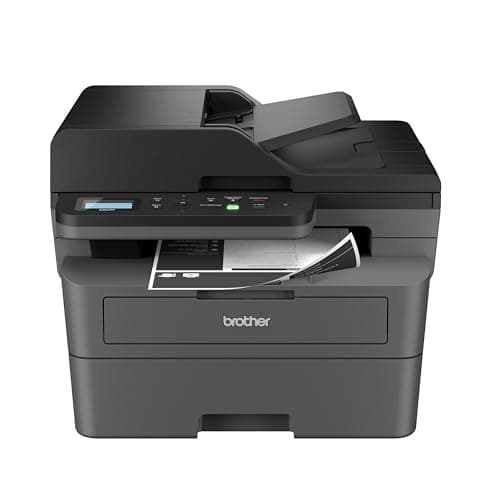
Who this is for: Best for small businesses and home offices that need dependable, low-cost laser printing.
Brother vs HP Laser Printer (2026): Which Should You Actually Buy?
If you’re comparing Brother vs HP laser printer, the real question is whether you need a dependable monochrome workhorse or a more polished color all-in-one for team documents. Both brands make strong business printers, but they serve different buying priorities. This head-to-head breaks down the specs, value, and owner-facing tradeoffs so you can choose the right one without overpaying.
Related Reviews
At a Glance
| Category | Brother DCP-L2640DW | HP Color LaserJet Pro MFP 3301sdw |
|---|---|---|
| Print Type | Monochrome laser | Color laser |
| Functions | Print, scan, copy | Print, scan, copy |
| Print Speed | Up to 36 ppm | Up to 26 ppm |
| Duplex Printing | Yes | Yes |
| ADF | 50-page | Auto document feeder |
| Connectivity | Wi-Fi, Ethernet, USB | Wireless |
| Best For | Small businesses, home offices, high-volume text printing | Teams needing color reports and professional-looking documents |
| Price | $209.99 ✓ Prime | 19% OFF — Was $539.00 $438.90 ✓ Prime |
Design Winner: Brother
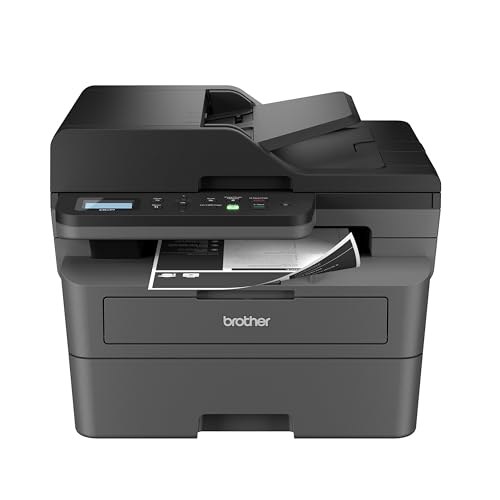


The Brother DCP-L2640DW Wireless Compact Monochrome Multi-Function Printer, Copy, Scan, Duplex, Mobile Printing is the cleaner fit for buyers who want a compact, no-nonsense office printer. Brother positions it as a small-business productivity machine, and the footprint plus monochrome layout make it easier to place on a desk or shelf without paying for color hardware you may not need.
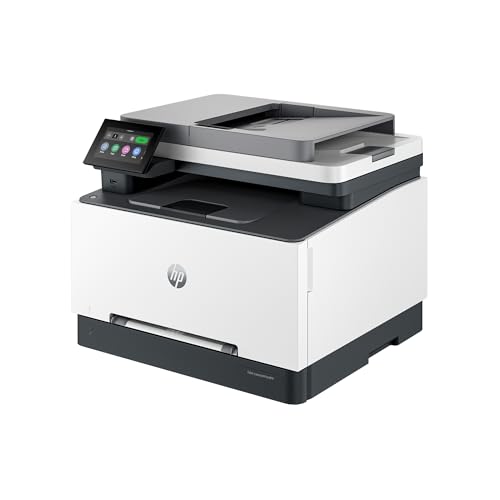
HP’s HP Color LaserJet Pro MFP 3301sdw | Color Printer | Wireless | All-in-One | Duplex looks more premium on paper because it supports color, but that extra capability also makes it larger, pricier, and more complex for users who mostly print text.
- ✓ Brother is compact and purpose-built for black-and-white office work
- ✓ 3-in-1 layout keeps it practical without unnecessary extras
- ✓ HP wins on color capability, but that’s only a design advantage if you actually need it
Performance Winner: Brother


On raw speed, Brother gets the edge with up to 36 pages per minute versus HP’s up to 26 ppm. That matters if you regularly print long text documents, invoices, shipping labels, or internal paperwork and want less waiting between jobs.
HP still has a strong performance story for business teams because its TerraJet toner is designed for vivid color documents and reports. But when this comparison is about practical laser-printer throughput, Brother’s faster monochrome engine is the better fit for most commercial-intent shoppers.
- ✓ Brother prints faster for text-heavy workloads
- ✓ HP is better for color documents, charts, and presentations
- ✓ Brother’s 50-page ADF is a strong productivity bonus for scanning and copying
Value Winner: Brother
Value is where Brother pulls ahead decisively. At $209.99, the Brother model costs far less than the HP at $438.90, and that gap is hard to ignore if you’re buying for a home office or a small business that prints mostly black-and-white documents.
HP does have a current discount, and the color output can justify the higher price for teams that truly need it. But if your documents don’t need color, you’re paying a significant premium for a feature set that may go unused. Brother also highlights toner savings through its genuine toner ecosystem, which strengthens the long-term value case.
- ✓ Brother has the lower upfront price by a wide margin
- ✓ HP’s discount helps, but it still costs much more overall
- ✓ Brother makes more sense for cost-conscious buyers focused on text printing
Battery/Durability Winner: HP
Neither printer uses a battery, so the more relevant comparison here is reliability and long-term business durability. HP leans harder into that angle with “award-winning reliability” messaging and features aimed at heavier team use, including a 250-sheet input tray and color workflow support.
Brother is still the better practical buy for everyday office use, but HP has the edge if your priority is a more robust-feeling color all-in-one for a busy small team. If your office printing includes frequent reports, client-facing materials, and shared use, HP’s higher-end positioning may feel more durable over time.
- ✓ HP is the stronger pick for team-oriented durability expectations
- ✓ 250-sheet tray supports busier office workflows
- ✓ Brother remains durable enough for everyday monochrome use, but it is the simpler machine
Connectivity and Ease of Use Winner: Brother
Brother’s connectivity package is more flexible on paper: dual-band Wi-Fi, Ethernet, USB, and mobile management through the Brother Mobile Connect app. That gives it an advantage for households and offices that want multiple ways to connect without friction.
HP also offers wireless printing and the expected business features like auto duplex and an ADF, but Brother’s broader connection options make setup and everyday use easier for mixed environments. If you want to print from several devices and still keep a wired fallback, Brother is the safer pick.
- ✓ Brother offers Wi-Fi, Ethernet, and USB
- ✓ Brother Mobile Connect adds convenient remote management
- ✓ HP is straightforward, but Brother is more flexible
Brother Is the Better Choice If…
- You print mostly black-and-white documents.
- You want the lower purchase price and better overall value.
- You need faster text printing for office paperwork.
- You prefer a compact printer that fits a small workspace.
- You want Ethernet plus wireless plus USB flexibility.
HP Is the Better Choice If…
- You need color printing for reports, charts, or presentations.
- You’re buying for a small team that shares one printer.
- You want a more premium all-in-one business setup.
- You can justify the higher upfront cost for color output.
- You value a larger input tray and business-focused reliability features.
Our Final Verdict
For most shoppers searching brother vs hp laser printer, Brother is the smarter buy. It’s cheaper, faster for monochrome work, more flexible on connectivity, and better aligned with the needs of home offices and small businesses that print mostly text.
HP is the better choice only if color printing is genuinely essential. If you regularly produce client-facing documents, charts, or team reports where color matters, the HP Color LaserJet Pro MFP 3301sdw justifies its premium more easily. But for the majority of buyers, Brother wins on practicality and price.
Brother DCP-L2640DW Wireless Compact Monochrome Multi-Function Printer, Copy, Scan, Duplex, Mobile Printing
HP Color LaserJet Pro MFP 3301sdw | Color Printer | Wireless | All-in-One | Duplex
Frequently Asked Questions
Is Brother or HP better for laser printers?
Brother is better for most buyers who want a fast, affordable monochrome laser printer, while HP is better if you need color printing and a more team-focused all-in-one.
Which laser printer brand is more reliable, Brother or HP?
Both brands have strong business printers, but HP emphasizes award-winning reliability on this model while Brother is known here for simplicity and practical office use.
Is Brother cheaper to run than HP?
In this comparison, Brother usually makes more sense for cost-conscious buyers because the upfront price is much lower and it is aimed at black-and-white printing.
Should I buy an HP color laser printer instead of a Brother monochrome printer?
Buy HP if you regularly need color documents, presentations, or reports; otherwise Brother is the better value for everyday text printing.
Which printer is better for a small business?
Brother is better for small businesses that print mostly black-and-white paperwork, while HP is better for small teams that need color output and a more premium all-in-one setup.
Pros
- + Brother is cheaper and better value
- + Brother prints faster for monochrome jobs
- + Brother offers flexible connectivity
- + HP supports color printing for reports
- + HP includes business-focused reliability features
Cons
- – Brother does not print in color
- – HP costs much more upfront
- – HP is slower for text-heavy printing
- – Brother is simpler and less premium for teams
Frequently asked questions
- Is Brother or HP better for laser printers?
- Brother is better for most buyers who want a fast, affordable monochrome laser printer, while HP is better if you need color printing and a more team-focused all-in-one.
- Which laser printer brand is more reliable, Brother or HP?
- Both brands have strong business printers, but HP emphasizes award-winning reliability on this model while Brother is known here for simplicity and practical office use.
- Is Brother cheaper to run than HP?
- In this comparison, Brother usually makes more sense for cost-conscious buyers because the upfront price is much lower and it is aimed at black-and-white printing.
- Should I buy an HP color laser printer instead of a Brother monochrome printer?
- Buy HP if you regularly need color documents, presentations, or reports; otherwise Brother is the better value for everyday text printing.
- Which printer is better for a small business?
- Brother is better for small businesses that print mostly black-and-white paperwork, while HP is better for small teams that need color output and a more premium all-in-one setup.
Score breakdown
- value
- 9.0
- usability
- 8.0
- durability
- 8.0
- performance
- 8.0
- buyerFeedback
- 8.0
Get the Full Home Buyer's Guide
Join our free newsletter — we'll send our latest Home picks, specs and verdicts straight to your inbox.
Free. No spam. Unsubscribe anytime.
Was this review helpful?
Be the first to share your feedback on this review.
Sign in to vote and let us know what you think.
Discussion (0)
No comments yet. Be the first to start the discussion.
Related Reviews
What is How to Reduce Eye Strain at Computer? A Complete 2026 Guide
If your eyes feel dry, tired, blurry, or sore after long hours at a screen, you’re not alone. Learning how to reduce eye strain at computer use is mostly about controlling light, distance, posture, and breaks so your eyes don’t work harder than they need to. In this guide, you’ll get a clear explana
Logitech MX Keys vs Keychron (2026): Which Should You Actually Buy?
The Logitech MX Keys S is built around a low-profile, laptop-like typing experience with spherically dished keys and a solid, understated chassis. For buyers who want a premium office keyboard that blends in on a work desk and keeps wrist posture comfortable, Logitech’s design language is hard to be
What is Inkjet vs Laser Printer 2026? A Complete 2026 Guide
If you’re trying to choose between an inkjet and a laser printer in 2026, the biggest challenge is separating real-world value from marketing claims. Inkjet models usually win for color, photos, and lower upfront cost, while laser printers are often better for fast, high-volume text printing and low