

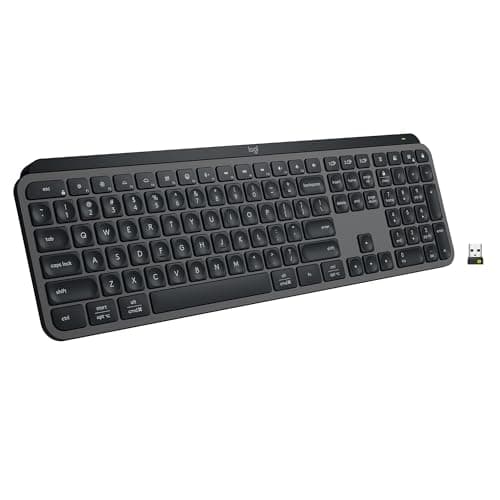
Who this is for: Best for buyers comparing a premium office keyboard against a more customizable all-rounder for work and gaming.
Logitech MX Keys vs Keychron (2026): Which Should You Actually Buy?
At a Glance
| Category | Logitech MX Keys S | Keychron K2 HE |
|---|---|---|
| Layout | Full-size low-profile productivity keyboard | 75% compact layout |
| Switch Type | Low-profile scissor-style typing feel | Magnetic Hall Effect switches |
| Connectivity | Bluetooth Low Energy, Logi Bolt USB receiver | 2.4 GHz wireless, Bluetooth 5.2, Type-C |
| Customization | Smart Actions via Logi Options+ | Web configurator, remapping, macros, actuation tuning |
| Best For | Office work, typing comfort, multi-device productivity | Power users, gamers, enthusiasts, customization seekers |
| Price | $129.99 ✓ Prime | 20% OFF — Was $139.99 $111.99 ✓ Prime |
Design
Logitech MX Keys S Wins for Pure Desk Ergonomics
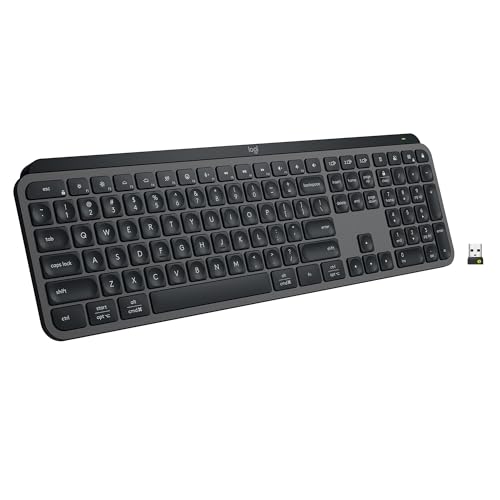
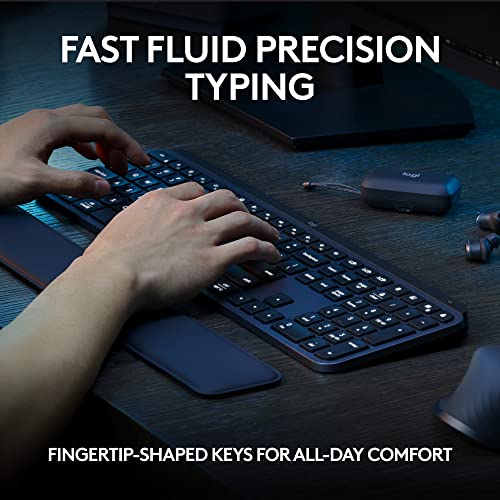
The Logitech MX Keys S is built around a low-profile, laptop-like typing experience with spherically dished keys and a solid, understated chassis. For buyers who want a premium office keyboard that blends in on a work desk and keeps wrist posture comfortable, Logitech’s design language is hard to beat.
Related Reviews
The Keychron K2 HE, by contrast, is a more enthusiast-forward 75% board. It looks more compact and more mechanical, which is great if you want a smaller footprint, but it is less universally “office neutral” than the MX Keys S.
Winner: Logitech MX Keys S
- ✓ Low-profile form factor feels familiar to laptop users
- ✓ Better fit for professional desk setups
- ✓ More focused on comfort and quiet typing than flair
- ✗ Less exciting if you want a mechanical keyboard aesthetic
Keychron K2 HE Wins for Compact Enthusiast Appeal
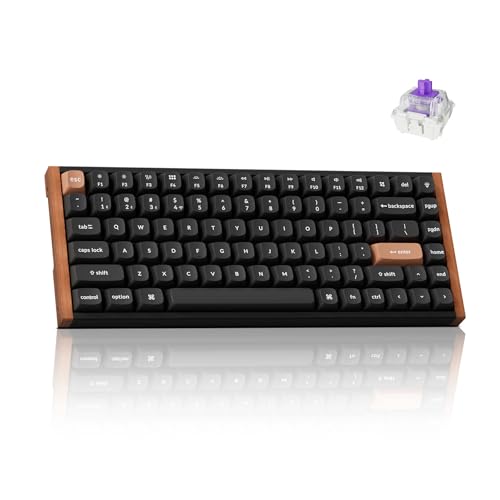

Keychron’s K2 HE is the more modern enthusiast board, with a 75% layout that saves space while keeping essential keys. Its magnetic Hall Effect switches and hot-swap-friendly design make it feel purpose-built for users who want more control over how the keyboard behaves.
If you like the idea of a keyboard that looks and feels more like a customizable tool than a polished office accessory, Keychron has the edge here.
Winner: Keychron K2 HE
- ✓ Compact 75% layout saves desk space
- ✓ More enthusiast-oriented design
- ✓ Hot-swappable magnetic switch platform
- ✗ Less refined for traditional office aesthetics
Performance
Keychron K2 HE Is the Clear Performance Winner
The biggest difference in the Logitech MX Keys vs Keychron matchup is performance philosophy. The MX Keys S is optimized for smooth, quiet, accurate typing, while the K2 HE is built around magnetic switch precision, 1000 Hz polling, and adjustable actuation.
That makes the Keychron far more compelling if you care about gaming responsiveness, rapid triggering, or dialing in a custom feel. Logitech is excellent for productivity, but Keychron simply offers more advanced performance tuning.
Winner: Keychron K2 HE
- ✓ Magnetic Hall Effect switches with 0.1 mm sensitivity
- ✓ Adjustable actuation point from 0.2 to 3.8 mm
- ✓ 1000 Hz polling rate for competitive use
- ✗ More than casual office users may ever need
Logitech MX Keys S Wins for Everyday Typing Comfort
For long writing sessions, spreadsheets, and general office work, the MX Keys S remains a very strong performer. Its spherically dished keys, quiet operation, and low-profile angle are specifically aimed at reducing fatigue and keeping typing fluid.
While it cannot match the K2 HE’s raw technical flexibility, it does the basics extremely well. If your definition of performance is “fast, quiet, accurate, and easy to live with,” Logitech wins this round.
Winner: Logitech MX Keys S
- ✓ Fluid, precise, quieter typing experience
- ✓ Smart Actions can speed up repetitive workflows
- ✓ Better for sustained productivity typing
- ✗ Not designed for gaming-level tuning
Value
Keychron K2 HE Offers Better Feature Value
At $111.99, the Keychron K2 HE undercuts the MX Keys S while offering a more advanced switch system, more connectivity options, and deeper customization. That combination makes it a stronger value for buyers who want premium features without paying more.
It is especially attractive if you want one board for work, casual gaming, and experimentation. The extra controls and tuning options make the price feel justified.
Winner: Keychron K2 HE
- ✓ Lower price than MX Keys S
- ✓ More advanced feature set
- ✓ Strong value for enthusiasts and gamers
- ✗ Value is less compelling if you only need basic typing
Logitech MX Keys S Is the Safer Buy for Simple Productivity
The MX Keys S costs more, but its value proposition is different: you are paying for a refined typing feel, broad OS support, and Logitech’s productivity ecosystem. For buyers who want a dependable keyboard that should feel instantly familiar, that premium can be worth it.
Still, when comparing pure feature-for-dollar, Logitech trails Keychron.
Winner: Keychron K2 HE
- ✓ Great if you want a no-fuss, polished office keyboard
- ✓ Strong cross-platform support
- ✗ Higher price than Keychron
- ✗ Fewer enthusiast features for the money
Battery and Durability
Logitech MX Keys S Wins for Office-Ready Reliability
Logitech’s MX Keys S is built like a premium productivity tool: solid construction, low-profile design, and a focus on dependable day-to-day use. The backlighting and smart illumination features also make it feel polished and practical.
While the Keychron is not flimsy, the MX Keys S is the safer pick if your priority is a stable, mature, workhorse keyboard for long-term desk use.
Winner: Logitech MX Keys S
- ✓ Solid build quality
- ✓ Backlit keys with adaptive illumination
- ✓ Designed for long work sessions
- ✗ Not as technically specialized as Hall Effect boards
Keychron K2 HE Wins for Long-Term Feature Longevity
The K2 HE’s Hall Effect platform and hot-swappable magnetic switch support give it a durability advantage in a different sense: it is built around a more modern, adaptable keyboard architecture. For users who like to tinker or evolve their setup over time, that matters.
It is the better long-term pick for buyers who want a keyboard that can adapt to changing preferences, not just survive daily use.
Winner: Keychron K2 HE
- ✓ Hot-swappable magnetic switch support
- ✓ Adjustable actuation for future flexibility
- ✓ More adaptable platform overall
- ✗ More complex than a basic productivity keyboard
Connectivity and Compatibility
Keychron K2 HE Wins for Versatility
The Keychron K2 HE supports 2.4 GHz wireless, Bluetooth 5.2, and wired Type-C connectivity, plus it can connect to up to three devices. That makes it a better fit for users juggling a desktop, laptop, tablet, or phone.
It also includes Mac and Windows keycaps, which makes switching platforms easier.
Winner: Keychron K2 HE
- ✓ 2.4 GHz wireless for low-latency use
- ✓ Bluetooth 5.2 and wired Type-C modes
- ✓ Up to three-device switching
- ✗ More options than some casual users need
Logitech MX Keys S Wins for Simplicity
The MX Keys S supports Bluetooth Low Energy and Logi Bolt, and it can pair with up to three devices across major operating systems. For many buyers, that is all they need: stable, simple, and easy to set up.
It does not offer the same low-latency gaming angle as Keychron, but for office workflows it is straightforward and dependable.
Winner: Logitech MX Keys S
- ✓ Easy multi-device workflow
- ✓ Works across Windows, macOS, Linux, and ChromeOS
- ✓ Simple, mature wireless setup
- ✗ Fewer advanced connection modes
Logitech MX Keys S Is the Better Choice If…
- You want a premium office keyboard that feels quiet and refined.
- You prefer a low-profile, laptop-like typing experience.
- You value comfort and productivity over customization.
- You want a keyboard that fits neatly into a professional desk setup.
- You mostly type, write, or work in productivity apps rather than game.
Keychron K2 HE Is the Better Choice If…
- You want the more advanced keyboard for customization and performance.
- You plan to use the same keyboard for both work and gaming.
- You like compact 75% layouts and a more enthusiast feel.
- You want adjustable actuation and magnetic switch precision.
- You want better feature value for the money.
Our Final Verdict
In the Logitech MX Keys vs Keychron comparison, the Keychron K2 HE is the better overall buy for most shoppers in 2026. It gives you more performance headroom, more connection options, deeper customization, and a lower price, which is hard to ignore in a commercial-intent matchup like this.
That said, the Logitech MX Keys S is still the better keyboard if your priority is quiet, comfortable, office-first typing with a polished premium feel. If you want the best productivity keyboard, Logitech remains excellent. If you want the best all-around value and flexibility, Keychron wins.
Check Keychron K2 HE Price on Amazon →
Check Logitech MX Keys S Price on Amazon →
Frequently Asked Questions
Is the Logitech MX Keys S better than Keychron for office work?
Yes, the Logitech MX Keys S is usually better for office work because it has a quieter, low-profile design and a more polished productivity focus.
Is Keychron K2 HE better for gaming than Logitech MX Keys S?
Yes, the Keychron K2 HE is better for gaming thanks to its magnetic Hall Effect switches, adjustable actuation, and 1000 Hz polling rate.
Which keyboard is better value in 2026?
The Keychron K2 HE is the better value because it costs less and includes more advanced features and customization options.
Does the Logitech MX Keys S work with multiple devices?
Yes, it can pair with up to three devices and works across several operating systems, making it strong for multi-device productivity.
Which should I buy if I want one keyboard for work and play?
Buy the Keychron K2 HE if you want one keyboard for both work and play, since it offers more flexibility, faster performance, and better customization.
Pros
- + Keychron offers magnetic Hall Effect switches and adjustable actuation
- + MX Keys S provides a quiet, low-profile typing experience
- + Keychron delivers stronger value and more connectivity options
- + MX Keys S is more polished for office productivity
Cons
- – MX Keys S costs more than Keychron
- – Keychron feels less office-neutral than Logitech
- – MX Keys S lacks gaming-focused tuning
- – Keychron may be overkill for simple typing needs
Frequently asked questions
- Is the Logitech MX Keys S better than Keychron for office work?
- Yes, the Logitech MX Keys S is usually better for office work because it has a quieter, low-profile design and a more polished productivity focus.
- Is Keychron K2 HE better for gaming than Logitech MX Keys S?
- Yes, the Keychron K2 HE is better for gaming thanks to its magnetic Hall Effect switches, adjustable actuation, and 1000 Hz polling rate.
- Which keyboard is better value in 2026?
- The Keychron K2 HE is the better value because it costs less and includes more advanced features and customization options.
- Does the Logitech MX Keys S work with multiple devices?
- Yes, it can pair with up to three devices and works across several operating systems, making it strong for multi-device productivity.
- Which should I buy if I want one keyboard for work and play?
- Buy the Keychron K2 HE if you want one keyboard for both work and play, since it offers more flexibility, faster performance, and better customization.
Score breakdown
- value
- 8.9
- usability
- 8.6
- durability
- 8.3
- performance
- 8.7
- buyerFeedback
- 8.5
Get the Full Home Buyer's Guide
Join our free newsletter — we'll send our latest Home picks, specs and verdicts straight to your inbox.
Free. No spam. Unsubscribe anytime.
Was this review helpful?
Be the first to share your feedback on this review.
Sign in to vote and let us know what you think.
Discussion (0)
No comments yet. Be the first to start the discussion.
Related Reviews
What is Inkjet vs Laser Printer 2026? A Complete 2026 Guide
If you’re trying to choose between an inkjet and a laser printer in 2026, the biggest challenge is separating real-world value from marketing claims. Inkjet models usually win for color, photos, and lower upfront cost, while laser printers are often better for fast, high-volume text printing and low
How to Choose the Best Home Printer in 2026: Complete Buying Guide
Choosing the right home printer can save you money, reduce daily frustration, and keep you from buying a machine that does the wrong job well. The most common mistake buyers make is focusing only on the sticker price and ignoring ink costs, connectivity, and whether they actually need print-only, al
Desk Lamp Lux and Flicker Test Review (2026): Specs, Pros & Cons, and Who It's For
Check Price on Amazon →