


Who this is for: Best for remote workers, gamers, and office users who want a more ergonomic, space-saving monitor setup.
8 Best Monitor Arms in 2026 — Better Ergonomics, More Desk Space, and Cleaner Setups
If your desk feels cramped, your neck aches after long sessions, or your monitors never quite sit at the right height, a good monitor arm can make an immediate difference. The best monitor arms 2026 picks below are chosen for their adjustability, stability, compatibility, and real-world owner feedback patterns seen across published reviews and product specs. Since this is a research-based roundup, I’m comparing the documented features, mounting limits, and common buyer pain points rather than claiming hands-on testing. Whether you need a dual-arm workstation, a budget-friendly desk upgrade, or a sturdier premium mount, this guide will help you narrow the field fast.
Related Reviews
Quick Picks
| Rank | Product | Best For |
|---|---|---|
| 1 | HUANUO FlowLift™ Dual Monitor Stand | Premium stability and broad adjustability |
| 2 | ErGear Dual Monitor Arm | Fast setup with tool-free VESA mounting |
| 3 | ErGear Single Monitor Arm | Budget single-monitor ergonomics |
| 4 | HUANUO Dual Monitor Stand - White | Clean-looking premium dual setup |
| 5 | MOUNTUP Dual Monitor Stand | Affordable dual-arm flexibility |
| 6 | VIVO Dual Monitor Stand STAND-V002O | Classic mechanical dual-monitor support |
| 7 | HUANUO Dual Monitor Mount | Higher weight capacity for larger screens |
| 8 | VIVO Dual Monitor Desk Mount STAND-V002 | Budget steel stand with strong support |
1. HUANUO FlowLift™ Dual Monitor Stand — Best Premium Dual Monitor Arm

Verdict: A strong premium pick for users who want broad motion, tidy cable management, and a stable dual-monitor platform that works well for both office and gaming setups.
- ✓ Supports 13–32 inch monitors with VESA 75x75 or 100x100 compatibility
- ✓ Dual C-clamp structure plus grommet option for secure installation
- ✓ Full-motion adjustment with tilt, swivel, rotation, and up to 15.75″ lift
- ✓ Built-in cable management helps clear desktop clutter
- ✗ Only suitable for wooden desks within the specified thickness range
- ✗ Desk underside must be clear of cross beams or panels
- ✗ Compatibility is strict, so setup requires careful pre-checking
2. ErGear Dual Monitor Arm — Best for Fast Installation

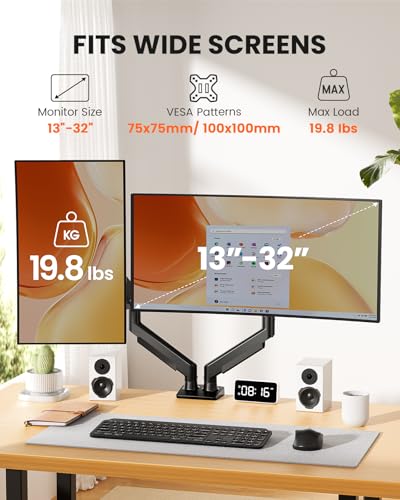
Verdict: This is the easiest dual-arm option to recommend if you want a modern mount with quick assembly and solid motion range without jumping to a premium price tier.
- ✓ Tool-free VESA mounting simplifies setup
- ✓ Fits most 13–32 inch flat or curved monitors up to 19.8 lbs each
- ✓ Height, extension, tilt, swivel, and rotation adjustments are all available
- ✓ Cable clips help keep the workspace organized
- ✗ Desk mounting limits are narrower than some competing stands
- ✗ Best on wooden desks with a clear underside
- ✗ Max VESA support is 100x100 only, so larger patterns won’t work
3. ErGear Single Monitor Arm — Best Budget Single-Monitor Arm


Verdict: If you only need one screen elevated and want a value-oriented arm with strong adjustability, this is one of the most practical picks in the lineup.
- ✓ Fits most 13–34 inch flat or curved monitors up to 19.8 lbs
- ✓ Tool-free VESA installation keeps setup simple
- ✓ Height and reach adjustment support a more ergonomic eye line
- ✓ Cable management clips help reduce desk clutter
- ✗ Single-arm design won’t suit dual-monitor users
- ✗ Still requires VESA compatibility before purchase
- ✗ Desk thickness and underside clearance still matter for installation
4. HUANUO Dual Monitor Stand - White — Best White Dual Monitor Arm

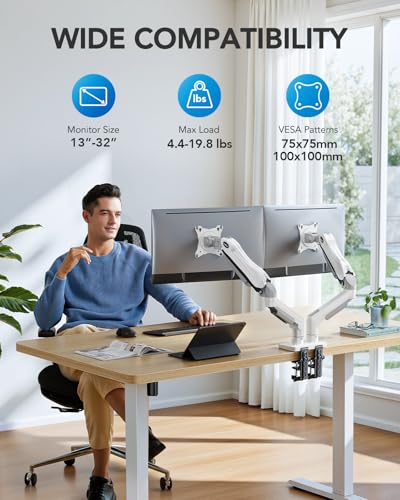
Verdict: A strong choice if you want a dual monitor arm that looks cleaner and lighter on a modern desk while still offering the flexible movement most buyers want.
- ✓ Supports 13–32 inch monitors with 75x75 or 100x100 VESA patterns
- ✓ Pneumatic spring design provides smooth motion
- ✓ C-clamp and grommet options add installation flexibility
- ✓ Cable management helps keep the setup streamlined
- ✗ White finish may not match every workspace
- ✗ Compatibility rules are strict for monitor size, weight, and VESA pattern
- ✗ Best suited for desks that meet the mounting requirements exactly
5. MOUNTUP Dual Monitor Stand — Best Budget Dual Monitor Arm


Verdict: For shoppers who want a lower-cost dual mount with solid motion and broad screen-size support, this is an easy value contender.
- ✓ Fits flat and curved screens from 17–32 inches
- ✓ Full motion with tilt, swivel, and 360° rotation
- ✓ Pneumatic arms are designed for smooth adjustments
- ✓ Cable management helps free up desk space
- ✗ Lower max weight than some premium dual arms
- ✗ Requires careful tension adjustment for best performance
- ✗ Not ideal for heavier monitor setups near the upper limit
6. VIVO Dual Monitor Stand STAND-V002O — Best Mechanical Dual Arm

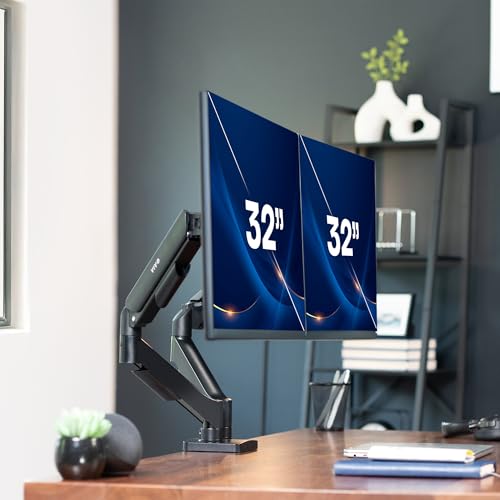
Verdict: A dependable mechanical-style dual arm for buyers who want a proven articulating layout and broad compatibility without chasing a flashy design.
- ✓ Compatible with most 17–32 inch monitors up to 19.8 lbs each
- ✓ Mechanical spring adjustment supports toolless positioning
- ✓ Strong articulation with tilt, swivel, and rotation
- ✓ Open-top VESA plates make installation easier
- ✗ The back of the arms extends past the edge of the desk
- ✗ Not the most compact option for tight spaces
- ✗ Best suited to users who have room behind the desk
7. HUANUO Dual Monitor Mount — Best for Heavier Dual Screens


Verdict: This is the best fit in the roundup for users who want a bit more load capacity and a stable, ergonomic dual-monitor setup for larger displays.
- ✓ Higher 22 lb per-arm capacity than many competing dual mounts
- ✓ Fits most 17–32 inch flat or curved displays
- ✓ Adjustable tilt, swivel, and rotation for ergonomic positioning
- ✓ Includes both C-clamp and grommet mounting options
- ✗ Still limited to VESA 75x75 or 100x100 patterns
- ✗ Desk thickness limits must be checked carefully
- ✗ Not the best choice for users who want a very compact profile
8. VIVO Dual Monitor Desk Mount STAND-V002 — Best Budget Steel Stand


Verdict: A practical steel dual-monitor stand for shoppers who want sturdy support, broad compatibility, and a straightforward layout at the value end of the list.
- ✓ Supports two monitors up to 30 inches and 22 lbs each
- ✓ Steel construction adds a reassuring sense of durability
- ✓ Tilt, swivel, rotation, and height adjustment are included
- ✓ Cable management clips help keep things tidy
- ✗ Less refined than some newer premium models
- ✗ Not the most compact option for smaller desks
- ✗ Best for users who prioritize function over a sleek aesthetic
How We Chose These Products
These monitor arms were selected by comparing published specifications, mounting limits, adjustment ranges, materials, and recurring owner-feedback themes across product listings and independent retail commentary. For a category like monitor arms, the most important filters are compatibility, stability, adjustability, and installation flexibility, because the wrong arm can wobble, sag, or simply fail to fit your desk or screen. We also gave extra weight to models with tool-free VESA installation, cable management, and wider support for common monitor sizes from 13 to 32 inches. Finally, we separated premium, mid-range, and budget options so different buyers can quickly find the right fit without overpaying for features they may not need.
Frequently Asked Questions
1. What should I look for when buying the best monitor arms 2026?
Focus on monitor size, weight capacity, VESA compatibility, desk thickness, and how much tilt, swivel, and rotation you need. Stability and ease of installation matter just as much as range of motion.
2. Are dual monitor arms better than single monitor arms?
Dual monitor arms are better if you work with two screens and want a cleaner, more ergonomic setup. A single arm is usually the better value if you only need to position one display.
3. Will a monitor arm fit any desk?
No. You need to check desk thickness, desk material, and whether the underside has crossbars or panels that could block the clamp or grommet mount. Some models work best on wooden desks only.
4. Do I need VESA mounting holes on my monitor?
Yes, in almost all cases. These monitor arms are designed for VESA patterns such as 75x75 mm or 100x100 mm, so your monitor must support one of those mounting standards.
5. Which monitor arm is best for a heavier setup?
The HUANUO Dual Monitor Mount is the strongest fit in this roundup for heavier dual-screen setups because it supports up to 22 lbs per arm while still offering broad adjustment.
Pros
- + Broad monitor compatibility across 13–32 inch and 13–34 inch models
- + Strong adjustability with tilt, swivel, rotation, and height changes
- + Cable management and desk-space savings
- + Multiple mounting styles including C-clamp and grommet
Cons
- – Some models require strict desk-material and clearance checks
- – VESA compatibility is mandatory
- – Heavier setups may need the higher-capacity options
- – Dual arms can be bulky on smaller desks
Frequently asked questions
- What should I look for when buying the best monitor arms 2026?
- Focus on monitor size, weight capacity, VESA compatibility, desk thickness, and how much tilt, swivel, and rotation you need. Stability and ease of installation matter just as much as range of motion.
- Are dual monitor arms better than single monitor arms?
- Dual monitor arms are better if you work with two screens and want a cleaner, more ergonomic setup. A single arm is usually the better value if you only need to position one display.
- Will a monitor arm fit any desk?
- No. You need to check desk thickness, desk material, and whether the underside has crossbars or panels that could block the clamp or grommet mount. Some models work best on wooden desks only.
- Do I need VESA mounting holes on my monitor?
- Yes, in almost all cases. These monitor arms are designed for VESA patterns such as 75x75 mm or 100x100 mm, so your monitor must support one of those mounting standards.
- Which monitor arm is best for a heavier setup?
- The HUANUO Dual Monitor Mount is the strongest fit in this roundup for heavier dual-screen setups because it supports up to 22 lbs per arm while still offering broad adjustment.
Score breakdown
- value
- 8.4
- usability
- 8.7
- durability
- 8.5
- performance
- 8.8
- buyerFeedback
- 8.3
Get the Full Home Buyer's Guide
Join our free newsletter — we'll send our latest Home picks, specs and verdicts straight to your inbox.
Free. No spam. Unsubscribe anytime.
Was this review helpful?
Be the first to share your feedback on this review.
Sign in to vote and let us know what you think.
Discussion (0)
No comments yet. Be the first to start the discussion.
Related Reviews

8 Best Keyboards for Mac in 2026 — Faster Typing, Better Mac Compatibility, and Smarter Features
If you’re shopping for the best keyboards for mac 2026 , the hard part is narrowing down which models actually fit the Mac experience you want. Some buyers need Apple-perfect integration and Touch ID, while others want a quieter, more affordable wireless board with backlighting and multi-device swit

8 Best Ergonomic Keyboards in 2026 — Reduce Wrist Strain and Type More Comfortably
If your wrists, shoulders, or forearms hurt after long work sessions, the right ergonomic keyboard can make a noticeable difference. The best ergonomic keyboards 2026 picks below focus on split layouts, palm support, comfortable key shape, and connectivity that fits real-world desk setups. This list

5 Best Wireless Keyboards for Multiple Devices in 2026 — Easy Switching Across Laptop, Tablet, and Phone
If you’re tired of juggling separate keyboards for your laptop, tablet, and phone, a multi-device wireless keyboard can clean up your desk fast. The best wireless keyboards for multiple devices 2026 make it easy to switch between work, school, and travel setups without re-pairing every time. In this