


If your laptop has too few ports, a messy desk, or a dual-monitor setup that keeps glitching, the right dock can fix all three problems at once. The best laptop docking stations in 2026 are the ones that balance display support, charging, and real-world compatibility without forcing you into a complicated setup. This list focuses on research-backed picks with strong port selection, clear laptop support, and enough flexibility for modern USB-C, USB4, and Thunderbolt workflows.
Related Reviews
Because this is a commercial investigation roundup, these recommendations are based on published specs, feature sets, and documented owner feedback patterns—not hands-on testing. I prioritized docks that make sense for buyers comparing refreshed models against earlier-wave laptop docks, especially if you need reliable dual displays and a cleaner desk.
Quick Picks
| Rank | Product | Best For |
|---|---|---|
| 1 | Anker Prime Docking Station | Power users who want the most capable all-in-one dock |
| 2 | Anker Laptop Docking Station Dual Monitor | Most people who want a dependable mid-range dual-monitor dock |
| 3 | MOKiN Laptop Docking Station Dual Monitor | Budget buyers who want lots of ports and multi-display flexibility |
1. Anker Prime Docking Station — Best Premium All-in-One Dock


Verdict: If you want a dock that feels built for a serious workstation, the Anker Prime Docking Station is the most feature-rich option here, with broad connectivity, fast data transfer, and stronger charging headroom than the others.
✓ 14-in-1 connectivity gives you a true all-in-one setup for charging, data, dual displays, audio, and Ethernet
✓ Up to 160W total output makes it the strongest charging option in this roundup for multi-device desks
✓ Multiple ports with speeds up to 10Gbps help reduce bottlenecks for external drives and accessories
✓ Dual HDMI support is a strong fit for users building a more advanced desktop-style laptop setup
✗ Premium positioning makes it the least budget-friendly choice in the group
✗ Dual-display output is capped by laptop and monitor compatibility rules, so not every setup gets the same result
✗ Not compatible with Linux, which narrows its audience
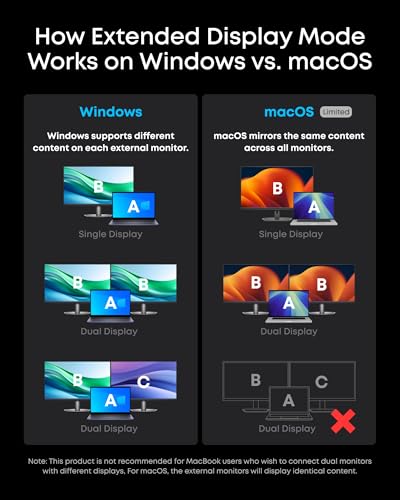
✗ macOS external monitors mirror the same image rather than acting as fully independent displays
2. Anker Laptop Docking Station Dual Monitor — Best Mid-Range Balance
Verdict: This is the safest all-around pick for most buyers: enough ports for a real desk setup, solid dual-monitor support, and a more approachable feature set than the premium model.
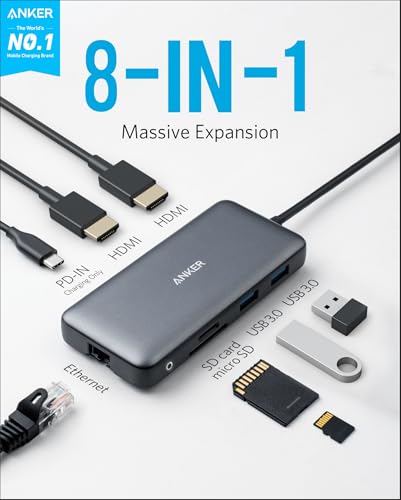
✓ 8-in-1 design covers the essentials without adding unnecessary complexity
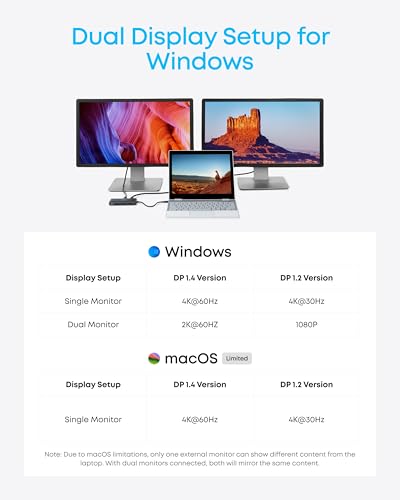
✓ Dual HDMI output supports a single 4K display or two external displays, which is ideal for common productivity setups
✓ Up to 85W pass-through charging is a practical fit for many USB-C laptops
✓ Includes Ethernet and SD/TF card reading, which helps creators and remote workers alike
✗ Charger is not included, so you need the right USB-C power brick separately
✗ On macOS, both external monitors mirror the same image rather than extending independently
✗ Not compatible with Linux
✗ Fewer total ports than the premium Anker option, so heavy accessory users may outgrow it
3. MOKiN Laptop Docking Station Dual Monitor — Best Budget Multi-Display Dock


Verdict: The MOKiN dock is the most flexible budget option here, especially if you want a lot of ports and the ability to experiment with multi-monitor layouts.
✓ 14-in-1 layout offers a wide range of connections for the price tier
✓ Two HDMI ports plus two DisplayPort outputs give it strong multi-display flexibility
✓ The screen-off button is a useful privacy feature for shared or open workspaces
✓ 1000Mbps Ethernet and multiple 5Gbps USB ports make it practical for work-from-home setups
✗ Compatibility is narrower because it requires Thunderbolt 3/4 or a full-function USB-C port
✗ macOS support is limited to mirrored external displays due to OS constraints
✗ The setup can feel more specialized than the Anker options if you just want plug-and-play simplicity
✗ Charger is not included, so you need to supply your own power adapter
How We Chose These Products
To narrow down the best laptop docking stations in 2026, I looked for products that solve the most common buyer problems: too few ports, unreliable external display support, weak charging, and compatibility confusion. I also favored docks with clearly documented specs, especially around dual-monitor output, power delivery, and connection standards like USB-C, USB4, and Thunderbolt.
Selection criteria
- Display support: Strong dual-monitor capability and clear limitations for macOS, Windows, and ChromeOS.
- Charging output: Enough pass-through or total power to support real laptop workflows.
- Port variety: A useful mix of HDMI, Ethernet, USB-A, USB-C, and card reader options.
- Compatibility clarity: Explicit support notes matter more than vague marketing claims.
- Value by tier: Premium, mid-range, and budget picks should each make sense for different buyers.
Because this is a research-based roundup, the rankings reflect published feature sets and buyer feedback patterns rather than personal lab testing. That approach is especially important in the docking-station category, where laptop model, OS, monitor resolution, and cable quality can all affect results.
Frequently Asked Questions
1. What is the best laptop docking station in 2026 for dual monitors?
The Anker Prime Docking Station is the best overall choice if you want the most capable dual-monitor dock with the strongest feature set and charging output.
2. Which docking station is best for a MacBook?
All three options support macOS in some form, but the display behavior is limited to mirrored external monitors on these models. If you need the most polished overall workstation dock for a MacBook, the Anker Prime Docking Station is the strongest premium option from this list.
3. Do I need a Thunderbolt laptop for these docking stations?
Not always. The Anker docks support USB-C, USB4, and Thunderbolt connections, while the MOKiN dock specifically requires Thunderbolt 3/4 or a full-function USB-C port. Your laptop’s port capabilities matter as much as the dock itself.
4. Can these docking stations charge my laptop while using monitors?
Yes, each dock includes power delivery support, but the charger requirements differ. The Anker Laptop Docking Station Dual Monitor supports up to 85W pass-through, the Anker Prime Docking Station offers up to 160W total output, and the MOKiN dock supports up to 100W charging.
5. Which dock is best if I want the most ports for the money?
The MOKiN Laptop Docking Station Dual Monitor is the best budget-focused option if you want a wide port selection and multi-display flexibility without moving up to the premium tier.
Pros
- + Anker Prime offers 14-in-1 connectivity and strong charging
- + Anker mid-range dock balances ports, dual HDMI, and value
- + MOKiN adds triple-display flexibility and a privacy screen-off button
- + All picks support modern USB-C workstation setups
Cons
- – macOS mirror-mode limits apply across these docks
- – Linux compatibility is not supported on the Anker models
- – Charger is not included with the Anker mid-range and MOKiN docks
- – MOKiN requires Thunderbolt 3/4 or a full-function USB-C port
Frequently asked questions
- What is the best laptop docking station in 2026 for dual monitors?
- The Anker Prime Docking Station is the best overall choice if you want the most capable dual-monitor dock with the strongest feature set and charging output.
- Which docking station is best for a MacBook?
- All three options support macOS in some form, but the display behavior is limited to mirrored external monitors on these models. If you need the most polished overall workstation dock for a MacBook, the Anker Prime Docking Station is the strongest premium option from this list.
- Do I need a Thunderbolt laptop for these docking stations?
- Not always. The Anker docks support USB-C, USB4, and Thunderbolt connections, while the MOKiN dock specifically requires Thunderbolt 3/4 or a full-function USB-C port. Your laptop’s port capabilities matter as much as the dock itself.
- Can these docking stations charge my laptop while using monitors?
- Yes, each dock includes power delivery support, but the charger requirements differ. The Anker Laptop Docking Station Dual Monitor supports up to 85W pass-through, the Anker Prime Docking Station offers up to 160W total output, and the MOKiN dock supports up to 100W charging.
- Which dock is best if I want the most ports for the money?
- The MOKiN Laptop Docking Station Dual Monitor is the best budget-focused option if you want a wide port selection and multi-display flexibility without moving up to the premium tier.
Get the Full Home Buyer's Guide
Join our free newsletter — we'll send our latest Home picks, specs and verdicts straight to your inbox.
Free. No spam. Unsubscribe anytime.
Was this review helpful?
Be the first to share your feedback on this review.
Sign in to vote and let us know what you think.
Discussion (0)
No comments yet. Be the first to start the discussion.
Related Reviews

Vertical Mouse vs Regular Mouse (2026): Which Should You Actually Buy?
If you’re deciding between a vertical mouse vs regular mouse, the real question is whether you want better ergonomics or maximum simplicity. A vertical design can help your hand and forearm feel more natural during long work sessions, while a traditional compact mouse usually wins on price, familiar

8 Best Monitor Arms in 2026 — Better Ergonomics, More Desk Space, and Cleaner Setups
If your desk feels cramped, your neck aches after long sessions, or your monitors never quite sit at the right height, a good monitor arm can make an immediate difference. The best monitor arms 2026 picks below are chosen for their adjustability, stability, compatibility, and real-world owner feedba

8 Best Keyboards for Mac in 2026 — Faster Typing, Better Mac Compatibility, and Smarter Features
If you’re shopping for the best keyboards for mac 2026 , the hard part is narrowing down which models actually fit the Mac experience you want. Some buyers need Apple-perfect integration and Touch ID, while others want a quieter, more affordable wireless board with backlighting and multi-device swit