

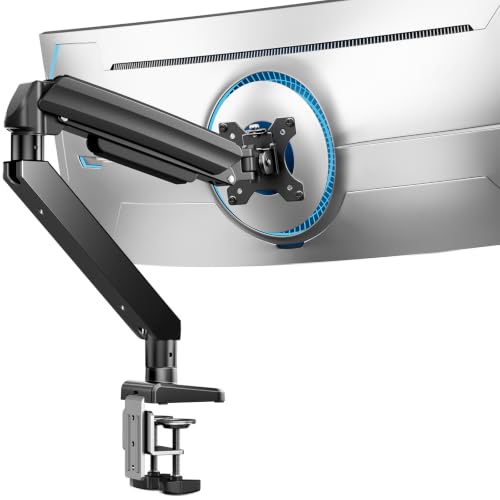
Who this is for: Best for ultrawide monitor buyers who need a stable, ergonomic arm for large curved or flat screens.
If your ultrawide monitor sags, wobbles, or eats up too much desk space, a heavy-duty monitor arm can make a huge difference. The best heavy-duty monitor mounts for ultrawide monitors in 2026 combine strong weight support, wide VESA compatibility, and enough articulation to position large curved screens comfortably. In this guide, we focused on research-backed picks for oversized displays, using published specs, installation details, and owner feedback trends rather than hands-on testing. If you need a mount that can hold a big screen steady and free up your workspace, these are the strongest options worth shortlisting.
Related Reviews
Quick Picks
| Rank | Product | Best For |
|---|---|---|
| 1 | HUANUO TitanLift Heavy Duty Monitor Arm | Best overall support for very large ultrawides |
| 2 | ErGear Heavy Duty Monitor Arm | Best budget pick for 49-inch ultrawides |
| 3 | VIVO Aluminum Ultrawide Monitor Tension Arm | Best premium spring-assist feel |
| 4 | ARES WING Ultrawide Monitor Desk Arm | Best balanced mid-range option |
| 5 | WALI Heavy Duty Monitor Arm for 13-49 inch 1000R Curved Screen | Best for high-capacity curved ultrawides |
| 6 | Ultrawide Monitor Arm fits 17-49 Inch Heavy Duty Flat/Curved Monitor | Best for stable gas-spring value |
| 7 | WALI Ultrawide Single Monitor Arm for 17-49 inch Curved Screen | Best for organized desks and ergonomic reach |
| 8 | Dual Ultrawide Monitor Mount for 24-57'' Screens | Best stacked setup for compact spaces |
1. HUANUO TitanLift Heavy Duty Monitor Arm — Best Overall Support


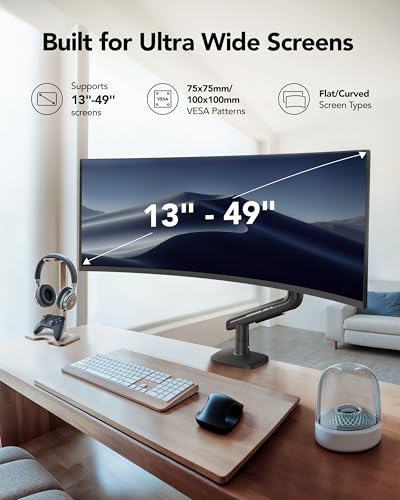
Verdict: This is the strongest all-around choice if you want a premium-feeling arm that can handle a huge ultrawide with confidence and adjust smoothly.
- ✓ Supports screens up to 49 inches and 44 lbs, which makes it a strong fit for many large ultrawides.
- ✓ High-strength aluminum alloy construction with reinforced parts is designed for long-term stability.
- ✓ Full motion adjustment includes tilt, swivel, rotation, and a long extension range for ergonomic positioning.
- ✓ Quick-install VESA head and built-in cable management make setup and cleanup easier.
- ✗ Premium positioning may make it more than some buyers need if their monitor is lighter.
- ✗ Like most heavy-duty arms, it still requires checking VESA pattern and monitor weight carefully.
- ✗ Best results depend on a sturdy desk and proper installation.
2. ErGear Heavy Duty Monitor Arm — Best Budget Heavy-Duty Pick


Verdict: A strong value option for buyers who want serious weight support and wide compatibility without jumping to a premium-tier arm.
- ✓ Fits 13- to 49-inch ultrawide, curved, and super-wide monitors with standard 75x75 / 100x100 VESA.
- ✓ 37.4 lb capacity is strong for a budget-friendly heavy-duty mount.
- ✓ Dual C-clamp design and thickened steel arm are aimed at reducing wobble.
- ✓ Good reach and height adjustment help with eye-level positioning and desk-space savings.
- ✗ Lower capacity than the top premium picks, so it is not the best match for the heaviest ultrawides.
- ✗ Buyers with especially deep or unusually shaped desks should double-check clamp fit.
- ✗ Motion range is solid, but not as refined as some higher-end spring-assist models.
3. VIVO Aluminum Ultrawide Monitor Tension Arm — Best Premium Spring-Assist Feel
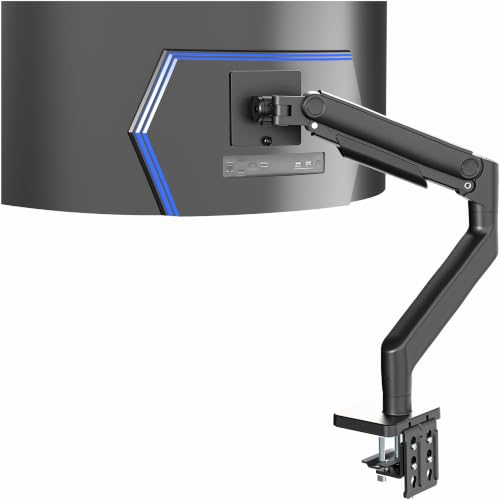
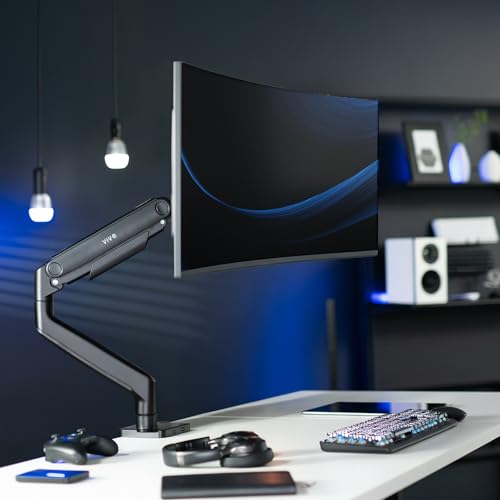

Verdict: If you want a premium arm that counterbalances a heavy ultrawide elegantly, this is one of the most polished options in the group.
- ✓ Supports up to 49 inches and 44 lbs, making it suitable for large ultrawides and gaming displays.
- ✓ Spring-assist tension arm is designed for smooth, hand-guided adjustments.
- ✓ Strong articulation includes tilt, swivel, rotation, and height adjustment.
- ✓ Integrated cable management and detachable VESA plate improve setup convenience.
- ✗ Premium features may be more than needed for lighter monitors.
- ✗ As with all tension arms, setup quality matters for getting the ideal balance.
- ✗ The best experience depends on matching monitor weight closely to the arm’s intended range.
4. ARES WING Ultrawide Monitor Desk Arm — Best Mid-Range Balance


Verdict: A well-rounded choice for buyers who want strong support, long reach, and easy installation without going all the way to a top-tier price point.
- ✓ Supports 17- to 49-inch ultrawide monitors up to 44 lbs.
- ✓ Full range of motion includes tilt, swivel, rotation, and a long extension range.
- ✓ High-quality steel and fatigue-tested gas spring are built for durability.
- ✓ Topside installation and detachable VESA plate make setup easier on the user.
- ✗ Requires a VESA mount adapter for some monitors without standard mounting holes.
- ✗ Not the lightest-duty option, so desk stability still matters.
- ✗ Buyers should verify desk thickness and monitor weight before ordering.
5. WALI Heavy Duty Monitor Arm for 13-49 inch 1000R Curved Screen — Best for High-Capacity Curved Screens


Verdict: This is a strong match for curved ultrawides when you want high load support and a broad motion range in a familiar, practical design.
- ✓ Supports up to 44 lbs and is designed for flat or 1000R curved ultrawide monitors.
- ✓ Long reach and height adjustability help with ergonomic placement.
- ✓ Strong stability features and 20,000+ cycle durability testing are reassuring for daily use.
- ✓ C-clamp and grommet options give flexibility for different desk setups.
- ✗ Grommet and clamp compatibility is narrower than some rivals, so desk fit matters.
- ✗ Best suited to wooden desks, according to the manufacturer guidance.
- ✗ The arm is capable, but not as premium-feeling as the top-tier aluminum models.
6. Ultrawide Monitor Arm fits 17-49 Inch Heavy Duty Flat/Curved Monitor — Best Value Gas-Spring Option


Verdict: A smart pick if you want a stable gas-spring arm for a large monitor and care most about keeping the desk clean and the setup simple.
- ✓ Supports 17- to 49-inch flat and curved monitors up to 35.2 lbs.
- ✓ Gas spring design is meant to eliminate droop and hold position consistently.
- ✓ Cable management and clamp/grommet mounting help create a tidy workspace.
- ✓ Full motion adjustability supports ergonomic positioning for work or gaming.
- ✗ Lower weight capacity than several competing heavy-duty arms.
- ✗ If your ultrawide is especially heavy, this may not be the safest long-term fit.
- ✗ Motion details are less clearly specified than on some premium competitors.
7. WALI Ultrawide Single Monitor Arm for 17-49 inch Curved Screen — Best for Everyday Ergonomics


Verdict: This is a reliable choice for buyers who want strong support, good ergonomics, and a familiar installation style for a single ultrawide.
- ✓ Supports up to 49-inch displays and a 44 lb max load for flat screens.
- ✓ Long extension and height range help bring the screen into a better viewing position.
- ✓ Built-in cable management keeps the setup cleaner.
- ✓ Durable core and wider VESA head are designed for steadier adjustment over time.
- ✗ Curved-screen load rating is lower than the flat-screen rating, so compatibility needs extra attention.
- ✗ Desk thickness limits are stricter than some other options.
- ✗ Best on wooden desks, which narrows placement flexibility a bit.
8. Dual Ultrawide Monitor Mount for 24-57'' Screens — Best Stacked Setup for Compact Spaces


Verdict: If you need a vertically stacked solution for a small office, studio, or wall-adjacent desk, this mount stands out for space efficiency and high load support.
- ✓ Designed for ultrawide screens up to 57 inches with very high per-arm load support.
- ✓ Vertically stacked layout is ideal when desk depth is limited.
- ✓ Topside clamp/grommet installation is helpful in tight spaces.
- ✓ Cable management and quick-release VESA plate simplify setup and organization.
- ✗ This is a dual stacked mount, so it is not the right choice if you only need one arm.
- ✗ Some 49-, 55-, and 57-inch screens may require an additional steel adapter.
- ✗ Buyers should be especially careful about desk thickness and VESA compatibility.
How We Chose These Products
To build this list of the best heavy-duty monitor mounts for ultrawide monitors in 2026, we compared published specifications, mounting compatibility, load limits, articulation ranges, and installation methods. We prioritized mounts that can handle large curved and flat ultrawide displays without sagging, especially models with strong VESA support and stable desk attachment options.
We also looked for practical features that matter in real-world use: cable management, easy VESA plate design, clamp and grommet flexibility, and extended reach for ergonomic positioning. Finally, we weighed owner feedback patterns and brand consistency to favor mounts that appear dependable for daily office, gaming, and creator setups.
Frequently Asked Questions
1. What weight capacity do I need for an ultrawide monitor arm?
Check your monitor’s actual weight, including any adapters or accessories. For many 49-inch ultrawides, a mount rated around 44 lbs or higher is a safer target, while lighter ultrawides can work with lower-capacity arms if the VESA pattern matches.
2. Are all ultrawide monitors VESA compatible?
No. Many are, but some ultrawide monitors need an adapter or may use a nonstandard mounting setup. Always confirm the monitor’s VESA pattern before buying a mount.
3. Is a gas spring monitor arm better for ultrawide screens?
Often yes, because gas spring and tension arms make it easier to reposition a large screen smoothly. That said, the best choice still depends on weight support, desk strength, and how often you plan to move the display.
4. Should I choose clamp or grommet mounting?
Clamp mounting is usually easier and works well for many desks, while grommet mounting can feel more secure if your desk supports it. The best option depends on your desk thickness, shape, and whether there is a cable hole available.
5. What is the best heavy-duty monitor mount for a 49-inch ultrawide?
For most buyers, the HUANUO TitanLift Heavy Duty Monitor Arm is the strongest all-around pick here thanks to its 44 lb capacity, wide compatibility, and smooth adjustment. If you want a budget option, the ErGear Heavy Duty Monitor Arm is also a compelling choice.
Pros
- + Strong weight support for large ultrawide monitors
- + Wide VESA compatibility across 75x75 and 100x100 mounts
- + Full-motion adjustability for better ergonomics
- + Cable management and desk-space savings
- + Clamp and grommet options on many models
Cons
- – Some models require careful VESA and weight checks
- – Heavier ultrawides may need premium-capacity arms
- – Desk thickness limits vary by mount
- – Some ultrawides need an adapter not included
Frequently asked questions
- What weight capacity do I need for an ultrawide monitor arm?
- Check your monitor’s actual weight, including any adapters or accessories. For many 49-inch ultrawides, a mount rated around 44 lbs or higher is a safer target, while lighter ultrawides can work with lower-capacity arms if the VESA pattern matches.
- Are all ultrawide monitors VESA compatible?
- No. Many are, but some ultrawide monitors need an adapter or may use a nonstandard mounting setup. Always confirm the monitor’s VESA pattern before buying a mount.
- Is a gas spring monitor arm better for ultrawide screens?
- Often yes, because gas spring and tension arms make it easier to reposition a large screen smoothly. That said, the best choice still depends on weight support, desk strength, and how often you plan to move the display.
- Should I choose clamp or grommet mounting?
- Clamp mounting is usually easier and works well for many desks, while grommet mounting can feel more secure if your desk supports it. The best option depends on your desk thickness, shape, and whether there is a cable hole available.
- What is the best heavy-duty monitor mount for a 49-inch ultrawide?
- For most buyers, the HUANUO TitanLift Heavy Duty Monitor Arm is the strongest all-around pick here thanks to its 44 lb capacity, wide compatibility, and smooth adjustment. If you want a budget option, the ErGear Heavy Duty Monitor Arm is also a compelling choice.
Get the Full Home Buyer's Guide
Join our free newsletter — we'll send our latest Home picks, specs and verdicts straight to your inbox.
Free. No spam. Unsubscribe anytime.
Was this review helpful?
Be the first to share your feedback on this review.
Sign in to vote and let us know what you think.
Discussion (0)
No comments yet. Be the first to start the discussion.
Related Reviews

6 Best Ergonomic Saddle Stools for Office 2026 — Better Posture, Less Back Strain
If your workday leaves you stiff, slouched, or shifting around for relief, a saddle stool can be a smart alternative to a standard office chair. The best ergonomic saddle stools for office 2026 are designed to encourage a more upright posture, reduce pressure on the lower back, and make long sitting

Microsoft Modern Webcam Review (2026): Specs, Pros & Cons, and Who It's For
The Microsoft Modern Webcam is clearly designed for work-first use rather than creator-style production. Based on the published specs and owner feedback, its strongest physical trait is stability: it mounts well on monitors, laptops, and desktops without feeling fussy or overly delicate.
8 Best Corner Standing Desks for Small Rooms in 2026 — Space-Saving Picks for Compact Workspaces
If you’re trying to fit a standing desk into a tight bedroom, apartment corner, or multipurpose office, the wrong shape can make the room feel even smaller. The best corner standing desks for small rooms in 2026 solve that problem by using overlooked corner space, adding storage where it matters, an