


Who this is for: Best for creators and professionals who want a flexible 2-in-1 Windows laptop for multitasking, sketching, and presentation work.
Check PriceIf you want a Windows laptop that can shift from traditional clamshell work to sketching, presenting, and touch-first use, the Microsoft Surface Laptop Studio 2 14.4" Tablet 2-in-1 Laptop 120 Hz Intel Core i7-13800H 32GB RAM 1TB SSD NVIDIA GeForce RTX 4050 Platinum is one of the most distinctive options in Microsoft’s lineup. The challenge is that its premium design comes with tradeoffs in weight, pricing, and raw value versus more conventional creator laptops. This research-based review breaks down the specs, owner feedback patterns, and comparison points so you can decide whether it fits your workflow.
Related Reviews
Key Specifications
| Spec | Details |
|---|---|
| Product | Microsoft Surface Laptop Studio 2 14.4" Tablet 2-in-1 Laptop 120 Hz Intel Core i7-13800H 32GB RAM 1TB SSD NVIDIA GeForce RTX 4050 Platinum |
| Display | 14.4-inch 2400 x 1600 touchscreen, 120 Hz |
| Processor | Intel Core i7-13800H |
| Memory | 32GB RAM |
| Storage | 1TB SSD |
| Graphics | NVIDIA GeForce RTX 4050 6GB |
| Battery | Up to 18 hours claimed runtime |
| Form factor | 2-in-1 convertible with tablet-style flexibility |
Design & Build Quality

The Surface Laptop Studio 2 stands out because it is not trying to look like every other laptop. Its pull-forward hinge design remains the biggest reason people consider it: you can use it like a standard laptop, move it into a more touch-friendly angled mode, or fold it into a tablet-style layout for drawing and note-taking.
That flexibility is the headline feature, and it’s also the reason this machine appeals to designers, illustrators, and presenters. Published reviews commonly praise the industrial design and the premium feel of the chassis, while owner feedback often highlights how natural the different modes feel once you adapt to the hinge system.
There are tradeoffs, though. Because the device is built around a more complex convertible mechanism, it is not as slim or light as a typical ultraportable. If your main priority is carrying the laptop everywhere with minimal bulk, this may feel more substantial than you expect. Still, the build quality is generally regarded as a strong point, with Microsoft’s Surface line continuing to emphasize a polished, professional look.
✓ Pros
- Distinctive 2-in-1 hinge design supports laptop, angled, and tablet-style use
- Premium look and feel that suits creative and professional settings
- Flexible form factor is useful for sketching, presenting, and touch input
- Large 14.4-inch display gives you more room than many compact laptops
✗ Cons
- Bulkier than thinner traditional laptops
- Convertible mechanism adds complexity compared with simpler clamshell designs
- Not the most travel-friendly option if low weight is your top priority
Performance & Features


On paper, the Surface Laptop Studio 2 is built for demanding multitasking. The Intel Core i7-13800H, 32GB of memory, and 1TB SSD combination makes it well suited to creative apps, large browser sessions, office work, and heavier multitasking. That memory amount is especially important for users who keep many apps open at once or work with large files.
The inclusion of an NVIDIA GeForce RTX 4050 with 6GB of memory also pushes it beyond the typical productivity laptop. Research from published reviews suggests this makes it more credible for creative workloads that benefit from discrete graphics, including photo editing, light 3D work, and some video workflows. It is not a full desktop replacement for high-end gaming or workstation use, but it gives the laptop more headroom than integrated graphics alone.
The 14.4-inch 2400 x 1600 display at 120 Hz is another strength. Reviewers often point to the combination of resolution and refresh rate as a major quality-of-life upgrade, especially when scrolling documents, sketching, or watching content. The screen is one of the main reasons this model feels premium in everyday use.
Battery claims are strong on paper, but real-world feedback across premium Windows laptops often shows that actual runtime varies significantly with brightness, workload, and whether the discrete GPU is active. In other words, the advertised endurance is encouraging, but buyers should expect more moderate results under heavier creative use.
✓ Pros
- Intel Core i7-13800H is strong for productivity and demanding multitasking
- 32GB RAM helps with heavy app switching and larger workloads
- 1TB SSD gives generous storage and fast file access
- RTX 4050 adds useful graphics capability for creative apps
- 14.4-inch 2400 x 1600 display at 120 Hz is sharp and smooth
- 2-in-1 design adds flexibility for touch and pen-style workflows
✗ Cons
- RTX 4050 is capable, but not top-tier for demanding gaming or 3D work
- Battery life in real use may be lower than the headline claim depending on workload
- Performance is strong, but the design may not justify the premium for everyone
Value for Money
Value is where the Surface Laptop Studio 2 becomes more complicated. As a mid-range product in this comparison set, it is not an entry-level machine, but it is also not positioned like a no-compromise flagship workstation. Instead, it sells the idea of versatility: one device that can serve as a premium laptop, a touch-friendly canvas, and a creative tool.
If you will actually use those extra modes, the premium can make sense. Designers, note-takers, and professionals who present often may find the hinge design and display quality justify the cost more than a conventional clamshell laptop would. The 32GB RAM and 1TB SSD configuration also adds practical longevity, which matters if you want a system that stays responsive over time.
However, if your needs are mostly email, browsing, spreadsheets, and streaming, there are cheaper laptops that will do the job just as well. In that case, you would be paying for hardware and flexibility you may never fully use. This is why the Surface Laptop Studio 2 tends to appeal most to buyers who value form factor as much as specs.
✓ Pros
- Strong spec sheet helps it feel future-ready
- Unique convertible design adds practical versatility
- Premium display and GPU make it more appealing to creators
- Better long-term fit for users who need multiple modes
✗ Cons
- Premium design can be hard to justify for basic productivity users
- There are cheaper laptops with similar core computing performance
- Value depends heavily on whether you will use the 2-in-1 design
Who Should Buy This
The Surface Laptop Studio 2 is best for buyers who want a premium Windows machine with genuine flexibility. It makes the most sense for creative professionals, students in design-heavy programs, digital note-takers, and anyone who values a convertible form factor over ultra-thin portability.
It is also a good fit if you want strong multitasking headroom. The 32GB RAM and fast SSD make it a sensible choice for people who keep many apps open, work with large documents, or move between creative and productivity tasks all day.
If you want a laptop that feels more like a tool than a generic notebook, this one has a clear identity. That matters more than many spec sheets suggest.
Who Should Look Elsewhere
You should probably look elsewhere if your main priority is pure value, maximum portability, or top-tier gaming performance. The Surface Laptop Studio 2 is powerful, but it is not the cheapest or the lightest way to get a Windows laptop.
It is also not ideal if you rarely use touch or tablet-style modes. In that case, the signature hinge becomes a nice extra rather than a meaningful advantage, and you may be better served by a traditional laptop with similar internals.
Gamers who want the highest frame rates or creators who need a more performance-focused GPU may also want a different class of machine. This laptop is versatile first, specialized second.
Best Alternatives
HP OmniBook X Flip AI Laptop 2026

If you want a more budget-friendly convertible with a larger 16-inch OLED touchscreen, the HP OmniBook X Flip AI Laptop 2026 is the most direct alternative. It’s a strong pick for buyers who want 2-in-1 flexibility without stepping into a premium creator-focused Surface design.
Lenovo Legion 5a - 2026 - Gaming Laptop
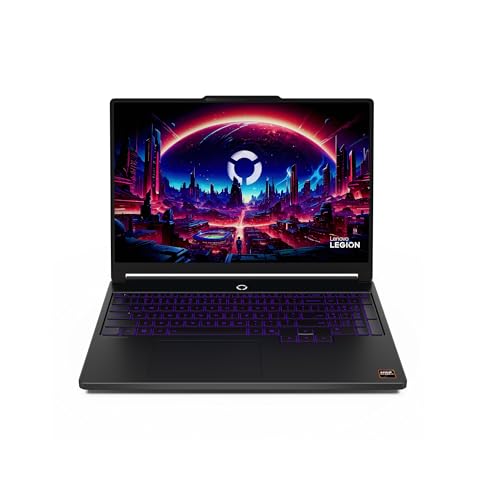
If your priority is graphics-heavy performance rather than a convertible form factor, the Lenovo Legion 5a - 2026 - Gaming Laptop is a better fit. It is the more specialized choice for gaming and power users who do not need the Surface-style hinge.
Razer Blade 16 (2026)

If you want a premium laptop with much stronger gaming and creator performance, the Razer Blade 16 (2026) is the high-end alternative to consider. It’s better suited to users who care more about raw power and a fast OLED panel than 2-in-1 versatility.
Final Verdict
The Microsoft Surface Laptop Studio 2 is a smart buy if you want a premium Windows 2-in-1 with strong multitasking specs, a sharp 120 Hz display, and a genuinely useful convertible design. It makes the most sense for creators, professionals, and students who will take advantage of its flexible modes.
If you want the most practical value for everyday tasks, or if you do not care about tablet-style use, there are better bargains elsewhere. But as a research-backed package of design, performance, and versatility, this Surface remains one of the more distinctive premium laptops you can choose.
Frequently Asked Questions
Is the Microsoft Surface Laptop Studio 2 good for creators?
Yes. Based on its specs and published reviews, it is a strong fit for creators who want a flexible 2-in-1 design, a sharp display, and enough performance for productivity and creative apps.
Can the Surface Laptop Studio 2 handle gaming?
It can handle some gaming thanks to the RTX 4050, but it is better viewed as a creator and productivity laptop than a dedicated gaming machine.
Is the Surface Laptop Studio 2 worth it for students?
It can be worth it for students in design, media, or note-heavy programs who will use the convertible form factor. For general coursework alone, it may be more laptop than necessary.
How portable is the Surface Laptop Studio 2?
It is portable enough for a premium 2-in-1, but it is not as light or slim as many standard laptops. Buyers should expect a more substantial carry than with ultraportables.
What is the biggest reason to buy the Surface Laptop Studio 2?
The biggest reason is its unique hinge-based 2-in-1 design paired with strong multitasking specs, which makes it especially appealing for users who want both performance and flexibility.
Pros
- + Flexible 2-in-1 hinge design
- + Strong multitasking with 32GB RAM
- + Sharp 14.4-inch 120 Hz display
- + RTX 4050 adds creative graphics headroom
- + 1TB SSD offers roomy fast storage
Cons
- – Bulkier than thinner laptops
- – Battery life varies with workload
- – Premium price may not suit basic users
- – Not ideal for maximum gaming performance
Frequently asked questions
- Is the Microsoft Surface Laptop Studio 2 good for creators?
- Yes. Based on its specs and published reviews, it is a strong fit for creators who want a flexible 2-in-1 design, a sharp display, and enough performance for productivity and creative apps.
- Can the Surface Laptop Studio 2 handle gaming?
- It can handle some gaming thanks to the RTX 4050, but it is better viewed as a creator and productivity laptop than a dedicated gaming machine.
- Is the Surface Laptop Studio 2 worth it for students?
- It can be worth it for students in design, media, or note-heavy programs who will use the convertible form factor. For general coursework alone, it may be more laptop than necessary.
- How portable is the Surface Laptop Studio 2?
- It is portable enough for a premium 2-in-1, but it is not as light or slim as many standard laptops. Buyers should expect a more substantial carry than with ultraportables.
- What is the biggest reason to buy the Surface Laptop Studio 2?
- The biggest reason is its unique hinge-based 2-in-1 design paired with strong multitasking specs, which makes it especially appealing for users who want both performance and flexibility.
Score breakdown
- value
- 7.2
- usability
- 8.7
- durability
- 8.3
- performance
- 8.5
- buyerFeedback
- 8.1
Get the Full Tech Buyer's Guide
Join our free newsletter — we'll send our latest Tech picks, specs and verdicts straight to your inbox.
Free. No spam. Unsubscribe anytime.
Was this review helpful?
Be the first to share your feedback on this review.
Sign in to vote and let us know what you think.
Discussion (0)
No comments yet. Be the first to start the discussion.
Related Reviews
8 Best Laptops for ChatGPT and Local LLMs in 2026 — Faster AI Workflows, Better Multitasking
If you’re shopping for the best laptops for chatgpt and local llms , the real challenge is balancing AI-friendly performance with enough memory, storage, and portability to stay useful every day. ChatGPT in the browser is easy; running local models, keeping dozens of tabs open, and handling creative

8 Best Budget OLED Laptops in 2026 — Stunning Displays Without the Premium Price Tag
If you want the rich contrast, deep blacks, and vivid color of OLED without overspending, you’re in the right place. The best budget OLED laptops in 2026 are no longer just basic machines with pretty screens — many now bring solid everyday performance, modern AI features, and portable designs. This

Apple 2026 MacBook Neo Review (2026): Specs, Pros & Cons, and Who It's For
The MacBook Neo is positioned as a lightweight, highly portable Mac aimed at students and everyday users who want Apple’s ecosystem without jumping to a higher-tier laptop. Based on the published specs and product materials, its aluminum design and recycled enclosure are major selling points, especi