


Who this is for: Best for buyers who want an AI-ready laptop for ChatGPT, multitasking, and light-to-moderate local LLM work.
If you’re shopping for the best laptops for chatgpt and local llms, the real challenge is balancing AI-friendly performance with enough memory, storage, and portability to stay useful every day. ChatGPT in the browser is easy; running local models, keeping dozens of tabs open, and handling creative or coding work is where many laptops fall short. This roundup focuses on machines that make sense for AI-assisted workflows based on published specs, documented owner feedback patterns, and side-by-side comparisons—not hands-on testing.
Related Reviews
We prioritized fast CPUs with modern AI acceleration, at least 16GB RAM where possible, SSD storage, strong displays for long sessions, and designs that support productivity beyond just raw benchmarks. Some picks are better for browser-based ChatGPT and general AI work, while others are more suitable for local LLM experimentation, heavier multitasking, or creator-style workflows. If you want the most practical shortlist before you click through to Amazon, start with the quick picks below.
Quick Picks
| Rank | Product | Best For |
|---|---|---|
| 1 | ASUS Zenbook Duo Laptop (2026) | Power users who want the best dual-screen setup for AI workflows |
| 2 | HP OmniBook X Flip AI Laptop 2026 | Flexible 2-in-1 use with strong Copilot+ style productivity |
| 3 | ASUS Zenbook 14 OLED Touchscreen Laptop | Premium portable AI workhorse with a polished bundle |
| 4 | NIMO 15.6" FHD AI-Creator-Laptop | Heavier local multitasking and creator-style AI workloads |
| 5 | HP OmniBook 3 AI-Powered Laptop | Budget-friendly AI browsing and everyday productivity |
| 6 | Acer Swift Go 16in OLED Laptop | Display quality and balanced Intel AI performance |
| 7 | Lenovo 15.6" FHD Essential Laptop | Basic AI tasks, school, and office work on a budget |
| 8 | Tylvx Laptop Computer | Entry-level everyday use with enough RAM and storage for light AI browsing |
1. ASUS Zenbook Duo Laptop (2026) — Best Dual-Screen AI Productivity Laptop


Verdict: If you want the most workflow-friendly laptop here for ChatGPT, coding, research, and local LLM juggling, the dual-screen design is the standout advantage.
The ASUS Zenbook Duo Laptop (2026) is the most compelling option for serious AI multitaskers because the extra screen space can dramatically improve prompt writing, note-taking, reference lookup, and split-window workflows.
- ✓ Dual 14-inch OLED 3K touch displays give you room for prompts, docs, and reference material at the same time
- ✓ Intel Core Ultra 9 Processor 386H with 32GB RAM is built for responsive multitasking
- ✓ 1TB SSD provides generous space for projects, local files, and model-related assets
- ✓ Wi-Fi 7 and Windows 11 support a modern productivity setup
- ✗ Dual-screen designs can be less travel-friendly than a standard clamshell
- ✗ Premium hardware may be more than casual ChatGPT users need
- ✗ The form factor has a learning curve if you’re used to traditional laptops
2. HP OmniBook X Flip AI Laptop 2026 — Best 2-in-1 Laptop for AI Work and Flexibility

Verdict: This is the best pick if you want a flexible AI laptop that can shift between typing, touch input, reading, and presentation-style use.
The HP OmniBook X Flip AI Laptop 2026 combines a roomy 16-inch OLED touchscreen with a convertible design, making it especially useful for AI-assisted research, prompt editing, and content review.
- ✓ 16-inch 2K OLED touchscreen offers rich color and a spacious 16:10 layout
- ✓ 2-in-1 convertible design supports laptop, tablet, tent, and stand modes
- ✓ 16GB LPDDR5x RAM and 512GB SSD are a solid baseline for AI browsing and multitasking
- ✓ Ryzen AI 5 430 with a dedicated AI engine supports compatible AI applications
- ✗ 16GB RAM is good, but heavy local LLM users may want more headroom
- ✗ 512GB storage can fill up quickly if you keep large datasets or many local tools
- ✗ Best suited to productivity and light-to-moderate AI work rather than extreme local model loads
3. ASUS Zenbook 14 OLED Touchscreen Laptop — Best Premium Portable AI Laptop


Verdict: A strong premium choice for users who want a compact, polished machine that can handle AI browsing, writing, and creative work with less bulk.
The ASUS Zenbook 14 OLED Touchscreen Laptop stands out for its Ryzen AI platform, 1TB SSD, and accessory bundle, making it attractive for people who want a ready-to-go portable AI setup.
- ✓ Ryzen AI 9 465 and 16GB RAM support responsive AI-enhanced productivity
- ✓ 2K OLED touchscreen is ideal for reading, editing, and visual work
- ✓ 1TB SSD gives you room for documents, apps, and project files
- ✓ Bundle includes a stylus, sleeve, cleaning cloth, and USB flash drive
- ✗ 16GB RAM is not the highest ceiling for serious local LLM experimentation
- ✗ Premium positioning may be overkill for simple browser-based ChatGPT use
- ✗ A 14-inch screen can feel smaller than 16-inch options for split-window workflows
4. NIMO 15.6" FHD AI-Creator-Laptop — Best for Heavier Multitasking on a Mid-Range Budget


Verdict: This is one of the strongest value-oriented picks if your AI workflow includes lots of tabs, local tools, video calls, and creator-style multitasking.
The NIMO 15.6" FHD AI-Creator-Laptop is notable for its 32GB RAM and 1TB SSD, which are both useful when juggling browser-based AI tools, local utilities, and large project files.
- ✓ 32GB DDR5 RAM is excellent for multitasking and heavier browser sessions
- ✓ 1TB SSD gives you plenty of room for local files and applications
- ✓ AMD Ryzen 7 8745HS and Radeon 780M offer strong everyday performance
- ✓ Fast charging support and US-based warranty handling add practical appeal
- ✗ 15.6-inch FHD display is less premium than the OLED options above
- ✗ Brand recognition is lower than the bigger laptop makers in this list
- ✗ Best value is tied more to specs than to polished premium design
5. HP OmniBook 3 AI-Powered Laptop — Best Budget AI Laptop for Everyday Use

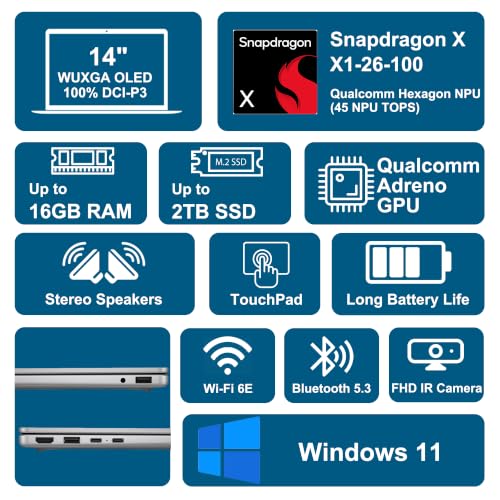
Verdict: A practical budget choice for ChatGPT users who want a modern AI-capable laptop without stepping into premium territory.
The HP OmniBook 3 AI-Powered Laptop makes sense for students, remote workers, and casual AI users who value portability, a good display, and enough memory for normal multitasking.
- ✓ Snapdragon X platform with up to 45 TOPS NPU supports AI-enhanced productivity
- ✓ 14-inch WUXGA OLED display with 100% DCI-P3 is sharp and color-rich
- ✓ 16GB DDR5 RAM is enough for ChatGPT, browsing, and office work
- ✓ Compact 3.13-lb design is easy to carry for work or school
- ✗ 256GB SSD is the tightest storage option among the stronger performers here
- ✗ Better for cloud-based AI workflows than large local model experimentation
- ✗ 14-inch screen is less spacious than 16-inch alternatives for split views
6. Acer Swift Go 16in OLED Laptop — Best Display for Reading and Prompt Work


Verdict: If screen quality matters most to you, this is a polished option for long reading sessions, prompt work, and general AI productivity.
The Acer Swift Go 16in OLED Laptop pairs a sharp 3.2K OLED panel with Intel Core Ultra AI acceleration, making it a smart fit for users who spend a lot of time reading, comparing, and writing.
- ✓ 16-inch 3.2K OLED display is excellent for long-form reading and editing
- ✓ Intel Core Ultra 5 with integrated AI acceleration supports modern productivity
- ✓ Thunderbolt 4 and USB4 provide flexible connectivity
- ✓ 100% DCI-P3 color and True Black 500 certification improve visual quality
- ✗ 8GB RAM is the weakest memory configuration among the more capable models here
- ✗ Better for lighter AI workloads than heavy local LLM use
- ✗ Strong display quality does not fully offset the lower RAM ceiling for power users
7. Lenovo 15.6" FHD Essential Laptop — Best Basic Budget Pick for ChatGPT and School Work


Verdict: A straightforward low-cost option for users who mainly need browser-based ChatGPT, email, documents, and classes.
The Lenovo 15.6" FHD Essential Laptop is aimed at everyday computing rather than advanced AI workloads, but it covers the basics well enough for light productivity and occasional AI use.
- ✓ Lightweight design and MIL-STD-810H testing support everyday portability
- ✓ Anti-glare 15.6-inch Full HD screen is practical for work and study
- ✓ Dedicated Copilot key adds convenient access to compatible AI assistance
- ✓ Useful port selection includes USB-C, USB-A, HDMI, and SD card reader
- ✗ 8GB RAM and 128GB storage are limiting for more ambitious AI workflows
- ✗ Best suited to web-based AI rather than local model experimentation
- ✗ This is an essentials-first machine, not a performance-first one
8. Tylvx Laptop Computer — Best Ultra-Budget Option for Light AI Browsing


Verdict: This is the most basic pick in the roundup, but it still offers a workable spec set for light ChatGPT use and general home-office tasks.
The Tylvx Laptop Computer is best viewed as an entry-level productivity machine with enough RAM and SSD storage to handle everyday browsing, documents, and simple AI-assisted work.
- ✓ 16GB RAM and 512GB SSD are respectable for the budget class
- ✓ 15.6-inch FHD IPS display is suitable for basic productivity
- ✓ Windows 11 Pro and included office software add practical value
- ✓ Full port selection helps with monitors and accessories
- ✗ Intel 8100Y is not aimed at demanding AI or creator workloads
- ✗ Best for light use, not local LLM experimentation
- ✗ Brand and platform details are less proven than the larger-name alternatives
How We Chose These Products
To build this list of the best laptops for chatgpt and local llms, we focused on specs that matter most for AI-assisted workflows: modern processors, AI/NPU support where available, memory capacity, SSD storage, display quality, and overall usability. We also weighed practical details such as portability, keyboard quality cues, connectivity, and whether a laptop is better suited to browser-based ChatGPT use or more demanding local model work.
Because this is a research-based roundup, we did not test these machines ourselves. Instead, we compared published specifications, product positioning, and owner-feedback trends to identify which laptops are most likely to satisfy different buyer needs. In general, the best options for local LLMs are the ones with more RAM, stronger CPUs, and more storage, while the best ChatGPT laptops can prioritize portability and display quality a bit more.
We also considered price tier relative to the group. Budget picks are included for readers who mainly need cloud AI and everyday productivity, while premium picks are better for power users who want more headroom, better screens, or more advanced multitasking layouts.
Frequently Asked Questions
1) What specs matter most for ChatGPT and local LLMs?
For ChatGPT in the browser, a modern CPU, 16GB RAM, and a comfortable display are usually enough. For local LLMs, more RAM, faster storage, and a stronger processor matter more because the workload is heavier and more memory-hungry.
2) Is 16GB RAM enough for local LLM use?
It can be enough for lighter local AI experimentation, smaller models, and general multitasking, but 32GB gives you more breathing room. If local LLMs are a serious priority, more memory is usually the safer choice.
3) Do I need a Copilot+ PC for AI work?
Not necessarily. A Copilot+ PC can be helpful for supported AI features and modern efficiency, but the most important factor is still the overall hardware balance. RAM, CPU performance, and storage often matter more than the label alone.
4) Are OLED laptops better for AI work?
OLED doesn’t make the laptop faster, but it can make long reading, writing, and prompt-editing sessions more pleasant. If you spend hours in documents, dashboards, and code windows, a good OLED display can improve the experience.
5) Which laptop in this list is best for both travel and AI productivity?
The HP OmniBook X Flip AI Laptop 2026 is one of the best all-around travel-friendly picks because it combines a 2-in-1 design, a large OLED touchscreen, and modern AI-oriented hardware in a flexible format.
Pros
- + Dual-screen productivity
- + 32GB RAM and 1TB SSD
- + 2-in-1 flexibility
- + Strong OLED displays
- + AI/NPU-ready options
Cons
- – Some models have limited RAM
- – Budget picks are not ideal for local LLMs
- – Premium models may be overkill
- – A few options have small SSDs
Frequently asked questions
- What specs matter most for ChatGPT and local LLMs?
- For ChatGPT in the browser, a modern CPU, 16GB RAM, and a comfortable display are usually enough. For local LLMs, more RAM, faster storage, and a stronger processor matter more because the workload is heavier and more memory-hungry.
- Is 16GB RAM enough for local LLM use?
- It can be enough for lighter local AI experimentation, smaller models, and general multitasking, but 32GB gives you more breathing room. If local LLMs are a serious priority, more memory is usually the safer choice.
- Do I need a Copilot+ PC for AI work?
- Not necessarily. A Copilot+ PC can be helpful for supported AI features and modern efficiency, but the most important factor is still the overall hardware balance. RAM, CPU performance, and storage often matter more than the label alone.
- Are OLED laptops better for AI work?
- OLED doesn’t make the laptop faster, but it can make long reading, writing, and prompt-editing sessions more pleasant. If you spend hours in documents, dashboards, and code windows, a good OLED display can improve the experience.
- Which laptop in this list is best for both travel and AI productivity?
- The HP OmniBook X Flip AI Laptop 2026 is one of the best all-around travel-friendly picks because it combines a 2-in-1 design, a large OLED touchscreen, and modern AI-oriented hardware in a flexible format.
Get the Full Tech Buyer's Guide
Join our free newsletter — we'll send our latest Tech picks, specs and verdicts straight to your inbox.
Free. No spam. Unsubscribe anytime.
Was this review helpful?
Be the first to share your feedback on this review.
Sign in to vote and let us know what you think.
Discussion (0)
No comments yet. Be the first to start the discussion.
Related Reviews

Microsoft Surface Laptop Studio 2 Review (2026): Specs, Pros & Cons, and Who It's For
If you want a Windows laptop that can shift from traditional clamshell work to sketching, presenting, and touch-first use, the Microsoft Surface Laptop Studio 2 14.4" Tablet 2-in-1 Laptop 120 Hz Intel Core i7-13800H 32GB RAM 1TB SSD NVIDIA GeForce RTX 4050 Platinum is one of the most distinctiv
8 Best Budget OLED Laptops in 2026 — Stunning Displays Without the Premium Price Tag
If you want the rich contrast, deep blacks, and vivid color of OLED without overspending, you’re in the right place. The best budget OLED laptops in 2026 are no longer just basic machines with pretty screens — many now bring solid everyday performance, modern AI features, and portable designs. This

Apple 2026 MacBook Neo Review (2026): Specs, Pros & Cons, and Who It's For
The MacBook Neo is positioned as a lightweight, highly portable Mac aimed at students and everyday users who want Apple’s ecosystem without jumping to a higher-tier laptop. Based on the published specs and product materials, its aluminum design and recycled enclosure are major selling points, especi