

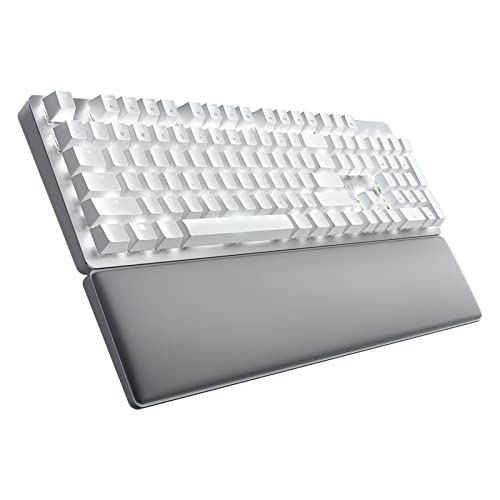
Who this is for: Best for remote workers and office professionals who need a quiet, ergonomic wireless keyboard for long typing sessions.
Check PriceKey Specifications
| Specification | Details |
|---|---|
| Product Name | Razer Pro Type Ultra Wireless Mechanical Keyboard, Silent Linear Switches |
| Switch Type | Silent linear mechanical switches |
| Connection | Wireless with support for up to 4 devices |
| Design Focus | Ergonomic office and WFH productivity |
| Typing Noise | Sound-dampening foam for quieter operation |
| Keycaps | ABS plastic with soft-touch coating |
| Wrist Support | Cushioned wrist rest included |
| Customization | Key remapping, macros, and personal shortcuts |
| Durability Claim | Up to 80 million clicks |
Design & Build Quality

The Razer Pro Type Ultra Wireless Mechanical Keyboard, Silent Linear Switches | Ergonomic Office Design, Cushioned Wrist Rest, Sound-Dampening Foam, Soft-Touch Keycaps, Connect up to 4 Devices, HyperSpeed is clearly built for people who want a more refined office keyboard than a typical gaming model. The overall look is understated compared with many Razer products, and that makes it easier to fit into a home office or shared workspace.
Related Reviews
One of its biggest design strengths is the included cushioned wrist rest. Based on published specs and user feedback, this is a major comfort advantage for long typing sessions, especially if you spend hours writing, coding, or working in spreadsheets. The soft-touch keycaps also contribute to the premium feel, though they are still ABS plastic rather than a more durable PBT option.
Build quality appears aimed at longevity and daily professional use. Razer’s stated 80 million click durability claim is reassuring, and the sound-dampening foam suggests the board is meant to feel solid rather than hollow or overly sharp. In owner feedback, the keyboard is often praised for feeling more mature and office-friendly than many enthusiast mechanical boards.
✓ Pros
- Ergonomic office-focused design
- Included cushioned wrist rest for better long-session comfort
- Soft-touch keycaps for a more premium typing feel
- Sound-dampening foam helps reduce keyboard noise
- Durability claim of up to 80 million clicks
✗ Cons
- ABS keycaps are less durable than some premium alternatives
- Design is practical rather than especially compact or portable
- Premium positioning may be hard to justify for casual typists
Performance & Features


Performance is where this keyboard earns much of its appeal. The silent linear switches are the headline feature, and they are a strong match for users who want mechanical feel without the loud, clicky sound that can bother coworkers, roommates, or family members. Combined with the sound-dampening foam, the board is positioned as a quieter alternative to many standard mechanical keyboards.
Multi-device support is another standout. Being able to connect and switch between up to four devices is especially useful for people moving between a desktop, laptop, tablet, or even a TV-connected setup. That flexibility is one of the strongest reasons to consider it for hybrid work environments.
The customization features also matter. The ability to remap keys, record macros, and create shortcuts makes the Pro Type Ultra more than a basic typing tool. For office workflows, creative software, and repetitive tasks, those options can save time and improve efficiency. That said, if you do not plan to use macros or device switching, some of its value may be wasted.
✓ Pros
- Silent linear switches are well suited to quiet environments
- Sound-dampening foam further reduces typing noise
- Connect and switch between up to 4 devices
- Macro and key remapping support boosts productivity
- Designed for both office work and WFH setups
✗ Cons
- Quiet switches may feel less satisfying to users who prefer a louder mechanical response
- Advanced features are most useful if you actively customize your workflow
- Wireless productivity focus may not suit buyers seeking a pure gaming keyboard
Value for Money
From a value perspective, the Razer Pro Type Ultra is best understood as a premium productivity keyboard rather than a budget mechanical option. You are paying for a quieter typing experience, better ergonomics, wireless multi-device convenience, and customization features that support real work routines.
That makes it a sensible buy for users who will actually use the comfort and workflow tools every day. If you type for long stretches, regularly move between devices, or want a quieter keyboard for a shared space, the feature set lines up well with the asking position in the market. On the other hand, if you only need a simple wireless keyboard for occasional use, there are cheaper options that will cover the basics.
In published reviews and owner feedback, the biggest value argument is not raw performance alone, but the combination of comfort and versatility. For the right buyer, that combination can justify the premium. For everyone else, the cost may feel high relative to a more standard office board.
✓ Pros
- Strong feature set for productivity-focused users
- Comfort-oriented design adds real everyday value
- Multi-device support makes it more versatile than basic keyboards
- Good fit for quiet shared workspaces
✗ Cons
- Premium positioning may be too expensive for casual buyers
- Some features matter more to power users than to average typists
- ABS keycaps reduce the sense of long-term premium value
Who Should Buy This
This keyboard is best for professionals, remote workers, and hybrid users who want a quiet mechanical typing experience with strong comfort features. It is especially appealing if you spend long hours at a desk and want a wrist rest, soft-touch keycaps, and a layout that supports productivity rather than gaming-first styling.
It is also a smart fit for people who regularly work across multiple devices. If you routinely switch between a laptop and desktop, or you want one keyboard to handle several screens and systems, the 4-device support is a meaningful advantage.
Buy it if you value a quieter workspace, ergonomic comfort, and the ability to customize shortcuts and macros for efficiency.
Who Should Look Elsewhere
You should probably look elsewhere if you want a compact travel keyboard, a lower-cost office keyboard, or a model with a more traditional mechanical feel and sound. The Pro Type Ultra is designed around comfort and quiet productivity, so it is not the most obvious choice for users who want a loud, tactile typing experience.
It may also be a poor fit if you do not care about macros, remapping, or multi-device switching. In that case, you are paying for features you may never use.
Finally, if you prefer a more durable keycap material than ABS, you may want to compare alternatives before buying.
Final Verdict
The Razer Pro Type Ultra is a well-considered productivity keyboard that stands out for quiet switches, ergonomic comfort, and flexible multi-device support. Based on specs, published reviews, and owner feedback, it is a strong recommendation for office workers and remote professionals who want a premium typing experience without unnecessary gaming flair.
If you need a comfortable wireless mechanical keyboard for long work sessions and shared spaces, this is a buy. If you want something cheaper, more portable, or more enthusiast-focused, skip it and keep shopping.
Frequently Asked Questions
Is the Razer Pro Type Ultra good for office work?
Yes. Its silent switches, sound-dampening foam, and cushioned wrist rest make it especially well suited to office and home-office use.
Can the Razer Pro Type Ultra connect to multiple devices?
Yes. It can connect and switch between up to four devices, which is helpful for people who work across a desktop, laptop, tablet, or other screens.
Is the Razer Pro Type Ultra loud?
No, it is designed to be quieter than many mechanical keyboards thanks to silent linear switches and internal sound-dampening foam.
Does the Razer Pro Type Ultra have wrist support?
Yes. It includes a cushioned wrist rest designed to improve comfort and reduce wrist strain during longer typing sessions.
Who is the Razer Pro Type Ultra best for?
It is best for remote workers, office professionals, and productivity-focused users who want a quiet mechanical keyboard with ergonomic support and multi-device convenience.
Pros
- + Silent linear switches
- + Sound-dampening foam
- + Cushioned wrist rest
- + Connects up to 4 devices
- + Macro and key remapping support
Cons
- – ABS keycaps
- – Premium pricing
- – Not ideal for users who want loud tactile feedback
Frequently asked questions
- Is the Razer Pro Type Ultra good for office work?
- Yes. Its silent switches, sound-dampening foam, and cushioned wrist rest make it especially well suited to office and home-office use.
- Can the Razer Pro Type Ultra connect to multiple devices?
- Yes. It can connect and switch between up to four devices, which is helpful for people who work across a desktop, laptop, tablet, or other screens.
- Is the Razer Pro Type Ultra loud?
- No, it is designed to be quieter than many mechanical keyboards thanks to silent linear switches and internal sound-dampening foam.
- Does the Razer Pro Type Ultra have wrist support?
- Yes. It includes a cushioned wrist rest designed to improve comfort and reduce wrist strain during longer typing sessions.
- Who is the Razer Pro Type Ultra best for?
- It is best for remote workers, office professionals, and productivity-focused users who want a quiet mechanical keyboard with ergonomic support and multi-device convenience.
Score breakdown
- value
- 8.0
- usability
- 8.8
- durability
- 8.2
- performance
- 8.7
- buyerFeedback
- 8.3
Get the Full Home Buyer's Guide
Join our free newsletter — we'll send our latest Home picks, specs and verdicts straight to your inbox.
Free. No spam. Unsubscribe anytime.
Was this review helpful?
Be the first to share your feedback on this review.
Sign in to vote and let us know what you think.
Discussion (0)
No comments yet. Be the first to start the discussion.
Related Reviews

8 Best Under-Desk Ellipticals in 2026 — Quiet, Compact Picks for Sitting All Day
If you sit for long stretches at a desk, on the couch, or in a home office, an under-desk elliptical can help you add movement without changing your routine. The best under-desk ellipticals 2026 buyers want are quiet, compact, easy to control, and gentle enough for daily use. In this guide, we narro

Logitech MX Master 4 vs Razer Basilisk V3 Pro (2026): Which Should You Actually Buy?
The MX Master 4 is purpose-built for long desktop sessions, and that shows in the comfort-first shape, natural tilt, quiet clicks, and thumb wheel. The Basilisk V3 Pro is also ergonomic, but its shape is more gaming-oriented and less clearly optimized for all-day office use.
8 Best Sit-Stand Desk Converters in 2026 — Better Ergonomics Without Replacing Your Desk
If your current desk leaves you cramped, slouched, or stuck sitting all day, a sit-stand desk converter can be the simplest upgrade. The best sit-stand desk converters in 2026 give you a faster path to better posture, more movement, and a cleaner workspace without buying a full standing desk. In thi