


Who this is for: Best for PC users who want a comfortable, feature-rich mouse for work, multitasking, or gaming-first use.
At a Glance
| Category | Logitech MX Master 4 | Razer Basilisk V3 Pro |
|---|---|---|
| Best for | Productivity, multitasking, comfort | Gaming, customization, precision control |
| Sensor focus | 8K DPI, any-surface use | Focus Pro 30K optical sensor |
| Buttons | Productivity-focused controls, Actions Ring, thumb wheel | 11 programmable buttons |
| Scrolling | MagSpeed wheel with ultra-fast, precise scrolling | HyperScroll tilt wheel with free-spin and tactile modes |
| Connectivity | USB-C dongle and Bluetooth | Wireless gaming mouse connectivity |
| Battery focus | Built for long work sessions | Up to 150-hour battery claim |
| Ergonomics | Natural tilt, quiet clicks, hand-stress reduction | Signature ergonomic gaming shape |
Design: Logitech MX Master 4 Wins
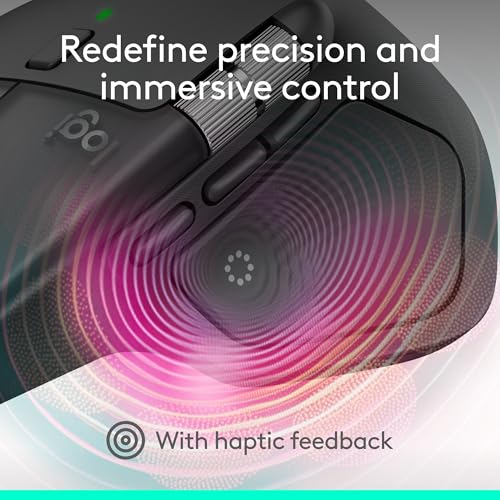

The MX Master 4 is purpose-built for long desktop sessions, and that shows in the comfort-first shape, natural tilt, quiet clicks, and thumb wheel. The Basilisk V3 Pro is also ergonomic, but its shape is more gaming-oriented and less clearly optimized for all-day office use.
Related Reviews
Winner: Logitech MX Master 4
- ✓ Natural tilt helps reduce hand stress during long workdays
- ✓ Quiet clicks are better for shared offices and home setups
- ✓ Thumb scroll wheel and Actions Ring are productivity-first features
- ✗ Larger, work-focused shape may feel less nimble for fast gaming grips
- ✗ Not as flashy or game-centric as the Razer
- ✗ Best fit depends on whether you value comfort over speed
Performance: Razer Basilisk V3 Pro Wins
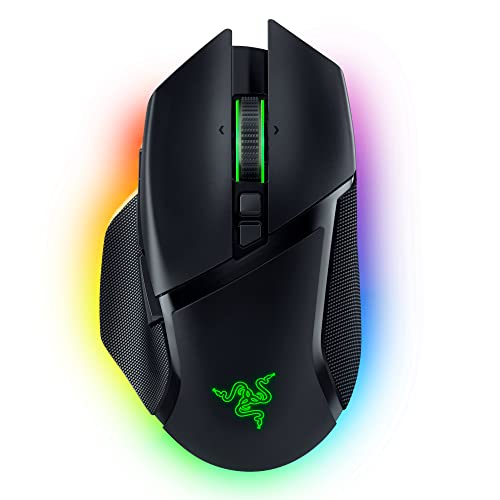

For raw pointer performance, the Basilisk V3 Pro has the stronger spec sheet. Its Focus Pro 30K sensor, optical switches, and HyperScroll tilt wheel are built for responsive gaming and precise control, especially when you want speed and consistency in fast-moving titles.
The MX Master 4 is highly capable for productivity, but its strengths are more about workflow efficiency than competitive gaming performance.
Winner: Razer Basilisk V3 Pro
- ✓ Focus Pro 30K sensor is the more aggressive performance spec
- ✓ Optical switches Gen-3 are designed for fast, reliable actuation
- ✓ HyperScroll tilt wheel adds flexibility for gaming and browsing
- ✗ Gaming focus can make it less ideal for office-first users
- ✗ RGB and extra tuning may be overkill for simple productivity
- ✗ Not as workflow-oriented as Logitech’s feature set
Features and Customization: Logitech MX Master 4 Wins

The MX Master 4 stands out with the Haptic Sense Panel and Actions Ring, both of which are clearly designed to speed up real work. Those features give it a more modern productivity edge than the Basilisk V3 Pro’s more traditional customization approach.
Razer does offer 11 programmable buttons and extensive lighting customization, but Logitech’s workflow tools are more useful for most PC buyers outside of gaming.
Winner: Logitech MX Master 4
- ✓ Haptic feedback can reinforce shortcuts and notifications
- ✓ Actions Ring adapts to different apps and workflows
- ✓ MagSpeed scrolling is built for fast, precise document navigation
- ✗ Less focused on game-specific customization
- ✗ Haptics may not matter much if you only need basic mouse control
- ✗ The feature set is strongest in productivity software, not gaming
Value: Razer Basilisk V3 Pro Wins
If you’re comparing what each mouse gives you for the money, the Basilisk V3 Pro has the stronger value proposition for a broader range of buyers. It delivers a flagship gaming sensor, lots of programmable buttons, and premium wireless features without being positioned as the more premium productivity option.
The MX Master 4 justifies itself with productivity tools and comfort, but it’s the more specialized purchase.
Winner: Razer Basilisk V3 Pro
- ✓ Strong gaming feature set with 11 programmable buttons
- ✓ Premium sensor and switch tech are included
- ✓ More versatile for gamers who also browse and work at a desk
- ✗ RGB and gaming extras may not be useful for everyone
- ✗ Value is best if you actually want gaming performance
- ✗ Less compelling if your main priority is office productivity
Battery and Durability: Razer Basilisk V3 Pro Wins
The Basilisk V3 Pro has the clearer durability and endurance story on paper, with optical switches Gen-3 promising a long click lifecycle and a listed 150-hour battery claim. That makes it attractive for gamers and heavy users who want fewer charging interruptions.
The MX Master 4 is also built for serious daily use, but the provided specs emphasize comfort, connectivity, and workflow more than endurance marketing.
Winner: Razer Basilisk V3 Pro
- ✓ Optical switches are designed to avoid double-clicking issues
- ✓ 150-hour battery claim is appealing for long sessions
- ✓ Built for repeated gaming use and frequent input
- ✗ Battery life depends on lighting and usage settings
- ✗ Durability is excellent for gaming, but less productivity-focused
- ✗ Extra features can add complexity compared with Logitech’s simpler work-first approach
Logitech MX Master 4 Is the Better Choice If…
- You want a mouse built around productivity, not gaming.
- You spend long hours in documents, spreadsheets, or creative apps.
- You value quiet clicks, comfort, and a natural hand position.
- You like workflow shortcuts such as customizable overlays and fast scrolling.
- You use a mouse across multiple devices and want a polished everyday experience.
Razer Basilisk V3 Pro Is the Better Choice If…
- You want a gaming mouse with stronger performance specs.
- You care about a high-end sensor and fast, precise tracking.
- You want more programmable buttons for game binds and macros.
- You like RGB lighting and a more customizable gaming aesthetic.
- You want a wireless mouse that can still double as a capable everyday desktop option.
Our Final Verdict
The Logitech MX Master 4 wins this head-to-head for most buyers because it is more comfortable, more productivity-focused, and more useful for everyday PC work. Its haptic controls, Actions Ring, and MagSpeed scrolling make it the smarter choice for people who spend most of their time navigating apps, documents, and workflows.
The Razer Basilisk V3 Pro is the better pick if your priority is gaming performance, extra buttons, and a more aggressive sensor-and-switch package. If you want one mouse that leans hard into play, it’s the stronger option.
Bottom line: choose the MX Master 4 for work, choose the Basilisk V3 Pro for gaming.
Frequently Asked Questions
Is the Logitech MX Master 4 good for gaming?
It can handle casual gaming, but it is primarily built for productivity, comfort, and workflow efficiency rather than competitive gaming performance.
Is the Razer Basilisk V3 Pro good for office work?
Yes, but it is still more gaming-oriented. It works well on a desk, though most office-first users will likely prefer the MX Master 4’s comfort and productivity tools.
Which mouse has better scrolling?
The MX Master 4 is better for fast productivity scrolling, while the Basilisk V3 Pro’s HyperScroll wheel is better if you want a gaming-style wheel with free-spin and tactile modes.
Which mouse is more comfortable for long use?
The MX Master 4 is the better comfort pick for most people because its shape, quiet clicks, and ergonomic tilt are designed for long work sessions.
Which is the better overall buy?
For most PC users, the Logitech MX Master 4 is the better overall buy. If your main priority is gaming performance, the Razer Basilisk V3 Pro is the better match.
Pros
- + MX Master 4 comfort and quiet clicks
- + MX Master 4 Haptic Sense Panel and Actions Ring
- + MX Master 4 MagSpeed scrolling
- + Basilisk V3 Pro Focus Pro 30K sensor
- + Basilisk V3 Pro 11 programmable buttons
- + Basilisk V3 Pro long battery claim
Cons
- – MX Master 4 is less gaming-focused
- – MX Master 4 is more specialized for productivity
- – Basilisk V3 Pro is less office-first
- – Basilisk V3 Pro RGB may be unnecessary
- – Basilisk V3 Pro is better for gaming than work
Frequently asked questions
- Is the Logitech MX Master 4 good for gaming?
- It can handle casual gaming, but it is primarily built for productivity, comfort, and workflow efficiency rather than competitive gaming performance.
- Is the Razer Basilisk V3 Pro good for office work?
- Yes, but it is still more gaming-oriented. It works well on a desk, though most office-first users will likely prefer the MX Master 4’s comfort and productivity tools.
- Which mouse has better scrolling?
- The MX Master 4 is better for fast productivity scrolling, while the Basilisk V3 Pro’s HyperScroll wheel is better if you want a gaming-style wheel with free-spin and tactile modes.
- Which mouse is more comfortable for long use?
- The MX Master 4 is the better comfort pick for most people because its shape, quiet clicks, and ergonomic tilt are designed for long work sessions.
- Which is the better overall buy?
- For most PC users, the Logitech MX Master 4 is the better overall buy. If your main priority is gaming performance, the Razer Basilisk V3 Pro is the better match.
Score breakdown
- value
- 8.0
- usability
- 9.0
- durability
- 8.0
- performance
- 8.0
- buyerFeedback
- 8.0
Get the Full Home Buyer's Guide
Join our free newsletter — we'll send our latest Home picks, specs and verdicts straight to your inbox.
Free. No spam. Unsubscribe anytime.
Was this review helpful?
Be the first to share your feedback on this review.
Sign in to vote and let us know what you think.
Discussion (0)
No comments yet. Be the first to start the discussion.
Related Reviews
8 Best Sit-Stand Desk Converters in 2026 — Better Ergonomics Without Replacing Your Desk
If your current desk leaves you cramped, slouched, or stuck sitting all day, a sit-stand desk converter can be the simplest upgrade. The best sit-stand desk converters in 2026 give you a faster path to better posture, more movement, and a cleaner workspace without buying a full standing desk. In thi

6 Best Printers for Home Office No Subscription in 2026 — Ink-Smart Picks That Skip Monthly Fees
If you’re looking for the best printers for home office no subscription, you probably want reliable wireless printing without getting pushed into recurring ink plans. That means a printer that can handle documents, scanning, and everyday family use while keeping ownership simple. The picks below foc

Razer Kiyo Pro Ultra Review (2026): Specs, Pros & Cons, and Who It's For
The Kiyo Pro Ultra is positioned as a premium webcam, and its design reflects that. The large sensor and F/1.7 lens are the headline hardware choices, and they signal that Razer is aiming for a more camera-like look rather than a basic webcam image. In the context of published specs and owner feedba