

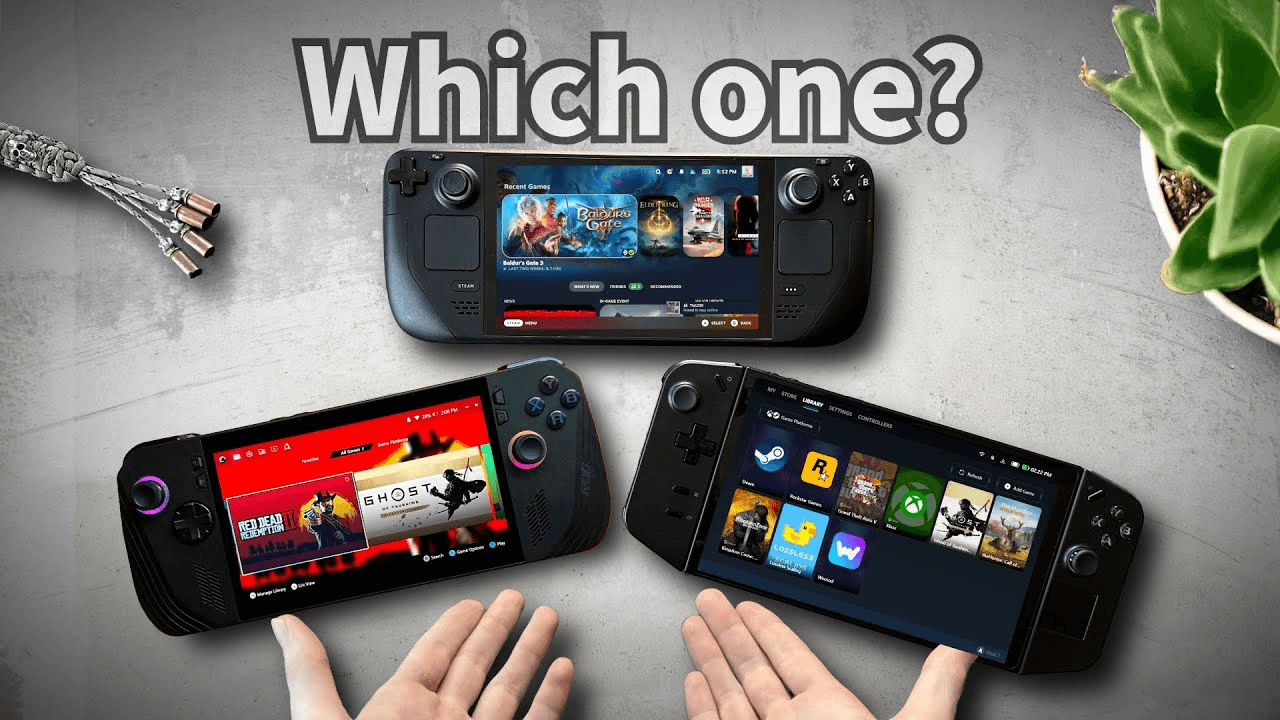
TL;DR
Steam Deck OLED: Beste algehele waarde + batterij + community-tweaks; perfect voor je Steam-bibliotheek en plug-and-play plezier.
ROG Ally X: Beste ruwe prestaties per pond plus 120Hz-scherm; ideaal als je Windows-flexibiliteit wilt met minder compromissen.
Legion Go 2: Beste groot scherm + afneembare controllers en een desktopachtige ervaring; geweldig voor strategy/indie en docked spelen.
Specs That Actually Matter (at a glance)
Feature | Steam Deck OLED | ROG Ally X | Legion Go 2 |
Screen | 7.4" OLED, 90/120Hz, ~800p | 7" IPS, 120Hz, 1080p | 8.8" IPS, 120Hz, 1600p (schaalt goed) |
CPU/GPU | Custom AMD APU (RDNA3-class), highly optimized | Latest AMD APU tuned for higher clocks | AMD APU with higher TDP headroom |
RAM/Storage | 16GB LPDDR5; 512GB–1TB NVMe | 24GB LPDDR5X; 1TB NVMe | 16–32GB LPDDR5X; up to 1–2TB NVMe |
Battery | Excellent efficiency; great standby | Bigger pack than original Ally; good at 120Hz with tweaks | Large battery; bigger screen = higher draw |
Weight | Lightest feel | Light | Heaviest (big screen & controllers) |
OS | SteamOS (Linux), console-like UX | Windows 11 with Armoury Crate SE | Windows 11 with Legion Space |
Controls | Hall-effect sticks, touchpads, rear buttons | Hall-effect sticks, good ergonomics | Detachable controllers, mouse mode |
(Exact configs vary; focus on experience and priorities.)
Performance & Playability
Steam Deck OLED
Valve’s tuning + Proton means “het werkt gewoon” voor een enorm deel van je Steam-bibliotheek.
Het OLED-paneel + HDR laten indie- en verhaalspellen echt opvallen; de 90Hz-modus is soepel zonder de batterij te slopen.
Best voor: RPGs, indies, platformers, AA-titels op 30–45 fps met slimme presets.
ROG Ally X
De hoogste prestaties per watt op vergelijkbare formaten; 1080p 120Hz is ideaal voor esports/retro upscaling.
Windows-compatibiliteit = Game Pass, launchers, mods—meer vrijheid, meer instellingen om te beheersen.
Best voor: actie- en competitieve titels met 60 fps-doelen en agressieve tuning.
Legion Go 2
Het enorme 8.8" scherm = desktopachtige werkruimte voor tactics/strategy en docked play.
Afneembare controllers + “mouse”-modus maken menu’s en emulators makkelijker.
Best voor: visual novels, city builders, RTS, emulation, couch dock-sessies.
Battery, Heat & Noise
Steam Deck OLED: Meest efficiënt overall; geweldige standby, erg stil in desktopscenario’s van 30–40W-equivalent.
ROG Ally X: Grotere batterij dan de OG Ally; 120Hz + hoge TDP verbruikt meer—gebruik onderweg 15–20W-profielen voor balans.
Legion Go 2: De capaciteit is sterk, maar het grotere paneel en Windows-overhead betekenen dat je voor lange sessies een gebalanceerd 15–20W-profiel wilt.
Snelle winst: beperk de framerate tot 40–60 fps, schakel FSR/XeSS/FSR2 in wanneer beschikbaar, en gebruik per-game TDP-profielen.
Controls & Ergonomics
Steam Deck OLED: Hall-sticks + touchpads = beste cursorbesturing in SteamOS, geweldig voor games met veel muisgebruik.
ROG Ally X: Comfortabele grips, responsieve triggers, strak 7" formaat voor lange sessies.
Legion Go 2: De afneembare controllers zijn fantastisch voor bepaalde games en reistafels; zwaarder in handheld-modus.
Software Experience
SteamOS: Console-eenvoudig, direct suspend/resume, cloud saves voelen naadloos aan, robuuste community power tools.
Windows (Ally/Legion): Ultieme compatibiliteit (EA/Ubisoft/Mods/Launchers), maar reken op het jongleren met driver/overlay en af en toe troubleshooting.
Emulation: Alle drie kunnen het; de UI van de Deck + community scripts zijn out of the box het minst omslachtig.
Docking & Peripherals
Alle ondersteunen USB-C-docks voor HDMI/DP-uit, Ethernet en controllers.
Legion Go 2 blinkt uit gedockt dankzij de grote native resolutie en afneembare pads.
ROG Ally X werkt goed samen met 120Hz monitors; overweeg een 2.5GbE-dock voor cloud sync.
Steam Deck OLED integreert perfect met Steam’s Big Picture en couch co-op.
Which One Should You Buy? (Personas)
“Ik wil plug-and-play plezier + beste batterij.” → Steam Deck OLED
“Ik wil Windows-flexibiliteit + 120Hz-snelheid.” → ROG Ally X
“Ik wil een groot scherm, docked spelen, emulation & menus made easy.” → Legion Go 2
Buyer’s Checklist (Copy/Paste)
Bibliotheek-fit: Steam-first (Deck) vs alle launchers/Game Pass (Windows)
Scherm: OLED contrast vs 1080p/120Hz vs groot 8.8"-canvas
Batterij: Mik onderweg op 15–20W-profielen; neem een 65W+ USB-C PD-oplader mee
Opslag: Minstens 1TB NVMe als je AAA speelt; microSD als extra ruimte
Besturing: Heb je touchpads nodig (Deck) of afneembare controllers (Legion)?
Dock-plan: Bureau/tv-opstelling, toetsenbord/muis, Ethernet
FAQ
Kunnen deze een gaming laptop vervangen?
Voor indie/AA en veel AAA met getunede instellingen: ja. Voor ultra-instellingen op 1440p/4K wint een laptop/desktop nog steeds.
Heb ik 120Hz nodig op een handheld?
Het is geweldig voor responsiviteit en retro/esports. Als je vooral begrenst op 40–60 fps, kan OLED + lagere verversing (Deck) batterij besparen.
Hoe groot moet de opslag zijn?
1TB is de sweet spot voor 3–6 grote games plus indies. Je kunt de NVMe later op alle drie upgraden.
Is Windows te veel gedoe?
Het is flexibeler, maar vereist geduld. Als je consoleachtige eenvoud wilt, neem dan de Deck.
Final Verdict
Beste algehele ervaring & batterij: Steam Deck OLED
Beste prestaties + Windows-ecosysteem: ROG Ally X
Beste veelzijdigheid op groot scherm & docked play: Legion Go 2
Klaar om live prijzen te checken?👉 Bekijk vandaag de beste aanbiedingen:
Ontvang de volledige Tech-koopgids
Meld je aan voor onze gratis nieuwsbrief — we sturen onze nieuwste Tech-keuzes, specs en oordelen rechtstreeks naar je inbox.
Gratis. Geen spam. Altijd uitschrijven mogelijk.
Was this review helpful?
Be the first to share your feedback on this review.
Sign in to vote and let us know what you think.
Discussion (0)
No comments yet. Be the first to start the discussion.
Gerelateerde reviews
HyperX OMEN Gaming Laptop 15-gb0xxx: mijn eerlijke test
Ik heb eindelijk die HyperX OMEN 15-gb0xxx gaming laptop geprobeerd waar iedereen zo enthousiast over is... en ja, hij verraste me positief.
Beste alternatieven voor goedkope PS5
Als je zoekt naar goedkope PS5-alternatieven, probeer je waarschijnlijk één van drie problemen op te lossen: de console is nog steeds duur, het digital-only model voelt te beperkt, of je wilt meer waar voor je geld. Het goede nieuws is dat er een paar PS5-opties zijn die goedkoper kunnen zijn dan de
8 beste Xbox-controllers voor comfort en precisie
Zoek je de beste Xbox-controllers van 2026? Dan wil je een controller die lekker in de hand ligt, direct reageert en stick drift voorkomt. De topkeuzes van dit jaar passen bij elk type speler, van budgetkopers tot competitieve gamers en custom fans.