

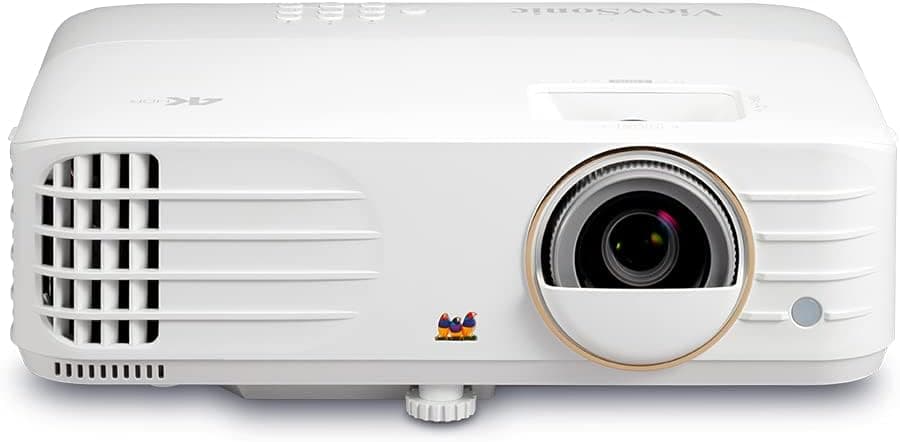
If you’re in the market for a bright, affordable 4K projector, the ViewSonic PX748-4K UHD might be your perfect solution. Boasting 4,000 ANSI lumens of brightness and native 4K UHD resolution, this projector aims to deliver cinematic quality on a budget. In this comprehensive review, we’ll dive into its features, image performance, ease of setup, pros and cons, and how it stacks up against other budget 4K projectors.
Related Reviews
Price: Check current price on Amazon
ViewSonic PX748-4K UHD: Overview
The PX748-4K UHD is a powerful projector designed to bring true 4K UHD content to life. Whether you’re watching movies, streaming games, or delivering presentations, this model aims to combine vivid color, sharp imagery, and reliable performance.
Key Specifications
Brightness: 4,000 ANSI lumens
Resolution: 4K UHD (3840×2160)
Contrast Ratio: 12,000:1
Lamp Life: Up to 20,000 hours (Eco Mode)
Keystone Correction: ±40° Vertical
Connectivity: 2× HDMI 2.0 (HDCP 2.2), USB Type-A
Built-in Audio: 10W speaker
Weight: 3.8 lbs
Design & Build Quality
1. Sleek, Portable Design
The PX748-4K features a compact chassis with easy-access controls and a lightweight build, making setup and transport a breeze.
2. Quick Setup
With auto keystone correction and an intuitive menu system, you can have vivid 4K content on screen in minutes.
3. Durable Build
The sturdy housing and integrated carry handle offer peace of mind for frequent setups and tear-downs.
Image Quality & Brightness
1. Crisp 4K Performance
Native 4K UHD ensures that text, graphics, and video appear sharp and detailed on screens up to 120 inches.
However, HDR support is basic, so peak highlights may appear less dynamic than some competitors.
2. Bright Room Performance
At 4,000 ANSI lumens, it outshines many budget models in well-lit environments without washing out the picture.
3. Smooth Motion
The 60Hz refresh rate
Keeps action scenes fluid, though fast panning may show slight blur.
Pros & Cons
Pros:
✔ Native 4K UHD resolution ✔ High brightness for bright rooms ✔ Easy setup with auto keystone
✔ Lightweight and portable
✔ Built-in speaker for quick audio
Cons:
❌ Limited HDR capabilities ❌ No lens shift ❌ Basic onboard audio
Comparison: How Does It Stack Up?
Curious how the PX748-4K compares to other budget 4K projectors?
Projector | Brightness | Resolution | HDR Support |
ViewSonic PX748-4K | 4,000 lm | 4K UHD | HDR10 |
Epson VS275 | 3,300 lm | 1080p | No HDR |
BenQ TK800 | 3,000 lm | 4K UHD | HDR10 |
Optoma HD146X | 3,600 lm | 1080p | No HDR |
The ViewSonic PX748-4K stands out as a budget-friendly 4K solution for home cinema enthusiasts seeking bright, sharp imagery without breaking the bank.
Final Verdict: Is the ViewSonic PX748-4K Worth It?
Overall, the PX748-4K is a compelling pick for budget-conscious users looking for native 4K performance, high brightness, and simplicity in setup.
Who Should Buy It?
✔ Home theater enthusiasts on a budget
✔ Gamers wanting large-screen 4K
✔ Small event presenters needing bright output
✔ Anyone needing native 4K and looking for more affordable options
Who Should Skip It?
❌ Those seeking advanced HDR and color accuracy
❌ Users requiring lens shift or zoom
❌ Buyers on a super-tight budget
Where to Buy the ViewSonic PX748-4K
Grab the PX748-4K UHD projector on Amazon, and be sure to look for bundle deals on screens or mounts for maximum value.
Get the Full Tech Buyer's Guide
Join our free newsletter — we'll send our latest Tech picks, specs and verdicts straight to your inbox.
Free. No spam. Unsubscribe anytime.
Was this review helpful?
Be the first to share your feedback on this review.
Sign in to vote and let us know what you think.
Discussion (0)
No comments yet. Be the first to start the discussion.
Related Reviews

8 Best 32 Inch Smart TVs in 2026 — Best Picks for Small Rooms, Fast Streaming, and Easy Setup
If you’re shopping for the best 32 inch smart tvs 2026, the challenge is finding a small-screen TV that still feels smart, fast, and worth buying. Many 32-inch models look similar on paper, so the real difference comes down to picture quality, streaming platform, ease of use, and how well they fit b


6 Best 43 Inch TVs in 2026 — Sharp Streaming, Better Motion, and Smarter Value
If you’re shopping for the best 43 inch TVs in 2026, you’re probably trying to fit a capable screen into a bedroom, apartment, office, or secondary living space without overbuying. The challenge is finding a model that looks good in 4K, is easy to use, and doesn’t force you to compromise on streamin