

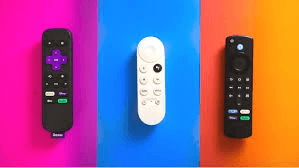
TL;DR
Roku Ultra — simplest interface, fastest to learn, rock-solid app support; best for no-nonsense streaming and multi-app households.
Fire TV Stick 4K Max — best for Prime Video + Alexa homes, speedy hardware, tons of free channels; great value during sales.
Chromecast with Google TV (4K) — best Google ecosystem pick with excellent recommendations and built-in Chromecast for casting from phone/laptop.
What Actually Matters (Quick Priorities)
Picture & audio: 4K HDR (Dolby Vision/HDR10+) + Dolby Atmos passthrough.
Speed & stability: snappy home screen, quick app launches, reliable Wi-Fi/Ethernet.
Search & voice: finding shows across apps should be easy—and unbiased.
Ecosystem fit: Alexa vs Google Assistant vs neutral; smart-home tie-ins.
Remote & extras: backlit buttons, TV controls, headphone listening, customizable keys.
Spec Snapshot (What You’ll Feel Day-to-Day)
Feature | Roku Ultra | Fire TV Stick 4K Max | Chromecast with Google TV (4K) |
HDR formats | Dolby Vision, HDR10/10+ | Dolby Vision, HDR10/10+ | Dolby Vision, HDR10/10+ |
Audio | Dolby Atmos passthrough | Dolby Atmos passthrough | Dolby Atmos passthrough |
Connectivity | Wi-Fi + Ethernet port | Wi-Fi 6/7 (model dependent) | Wi-Fi; USB-C hub can add Ethernet |
UI style | App-grid, simple, fast | Content-forward; Amazon-first | Content-forward; Google-wide |
Voice | Roku Voice | Alexa (deep smart-home) | Google Assistant + cast |
Remote perks | Backlit keys, lost-remote finder, private listening via app | TV controls, Alexa button | TV controls, Assistant, built-in Chromecast |
Best fit | Neutral, simple, reliable | Prime + Alexa households | YouTube/Google fans, casting |
(Model revisions vary; features above reflect current mainstream versions.)
Picture & Audio Quality
All three handle 4K HDR beautifully with Dolby Vision and Atmos on supported apps/TVs. If you own a Dolby Vision TV or a soundbar/AVR with Atmos, you’re covered either way—focus on the interface and ecosystem.
Performance & App Support
Roku Ultra: Consistently snappy, minimal bloat, and excellent app compatibility across paid and free services.
Fire TV 4K Max: Very quick launches and scrolls; integrates live TV and FAST (free ad-supported) channels aggressively.
Google TV 4K: Smooth and content-centric; shines with YouTube/YouTube TV and casting from Android/Chrome.
Search, Recommendations & Ads
Roku: The most neutral cross-app search; lighter ad footprint on the home screen.
Fire TV: Strong voice search, but the home feed pushes Amazon content prominently.
Google TV: Smart recommendations across apps and your watchlist; best if you live in Google’s services.
Smart-Home & Extras
Roku Ultra: Works with major voice assistants; Ethernet is clutch for stable 4K. Private listening via the mobile app (or some remotes with headphone jack).
Fire TV Stick 4K Max: Deep Alexa integration (cameras, routines, smart-home dashboard) and great with Ring doorbells.
Chromecast 4K: Cast anything from Android/Chrome; solid Google Home integration (cameras, routines, Nest).
Which Should You Buy? (Personas)
“I just want Netflix/Prime/YouTube to work fast.” → Roku UltraClean interface, Ethernet, neutral search—easy for the whole family.
“We’re all-in on Amazon & Alexa.” → Fire TV Stick 4K MaxBest with Prime Video, Alexa routines, Ring; great sale pricing.
“We live in Google land & cast from phones.” → Chromecast with Google TV (4K)Casting + Assistant + YouTube/YouTube TV excellence.
Buyer’s Checklist (Copy/Paste)
TV supports Dolby Vision/Atmos (or at least HDR10/Atmos)
Prefer Ethernet? Pick Roku Ultra (built-in) or add a USB-C hub on Chromecast
Voice ecosystem: Alexa vs Google Assistant vs neutral
Remote must-haves: backlight, TV power/volume, lost-remote finder
Live TV/FAST channels importance (Fire TV leads here)
Casting need (Google TV wins here)
Setup Tips (Faster Wins)
Set Match Content Frame Rate and Match Dynamic Range for smoother motion and accurate HDR.
Log into all apps once; then use universal search/voice to jump shows.
If Wi-Fi is flaky, run Ethernet (Roku Ultra) or add a USB-C hub (Chromecast).
Calibrate TV: choose Cinema/Movie mode, disable excessive motion smoothing for films.
Map remote shortcuts to your top apps; enable CEC so the streamer can power/volume your TV.
FAQ
Will these replace my cable box?Yes—pair with YouTube TV, Sling, or Hulu + Live TV, and add a digital antenna for locals if desired.
Do I need a 4K TV?They work on 1080p too, but the real gains (HDR/Dolby Vision) show on a 4K HDR set.
Which is best for travel?Sticks (Fire TV/Chromecast) are easiest to pack. Use a travel router for hotel captive portals.
Final Verdict
Best overall simplicity & stability: Roku Ultra
Best for Prime + Alexa homes: Fire TV Stick 4K Max
Best for Google fans & casting: Chromecast with Google TV (4K)
Ready to check live pricing?👉 See today’s best offers:
Get the Full Tech Buyer's Guide
Join our free newsletter — we'll send our latest Tech picks, specs and verdicts straight to your inbox.
Free. No spam. Unsubscribe anytime.
Was this review helpful?
Be the first to share your feedback on this review.
Sign in to vote and let us know what you think.
Discussion (0)
No comments yet. Be the first to start the discussion.
Related Reviews

6 Best TVs for Gaming 4K 120Hz 2026 — Smoothest Console Performance and Bright HDR
If you want the best TVs for gaming 4K 120Hz 2026, the challenge is finding a screen that actually delivers low-lag 120Hz gameplay without sacrificing HDR brightness or color. The picks below focus on TVs with native 120Hz panels, VRR/ALLM support, and strong gaming-friendly picture processing. They

8 Best 32 Inch Smart TVs in 2026 — Best Picks for Small Rooms, Fast Streaming, and Easy Setup
If you’re shopping for the best 32 inch smart tvs 2026, the challenge is finding a small-screen TV that still feels smart, fast, and worth buying. Many 32-inch models look similar on paper, so the real difference comes down to picture quality, streaming platform, ease of use, and how well they fit b
