

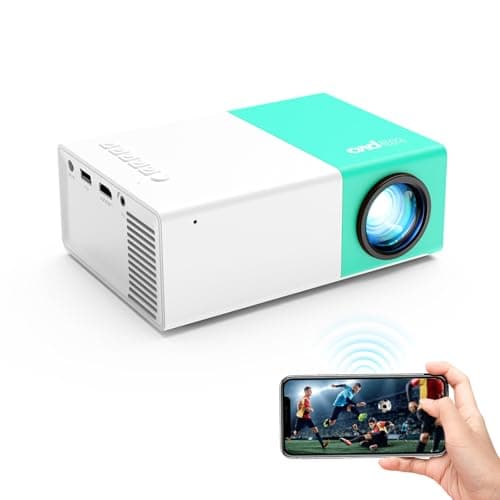
Who this is for: Best for budget-minded buyers who want a simple, portable projector for casual movies and phone mirroring.
How to Choose the Best Projector in 2026: Complete Buying Guide
Trying to figure out how to choose a projector can feel confusing fast: brightness numbers, resolution claims, throw distances, and “smart” features all compete for your attention. The biggest mistake most buyers make is focusing on one flashy spec—usually price or resolution—while ignoring the room, screen size, and how they’ll actually use the projector. This guide breaks the decision down into the features that matter most, the red flags to avoid, and a few budget-friendly picks that fit different real-world needs.
Related Reviews
Key Features to Look For
1) Brightness for Your Room
Brightness is one of the first things to check because it determines whether the image looks usable in your space. A dim projector may look fine in a dark bedroom, but it can wash out quickly in a living room with lights on or during daytime viewing.
For most buyers, the right brightness depends on ambient light more than anything else. If you want flexibility, prioritize a projector that can handle at least some light in the room instead of assuming “movie mode” darkness will always be possible.
2) Resolution and Image Sharpness
Resolution affects how detailed text, menus, and movie images look. Higher resolution is especially important if you plan to watch sports, stream modern content, or connect a laptop for presentations.
If you’re choosing between two models, resolution matters more as screen size increases. A projector that looks acceptable on a small wall may appear soft or pixelated once you stretch it larger.
3) Throw Distance and Screen Size Flexibility
Throw distance tells you how far the projector needs to sit from the wall or screen to create the image you want. This is critical because some rooms simply don’t have enough depth for a long-throw setup.
Before buying, measure your space and think about where the projector will actually live. A compact room usually benefits from a short-throw or portable design, while a larger media room can accommodate more placement options.
4) Keystone Correction and Focus Controls
Keystone correction helps square up the image when the projector isn’t perfectly centered. Focus controls matter because even a bright projector can look disappointing if the image never gets truly sharp.
These features are especially useful for casual setups where the projector gets moved around often. If you want easier setup and less frustration, look for models with straightforward adjustment tools.
5) Connectivity and Device Compatibility
Good connectivity makes a projector easier to use with phones, laptops, streaming sticks, game consoles, and tablets. The more compatible the projector is, the less likely you are to run into adapter headaches later.
Pay attention to whether the projector supports wireless screen mirroring, HDMI, USB, or Bluetooth audio. For many buyers, a projector that works with multiple sources is more valuable than one with a single “smart” feature.
6) Built-In Audio vs. External Speakers
Some projectors include speakers, but built-in audio is often only good enough for casual viewing. If you want a more immersive movie experience, external speakers or a soundbar can make a major difference.
That said, built-in audio is still useful for portability and quick setup. If you’re buying for travel, camping, or occasional use, integrated sound can reduce the number of accessories you need to carry.
7) Portability and Setup Convenience
Portability matters if you plan to move the projector between rooms, take it to friends’ houses, or use it outdoors. Smaller projectors are easier to store and quicker to set up, but they may trade away brightness or image quality.
Look for a balance between size and practicality. Features like wireless mirroring, simple inputs, and lightweight design can make a projector much easier to live with day to day.
What to Avoid
1) Buying Based on Resolution Alone
Resolution is important, but it doesn’t fix poor brightness, weak contrast, or bad room placement. A “high-resolution” projector can still look disappointing if it can’t handle your lighting conditions.
2) Ignoring Room Light
Many buyers underestimate how much ambient light affects the picture. If your room has windows, overhead lights, or daytime use, a projector that only looks good in darkness may not meet expectations.
3) Overlooking Throw Distance
It’s easy to get excited by the screen size promise and forget to measure the room. If the projector can’t physically create the image size you want from your available space, it won’t be a good fit.
4) Expecting Tiny Built-In Speakers to Replace Real Audio
Built-in speakers are convenient, but they often lack volume and depth. If you care about movies, games, or sports, plan for external audio unless the projector’s sound quality is specifically praised in reviews.
5) Falling for Vague Marketing Claims
Be cautious with phrases like “ultra-bright,” “cinematic,” or “1080p supported” without clear specs. Marketing language can hide limitations, so compare actual feature details, owner feedback, and use-case fit instead of relying on buzzwords.
6) Choosing a Projector with Too Few Inputs
A projector with limited ports can become annoying fast, especially if you switch between devices. Having multiple connection options makes the projector more versatile and future-proof.
Our Top Picks
Below are a few practical picks based on the product data provided. Since this is a research-based buying guide, these recommendations are framed around documented features, use-case fit, and owner-facing convenience rather than hands-on testing.
1) wepvo Projector WiFi Portable Movie Projector ✓ Prime $33.99
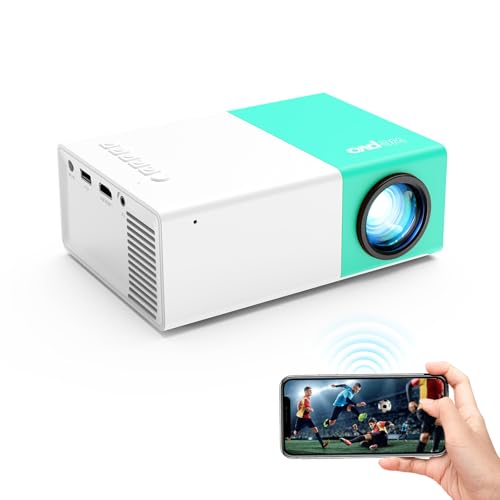
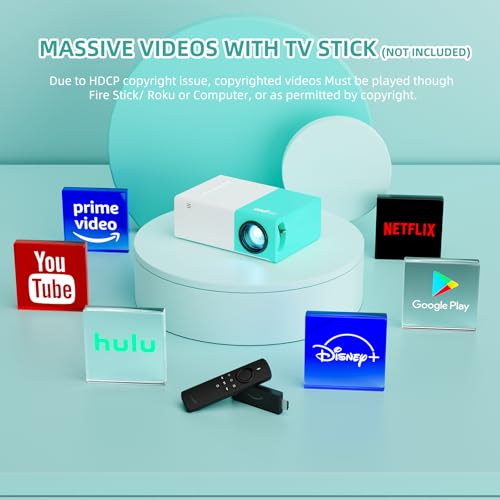

This is the best fit if you want a very affordable portable projector for casual movie nights, phone mirroring, or simple plug-and-play use. Its strongest appeal is convenience: wireless mirroring, wired mirroring, Bluetooth audio support, and broad device compatibility all make it easy to get started without a complicated setup.
The feature set suggests it’s ideal for buyers who care more about flexibility and budget than premium home-theater performance. If you want a low-cost way to learn how to choose a projector without overspending, this is the most approachable option in the list.
✓ Prime
Pros
- Wireless screen mirroring for iOS, Android, Windows 10, and more
- Wired mirroring option for phones and tablets
- Bluetooth 5.4 for audio devices like speakers or headphones
- Very affordable entry price
- Compact and portable for casual use
Cons
- Best suited for casual viewing rather than premium theater use
- Built-in speaker may not satisfy buyers who want big-room sound
- Lower-cost projectors often require darker rooms for best results
2) Best for Small Spaces and Simple Setups
If your main priority is getting a projector into a bedroom, dorm, or small apartment without a lot of hassle, a compact portable model is usually the smartest place to start. Look for easy mirroring, multiple inputs, and a design that won’t require permanent installation.
The wepvo model above is the strongest fit in this budget-friendly category because it emphasizes portability and broad compatibility. That makes it a practical choice for first-time buyers who want convenience over complexity.
3) Best for Phone and Tablet Users
Many buyers want a projector mainly so they can stream content from a phone or tablet. In that case, wireless screen mirroring and wired connection options matter more than advanced theater specs.
A model like the wepvo Projector WiFi Portable Movie Projector is useful here because it supports both wireless and data-cable mirroring, which gives you more flexibility when one connection method is inconvenient.
4) Best for Budget-Conscious Shoppers
If you’re trying to keep costs low, focus on the features you will actually use most often. For many buyers, that means decent portability, simple setup, and compatibility with existing devices rather than chasing premium picture specs.
Budget projectors are best when expectations are realistic: they can be excellent for casual movie nights, kids’ rooms, or backup viewing, but they usually aren’t the right choice for a bright living room or a dedicated theater.
Budget Guide: What You Get at Each Price Point
Under $50
At this level, you’re usually buying a basic portable projector for casual use. Expect simple features, modest image quality, and a setup that works best in darker rooms.
This is a good range for first-time buyers, kids’ rooms, travel, or occasional movie nights. The trade-off is that you’ll typically sacrifice brightness, refinement, and premium audio.
$50 to $150
This range often gives you better overall usability, more connection options, and a more polished user experience. You may also see improvements in image clarity and setup convenience.
For many shoppers, this is the sweet spot for value because it balances affordability with enough performance to feel useful in everyday situations.
$150 to $400
Projectors in this price range are often better suited to regular home use. You may get stronger brightness, better image processing, and more dependable audio or smart features.
If you want a projector for frequent movie nights or a living-room setup, this is where it starts to make sense to prioritize image quality and room compatibility more seriously.
$400 and Up
Once you move into this tier, you’re generally paying for stronger performance, better brightness, improved color, and more advanced setup flexibility. These models are often aimed at buyers who want a more dedicated experience.
This is the range to consider if you’re building a serious home theater, need better ambient-light handling, or want a projector that feels more premium overall.
Frequently Asked Questions
1) How do I choose the right projector for my room?
Start by measuring the room size, checking how much light is present, and deciding where the projector will sit. Then match those conditions to the projector’s brightness, throw distance, and connectivity options.
2) What is the most important spec when buying a projector?
For most people, brightness is the most important spec because it determines whether the image is usable in the real room. Resolution matters too, but brightness usually has the bigger impact on everyday satisfaction.
3) Is a cheap projector worth it?
Yes, if you want casual viewing, portability, or an entry-level setup. Cheap projectors can be a good value, but they usually work best in darker rooms and won’t match the performance of more expensive models.
4) Do I need external speakers for a projector?
Not always, but external speakers usually improve the experience. Built-in projector speakers are convenient, yet they often lack the fullness and volume many buyers want for movies or sports.
5) Can I use a projector with my phone?
Often yes, but you should confirm the projector supports your phone’s connection method. Wireless mirroring and wired screen sharing are both useful, and compatibility can vary by device and operating system.
Pros
- + Wireless screen mirroring
- + Wired mirroring support
- + Bluetooth 5.4 audio
- + Very affordable entry price
- + Portable and compact
Cons
- – Best for casual viewing
- – Built-in speaker may be limited
- – Needs darker rooms for best results
Frequently asked questions
- How do I choose the right projector for my room?
- Start by measuring the room size, checking how much light is present, and deciding where the projector will sit. Then match those conditions to the projector’s brightness, throw distance, and connectivity options.
- What is the most important spec when buying a projector?
- For most people, brightness is the most important spec because it determines whether the image is usable in the real room. Resolution matters too, but brightness usually has the bigger impact on everyday satisfaction.
- Is a cheap projector worth it?
- Yes, if you want casual viewing, portability, or an entry-level setup. Cheap projectors can be a good value, but they usually work best in darker rooms and won’t match the performance of more expensive models.
- Do I need external speakers for a projector?
- Not always, but external speakers usually improve the experience. Built-in projector speakers are convenient, yet they often lack the fullness and volume many buyers want for movies or sports.
- Can I use a projector with my phone?
- Often yes, but you should confirm the projector supports your phone’s connection method. Wireless mirroring and wired screen sharing are both useful, and compatibility can vary by device and operating system.
Score breakdown
- value
- 9.0
- usability
- 8.0
- durability
- 6.0
- performance
- 6.0
- buyerFeedback
- 7.0
Get the Full Tech Buyer's Guide
Join our free newsletter — we'll send our latest Tech picks, specs and verdicts straight to your inbox.
Free. No spam. Unsubscribe anytime.
Was this review helpful?
Be the first to share your feedback on this review.
Sign in to vote and let us know what you think.
Discussion (0)
No comments yet. Be the first to start the discussion.
Related Reviews
Best Cheap TVs for Gaming for Every Budget in 2026: Ranked by Price & Performance
If you’re shopping for the best cheap TVs for gaming , the hard truth is that low price usually means trade-offs in size, resolution, or smart features. The good news is that different budget tiers can still make sense depending on whether you want the absolute cheapest screen, the best value for a
INSIGNIA 50" Class F50 Series LED 4K UHD Smart Fire TV Review (2026): Specs, Pros & Cons, and Who It's For
If you're searching for tv input lag measurement 2026 , you probably want a TV that won't feel sluggish in game mode and won't waste your money on features you don't need. The INSIGNIA 50" Class F50 Series LED 4K UHD Smart Fire TV, Voice Remote with Alexa, Stream Live TV Without
Best Portable Projectors Under $300 for Every Budget in 2026: Ranked by Price & Performance
If you’re shopping for the best portable projectors under $300 , the challenge is simple: most cheap models look tempting, but only a few deliver sharp enough images, decent brightness, and easy setup without frustration. The good news is that you don’t need to spend a fortune to get a solid movie-n