

Who this is for: Best for phone users who want a simple desktop-style workstation with monitor output, charging, and extra ports.
If you want to use your phone like a desktop, the wrong USB-C hub can leave you with flaky display output, missing ports, and a setup that still feels temporary. The best USB-C docking stations for phone-as-desktop setups in 2026 are the ones that reliably support external monitors, keyboard and mouse input, and pass-through charging without making setup complicated. In this guide, I’m focusing on researched specs, compatibility notes, and documented owner feedback patterns so you can choose a dock that actually fits a phone-first workstation.
Related Reviews
Because phone-as-desktop setups depend heavily on device compatibility, these picks are best for users with USB-C phones that support DisplayPort Alt Mode and, in some cases, Samsung DeX. I’m also keeping the list practical: easy to plug in, useful for everyday productivity, and broad enough to work for remote work, travel, school, and light content creation.
Quick Picks
| Rank | Product | Best For |
|---|---|---|
| 1 | GKI 7-in-1 USB-C Docking Station | Most complete phone-as-desktop setup with broad compatibility |
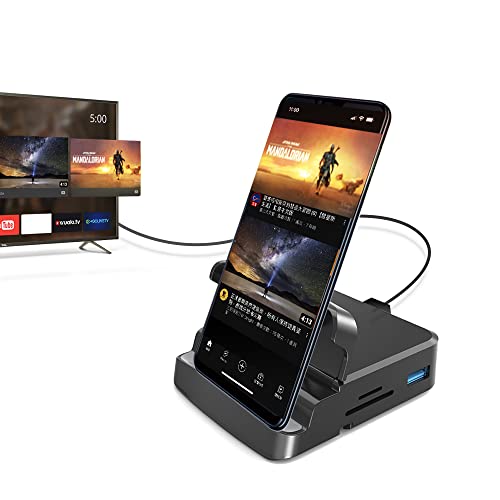
1. GKI 7-in-1 USB-C Docking Station — Best All-in-One Phone Desktop Hub


Verdict: This is the most versatile pick for turning a compatible phone into a desktop-style workstation, thanks to its mix of display output, data ports, memory card readers, and charging support.
- ✓ 7-in-1 expansion with HDMI, USB 3.0, two USB 2.0 ports, SD/TF card readers, and USB-C PD charging
- ✓ Supports Samsung DeX and other USB-C devices with DisplayPort Alt Mode
- ✓ Plug-and-play setup with no drivers or software required
- ✓ 4K UHD external display support for monitors, TVs, and projectors
- ✓ Pass-through charging helps reduce battery drain during longer work sessions
- ✗ Requires your phone to support DisplayPort Alt Mode for video output
- ✗ Charging support is not for laptops, so it is mainly a phone/tablet solution
- ✗ Fast charging depends on a separately purchased adapter and USB-C cable
- ✗ Best results still depend on the quality of your HDMI cable and monitor setup
How We Chose These Products
To build this list of the best USB-C docking stations for phone-as-desktop setups in 2026, I prioritized the features that matter most in a real phone-to-monitor workflow:
1) Display compatibility
A dock only makes sense for desktop-style phone use if it can send video to an external monitor. That’s why DisplayPort Alt Mode support and HDMI output were the first filters.
2) Desktop-style input support
Phone-as-desktop setups need room for a keyboard, mouse, and sometimes storage or card access. I looked for hubs that add practical ports instead of just basic charging.
3) Charging while in use
Long work sessions can drain a phone quickly, so pass-through charging is a major usability factor. I favored docks that help keep the phone powered during extended use.
4) Ease of setup
Since many buyers want a simple desktop alternative, plug-and-play operation matters. Products that avoid driver installs and extra software are better suited to this use case.
5) Compatibility breadth and owner feedback patterns
I also considered how broadly each dock is positioned across Samsung DeX, Android phones, iPhone 15/16/17 models, iPad USB-C devices, and other compatible USB-C hardware, along with common feedback themes about convenience and reliability.
Frequently Asked Questions
1) What do I need for a phone-as-desktop setup?
You need a USB-C phone that supports video output, a dock or hub with HDMI, plus a monitor, keyboard, and mouse. Some phones also benefit from desktop modes like Samsung DeX.
2) Will any USB-C docking station work with my phone?
No. Your phone must support DisplayPort Alt Mode for external display output. If it does not, the dock may still charge or connect accessories, but it will not act like a desktop hub.
3) Is Samsung DeX required for a phone desktop setup?
No. Samsung DeX is helpful for supported Galaxy devices, but other USB-C phones can still work with a monitor if they support video output over USB-C.
4) Can I use a docking station with an iPhone for desktop-style use?
Some USB-C docks can work with iPhone 15, 16, and 17 models that use USB-C, but the experience depends on the phone’s output support and the apps you want to use.
5) What is the biggest mistake people make when buying a phone dock?
The most common mistake is buying a hub without checking whether the phone supports DisplayPort Alt Mode. Without that feature, external monitor output usually will not work as expected.
Pros
- + 7-in-1 expansion with HDMI, USB 3.0, USB 2.0, SD/TF, and USB-C PD
- + Supports Samsung DeX and other USB-C devices with DisplayPort Alt Mode
- + Plug-and-play setup with no drivers or software required
- + 4K UHD external display support
- + Pass-through charging helps reduce battery drain
Cons
- – Requires DisplayPort Alt Mode for video output
- – Charging support is not for laptops
- – Fast charging needs a separately purchased adapter and cable
- – Best results depend on your HDMI cable and monitor
Frequently asked questions
- What do I need for a phone-as-desktop setup?
- You need a USB-C phone that supports video output, a dock or hub with HDMI, plus a monitor, keyboard, and mouse. Some phones also benefit from desktop modes like Samsung DeX.
- Will any USB-C docking station work with my phone?
- No. Your phone must support DisplayPort Alt Mode for external display output. If it does not, the dock may still charge or connect accessories, but it will not act like a desktop hub.
- Is Samsung DeX required for a phone desktop setup?
- No. Samsung DeX is helpful for supported Galaxy devices, but other USB-C phones can still work with a monitor if they support video output over USB-C.
- Can I use a docking station with an iPhone for desktop-style use?
- Some USB-C docks can work with iPhone 15, 16, and 17 models that use USB-C, but the experience depends on the phone’s output support and the apps you want to use.
- What is the biggest mistake people make when buying a phone dock?
- The most common mistake is buying a hub without checking whether the phone supports DisplayPort Alt Mode. Without that feature, external monitor output usually will not work as expected.
Get the Full Tech Buyer's Guide
Join our free newsletter — we'll send our latest Tech picks, specs and verdicts straight to your inbox.
Free. No spam. Unsubscribe anytime.
Was this review helpful?
Be the first to share your feedback on this review.
Sign in to vote and let us know what you think.
Discussion (0)
No comments yet. Be the first to start the discussion.
Related Reviews

Samsung Galaxy Z Fold5 Review (2026): Specs, Pros & Cons, and Who It's For
The Galaxy Z Fold5 remains one of the most refined book-style foldables Samsung has made, and that matters a lot if you’re considering a device in this category. Published reviews consistently point to the improved hinge design and slimmer folded profile as meaningful quality-of-life upgrades over e

8 Best Portable Photo Printers for Printing from Your Phone in 2026 — Easy, High-Quality Prints Anywhere
If you want the best portable photo printers for printing from your phone, the biggest challenge is usually finding one that’s truly easy to use without giving up print quality. Some models are ultra-compact but limited to sticker-size photos, while others handle larger 4x6 prints but take up more s

7 Best Smartphone-Compatible Ring Lights for Streaming in 2026 — Brighter, Smoother Phone Video
If your phone videos look dim, shadowy, or inconsistent on livestreams, the right ring light can make an immediate difference. The best smartphone-compatible ring lights for streaming 2026 combine adjustable brightness, color temperature control, stable phone mounting, and easy setup for creators wh