


Key Specifications
| Spec | Details |
|---|---|
| Product | Samsung SSD 9100 PRO 2TB |
| Interface | PCIe 5.0 x4, M.2 2280 |
| Sequential Read Speed | Up to 14,700 MB/s |
| Sequential Write Speed | Up to 13,400 MB/s |
| Random Performance | Up to 1,850K / 2,600K IOPS |
| Capacity | 2TB |
Design & Build Quality
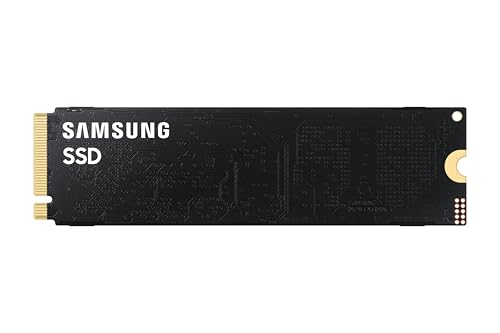
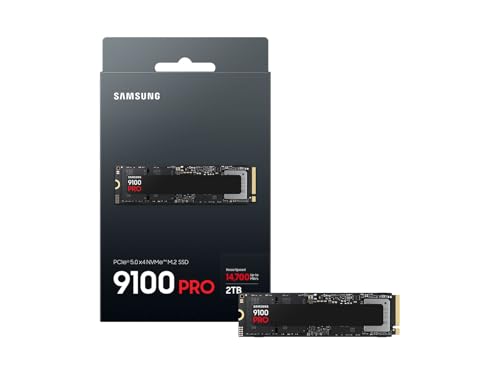
The Samsung SSD 9100 PRO 2TB is built for users who want cutting-edge storage without sacrificing reliability. Its standard M.2 2280 form factor means it fits into modern desktops and laptops that support PCIe 5.0, but the real story here is thermal and power efficiency, not just raw speed numbers.
Related Reviews
Samsung’s 5nm controller and advanced thermal management are a smart move for a Gen 5 drive. Early PCIe 5.0 SSDs earned a reputation for running hot, but this model is designed to keep performance stable under sustained loads. That matters more than most buyers realize, because a fast SSD that throttles under pressure can feel slower than a cheaper Gen 4 drive in real use.
- ✓ Standard M.2 2280 design for broad compatibility
- ✓ Advanced thermal control helps maintain performance
- ✓ 5nm controller improves power efficiency
- ✓ Built for demanding desktops, laptops, and workstations
- ✗ Requires PCIe 5.0 support to fully benefit from its speed
- ✗ Premium pricing makes it a niche purchase
- ✗ Overkill for basic everyday storage upgrades
Performance & Real-World Use

This is where the question is a Gen 5 SSD worth it 2026 gets a practical answer: yes, but only for the right workload. On paper, 14,700 MB/s sequential read speed is dramatically faster than most Gen 4 drives, and in large file transfers, video editing, AI workflows, and workstation tasks, that extra bandwidth can save real time.
For gaming, though, the gains are less dramatic. Game load times are already very fast on good Gen 4 SSDs, so the leap to Gen 5 often feels incremental rather than transformative. You may notice smoother asset streaming in certain heavy titles or faster installs and updates, but you should not expect night-and-day differences in every game.
Where the 9100 PRO really shines is in sustained professional use. If you move large media files, edit high-resolution video, run AI tools locally, or juggle huge project folders, the higher random IOPS and sequential throughput can make the system feel more responsive. It is the kind of drive that benefits creators and power users more than casual PC builders.
- ✓ Up to 14,700/13,400 MB/s sequential speeds for massive file transfers
- ✓ Up to 1,850K/2,600K IOPS for fast multitasking and app responsiveness
- ✓ Strong fit for AI apps, gaming, and heavy-duty workstations
- ✓ Power-efficient design helps sustain performance
- ✗ Real-world gaming gains are smaller than the spec sheet suggests
- ✗ Needs a compatible PCIe 5.0 system to justify the price
- ✗ Best value only appears under demanding workloads
Value for Money
The premium Samsung SSD 9100 PRO 2TB is not cheap; it sits firmly in enthusiast and professional territory, where buyers are paying for the fastest practical storage experience rather than the best cost per gigabyte.
If your main goal is to upgrade a gaming PC, this is probably more SSD than you need. Gen 4 drives still deliver excellent performance for far less money, and most users will feel better spending the difference on a larger capacity drive, more RAM, or a better GPU. But if your workflow regularly pushes storage hard, the time saved can justify the premium.
In short, the value proposition is strong only when performance directly impacts your work. For creators, developers, and heavy multitaskers, the premium can make sense. For general users, it is more of a luxury buy.
Who Should Buy This
- ✓ PC builders with a PCIe 5.0 motherboard who want the fastest storage available
- ✓ Video editors working with large 4K or higher-resolution files
- ✓ AI users and power users who benefit from high random performance
- ✓ Enthusiasts who want a top-end SSD for a premium workstation
- ✓ Users who frequently move huge files and need maximum throughput
Who Should Look Elsewhere
- ✗ Gamers who mostly want faster load times and better value
- ✗ Budget buyers looking for the best price-to-performance ratio
- ✗ Users with older systems that do not support PCIe 5.0
- ✗ Casual PC users who browse, stream, and do light productivity
- ✗ Anyone who wants a simple storage upgrade without paying a premium
Final Verdict
If you are asking is a Gen 5 SSD worth it 2026, the answer is yes for the right buyer and no for everyone else. The Samsung SSD 9100 PRO 2TB is a genuinely impressive PCIe 5.0 drive with elite speeds, strong efficiency, and the kind of real-world responsiveness that power users will appreciate.
For gaming-only builds, it is hard to recommend over a good Gen 4 SSD. But for creators, workstation users, and performance enthusiasts, this is one of the most convincing reasons to move to Gen 5 in 2026.
Buy it if you need top-tier storage performance and have a compatible system. Skip it if you want the smartest value upgrade.
Frequently Asked Questions
Is a Gen 5 SSD worth it in 2026 for gaming?
Usually not for most gamers. Load times are already very fast on Gen 4 SSDs, so Gen 5 is more of a premium upgrade than a must-have.
How much faster is a Gen 5 SSD than Gen 4?
On paper, Gen 5 can be roughly twice as fast in sequential speeds, but real-world gains depend on the task. Large file transfers benefit far more than gaming.
Will a Gen 5 SSD work in a Gen 4 motherboard?
Yes, in many cases it will work, but it will run at Gen 4 speeds. To get full performance, you need a PCIe 5.0-compatible system.
Is the Samsung SSD 9100 PRO 2TB good for video editing?
Yes, it is an excellent choice for video editing, especially if you work with large media files and want maximum transfer performance.
Should I buy a Gen 5 SSD or a bigger Gen 4 SSD?
For most people, a bigger Gen 4 SSD is the better value. Choose Gen 5 only if you specifically need the fastest possible storage speeds.
Frequently asked questions
- Is a Gen 5 SSD worth it in 2026 for gaming?
- Usually not for most gamers. Load times are already very fast on Gen 4 SSDs, so Gen 5 is more of a premium upgrade than a must-have. How much faster is a Gen 5 SSD than Gen 4?
- How much faster is a Gen 5 SSD than Gen 4?
- On paper, Gen 5 can be roughly twice as fast in sequential speeds, but real-world gains depend on the task. Large file transfers benefit far more than gaming. Will a Gen 5 SSD work in a Gen 4 motherboard?
- Will a Gen 5 SSD work in a Gen 4 motherboard?
- Yes, in many cases it will work, but it will run at Gen 4 speeds. To get full performance, you need a PCIe 5.0-compatible system. Is the Samsung SSD 9100 PRO 2TB good for video editing?
- Is the Samsung SSD 9100 PRO 2TB good for video editing?
- Yes, it is an excellent choice for video editing, especially if you work with large media files and want maximum transfer performance. Should I buy a Gen 5 SSD or a bigger Gen 4 SSD?
- Should I buy a Gen 5 SSD or a bigger Gen 4 SSD?
- For most people, a bigger Gen 4 SSD is the better value. Choose Gen 5 only if you specifically need the fastest possible storage speeds.
Get the Full Tech Buyer's Guide
Join our free newsletter — we'll send our latest Tech picks, specs and verdicts straight to your inbox.
Free. No spam. Unsubscribe anytime.
Was this review helpful?
Be the first to share your feedback on this review.
Sign in to vote and let us know what you think.
Discussion (0)
No comments yet. Be the first to start the discussion.
Related Reviews

8 Best 4K Gaming PC Build in 2026 — Smooth Ultra-Settings Performance Without the Guesswork
If you’re searching for the best 4k gaming pc build 2026, the hardest part is separating true 4K-ready desktops from systems that only look powerful on paper. This roundup focuses on prebuilt gaming PCs with modern GPUs, strong CPUs, enough RAM, fast SSD storage, and cooling that can actually suppor
8 Best 1440p Gaming PC Build in 2026 — Smooth High-FPS Performance Without the Guesswork
If you’re trying to find the best 1440p gaming pc build, the challenge is knowing which prebuilt desktop actually has the right balance of GPU power, CPU headroom, cooling, and upgrade potential. A good 1440p rig should handle modern AAA games smoothly, keep competitive titles responsive, and avoid

Intel Core i9-14900K Review (2026): Specs, Pros & Cons, and Who It's For
Check Price on Amazon →