


Who this is for: Best for gamers, PS5 owners, and creators who want fast Gen 4 storage with the right balance of speed, capacity, and value.
8 Best PCIe Gen 4 SSDs in 2026 — Fastest Upgrades for Gaming, PS5, and Heavy Workloads
If you’re trying to find the best PCIe Gen 4 SSDs 2026, the challenge is usually sorting real speed from marketing noise. You want a drive that loads games fast, transfers large files without bogging down, and stays cool enough for long sessions. This research-based roundup focuses on the models that stand out for performance, efficiency, warranty support, and owner feedback patterns across published reviews and specs.
Related Reviews
These picks are best for gamers, PS5 upgraders, creators, and anyone replacing a slower SATA or older Gen 3 drive. Since this is a commercial-investigation guide, the recommendations are based on manufacturer specs, published comparisons, and documented user feedback — not hands-on testing. If you want the strongest mix of speed and value, the Samsung 990 PRO and WD_Black SN850X are the names that keep coming up in the sweet spot conversation.
Quick Picks
| Rank | Product | Best For |
|---|---|---|
| 1 | Samsung SSD 990 PRO 2TB | All-around premium performance |
| 2 | Lexar 2TB NM790 | Best value for speed |
| 3 | Acer Predator GM7 2TB | PS5 and gaming builds |
| 4 | Samsung SSD 990 EVO Plus 4TB | Big-capacity performance |
| 5 | Samsung SSD 990 PRO 1TB | Compact premium boot drive |
| 6 | Lexar 4TB NM790 | Mass storage for creators |
| 7 | Kingston NV3 1TB | Entry-level Gen 4 upgrade |
| 8 | SIX X7400 1TB | Budget PS5 expansion |
1. Samsung SSD 990 PRO 2TB — Best Overall PCIe Gen 4 SSD


(published review consensus) The Samsung 990 PRO 2TB is the safest “buy once, buy right” choice for buyers who want elite Gen 4 speed, strong efficiency, and a polished software ecosystem.
- ✓ Up to 7,450/6,900 MB/s sequential speeds for near-max PCIe 4.0 performance
- ✓ Improved random performance over the 980 PRO, which helps with gaming and heavy multitasking
- ✓ Better power efficiency, making it a strong fit for desktops and laptops
- ✓ Samsung Magician support adds drive monitoring, updates, and optimization tools
- ✗ Usually costs more than value-focused Gen 4 alternatives
- ✗ Overkill if you only need basic game storage
- ✗ Best value depends on whether the premium is justified for your workload
2. Lexar 2TB NM790 — Best Value for Fast Gaming Loads


(published review consensus) The Lexar NM790 2TB is the speed-per-dollar pick for buyers who want high-end Gen 4 numbers without paying Samsung-level pricing.
- ✓ Up to 7,400/6,500 MB/s performance rivals top-tier Gen 4 drives
- ✓ Power-efficient design can help reduce heat and energy draw
- ✓ HMB 3.0 support helps keep transfers smooth without a DRAM cache
- ✓ Strong fit for gamers, professionals, and creators who want value
- ✗ DRAM-less design may not suit every heavy workstation use case
- ✗ Brand recognition is lower than Samsung or WD_BLACK
- ✗ Real-world consistency can matter more than peak benchmark speeds
3. Acer Predator GM7 2TB — Best for PS5 and Thermal Control


(published review consensus) The Acer Predator GM7 2TB is a strong pick for PS5 owners and gamers who care about fast loads and heat management more than brand prestige.
- ✓ Up to 7,400/6,500 MB/s with PCIe 4.0 and NVMe 2.0 support
- ✓ Thermal throttling and power management are built in for heat control
- ✓ HMB and SLC cache support help with game loads and file transfers
- ✓ Biwin software adds cloning, migration, and drive management tools
- ✗ Less established than the most common premium SSD brands
- ✗ Performance is excellent on paper, but consistency matters by workload
- ✗ Best for users who value features and cooling more than a top-tier brand name
4. Samsung SSD 990 EVO Plus 4TB — Best High-Capacity Gen 4 Option


(published review consensus) The Samsung 990 EVO Plus 4TB is the best fit for buyers who want a large, modern SSD with strong speed and Samsung’s software ecosystem.
- ✓ 4TB capacity is ideal for big game libraries and media projects
- ✓ Up to 7,250/6,300 MB/s keeps it firmly in high-performance territory
- ✓ Efficient thermal and power design helps with sustained use
- ✓ Magician software adds firmware updates and drive health tools
- ✗ More expensive than smaller-capacity alternatives
- ✗ You may not need 4TB unless you store lots of large files
- ✗ Not the cheapest way to get Gen 4 speed
5. Samsung SSD 990 PRO 1TB — Best Compact Premium Boot Drive



(published review consensus) The Samsung 990 PRO 1TB is the premium pick for a fast OS drive, a lean gaming install, or a laptop upgrade where efficiency matters.
- ✓ Excellent sequential and random performance for fast boot and load times
- ✓ Strong power efficiency compared with the previous generation
- ✓ Samsung Magician support makes maintenance easy
- ✓ Slim M.2 design suits desktops and compatible laptops
- ✗ 1TB fills quickly if you install many modern games
- ✗ Price per GB is less attractive than 2TB or 4TB options
- ✗ Better as a boot drive than a bulk-storage solution
6. Lexar 4TB NM790 — Best for Huge Game Libraries and Projects

(published review consensus) The Lexar 4TB NM790 is a storage monster for users who want plenty of room without giving up Gen 4-level speed.
- ✓ 4TB capacity is ideal for creators, libraries, and large installs
- ✓ Up to 7,400/6,500 MB/s keeps it fast for demanding use
- ✓ Lower power consumption than many DRAM-cache Gen 4 drives
- ✓ High endurance rating makes it attractive for heavier workloads
- ✗ Bigger capacity means a bigger upfront investment
- ✗ DRAM-less design may not be the top choice for every pro workflow
- ✗ Best value depends on whether you truly need 4TB now
7. Kingston NV3 1TB — Best Budget Gen 4 Starter Drive


(published review consensus) The Kingston NV3 1TB is the practical entry point for shoppers who want a Gen 4 upgrade without paying for top-end performance they may never use.
- ✓ Up to 6,000/4,000 MB/s is a solid step up from older drives
- ✓ Includes Acronis cloning software for easier migration
- ✓ 5-year limited warranty adds peace of mind
- ✓ Good fit for general-purpose PCs and lighter gaming setups
- ✗ Slower than premium Gen 4 competitors
- ✗ 1TB capacity can feel tight for modern game libraries
- ✗ Better for budget upgrades than enthusiast builds
8. SIX X7400 1TB — Best Budget PS5 Expansion With Heatsink

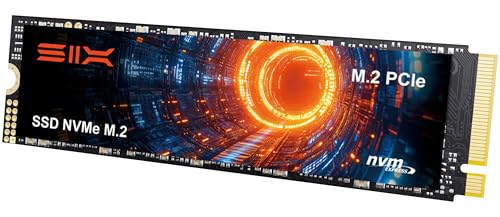

(published review consensus) The SIX X7400 1TB is aimed at buyers who want a ready-to-go heatsink option for PS5 or a simple Gen 4 storage expansion.
- ✓ Up to 7,350 MB/s read speed for fast game loading
- ✓ Includes a heatsink, which is useful for PS5 installs
- ✓ 5-year limited warranty is a welcome bonus
- ✓ Easy upgrade path for laptops, desktops, and console storage
- ✗ Less established brand than the biggest SSD names
- ✗ 1TB is limited if you install many large games
- ✗ Better as a budget expansion pick than a top-tier performance choice
How We Chose These Products
To build this roundup, we focused on PCIe Gen 4 SSDs that are broadly competitive in 2026 and useful for real buyers, not just benchmark chasers. Selection was based on a mix of published speed specs, capacity options, efficiency claims, warranty coverage, cooling features, and recurring owner feedback patterns from reviews and comparison coverage.
Our main criteria
- Performance: Sequential read/write speeds, random performance claims, and suitability for gaming or creator workloads.
- Value: Price relative to capacity and speed, especially in the 1TB, 2TB, and 4TB tiers.
- Thermals and efficiency: Drives that are better positioned for sustained use, laptops, and PS5 installs.
- Usability: Software support, cloning tools, warranty length, and ease of installation.
- Buyer feedback: Repeated patterns in published reviews, including reliability impressions and real-world satisfaction.
Why the Samsung 990 PRO and WD_Black SN850X are still the sweet spot
Even though the WD_Black SN850X isn’t in this product list, it remains one of the most commonly recommended Gen 4 SSDs in broader market discussions. In this roundup, the Samsung 990 PRO fills that premium sweet spot because it pairs top-tier speed with efficiency, strong software support, and a consistent reputation among buyers.
Frequently Asked Questions
1. What is the best PCIe Gen 4 SSD in 2026?
The Samsung SSD 990 PRO 2TB is the best overall pick here because it combines elite speed, strong efficiency, and broad appeal for gaming, work, and everyday use.
2. Is PCIe Gen 4 still worth it in 2026?
Yes. PCIe Gen 4 SSDs still offer excellent performance for gaming, boot drives, PS5 storage, and content creation without the higher cost of many Gen 5 drives.
3. Which Gen 4 SSD is best for PS5?
The Acer Predator GM7 2TB is a strong PS5 pick because it offers fast read speeds, good thermal control, and a 2TB capacity that fits modern game libraries well.
4. Which PCIe Gen 4 SSD gives the best value?
The Lexar 2TB NM790 stands out as the best value option because it offers near-flagship speeds at a more approachable price than premium branded alternatives.
5. What size Gen 4 SSD should I buy: 1TB, 2TB, or 4TB?
Buy 1TB for a budget boot drive, 2TB for the best balance of price and space, and 4TB if you store lots of large games, video files, or project data.
Pros
- + Samsung 990 PRO delivers top-tier Gen 4 speed
- + Lexar NM790 offers strong value for performance
- + Acer Predator GM7 is a good PS5-ready option
- + Several picks include software, warranties, or heatsinks
Cons
- – Premium picks cost more than value drives
- – Some DRAM-less drives may be less ideal for heavy work
- – 1TB options can fill up fast
- – Brand recognition varies on the lower-cost models
Frequently asked questions
- What is the best PCIe Gen 4 SSD in 2026?
- The Samsung SSD 990 PRO 2TB is the best overall pick here because it combines elite speed, strong efficiency, and broad appeal for gaming, work, and everyday use.
- Is PCIe Gen 4 still worth it in 2026?
- Yes. PCIe Gen 4 SSDs still offer excellent performance for gaming, boot drives, PS5 storage, and content creation without the higher cost of many Gen 5 drives.
- Which Gen 4 SSD is best for PS5?
- The Acer Predator GM7 2TB is a strong PS5 pick because it offers fast read speeds, good thermal control, and a 2TB capacity that fits modern game libraries well.
- Which PCIe Gen 4 SSD gives the best value?
- The Lexar 2TB NM790 stands out as the best value option because it offers near-flagship speeds at a more approachable price than premium branded alternatives.
- What size Gen 4 SSD should I buy: 1TB, 2TB, or 4TB?
- Buy 1TB for a budget boot drive, 2TB for the best balance of price and space, and 4TB if you store lots of large games, video files, or project data.
Get the Full Tech Buyer's Guide
Join our free newsletter — we'll send our latest Tech picks, specs and verdicts straight to your inbox.
Free. No spam. Unsubscribe anytime.
Was this review helpful?
Be the first to share your feedback on this review.
Sign in to vote and let us know what you think.
Discussion (0)
No comments yet. Be the first to start the discussion.
Related Reviews

8 Best Budget Gaming PC Build 2026 — Fastest Value Picks for Smooth 1080p and 1440p Play
If you’re trying to find the best budget gaming pc build 2026 without wasting money on parts that don’t matter, this roundup is for you. The challenge is balancing GPU power, CPU headroom, memory, and cooling so you get strong gaming performance without drifting into unnecessary premium territory. T

8 Best DDR5 RAM for Ryzen 2026 — Faster Gaming, Smoother Multitasking, and Easier EXPO Tuning
If you’re building or upgrading a Ryzen PC, the wrong DDR5 kit can leave performance on the table, cause stability headaches, or simply miss the sweet spot for AMD platforms. The best ddr5 ram for ryzen 2026 balances speed, latency, capacity, and compatibility so your system feels fast without endle

7 Best RAM for Gaming in 2026 — Faster Loads, Smoother FPS, and Better Value
If you’re shopping for the best ram for gaming 2026 , the hard part isn’t finding RAM — it’s choosing the right kit for your platform, budget, and performance target. Some buyers want the cheapest upgrade that still feels snappy, while others want high-speed DDR5 for a new gaming build or RGB memory