

Who this is for: Best for budget PC builders who want the strongest cooling value under $50 without overspending.
Best CPU Coolers Under $50 for Every Budget in 2026: Ranked by Price & Performance
If you’re hunting for the best cpu coolers under $50, the challenge is simple: not every cheap cooler is actually worth installing, and not every “premium” budget cooler fits every case. The good news is that under-$50 air coolers now cover everything from bare-minimum stock-replacement cooling to surprisingly strong dual-tower performance. This guide breaks the options into clear budget tiers so you can match your cooler to your CPU, case clearance, and noise tolerance without overspending.
Related Reviews
Best Budget Pick
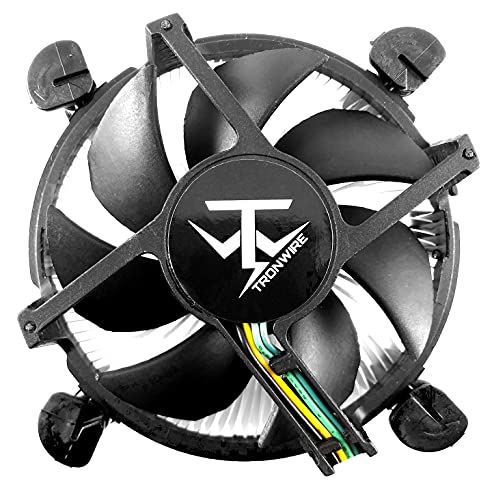


TRONWIRE TW-22 CPU Cooler ($3.95) ✓ Prime
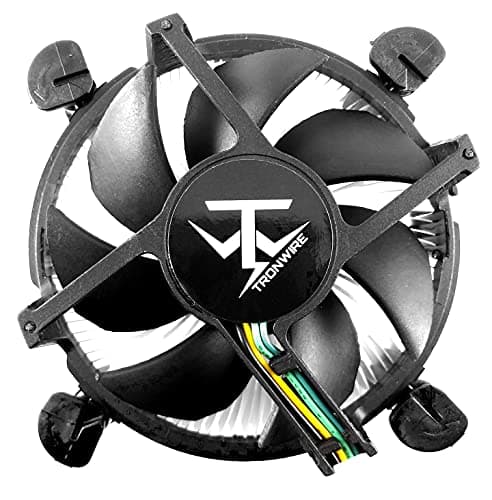
If you need the cheapest practical upgrade from a weak stock cooler, the TRONWIRE TW-22 CPU Cooler is the obvious budget pick. It’s designed for Intel desktop sockets, includes pre-applied thermal paste, and uses a 92mm PWM fan with a low-profile aluminum heatsink, which makes it a straightforward fit for basic office PCs and light-use builds. At this price, the goal isn’t max cooling headroom—it’s reliable, simple cooling for the lowest possible spend.
Why it wins at the lowest price
- Aluminum heatsink with pre-applied thermal paste for easy setup
- 92mm hydraulic bearing fan with 4-pin PWM control
- Low-profile design helps in compact cases
- Very low entry price for budget upgrades
- Best suited to lower-power Intel CPUs rather than high-heat chips
- Smaller 92mm fan means less thermal headroom than larger tower coolers
- Not the best choice if you want quiet operation under sustained load
Best Mid-Range Pick
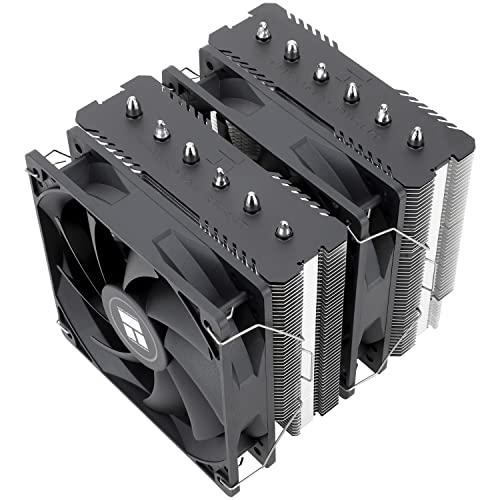


Thermalright Peerless Assassin 120 SE CPU Cooler ($31.41) ✓ Prime 10% OFF — Was $34.90
The Thermalright Peerless Assassin 120 SE CPU Cooler is the sweet spot for most buyers because it delivers near-flagship air-cooling features without leaving the under-$50 range. With six heat pipes, dual 120mm PWM fans, and broad support for modern Intel and AMD sockets, it’s the kind of cooler that makes sense for gaming PCs, productivity systems, and midrange CPUs that need real thermal headroom. If you want the best balance of cooling, noise, and price, this is the one to beat.
Why it’s the best value for most builds
- Dual 120mm PWM fans for strong airflow and better heat dissipation
- Six heat pipes and AGHP technology for better thermal transfer
- Broad socket support for Intel and AMD platforms
- Clear performance jump over small budget coolers
- Larger dual-tower design may create RAM or case clearance concerns
- More expensive than entry-level coolers, though still well under $50
- May be overkill for very low-power CPUs
Best Premium Pick


Thermalright Peerless Assassin 120 SE CPU Cooler ($31.41) ✓ Prime 10% OFF — Was $34.90
Because this guide is capped at $50, the Thermalright Peerless Assassin 120 SE CPU Cooler also takes the premium slot. That may sound unusual, but it’s actually the right call: in the under-$50 category, this cooler offers the strongest overall hardware package, and the extra spend still lands far below the ceiling. For buyers who want the most capable cooler in this price band, it’s the best-in-class choice.
What makes it the flagship pick here
- Dual-tower style cooling with six heat pipes
- Higher airflow and stronger thermal capacity than compact budget coolers
- Designed to handle more demanding CPUs more comfortably
- Still priced like a value cooler, not a premium luxury part
- Not a true “premium” price, just the strongest option within this budget cap
- Large size can be tough in smaller cases
- May be more cooler than needed for basic office systems
Is Spending More Actually Worth It?
Within a strict $50 ceiling, spending more is usually worth it only if your CPU runs hot, your case airflow is mediocre, or you care about keeping fan noise down during long workloads. The jump from a $4 low-profile cooler to a $31 dual-tower cooler is massive in thermal headroom, and that difference can matter a lot for gaming, content creation, or sustained multitasking.
That said, the cheapest option still has a place. If you’re cooling a modest Intel system, replacing a noisy or aging stock cooler, or building a compact PC where height is limited, the TRONWIRE can be the smarter buy because it solves the immediate problem for almost no money. The Thermalright is the better long-term choice for most people, but the budget pick is the better value when your CPU is low power and your needs are basic.
In short: spend up if your processor can benefit from real cooling overhead. Save money if your machine is light-duty and you just need a functional, easy install.
All Picks Compared
| Pick | Price | Best For | Main Strength | Trade-Off |
|---|---|---|---|---|
| TRONWIRE TW-22 CPU Cooler | $3.95 | Ultra-budget Intel builds | Lowest price, easy install | Limited cooling headroom |
| Thermalright Peerless Assassin 120 SE CPU Cooler | $31.41 | Most gaming and productivity PCs | Best balance of cooling and price | Large size may affect clearance |
| Thermalright Peerless Assassin 120 SE CPU Cooler | $31.41 | High-value “premium” under $50 | Strongest overall hardware package | May be overkill for basic systems |
Frequently Asked Questions
1. What is the best cpu cooler under $50 overall?
The Thermalright Peerless Assassin 120 SE CPU Cooler is the best overall pick because it offers the strongest cooling and best value balance in this price range.
2. Is a cheap CPU cooler enough for gaming?
Yes, if your CPU is modest and your case airflow is decent. For hotter gaming CPUs, a dual-fan cooler like the Thermalright is usually the safer choice.
3. Will the TRONWIRE TW-22 fit my Intel desktop?
It supports Intel sockets 1200, 1151, 1150, 1155, and 1156, so it fits many older and mid-generation Intel desktops. Always confirm your case height and motherboard layout first.
4. Do dual-tower coolers perform better than low-profile coolers?
In most cases, yes. Larger heatsinks and dual 120mm fans generally move and dissipate more heat than a small 92mm low-profile design.
5. Is it worth spending around $30 instead of under $10?
Usually yes, if your CPU runs warm or you want lower noise. The cooling jump from a basic budget cooler to a stronger tower cooler is significant.
Pros
- + TRONWIRE is extremely affordable
- + TRONWIRE includes pre-applied thermal paste
- + Thermalright offers dual 120mm PWM fans
- + Thermalright has six heat pipes and broad socket support
- + Thermalright gives the best value under $50
Cons
- – TRONWIRE has limited cooling headroom
- – TRONWIRE is best for lower-power CPUs
- – Thermalright may be large for smaller cases
- – Thermalright can be overkill for basic PCs
Frequently asked questions
- What is the best cpu cooler under $50 overall?
- The Thermalright Peerless Assassin 120 SE CPU Cooler is the best overall pick because it offers the strongest cooling and best value balance in this price range.
- Is a cheap CPU cooler enough for gaming?
- Yes, if your CPU is modest and your case airflow is decent. For hotter gaming CPUs, a dual-fan cooler like the Thermalright is usually the safer choice.
- Will the TRONWIRE TW-22 fit my Intel desktop?
- It supports Intel sockets 1200, 1151, 1150, 1155, and 1156, so it fits many older and mid-generation Intel desktops. Always confirm your case height and motherboard layout first.
- Do dual-tower coolers perform better than low-profile coolers?
- In most cases, yes. Larger heatsinks and dual 120mm fans generally move and dissipate more heat than a small 92mm low-profile design.
- Is it worth spending around $30 instead of under $10?
- Usually yes, if your CPU runs warm or you want lower noise. The cooling jump from a basic budget cooler to a stronger tower cooler is significant.
Score breakdown
- value
- 9.4
- usability
- 8.1
- durability
- 8.2
- performance
- 8.8
- buyerFeedback
- 8.6
Get the Full Tech Buyer's Guide
Join our free newsletter — we'll send our latest Tech picks, specs and verdicts straight to your inbox.
Free. No spam. Unsubscribe anytime.
Was this review helpful?
Be the first to share your feedback on this review.
Sign in to vote and let us know what you think.
Discussion (0)
No comments yet. Be the first to start the discussion.
Related Reviews
7 Best RAM for Gaming in 2026 — Faster Loads, Smoother FPS, and Better Value
If you’re shopping for the best ram for gaming 2026 , the hard part isn’t finding RAM — it’s choosing the right kit for your platform, budget, and performance target. Some buyers want the cheapest upgrade that still feels snappy, while others want high-speed DDR5 for a new gaming build or RGB memory
4 Best PC Case Fans in 2026 — Quiet Cooling and Strong Value for Any Build
If your PC runs hotter than you’d like, or your current fans are noisy, weak, or just plain outdated, you’re in the right place. This guide to the best pc case fans 2026 focuses on models that balance airflow, noise, PWM control, and price for real-world builds. These picks are based on published sp
4 Best 1000W Power Supplies in 2026 — Reliable Picks for High-End Gaming Builds
If you’re shopping for the best 1000w power supplies, you’re probably trying to power a demanding gaming PC, a content-creation rig, or a future-proof build without overpaying. The challenge is that many 1000W PSUs look similar on paper, but differ a lot in efficiency, connector support, noise, and