

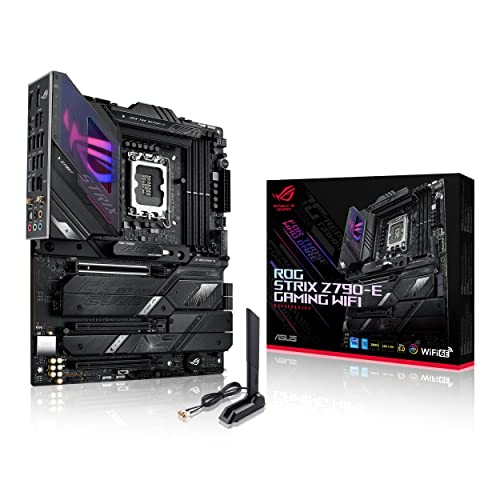
Who this is for: Best for Intel LGA 1700 builders who want a premium Z790 board for gaming, tuning, and long-term connectivity.
Check PriceIf you’re stuck choosing between the ASUS ROG Strix Z790-E Gaming WiFi 6E and the MSI MPG Z790 Carbon WiFi II Gaming Motherboard, the real question is which board gives you the best mix of performance, connectivity, and long-term value for an Intel LGA 1700 build. Both are premium ATX Z790 motherboards with DDR5 and PCIe 5.0 support, but they target slightly different buyers. In this head-to-head, we’ll break down the practical differences so you can buy with confidence.
Related Reviews
At a Glance
| Category | ASUS ROG Strix Z790-E Gaming WiFi 6E | MSI MPG Z790 Carbon WiFi II Gaming Motherboard |
|---|---|---|
| CPU Support | 12th, 13th, and 14th Gen Intel Core, LGA 1700 | 12th, 13th, and 14th Gen Intel, plus Pentium Gold and Celeron, LGA 1700 |
| Memory | DDR5 | DDR5, up to 7800+(OC) MHz |
| Expansion | PCIe 5.0, 5x M.2, 1x PCIe 5.0 M.2 | PCIe 5.0 slot, Lightning Gen 5 x4 M.2 |
| Networking | Wi‑Fi 6E, Intel 2.5 Gb Ethernet | Wi‑Fi 7, 2.5G LAN, Bluetooth 5.4 |
| Power Design | 18+1 90A power stages | Direct 19+1+1 phases power |
| USB / I/O | Thunderbolt 4, front panel USB 3.2 port | USB 3.2 Gen 2x2 |
| Best For | Users who want a strong, well-rounded Z790 board with ASUS tuning tools | Buyers who want the newer wireless stack and a more premium feature profile |
Design Winner: MSI MPG Z790 Carbon WiFi II Gaming Motherboard


On design and platform appeal, MSI takes the edge because the Carbon line is positioned as the more premium-feeling board in this matchup, and the spec sheet backs that up with a more advanced networking stack and stronger overall feature density. The ASUS board is still a polished ATX motherboard with excellent thermal hardware and ASUS’s familiar ROG styling, but the MSI board feels more forward-looking for a high-end gaming or creator build.
Why MSI wins design
- More premium positioning in the lineup, with a feature set aimed at high-end builds.
- Wi‑Fi 7 and Bluetooth 5.4 give it a more modern connectivity profile.
- Direct 19+1+1 phase power design reinforces its enthusiast identity.
Why ASUS still looks appealing
- ROG Strix branding is widely liked for clean, aggressive gaming aesthetics.
- Fanless PCH heatsink and double-sided M.2 cooling show thoughtful board layout.
- Thunderbolt 4 support adds premium workstation-style flexibility.
Winner: MSI MPG Z790 Carbon WiFi II Gaming Motherboard
Performance Winner: MSI MPG Z790 Carbon WiFi II Gaming Motherboard

For raw platform performance potential, MSI gets the nod because it advertises a stronger power delivery design and faster memory support. The board’s Direct 19+1+1 phases power layout and DDR5 support up to 7800+(OC) MHz make it the more aggressive option for buyers planning to push a 14th Gen Intel chip and fast memory tuning.
ASUS is no slouch here. Its 18+1 90A power stages are robust, and the board includes AI Overclocking plus AI Cooling II, which can make tuning more approachable. But if you’re judging purely by the performance ceiling suggested by the published specs, MSI has the slight advantage.
Why MSI wins performance
- Direct 19+1+1 phases power design is built for demanding CPUs.
- DDR5 support up to 7800+(OC) MHz suggests stronger memory headroom.
- PCIe 5.0 and Gen 5 storage support keep the platform current.
Why ASUS remains competitive
- 18+1 90A power stages are still very capable for high-core-count Intel CPUs.
- AI Overclocking and AI cooling tools can simplify optimization.
- Good thermal design supports sustained performance under load.
Winner: MSI MPG Z790 Carbon WiFi II Gaming Motherboard
Value Winner: ASUS ROG Strix Z790-E Gaming WiFi 6E

When you compare feature depth against the broader market position, ASUS is the better value play in this specific head-to-head. It’s listed as the budget tier option here, yet it still delivers PCIe 5.0, DDR5, Thunderbolt 4, 5x M.2 slots, 1x PCIe 5.0 M.2, and strong networking. That combination makes it a very compelling buy for someone who wants high-end capability without chasing the most premium model in the pair.
MSI is the more premium board, and that premium profile is part of its appeal. But if you want the stronger “specs per dollar” logic, ASUS is easier to justify for a lot of builders.
Why ASUS wins value
- Delivers a highly capable Z790 feature set without being the premium-tier pick.
- Thunderbolt 4 is a standout inclusion for a value-focused high-end board.
- 5x M.2 slots and a PCIe 5.0 M.2 slot add long-term storage flexibility.
Why MSI loses value slightly
- It is positioned as the premium option in this comparison.
- Its stronger feature set is excellent, but you may not need all of it for a gaming-first build.
- The extra headroom is more compelling for enthusiasts than for average buyers.
Winner: ASUS ROG Strix Z790-E Gaming WiFi 6E
Battery/Durability Winner: ASUS ROG Strix Z790-E Gaming WiFi 6E
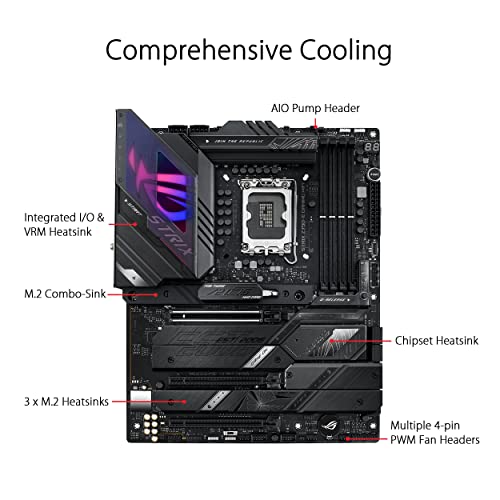
Motherboards don’t have batteries in the laptop sense, so for this category we’re judging durability, power stability, and thermal resilience. ASUS takes this round because its published hardware protections and cooling design are especially strong: 18+1 90A power stages, ProCool II power connector, alloy chokes, durable capacitors, VRM heatsink, fanless PCH heatsink, and double-sided M.2 cooling. That’s a very reassuring package for long-term reliability.
MSI’s Direct 19+1+1 power design is excellent, but ASUS’s combination of power hardware plus ASUS-specific thermal tools gives it a slight edge for sustained everyday stability.
Why ASUS wins durability
- 18+1 90A power stages are built for heavy CPU loads.
- ProCool II connector and durable components support long-term reliability.
- Fanless PCH heatsink and M.2 cooling help manage thermals quietly.
Why MSI is still strong
- Direct 19+1+1 phases power is also enthusiast-grade.
- Core Boost and Memory Boost support stable high-performance tuning.
- It remains a premium board designed for serious builds.
Winner: ASUS ROG Strix Z790-E Gaming WiFi 6E
Connectivity Winner: MSI MPG Z790 Carbon WiFi II Gaming Motherboard

Connectivity is where MSI clearly pulls ahead. Wi‑Fi 7 is the headline upgrade over ASUS’s Wi‑Fi 6E, and MSI also includes Bluetooth 5.4 alongside 2.5G LAN. That makes it the more future-ready networking choice for users who want the latest wireless standard and a board that should stay relevant longer.
ASUS still offers a strong package with Wi‑Fi 6E and Intel 2.5 Gb Ethernet, plus Thunderbolt 4 for high-speed peripheral and display flexibility. But if your priority is the newest wireless tech, MSI wins this category outright.
Why MSI wins connectivity
- Wi‑Fi 7 is the most important networking advantage in the comparison.
- Bluetooth 5.4 adds another modern connectivity upgrade.
- 2.5G LAN gives you fast wired networking for gaming and downloads.
Why ASUS is still excellent
- Wi‑Fi 6E is still fast and capable for most home networks.
- Intel 2.5 Gb Ethernet remains a strong wired option.
- Thunderbolt 4 gives it standout versatility for peripherals and expansion.
Winner: MSI MPG Z790 Carbon WiFi II Gaming Motherboard
ASUS ROG Strix Z790-E Gaming WiFi 6E Is the Better Choice If…
- You want the better value pick in this comparison.
- You care about durability-focused power and thermal design.
- You like ASUS tuning features such as AI Overclocking and AI Cooling II.
- You want Thunderbolt 4 built into the board.
- You need a strong Z790 motherboard without moving to the more premium option.
MSI MPG Z790 Carbon WiFi II Gaming Motherboard Is the Better Choice If…
- You want the stronger overall winner for most high-end builds.
- Wi‑Fi 7 and Bluetooth 5.4 matter to you.
- You plan to push memory tuning and want the higher DDR5 OC ceiling.
- You prefer the more premium-feeling feature set.
- You want the board with the best performance and connectivity balance.
Our Final Verdict
The overall winner is the MSI MPG Z790 Carbon WiFi II Gaming Motherboard. It wins this matchup because it offers the more modern wireless stack, stronger published power delivery, and a better high-end feature profile for enthusiasts building around Intel’s LGA 1700 platform.
That said, the ASUS ROG Strix Z790-E Gaming WiFi 6E is the smarter value pick if you want a highly capable board with excellent durability features, Thunderbolt 4, and ASUS’s useful AI tuning tools. If your priority is getting the most board for the money, ASUS is the one to watch. If you want the most future-ready premium option, MSI is the better buy.
Bottom line: choose ASUS for value and reliability-focused features; choose MSI for the best overall premium experience.
Frequently Asked Questions
1. Which is better for gaming: ASUS ROG Strix Z790-E or MSI MPG Z790 Carbon?
The MSI MPG Z790 Carbon WiFi II is the better gaming-focused pick overall because it combines Wi‑Fi 7, stronger power delivery, and a more premium feature set.
2. Does the ASUS ROG Strix Z790-E support DDR5?
Yes. The ASUS ROG Strix Z790-E Gaming WiFi 6E supports DDR5 memory and is built for 12th, 13th, and 14th Gen Intel CPUs on LGA 1700.
3. Does the MSI MPG Z790 Carbon WiFi II have Wi‑Fi 7?
Yes. One of its biggest advantages is Wi‑Fi 7, plus Bluetooth 5.4 and 2.5G LAN for a more modern connectivity setup.
4. Which motherboard is better for overclocking?
The MSI MPG Z790 Carbon WiFi II has the edge for overclocking potential because of its Direct 19+1+1 phase power design and higher advertised DDR5 memory ceiling.
5. Which board is the better value overall?
The ASUS ROG Strix Z790-E Gaming WiFi 6E is the better value choice because it delivers a very strong feature set, including Thunderbolt 4 and robust cooling, while staying less premium than the MSI option.
Pros
- + MSI has Wi-Fi 7 and Bluetooth 5.4
- + MSI offers stronger power delivery and DDR5 OC headroom
- + ASUS delivers Thunderbolt 4 and strong durability features
- + ASUS is the better value pick in this matchup
Cons
- – ASUS uses Wi-Fi 6E instead of Wi-Fi 7
- – MSI is the more premium-priced option
- – ASUS has slightly less aggressive memory support than MSI
- – MSI may be more than some buyers need for a gaming build
Frequently asked questions
- Which is better for gaming: ASUS ROG Strix Z790-E or MSI MPG Z790 Carbon?
- The MSI MPG Z790 Carbon WiFi II is the better gaming-focused pick overall because it combines Wi-Fi 7, stronger power delivery, and a more premium feature set.
- Does the ASUS ROG Strix Z790-E support DDR5?
- Yes. The ASUS ROG Strix Z790-E Gaming WiFi 6E supports DDR5 memory and is built for 12th, 13th, and 14th Gen Intel CPUs on LGA 1700.
- Does the MSI MPG Z790 Carbon WiFi II have Wi‑Fi 7?
- Yes. One of its biggest advantages is Wi‑Fi 7, plus Bluetooth 5.4 and 2.5G LAN for a more modern connectivity setup.
- Which motherboard is better for overclocking?
- The MSI MPG Z790 Carbon WiFi II has the edge for overclocking potential because of its Direct 19+1+1 phase power design and higher advertised DDR5 memory ceiling.
- Which board is the better value overall?
- The ASUS ROG Strix Z790-E Gaming WiFi 6E is the better value choice because it delivers a very strong feature set, including Thunderbolt 4 and robust cooling, while staying less premium than the MSI option.
Score breakdown
- value
- 8.0
- usability
- 9.0
- durability
- 8.0
- performance
- 9.0
- buyerFeedback
- 8.0
Get the Full Tech Buyer's Guide
Join our free newsletter — we'll send our latest Tech picks, specs and verdicts straight to your inbox.
Free. No spam. Unsubscribe anytime.
Was this review helpful?
Be the first to share your feedback on this review.
Sign in to vote and let us know what you think.
Discussion (0)
No comments yet. Be the first to start the discussion.
Related Reviews

Arc B580 driver maturity test Review (2026): Specs, Pros & Cons, and Who It's For
The Arc B580’s physical design is less the story than the software ecosystem around it, but build quality still matters for a card aimed at mainstream PC buyers. In the broader Arc lineup, Intel partner boards have generally moved toward more practical cooling, sturdier shrouds, and cleaner power de

AMD Radeon RX 7800 XT vs AMD Radeon RX 7600 (2026): Which Should You Actually Buy?
The RX 7800 XT card stands out with a more premium build focus: a metal back plate, larger cooling assembly, and RGB Fusion support. The RX 7600 card is more compact and practical for budget systems, but the 7800 XT’s hardware design is clearly the more robust package.

AMD Radeon RX 7600 Worth It Review (2026): Specs, Pros & Cons, and Who It's For
The RX 7600 class is built for practical, mainstream gaming rigs rather than flashy showcase builds. In this ASRock Challenger Pro configuration, the triple-fan cooler and 2.5-slot footprint suggest a focus on thermal headroom and quieter operation, which is a welcome trait at this performance tier.