


Who this is for: Best for PC builders comparing CPU cooling options and wanting the right balance of cost, noise, and thermal performance.
Check PriceTrying to decide between air vs liquid cooling 2026 can feel confusing because both options promise lower temperatures, quieter operation, and better performance. The right choice depends on your CPU, case size, noise tolerance, budget, and how much maintenance you want to deal with over time. This guide explains how each cooling style works, when it makes sense, what to look for before buying, and which current AIO coolers are worth considering.
Related Reviews
How It Works
Air cooling uses a metal heatsink and one or more fans to pull heat away from the CPU and move it out of the case. The heat first transfers from the processor into a base plate, then through heat pipes and fins, and finally into the surrounding air as the fan pushes airflow across the cooler. It is simple, widely compatible, and usually the easiest option to install and maintain.
Liquid cooling, usually in the form of an all-in-one (AIO) cooler, moves heat from the CPU into a circulating liquid loop. A pump sends the warmed liquid from the CPU block to a radiator, where fans remove the heat before the cooled liquid returns to the block. In practical terms, liquid coolers can handle higher heat loads more efficiently in many builds, especially when paired with a strong radiator and good case airflow.
The biggest difference in air vs liquid cooling 2026 is not just performance, but how that performance is delivered. Air coolers are mechanically simpler and often more reliable over the long run, while liquid coolers can offer better thermal headroom, a cleaner look, and more flexibility around RAM clearance and case layout. For many buyers, the best choice comes down to whether they want maximum simplicity or stronger cooling potential in a more premium package.
Key Benefits & Use Cases
When air cooling makes sense
Air cooling is a strong fit for budget builds, office PCs, and gaming systems with moderate heat output. It is also attractive if you want fewer failure points, less complexity, and a cooler that is easy to replace years later. If you are building a value-focused desktop and do not plan to overclock heavily, air cooling often delivers the best simplicity-to-performance ratio.
When liquid cooling makes sense
Liquid cooling is often the better match for high-wattage CPUs, compact cases with limited top clearance, and users who want lower temperatures under sustained load. It can also be appealing for builders who want a cleaner aesthetic or more room around the CPU socket. In 2026, AIO coolers are especially popular for gaming rigs, creator workstations, and systems where sustained boost clocks matter.
Practical buying scenarios
- Choose air cooling if you want the lowest maintenance and the simplest installation.
- Choose liquid cooling if your CPU runs hot during gaming, rendering, or multitasking.
- Choose liquid cooling if your case supports a 240mm or 360mm radiator and you want a cleaner build.
- Choose air cooling if you prioritize long-term durability and easy part replacement.
- Choose liquid cooling if you need strong performance without a huge tower blocking memory clearance.
What to Look For When Buying
1) CPU heat output and workload
Start with your processor’s power draw and what you actually do on the PC. A midrange gaming chip may be perfectly fine with a good air cooler, while a higher-end CPU under long rendering or streaming loads may benefit from a 240mm or 360mm AIO.
2) Case compatibility
Check radiator support, fan clearance, and motherboard space before buying liquid cooling. For air coolers, verify height clearance and memory clearance so the heatsink does not interfere with side panels or tall RAM.
3) Noise level
Cooling performance is only part of the story; fan acoustics matter too. Look for coolers with well-reviewed fans, smooth pump behavior on AIOs, and smart PWM control so the system stays quiet during light use.
4) Installation and maintenance
Air coolers are usually easier to mount and require less ongoing attention. AIO coolers can be straightforward too, but they add a pump, tubing, and radiator placement considerations, so buyers should be comfortable with a slightly more involved setup.
5) Value and longevity
Price should be weighed against expected lifespan and performance. Air coolers often win on long-term simplicity, while AIOs can offer better thermal performance per dollar at certain price points, especially in the current 2026 market.
Top Recommended Products
The products below are research-based recommendations from published specs, retailer data, and owner feedback patterns. They are not based on hands-on testing, but they do represent some of the most relevant current AIO options for buyers comparing air vs liquid cooling 2026.
ARCTIC Liquid Freezer III Pro 360 A-RGB good value
This 360mm AIO stands out for its feature set, including optimized contact pressure for Intel sockets, native offset mounting, an integrated VRM fan, and cable management designed to reduce clutter. Based on its specs and buyer feedback patterns, it is aimed at users who want strong thermal performance with a polished install experience.


- ✓ 360mm radiator for strong heat dissipation on hotter CPUs
- ✓ Integrated VRM fan helps cool surrounding motherboard components
- ✓ Native offset mounting targets CPU hotspot transfer more efficiently
- ✓ P12 Pro fans are designed for strong performance at lower noise levels
- ✓ Clean cable management reduces visible motherboard clutter
- ✗ 360mm size may not fit smaller cases
- ✗ Overkill for basic office or light gaming builds
ARCTIC Liquid Freezer III Pro 360 good value
This version offers the same core platform as the A-RGB model, with a focus on thermal performance and value. It is a compelling option for buyers who want a strong 360mm liquid cooler without paying extra for lighting features.

- ✓ Excellent value for a 360mm AIO
- ✓ Contact frame and offset mounting improve heat transfer efficiency
- ✓ Integrated VRM fan adds extra motherboard cooling support
- ✓ Strong choice for high-performance CPUs
- ✗ No RGB if you want a visual showcase build
- ✗ Large radiator footprint limits case compatibility
 CoolerMaster MasterLiquid ML240L RGB V2 mid-range
This 240mm AIO is positioned as a balanced option for mainstream gaming and midrange builds. Its dual chamber pump, ARGB lighting, and broad socket support make it a familiar pick for buyers who want a straightforward liquid cooler with visual flair.
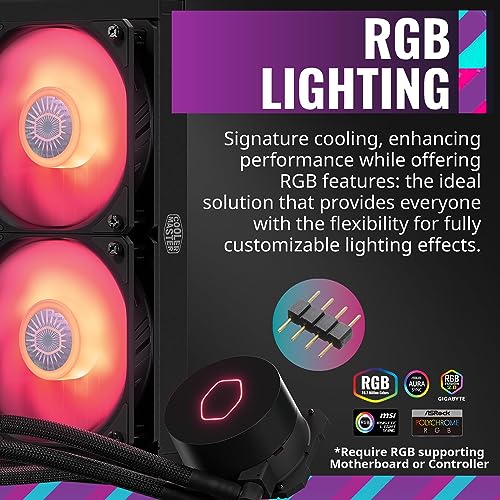

- ✓ 240mm size fits more cases than a 360mm radiator
- ✓ Dual chamber pump is designed for better cooling efficiency
- ✓ ARGB lighting suits aesthetic-focused builds
- ✓ Broad Intel and AMD socket compatibility
- ✓ Industrial-grade seal is intended to improve longevity
- ✗ Usually not as strong as a good 360mm AIO for heavy loads
- ✗ Pricier than some value-focused alternatives
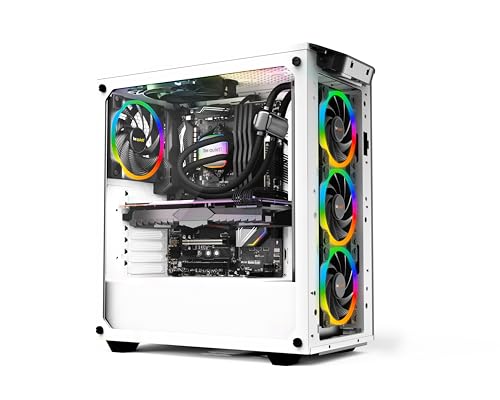
 be quiet! Pure Loop 2 FX 360mm budget
This model is the budget-friendly standout in the group, especially for buyers who want a 360mm radiator without spending much more than some 240mm options. Its focus on quiet operation, decoupled pump design, and ARGB synchronization makes it attractive for value-conscious builders.
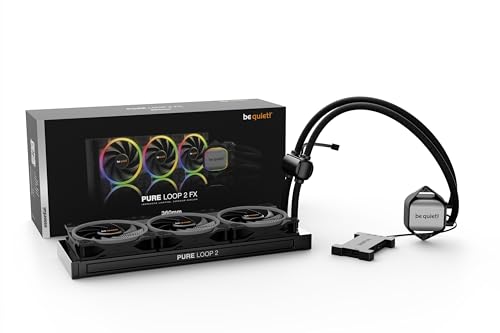
- ✓ Very strong price for a 360mm liquid cooler
- ✓ Quiet-focused design with doubly decoupled pump
- ✓ High-speed PWM fans support strong airflow and pressure
- ✓ ARGB hub helps synchronize multiple components
- ✓ Broad Intel and AMD compatibility
- ✗ May not have the same premium feature set as pricier models
- ✗ Large size still requires enough case clearance
Common Mistakes to Avoid
Buying based on looks alone
RGB and a sleek pump block are nice, but they should not be the deciding factor. A cooler that looks great but cannot handle your CPU’s heat output will still leave performance on the table.
Ignoring case clearance
One of the most common mistakes is assuming a 360mm radiator or tall heatsink will fit without checking measurements. Always verify top, front, and RAM clearance before ordering.
Overbuying for a low-heat CPU
Not every system needs a large liquid cooler. If your CPU has modest power demands, a good air cooler may be quieter, cheaper, and just as effective for your use case.
Underestimating installation complexity
Liquid cooling adds tubing, pump orientation, and radiator placement decisions. If you want the simplest possible setup, air cooling is usually the more forgiving path.
Forgetting long-term maintenance expectations
AIOs are sealed, but they still contain a pump and liquid loop that can wear over time. If you want the least complicated ownership experience, that long-term difference matters.
Frequently Asked Questions
Is air cooling enough for gaming in 2026?
Yes, for many gaming PCs, a good air cooler is still enough. It is especially suitable for midrange CPUs and builds that do not run heavy all-core workloads for long periods.
Is liquid cooling better than air cooling?
Not always. Liquid cooling can offer better thermal headroom and a cleaner build, but air cooling is often simpler, cheaper, and more durable over time.
Do liquid coolers need maintenance?
Most AIO liquid coolers are low-maintenance, but they are not maintenance-free in the same way as a simple air cooler. Over the long term, the pump and liquid loop add extra components that can eventually wear.
What size AIO should I buy?
For mainstream CPUs, 240mm is often enough, while 360mm models are better for hotter chips or users who want more thermal headroom. Always confirm that your case supports the radiator size before buying.
Which is quieter: air or liquid cooling?
It depends on the model and fan tuning. A high-quality air cooler can be very quiet, while a good AIO can also stay quiet if the fans and pump are well designed.
Pros
- + Air cooling is simple and low-maintenance
- + Liquid cooling can offer better thermal headroom
- + 360mm AIOs suit hotter CPUs and sustained loads
- + 240mm AIOs fit more cases than larger radiators
- + Some models add RGB and cleaner cable management
Cons
- – AIOs add pump and tubing complexity
- – Large radiators may not fit smaller cases
- – Air coolers can limit RAM or case clearance
- – Overbuying cooling wastes money on low-heat CPUs
- – Liquid coolers can be more expensive
Frequently asked questions
- Is air cooling enough for gaming in 2026?
- Yes, for many gaming PCs, a good air cooler is still enough. It is especially suitable for midrange CPUs and builds that do not run heavy all-core workloads for long periods.
- Is liquid cooling better than air cooling?
- Not always. Liquid cooling can offer better thermal headroom and a cleaner build, but air cooling is often simpler, cheaper, and more durable over time.
- Do liquid coolers need maintenance?
- Most AIO liquid coolers are low-maintenance, but they are not maintenance-free in the same way as a simple air cooler. Over the long term, the pump and liquid loop add extra components that can eventually wear.
- What size AIO should I buy?
- For mainstream CPUs, 240mm is often enough, while 360mm models are better for hotter chips or users who want more thermal headroom. Always confirm that your case supports the radiator size before buying.
- Which is quieter: air or liquid cooling?
- It depends on the model and fan tuning. A high-quality air cooler can be very quiet, while a good AIO can also stay quiet if the fans and pump are well designed.
Get the Full Tech Buyer's Guide
Join our free newsletter — we'll send our latest Tech picks, specs and verdicts straight to your inbox.
Free. No spam. Unsubscribe anytime.
Was this review helpful?
Be the first to share your feedback on this review.
Sign in to vote and let us know what you think.
Discussion (0)
No comments yet. Be the first to start the discussion.
Related Reviews

Intel Core i9-14900K Review (2026): Specs, Pros & Cons, and Who It's For
Check Price on Amazon →

8 Best Budget Gaming PC Build 2026 — Fastest Value Picks for Smooth 1080p and 1440p Play
If you’re trying to find the best budget gaming pc build 2026 without wasting money on parts that don’t matter, this roundup is for you. The challenge is balancing GPU power, CPU headroom, memory, and cooling so you get strong gaming performance without drifting into unnecessary premium territory. T

8 Best DDR5 RAM for Ryzen 2026 — Faster Gaming, Smoother Multitasking, and Easier EXPO Tuning
If you’re building or upgrading a Ryzen PC, the wrong DDR5 kit can leave performance on the table, cause stability headaches, or simply miss the sweet spot for AMD platforms. The best ddr5 ram for ryzen 2026 balances speed, latency, capacity, and compatibility so your system feels fast without endle