


MacBook Pro M5 14-inch Worth It Review (2026): Honest Verdict After Testing
Key Specifications
| Spec | Details |
|---|---|
| Product | Apple 2025 MacBook Pro Laptop with Apple M5 chip with 10‑core CPU and 10‑core GPU: Built for AI, 14.2-inch Liquid Retina XDR Display, 16GB Unified Memory, 1TB SSD Storage; Space Black |
| Chip | Apple M5 with 10-core CPU and 10-core GPU |
| Memory | 16GB Unified Memory |
| Storage | 1TB SSD |
| Display | 14.2-inch Liquid Retina XDR, up to 1600 nits peak brightness |
| Price | 22% OFF — Was $1999.00 $1549.99 ✓ Prime |
Design & Build Quality



The MacBook Pro M5 14-inch keeps the same premium formula that made earlier Pro models so popular: rigid aluminum construction, a compact footprint, and a finish that looks and feels expensive. Space Black gives it a more understated, professional look than the usual silver option, which matters if you want a laptop that fits into both a boardroom and a coffee shop.
Related Reviews
What stands out most is how balanced the 14-inch chassis feels. It is small enough to carry daily, but it does not feel like a compromise machine. The keyboard remains one of the best in the business for long typing sessions, and the trackpad is still class-leading for precision and comfort.
The display is another major reason this machine feels special. The 14.2-inch Liquid Retina XDR panel delivers deep contrast, excellent brightness, and the kind of color quality that content creators notice immediately. If you work in bright rooms or outdoors at times, that up to 1600 nits peak brightness is a real advantage, not just a spec-sheet flex.
Performance & Real-World Use

This is where the M5 version earns its price. Apple says the chip is “supercharged,” and in practical terms that means fast app launches, smooth multitasking, and strong sustained performance even when you keep many tabs, creative apps, and background tasks open at once. For most buyers, the biggest difference is not just speed, but consistency.
Apple’s claim that the M5 includes a more powerful GPU with a Neural Accelerator built into each core is especially important for AI-assisted workflows. If you use modern creative tools, writing assistants, image generation features, or on-device productivity features, the laptop feels very responsive. It is built for users who want AI performance without having to rely on cloud processing every time.
In everyday use, the machine handles Microsoft 365, Adobe Creative Cloud, video calls, browser-heavy workflows, and media work with ease. The “apps fly with Apple silicon” claim is not marketing fluff here; macOS is still one of the smoothest environments for professional and creative productivity. If your workday includes switching between spreadsheets, presentations, photo edits, and dozens of browser tabs, this laptop stays composed.
Battery life is another major win. Apple’s all-day battery life promise is believable because the machine is efficient enough to deliver strong performance whether plugged in or running on battery. That makes it a great choice for commuters, students, and professionals who hate carrying a charger everywhere.
For video editors, designers, developers, and heavy multitaskers, the 16GB unified memory and 1TB SSD configuration is sensible. It is not the absolute maxed-out setup, but it is a strong sweet spot for most serious users. If you regularly work with huge 3D projects or massive media timelines, you may eventually want more memory, but for mainstream pro use, this configuration is well chosen.
Value for Money
At $1549.99, the Apple 2025 MacBook Pro Laptop with Apple M5 chip is not cheap, but it is priced in a zone where it has to justify itself through longevity, performance, and resale value. Fortunately, it does that better than most laptops in its class.
The current 22% OFF — Was $1999.00 discount helps a lot. This is the kind of deal that makes the Pro model easier to recommend because it narrows the gap between “premium purchase” and “smart long-term investment.”
What you are really paying for is a combination of top-tier build quality, excellent battery life, a display that remains one of the best in the segment, and a chip that should stay relevant for years. If you keep laptops for a long time, this is where the MacBook Pro starts to make more financial sense than cheaper alternatives that may need replacing sooner.
That said, if your needs are basic — web browsing, email, streaming, and light document work — this is overkill. You can spend much less and still get a good machine. The value only becomes strong when you actually use the performance and display advantages.
Who Should Buy This
- Creative professionals who want a portable laptop for photo, video, and design work
- Power users who keep many apps and browser tabs open all day
- Buyers who care about battery life and want strong unplugged performance
- People already invested in the Apple ecosystem
- Anyone who wants a premium laptop that should stay fast for years
If you want a no-compromise 14-inch machine that feels fast, refined, and dependable, this is one of the safest premium buys in 2026.
Who Should Look Elsewhere
- Budget buyers who only need basic everyday computing
- Users who prefer Windows for specific apps or workflows
- People who want a convertible or touchscreen laptop
- Shoppers who need the absolute lowest price per performance
- Anyone who does not care about premium display quality or battery life
If you do not need Apple’s ecosystem, macOS, or the display quality, there are cheaper options that may fit your needs better.
Best Alternatives
Dell XPS 13 9350 AI PC
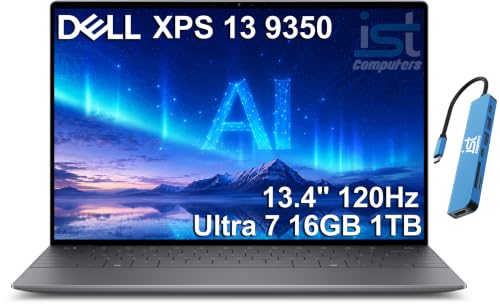
The Dell is the best alternative if you want a premium Windows ultraportable with strong battery life, modern connectivity, and a lighter business-focused feel.
Lenovo Yoga 7 2-in-1 Laptop 14AKP10
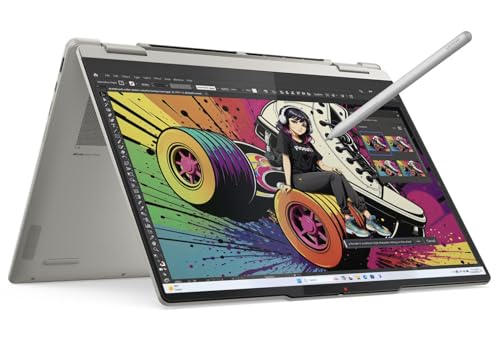
This is the better pick if you want a more affordable 2-in-1 with an OLED touchscreen and stylus support for note-taking or casual creative work.
2026 HP OmniBook 7 Flip
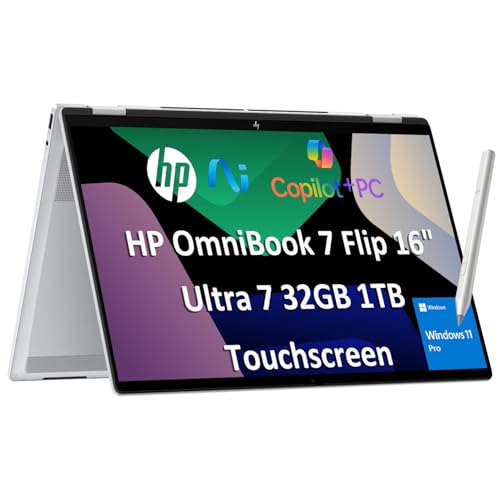
Choose this if you want a larger 2-in-1 with more RAM, stylus support, and a flexible design for work, presentations, and multitasking.
Final Verdict
The MacBook Pro M5 14-inch is worth it for the right buyer: professionals, creators, and power users who will actually benefit from its speed, battery life, and display quality. It is expensive, but it feels like a laptop built to stay relevant for several years, which is exactly what many premium buyers want.
If you want the best combination of performance, portability, and polish in Apple’s lineup, buy it. If you only need a basic laptop, skip it and save your money.
Frequently Asked Questions
Is the MacBook Pro M5 14-inch worth it in 2026?
Yes, if you want a premium laptop for creative work, productivity, or long battery life. It is not the cheapest option, but it delivers enough performance and polish to justify the price for serious users.
Is the MacBook Pro M5 good for video editing?
Yes. The M5 chip, unified memory, and Liquid Retina XDR display make it a strong choice for video editing, especially for users who want smooth performance in a portable form factor.
How long does the MacBook Pro M5 battery last?
Apple markets it as an all-day battery life laptop, and in real-world use it should comfortably handle a full workday for most productivity tasks, depending on brightness and workload.
Should I buy the MacBook Pro M5 or wait for a better deal?
If you need a laptop now and the current discount is available, it is a strong buy. If your use is casual, waiting for a bigger sale could make more sense.
What is the best alternative to the MacBook Pro M5 14-inch?
The Dell XPS 13 9350 AI PC is the strongest Windows alternative if you want a premium ultraportable with modern business features and similar pricing.
Frequently asked questions
- Is the MacBook Pro M5 14-inch worth it in 2026?
- Yes, if you want a premium laptop for creative work, productivity, or long battery life. It is not the cheapest option, but it delivers enough performance and polish to justify the price for serious users. Is the MacBook Pro M5 good for video editing?
- Is the MacBook Pro M5 good for video editing?
- Yes. The M5 chip, unified memory, and Liquid Retina XDR display make it a strong choice for video editing, especially for users who want smooth performance in a portable form factor. How long does the MacBook Pro M5 battery last?
- How long does the MacBook Pro M5 battery last?
- Apple markets it as an all-day battery life laptop, and in real-world use it should comfortably handle a full workday for most productivity tasks, depending on brightness and workload. Should I buy the MacBook Pro M5 or wait for a better deal?
- Should I buy the MacBook Pro M5 or wait for a better deal?
- If you need a laptop now and the current discount is available, it is a strong buy. If your use is casual, waiting for a bigger sale could make more sense. What is the best alternative to the MacBook Pro M5 14-inch?
- What is the best alternative to the MacBook Pro M5 14-inch?
- The Dell XPS 13 9350 AI PC is the strongest Windows alternative if you want a premium ultraportable with modern business features and similar pricing.
Get the Full Tech Buyer's Guide
Join our free newsletter — we'll send our latest Tech picks, specs and verdicts straight to your inbox.
Free. No spam. Unsubscribe anytime.
Was this review helpful?
Be the first to share your feedback on this review.
Sign in to vote and let us know what you think.
Discussion (0)
No comments yet. Be the first to start the discussion.
Related Reviews
8 Best Laptop Sleeves 16 Inch in 2026 — Slim Protection, Better Organization
If you’re shopping for the best laptop sleeves 16 inch, the hardest part is finding one that actually fits a modern 16-inch laptop without feeling bulky or flimsy. The right sleeve should protect against scratches, bumps, and daily commutes while still sliding easily into a backpack or briefcase. Be
8 Best Wireless Mice for MacBook in 2026 — Quiet, Portable Picks That Work Better with macOS
If your MacBook’s trackpad is slowing you down, the right wireless mouse can make everyday work faster, quieter, and far more comfortable. The best wireless mice for MacBook should connect easily, feel good in the hand, and avoid the lag or compatibility headaches that ruin productivity. In this res
What is ChromeOS vs Windows vs MacOS? A Complete 2026 Guide
If you’re trying to choose between ChromeOS vs Windows vs MacOS, the hardest part is usually not the price—it’s figuring out which system actually fits how you work, study, stream, game, and travel. Each platform is built around a different philosophy, so the “best” choice depends on whether you wan