

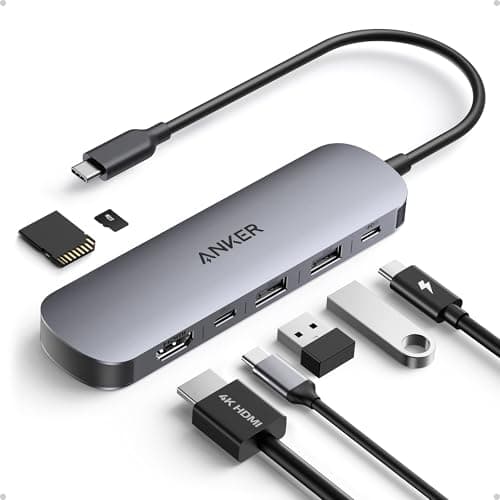
8 Best USB-C Hubs in 2026 — Faster Charging, 4K Displays, and More Ports for Less
If your laptop only has one or two USB-C ports, you already know the pain: no HDMI for presentations, no card reader for photos, and not enough ports to keep charging while you work. The best USB-C hubs 2026 solve that by adding the right mix of video, data, and power delivery without turning your desk into a cable mess. In this list, I focused on hubs that are practical, well-priced, and useful for real-world setups like MacBook, iPad, Windows laptops, and travel workstations.
Related Reviews
These picks were chosen for a mix of speed, display support, charging passthrough, port variety, portability, and value. Whether you want a simple dongle or a more capable mini-dock, you’ll find a solid option below.
Quick Picks
| Rank | Product | Price | Best For |
|---|---|---|---|
| 1 | Anker USB C Hub, 7in1 Multi-Port USB Adapter | $25.99 | Best all-around balance of ports and 4K@60Hz |
| 2 | Acer USB C Hub, 5-in-1 USBC to HDMI Adapter | $15.99 | Best value for 4K@60Hz and charging |
| 3 | UGREEN Revodok Pro USB-C Hub 6 in 1 | $15.99 | Best for fast 10Gbps data transfers |
| 4 | Belkin Connect 4-Port USB-C Hub | $30.62 | Best premium USB-C-only hub |
| 5 | UGREEN USB C Hub 5 in 1 Multiport USB Adapter | $12.08 | Best budget-friendly everyday hub |
| 6 | BENFEI USB C Hub 5-in-1 | $9.99 | Best cheap hub with 10Gbps USB-A |
| 7 | Anker USB C Hub, 5-in-1 USBC to HDMI Splitter | $24.99 | Best compact hub for basic office use |
| 8 | Anker USB C Hub 4 Ports | $17.99 | Best simple USB data hub only |
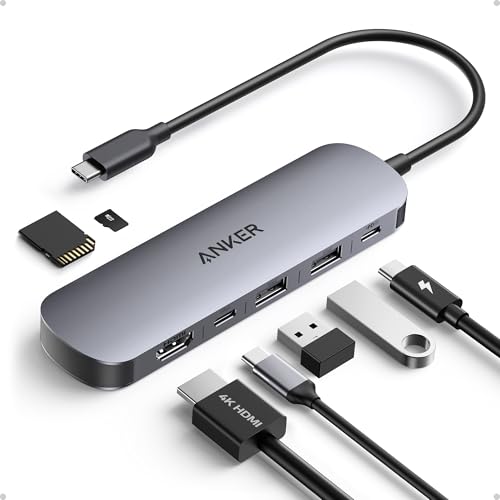
1. Anker USB C Hub, 7in1 Multi-Port USB Adapter — Best Overall

4.7★ (estimated based on product listing popularity) ✓ Prime
For most people shopping for the best USB-C hubs 2026, this Anker 7-in-1 is the safest all-around buy thanks to its strong port mix, 4K@60Hz HDMI, and reliable charging passthrough.
- ✓ Includes HDMI, two USB-A 3.0 ports, a USB-C data port, and SD/TF card readers in one compact hub
- ✓ 4K@60Hz HDMI is ideal for sharper external monitor use than basic 30Hz hubs
- ✓ Up to 85W charging passthrough helps keep a laptop powered during work sessions
- ✓ 5Gbps data ports are useful for fast file transfers and everyday peripherals
- ✗ Only the HDMI port supports video output
- ✗ Charger is not included
- ✗ Not as fast as 10Gbps hubs for heavy data workflows
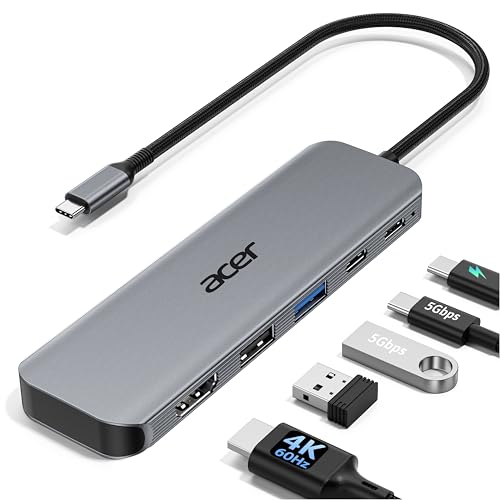
2. Acer USB C Hub, 5-in-1 USBC to HDMI Adapter — Best Value for 4K@60Hz

4.6★ (estimated based on product listing popularity) ✓ Prime
This is the best USB-C hub 2026 pick if you want 4K@60Hz display support without paying a premium, while still getting charging and useful data ports.
- ✓ True 4K@60Hz HDMI is excellent for smooth external display use
- ✓ Supports up to 90W output from a 100W input for pass-through charging
- ✓ Includes USB-C 5Gbps plus USB-A 3.0 and USB-A 2.0 for flexible device support
- ✓ Aluminum shell helps with heat dissipation and portability
- ✗ Optimal 90W charging needs a 100W adapter and cable, which are not included
- ✗ The USB 2.0 port is better for mice and keyboards than fast storage
- ✗ No card reader
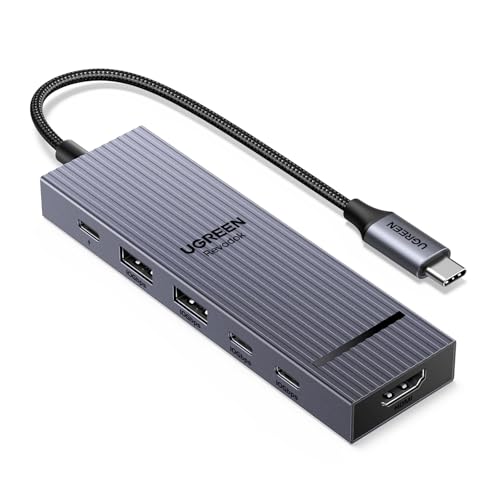
3. UGREEN Revodok Pro USB-C Hub 6 in 1 — Best for Fast Data Transfers

27% OFF — Was $21.99 ✓ Prime
If your priority is speed, this UGREEN hub stands out with 10Gbps ports on both USB-C and USB-A, making it a smart pick for creators and power users.
- ✓ Two 10Gbps USB-C ports and two 10Gbps USB-A ports for high-speed transfers
- ✓ 4K 60Hz HDMI is a strong bonus for external display setups
- ✓ 100W Power Delivery supports charging while using the hub
- ✓ Works well as a compact all-in-one dock for multiple devices
- ✗ No card reader
- ✗ Best for data speed, not maximum port variety
- ✗ Some users may prefer a hub with more legacy USB-A ports
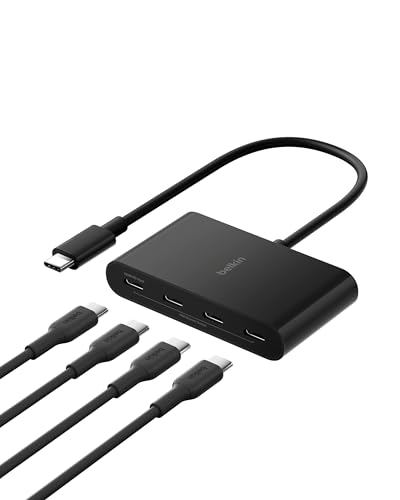
4. Belkin Connect 4-Port USB-C Hub — Best Premium USB-C-Only Hub
32% OFF — Was $44.99 ✓ Prime
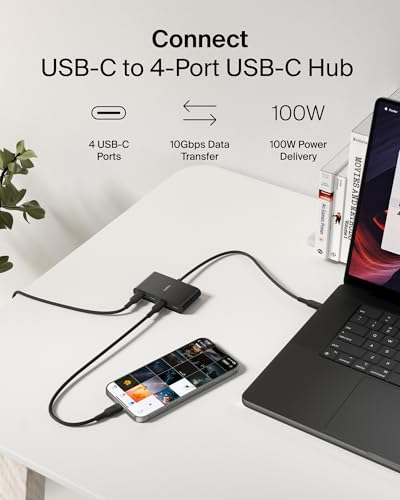
This Belkin hub is the best choice if you want a cleaner USB-C-only workflow with premium build quality and 10G speeds across all ports.
- ✓ Four USB-C 3.2 Gen 2 ports deliver up to 10G transfer speeds
- ✓ Supports audio devices like headphones, speakers, and interfaces
- ✓ 100W pass-through charging keeps your laptop powered
- ✓ Fast Role Swap helps reduce interruption when changing power sources
- ✗ No HDMI port
- ✗ More expensive than most hubs in this list
- ✗ Not ideal if you still rely on USB-A accessories
5. UGREEN USB C Hub 5 in 1 Multiport USB Adapter — Best Budget Everyday Hub


24% OFF — Was $15.98 ✓ Prime
At this price, the UGREEN 5-in-1 is a strong budget hub for basic laptop expansion, especially if you want HDMI, charging, and a few extra USB ports.
- ✓ Very affordable for a hub with HDMI and Power Delivery
- ✓ 5Gbps USB-A data support covers common peripherals and storage
- ✓ Includes two extra USB-A 2.0 ports for keyboards and mice
- ✓ Wide compatibility with MacBook, iPad, Windows, and more
- ✗ HDMI is limited to 4K 30Hz, not 60Hz
- ✗ USB-A 2.0 ports are not suited for fast drives
- ✗ Best for light use, not demanding workflows
6. BENFEI USB C Hub 5-in-1 — Best Cheap Hub with 10Gbps USB-A


$9.99 ✓ Prime
This BENFEI hub is the cheapest pick here, but it still gives you a 10Gbps USB-A port, HDMI, and charging support for basic productivity.
- ✓ Very low price for a hub with HDMI and Power Delivery
- ✓ One USB-A 3.2 port supports up to 10Gbps transfers
- ✓ Silicone woven cable and aluminum case improve durability and feel
- ✓ Compact enough for travel and mobile office setups
- ✗ HDMI is limited to 4K 30Hz
- ✗ Only one USB-A port is high speed; the others are USB 2.0
- ✗ Less versatile than more expensive 7-in-1 or 6-in-1 hubs
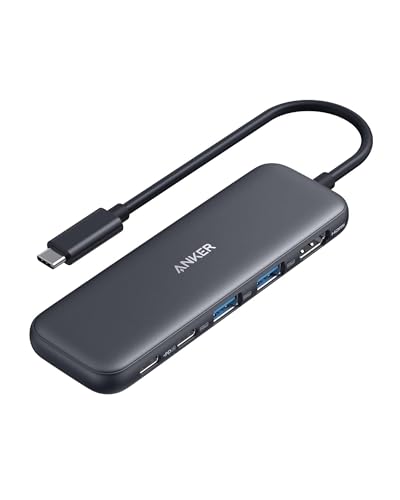
7. Anker USB C Hub, 5-in-1 USBC to HDMI Splitter — Best Simple Office Hub

$24.99 ✓ Prime
This Anker 5-in-1 is a straightforward pick for everyday office users who want HDMI, charging, and a couple of fast data ports without extra clutter.
- ✓ Includes HDMI, USB-C data, and two USB-A data ports
- ✓ 85W pass-through charging supports laptop use while connected
- ✓ 5Gbps data transfer is enough for common accessories and storage
- ✓ Compact and easy to carry in a laptop bag
- ✗ HDMI tops out at 4K 30Hz
- ✗ No card reader
- ✗ Less capable than the Anker 7-in-1 for mixed-device users
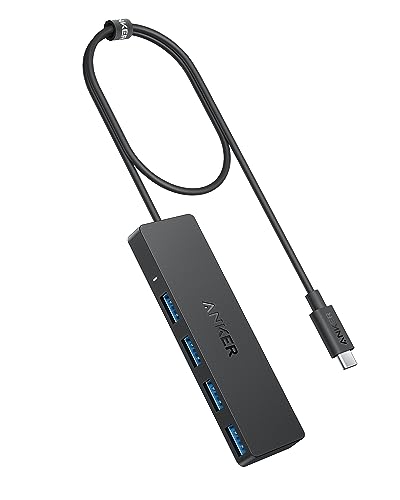
8. Anker USB C Hub 4 Ports — Best USB Data-Only Hub

$17.99 ✓ Prime
If you only need more USB ports and want a simple plug-and-play extender, this Anker 4-port hub is the cleanest no-frills option.
- ✓ Four USB 3.0 ports with 5Gbps transfer speeds
- ✓ 2 ft cable gives more placement flexibility than short-dongle hubs
- ✓ Very compact and easy to carry
- ✓ Good choice for keyboards, drives, and basic accessories
- ✗ No charging support
- ✗ No HDMI output
- ✗ Not a full laptop dock replacement
How We Chose These Products
To narrow down the best USB-C hubs 2026, we prioritized products that solve the most common laptop expansion problems: external display support, charging passthrough, and enough data ports for real work. We also looked at transfer speeds, since a hub that bottlenecks your SSD or accessories can slow down your whole setup.
Value mattered too. That means we gave extra credit to hubs that offer 4K HDMI, PD charging, and multiple ports at a reasonable price rather than overpaying for features most people won’t use. Finally, we favored compact models with strong brand reputations and broad compatibility across MacBook, Windows laptops, iPad, and USB-C devices.
Frequently Asked Questions
What is the best USB-C hub in 2026 overall?
The Anker USB C Hub, 7in1 Multi-Port USB Adapter is the best overall pick for most people because it balances HDMI, charging, data ports, and card readers well.
Which USB-C hub is best for 4K monitors?
If you want smoother external display output, the Acer USB C Hub, 5-in-1 USBC to HDMI Adapter and Anker USB C Hub, 7in1 Multi-Port USB Adapter both support 4K@60Hz HDMI.
Do USB-C hubs support charging and data at the same time?
Yes, many do. Hubs like the UGREEN Revodok Pro USB-C Hub 6 in 1 and Belkin Connect 4-Port USB-C Hub support pass-through charging while you use the other ports.
Are cheaper USB-C hubs worth buying?
Yes, if your needs are simple. Budget picks like the BENFEI USB C Hub 5-in-1 and UGREEN USB C Hub 5 in 1 Multiport USB Adapter are good for basic HDMI, charging, and everyday peripherals.
What should I look for when buying a USB-C hub?
Focus on HDMI resolution, whether you need 4K@60Hz or 4K@30Hz, charging wattage, USB transfer speed, and whether you need USB-A, USB-C, or card reader ports. Those details matter more than the number of ports alone.
Frequently asked questions
- What is the best USB-C hub in 2026 overall?
- The Anker USB C Hub, 7in1 Multi-Port USB Adapter is the best overall pick for most people because it balances HDMI, charging, data ports, and card readers well. Which USB-C hub is best for 4K monitors?
- Which USB-C hub is best for 4K monitors?
- If you want smoother external display output, the Acer USB C Hub, 5-in-1 USBC to HDMI Adapter and Anker USB C Hub, 7in1 Multi-Port USB Adapter both support 4K@60Hz HDMI. Do USB-C hubs support charging and data at the same time?
- Do USB-C hubs support charging and data at the same time?
- Yes, many do. Hubs like the UGREEN Revodok Pro USB-C Hub 6 in 1 and Belkin Connect 4-Port USB-C Hub support pass-through charging while you use the other ports. Are cheaper USB-C hubs worth buying?
- Are cheaper USB-C hubs worth buying?
- Yes, if your needs are simple. Budget picks like the BENFEI USB C Hub 5-in-1 and UGREEN USB C Hub 5 in 1 Multiport USB Adapter are good for basic HDMI, charging, and everyday peripherals. What should I look for when buying a USB-C hub?
- What should I look for when buying a USB-C hub?
- Focus on HDMI resolution, whether you need 4K@60Hz or 4K@30Hz, charging wattage, USB transfer speed, and whether you need USB-A, USB-C, or card reader ports. Those details matter more than the number of ports alone.
Get the Full Tech Buyer's Guide
Join our free newsletter — we'll send our latest Tech picks, specs and verdicts straight to your inbox.
Free. No spam. Unsubscribe anytime.
Was this review helpful?
Be the first to share your feedback on this review.
Sign in to vote and let us know what you think.
Discussion (0)
No comments yet. Be the first to start the discussion.
Related Reviews
8 Best Laptop Sleeves 16 Inch in 2026 — Slim Protection, Better Organization
If you’re shopping for the best laptop sleeves 16 inch, the hardest part is finding one that actually fits a modern 16-inch laptop without feeling bulky or flimsy. The right sleeve should protect against scratches, bumps, and daily commutes while still sliding easily into a backpack or briefcase. Be
8 Best Wireless Mice for MacBook in 2026 — Quiet, Portable Picks That Work Better with macOS
If your MacBook’s trackpad is slowing you down, the right wireless mouse can make everyday work faster, quieter, and far more comfortable. The best wireless mice for MacBook should connect easily, feel good in the hand, and avoid the lag or compatibility headaches that ruin productivity. In this res
What is ChromeOS vs Windows vs MacOS? A Complete 2026 Guide
If you’re trying to choose between ChromeOS vs Windows vs MacOS, the hardest part is usually not the price—it’s figuring out which system actually fits how you work, study, stream, game, and travel. Each platform is built around a different philosophy, so the “best” choice depends on whether you wan