

Who this is for: Best for flight sim buyers who want the right HOTAS for their platform, budget, and realism goals.
How to Choose the Best HOTAS for Flight Simulators in 2026: Complete Buying Guide
If you’re trying to figure out how to choose a HOTAS for flight simulators, the hard part isn’t finding options — it’s avoiding the wrong one for your setup, platform, and skill level. A bad match can leave you with awkward throttle placement, too few controls, or pedals you don’t actually use. This guide breaks down the features that matter most, what to avoid, and which HOTAS bundles make the most sense for different types of sim pilots.
Related Reviews
Key Features to Look For
1) Platform compatibility
The first filter should always be whether the HOTAS works with your platform, especially if you’re on Xbox Series X|S, PC, or both. Some models are console-friendly with dedicated menu buttons and official integration, while others are mainly designed for PC users. If you buy the wrong platform version, you can end up with limited functionality or extra setup headaches.
2) Throttle and stick layout
A true HOTAS setup gives you a separate throttle and stick, which is a major advantage for immersion and control. Look for whether the throttle is detachable, whether it can sit comfortably on a desk or lap, and whether the stick has enough resistance for precise inputs. A good layout reduces fatigue and helps you make small corrections more naturally.
3) Number of axes and buttons
More axes and programmable buttons usually mean fewer keyboard trips in the middle of a flight. For flight sims, this matters because you’ll want quick access to trim, views, weapon controls, landing gear, flaps, and camera functions. A setup with a solid number of buttons and a hat switch is usually much more practical than a bare-bones stick.
4) Rudder control options
Yaw control is one of the biggest differences between casual and serious sim setups. Some HOTAS units rely on a twist axis on the stick, while others include dedicated rudder pedals or a rocker-style control on the throttle. Pedals are generally more realistic and precise, but a twist axis can be the better value if you’re short on space or budget.
5) Ergonomics and long-session comfort
Flight sim sessions can run long, so comfort matters more than many buyers expect. Check hand position, grip shape, foot support if pedals are included, and whether the throttle can be used without strain. If the controls feel awkward after 30 minutes, they’ll be a problem during longer missions, landings, and multiplayer sessions.
6) Adjustability and resistance tuning
Some sticks let you adjust resistance, which can make a big difference in precision and preference. Lighter resistance may feel better for casual flying, while firmer tension can help with fine control in combat or landing. Adjustable feel is especially useful if multiple people in your household will use the same setup.
7) Expansion path and bundle value
If you know you’ll want more realism later, look at whether the HOTAS bundle includes pedals or can be expanded over time. A starter setup may be enough for now, but a package with pedals can save you from buying a separate add-on later. The best value is often the one that matches your current needs without forcing an upgrade too soon.
What to Avoid
Buying for features you won’t use
It’s easy to overspend on a “complete” setup when you only need a reliable stick and throttle. If you mostly fly casually, you may not need pedals, a huge button count, or a premium combat layout. Pay for the controls you’ll actually use, not the ones that sound impressive in the listing.
Ignoring your platform first
One of the most common mistakes is choosing a HOTAS based on price or reviews before checking compatibility. A model that works great on PC may not be ideal for Xbox, and console users often benefit from dedicated system buttons. Always confirm platform support before comparing anything else.
Choosing a setup with too few controls
Flight simulators become frustrating when you have to constantly reach for the keyboard or controller. If the stick and throttle don’t offer enough buttons, hats, or axes, you’ll lose immersion fast. This is especially important if you fly complex aircraft or use multiple sim functions.
Overlooking physical space
Some HOTAS setups look compact in photos but take up a lot of desk real estate once placed side by side. If you have limited space, a detachable throttle or a more compact bundle may be a better fit. Always think about cable routing, arm movement, and where your keyboard will live.
Assuming pedals are mandatory
Pedals are excellent, but they’re not always the right starting point. If you’re new to flight simming or have a tight budget, a twist axis or throttle-based yaw control may be enough. The mistake is assuming “more realism” automatically means “better choice” for your situation.
Our Top Picks
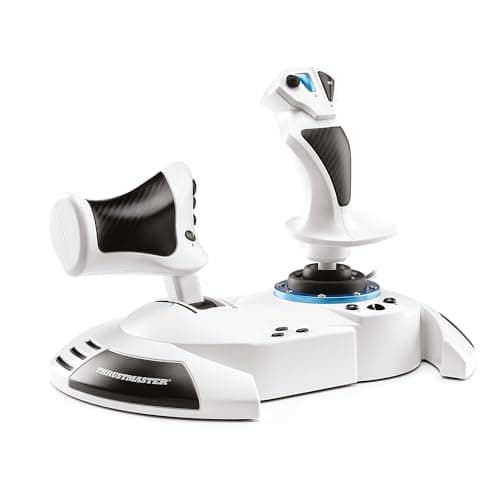
1) Thrustmaster T.Flight Hotas One Microsoft Flight Simulator Edition ✓ Prime — best for beginner-to-midrange Xbox and PC flyers
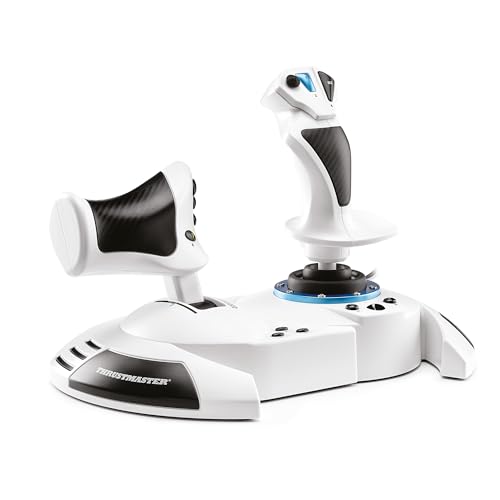
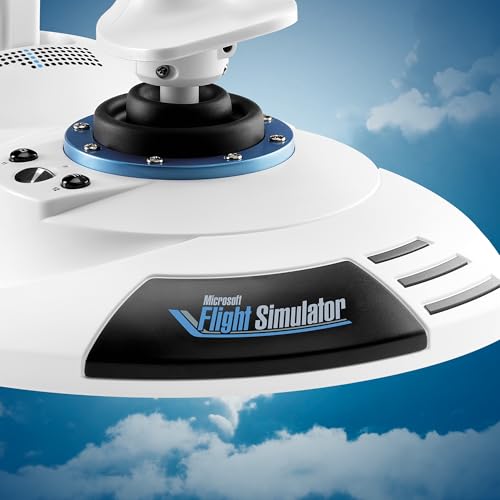

This is the easiest recommendation if you want a straightforward HOTAS with official Microsoft Flight Simulator licensing and broad appeal for Xbox Series X|S and PC. It offers 10-bit accuracy, five axes, 14 buttons, a quick fire trigger, a multidirectional hat, and a removable throttle that works well on a desk or in your lap. For buyers who want a simple, approachable setup without going overboard, it hits the sweet spot.
✓ Prime
- Official Microsoft Flight Simulator license for Xbox Series X|S and PC
- Five axes with 10-bit accuracy for solid control
- Removable throttle adds flexibility for desk or lap use
- Adjustable joystick resistance helps tailor the feel
- Good balance of buttons and simplicity for newer sim pilots
- Not as feature-rich as higher-end sim bundles
- Best suited to casual and midrange users, not hardcore cockpit builders
2) Thrustmaster T-Flight Full Kit HOTAS with Rudder Pedals ✓ Prime — best for simmers who want a more complete cockpit feel
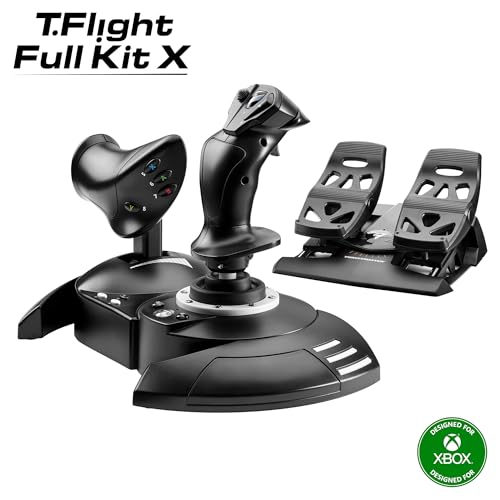


If you want the most immersive package in this guide, this bundle stands out because it includes rudder pedals right out of the box. The TFRP pedals use a S.M.A.R.T. slide rail system for smoother yaw control, and the full setup gives you a more authentic flight-sim experience without needing to piece together accessories later. It’s a stronger choice for players who know they’ll value coordinated turns, taxi precision, and better landing control.
✓ Prime
- Includes rudder pedals for a more complete sim setup
- Dedicated Xbox buttons help with console navigation
- Large detachable throttle and five axes support varied aircraft
- Pedals feature a smooth slide rail system for better yaw control
- Full-foot pedal design improves comfort on longer sessions
- Costs more than simpler HOTAS-only options
- May be more than casual players need at first
3) Thrustmaster T.Flight Hotas One Microsoft Flight Simulator Edition vs. T-Flight Full Kit HOTAS with Rudder Pedals — which should you pick?
If you’re deciding between these two, the main question is whether you want pedals now or later. The Thrustmaster T.Flight Hotas One Microsoft Flight Simulator Edition is the better starting point for budget-conscious buyers who want simplicity and flexibility. The Thrustmaster T-Flight Full Kit HOTAS with Rudder Pedals is the better fit if you want a more realistic, all-in-one setup and don’t mind paying more for the extra control.
Budget Guide: What You Get at Each Price Point
Under $150: Simple, effective starter control
At this level, you should expect a basic but capable HOTAS with a stick, throttle, and enough controls to fly comfortably without a keyboard. The focus is usually on accessibility, platform compatibility, and core functionality. This is the best range for beginners who want to get into flight sims without a large upfront cost.
$150 to $250: Better value and stronger immersion
This is the sweet spot for many buyers because it often brings better ergonomics, more buttons, and stronger platform integration. You’ll usually get a more polished throttle layout and, in some bundles, better control over yaw or even rudder pedals. If you plan to fly regularly, this range tends to offer the best balance of cost and realism.
Above $250: More complete cockpit-style setups
Once you move above this range, you’re usually paying for a more complete package, extra realism, or bundled accessories. That can be worth it if you know you’ll spend a lot of time in simulators and want less compromise. For many buyers, though, the jump in price should only happen if the added hardware solves a real need.
How to think about value
Value in a HOTAS is not just the lowest price — it’s the setup that matches your platform, your desk space, and your flying style. A cheaper model can be the better buy if it gives you the controls you need and nothing unnecessary. A pricier bundle only wins if you’ll actually use the extra hardware.
Frequently Asked Questions
What is the most important thing to look for when choosing a HOTAS?
The most important factor is platform compatibility, followed closely by control layout. Make sure the HOTAS works with your system and has enough buttons, axes, and throttle flexibility for the aircraft you want to fly.
Do I need rudder pedals for flight simulators?
No, but they improve realism and yaw control. If you’re new or on a tighter budget, a twist axis or throttle-based rudder control can be enough to start with.
Is a HOTAS better than a regular controller for flight sims?
Yes, for most flight simulators, a HOTAS is more immersive and gives you finer control. It also reduces the need to constantly switch between the controller and keyboard.
How many buttons do I need on a HOTAS?
There’s no perfect number, but more buttons generally means less menu diving and fewer keyboard shortcuts. For most players, a stick with a hat switch and a throttle with several programmable buttons is a strong starting point.
Should beginners buy a cheap HOTAS or start with a premium bundle?
Beginners usually do best with a midrange HOTAS that covers the basics without being overwhelming. A premium bundle only makes sense if you already know you want pedals, extra controls, or a more realistic cockpit-style setup.
Pros
- + Platform compatibility options
- + More axes and buttons improve control
- + Rudder pedals boost realism
- + Detachable throttle adds flexibility
- + Good value at midrange prices
Cons
- – Wrong platform choice can limit use
- – Too few controls can force keyboard use
- – Pedals add cost and space needs
- – Premium bundles may be overkill
Frequently asked questions
- What is the most important thing to look for when choosing a HOTAS?
- The most important factor is platform compatibility, followed closely by control layout. Make sure the HOTAS works with your system and has enough buttons, axes, and throttle flexibility for the aircraft you want to fly.
- Do I need rudder pedals for flight simulators?
- No, but they improve realism and yaw control. If you’re new or on a tighter budget, a twist axis or throttle-based rudder control can be enough to start with.
- Is a HOTAS better than a regular controller for flight sims?
- Yes, for most flight simulators, a HOTAS is more immersive and gives you finer control. It also reduces the need to constantly switch between the controller and keyboard.
- How many buttons do I need on a HOTAS?
- There’s no perfect number, but more buttons generally means less menu diving and fewer keyboard shortcuts. For most players, a stick with a hat switch and a throttle with several programmable buttons is a strong starting point.
- Should beginners buy a cheap HOTAS or start with a premium bundle?
- Beginners usually do best with a midrange HOTAS that covers the basics without being overwhelming. A premium bundle only makes sense if you already know you want pedals, extra controls, or a more realistic cockpit-style setup.
Get the Full Tech Buyer's Guide
Join our free newsletter — we'll send our latest Tech picks, specs and verdicts straight to your inbox.
Free. No spam. Unsubscribe anytime.
Was this review helpful?
Be the first to share your feedback on this review.
Sign in to vote and let us know what you think.
Discussion (0)
No comments yet. Be the first to start the discussion.
Related Reviews
What is How to Reduce Input Lag? A Complete 2026 Guide
If your games feel “off,” the problem may be input lag: the delay between pressing a button and seeing the action happen on screen. That delay can make aiming harder, combos less reliable, and everyday navigation feel sluggish. This guide explains how to reduce input lag in plain English, plus what
7 Best Fight Sticks in 2026 — Tournament-Ready Picks for Every Budget
If you’re searching for the best fight sticks 2026 , you probably want one thing: a controller that feels accurate, durable, and worth the money for your favorite fighting games. The problem is that “best” depends on your setup, your budget, and whether you want a traditional stick or a more modern
What is How to Extend PS5 Storage? A Complete 2026 Guide
If your PS5 storage fills up fast, you are not alone. Modern games can take up huge amounts of space, and constant deleting and redownloading gets old quickly. This guide explains how to extend PS5 storage in a simple way so you can choose the right expansion method with confidence.