


Who this is for: Best for wireless earbud owners who want a safe, simple way to remove grime and keep sound, comfort, and charging performance consistent.
Check PriceIf your earbuds sound muffled, smell off, or just look grimy, you’re not alone. Learning how to clean wireless earbuds the right way can improve comfort, hygiene, and sometimes even sound quality without damaging delicate drivers or charging contacts. This guide explains the safe cleaning process in plain English, what to avoid, and which earbuds are worth considering if you want an easier-to-maintain pair.
Related Reviews
How It Works
Wireless earbuds work by sending audio from your phone or laptop over Bluetooth to tiny speakers inside each earbud. Because they sit close to your skin and ear canal, they collect earwax, sweat, skin oils, dust, and pocket lint much faster than over-ear headphones.
Cleaning them is mostly about removing buildup from three areas: the outer shell, the speaker mesh, and the charging contacts. The outer shell can usually be wiped with a dry or lightly dampened microfiber cloth, while the mesh needs gentle brushing so debris doesn’t get pushed deeper into the grille. Charging contacts should stay dry and free of residue so the case can recharge the earbuds properly.
The key idea is simple: clean the surface, dislodge debris carefully, and keep moisture away from openings and electronics. That’s why most manufacturers recommend soft tools, minimal liquid, and waiting for everything to dry fully before charging.
Key Benefits & Use Cases
Why cleaning matters
Regular cleaning can make earbuds more comfortable to wear and can reduce the buildup that blocks sound. It also helps prevent the charging case from getting dirty enough to interfere with charging or create a sticky fit. For many people, cleaning is less about “making them look new” and more about keeping them usable and hygienic.
Common use cases
- Daily commuters: Remove pocket lint, dust, and grime from the case and stems.
- Gym users: Clear sweat residue after workouts to help reduce odor and buildup.
- Students and office workers: Keep the speaker mesh clear for better call clarity and music playback.
- Shared households: Improve hygiene when multiple people handle the same earbuds or case.
- Travelers: Prevent charging issues caused by debris trapped in the case.
What to Look For When Buying
If you’re shopping for earbuds and want a pair that’s easier to maintain, these five criteria matter most.
1) Smooth, easy-to-wipe surfaces
Glossy or simple outer shells are generally easier to clean than deeply textured designs. Fewer grooves mean less dirt trapped around the body of the earbud.
2) Secure ear tips or hooks
Removable silicone tips are easier to wash than fixed foam or fabric parts. If you sweat a lot, a secure fit also helps keep grime from building up as quickly.
3) Protected charging contacts
Look for earbuds with charging points that are easy to access and not overly recessed. That makes it simpler to keep the contacts dry and free of residue.
4) Water resistance for sweat and light moisture
An IP rating can help protect against everyday sweat and minor splashes, though it does not mean the earbuds are washable. It still matters because moisture resistance adds a margin of safety during cleaning and use.
5) A case that’s easy to open and inspect
A well-designed charging case makes it easier to spot debris before it causes problems. If the case is tight, shallow, and simple inside, maintenance is usually easier over time.
Top Recommended Products
Below are research-based product options from the provided list. These are included because their published specs, price points, and owner-facing features give them different strengths depending on your needs.
Apple AirPods Pro 3 Wireless Earbuds, Active Noise Cancellation, Live Translation, Heart Rate Sensing, Hearing Aid Feature, Bluetooth Headphones, Spatial Audio, High-Fidelity Sound, USB-C Charging



For readers who want a premium everyday set, the AirPods Pro 3 stand out for top-tier noise cancellation, strong battery life, and a feature-rich ecosystem. They’re also a good fit if you want a polished charging case and premium materials that are typically straightforward to wipe down carefully.
- ✓ Excellent active noise cancellation for focused listening
- ✓ Strong battery life with ANC on
- ✓ Spatial audio and high-fidelity sound
- ✓ USB-C charging for convenience
- ✓ Feature-rich for fitness and communication
- ✗ Expensive compared with budget options
- ✗ Best value depends heavily on Apple ecosystem use
kurdene Wireless Earbuds Bluetooth 5.3 in Ear Buds Light Weight Headphones,Deep Bass Sound,Built in Mics Headset,Clear Calls Earphones for Sports Workout


This budget-friendly pair is appealing if you want lightweight earbuds for workouts and casual listening. The simple design, Bluetooth 5.3 pairing, and included silicone ear tips make it a practical low-cost option for users who want easy day-to-day upkeep.
- ✓ Very affordable entry price
- ✓ Bluetooth 5.3 for faster pairing
- ✓ Lightweight and comfortable for sports
- ✓ Built-in mics for clearer calls
- ✓ Includes three ear tip sizes
- ✗ Not as feature-rich as premium models
- ✗ Budget build may not suit heavy long-term use
Lovskoo Ture Wire-Less Earbuds Blue Tooth Headphones 48hrs Play Back Sport Earphones with Cool Light Low Delay PX4 Waterproof Ear Buds Built-in Mic Wire-Less Headset Deep Bass Workout Earbuds


If price is your only concern, this is the cheapest option in the list by a wide margin. It offers basic wireless convenience, LED battery display, and sports-friendly design, which makes it a simple backup pair or a low-risk first purchase.
- ✓ Extremely low price
- ✓ LED battery display on the charging case
- ✓ Auto-pairing when removed from the case
- ✓ Designed for sports and training
- ✓ 48-hour playback claim for extended use
- ✗ Limited brand recognition and fewer premium features
- ✗ Likely not the best choice for demanding audio users
RJSQAQE Single Open Ear Earbuds - Bluetooth 5.3 Wireless Earbuds with Earhooks for Long Time Playback,Handsfree Earbud with Noise Canceling Mic,Single Ear Headphone for iPhone Android Game (Black)

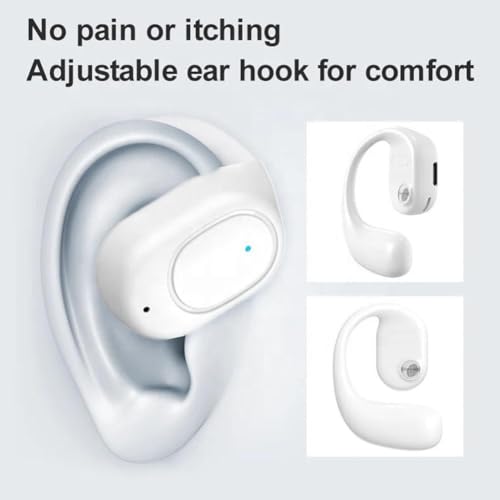
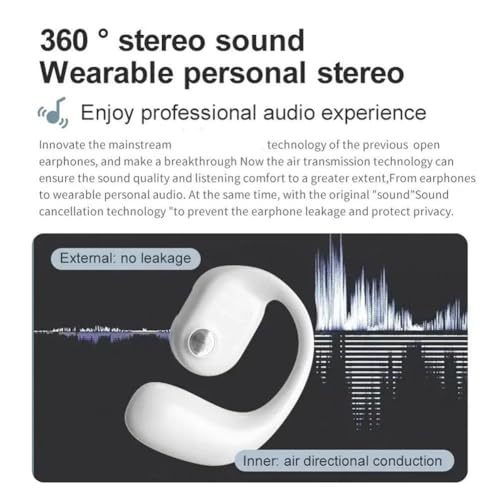
This single-ear option is useful if you want one ear free for awareness, work calls, or gaming. It’s not the typical choice for learning how to clean wireless earbuds, but it is still easy to maintain because the design is compact and straightforward.
- ✓ Single-ear design for situational awareness
- ✓ Bluetooth 5.3 connectivity
- ✓ Lightweight and portable
- ✓ Earhook design for a secure fit
- ✓ Good for calls and casual use
- ✗ Not ideal if you want stereo listening
- ✗ Battery life is shorter than some dual-ear options
Common Mistakes to Avoid
- Using too much liquid: Spraying cleaner directly onto earbuds can push moisture into openings and damage internal components.
- Soaking the earbuds or case: Wireless earbuds are not meant to be submerged unless the manufacturer explicitly says otherwise, and even then charging contacts need special care.
- Using sharp tools: Pins, toothpicks, and metal objects can puncture the mesh or scratch the speaker grill.
- Cleaning while charging: Always disconnect earbuds and keep them away from the charger until fully dry.
- Forgetting the case: Dirty charging wells can transfer grime right back onto the earbuds and interfere with power delivery.
- Ignoring ear tips: Silicone tips can collect wax and oils, so they should be removed and cleaned separately when possible.
A simple rule helps: if a cleaning method feels aggressive, it probably is. Gentle, dry-first cleaning is safer than trying to “deep clean” with a lot of liquid or force.
Frequently Asked Questions
How often should I clean wireless earbuds?
For most people, a quick wipe after heavy use and a more thorough cleaning once a week is a good routine. If you work out daily or wear them for long stretches, you may need to clean them more often.
Can I use alcohol to clean wireless earbuds?
Many manufacturers allow a small amount of isopropyl alcohol on a cloth for certain exterior surfaces, but you should avoid soaking or saturating any part of the earbuds. Always check the product guidance first and keep liquid away from openings and charging contacts.
How do I clean earwax out of the mesh?
Use a soft, dry brush or a clean, dry toothbrush-style tool to gently loosen debris from the mesh. Avoid pushing wax deeper into the opening, and never use a sharp object that could damage the speaker grille.
Can I wash silicone ear tips?
Yes, removable silicone tips can usually be washed with mild soap and water, then dried completely before reattaching. Make sure they are fully dry so moisture does not get trapped near the earbuds.
Why do my wireless earbuds sound muffled after cleaning?
Muffled sound can happen if moisture is still trapped in the mesh or if wax debris was pushed deeper during cleaning. Let the earbuds dry fully and inspect the speaker openings again before using them.
Pros
- + Improves comfort and hygiene
- + Can restore clearer sound
- + Helps charging contacts work properly
- + Simple routine with low-cost tools
- + Extends the usable life of earbuds
Cons
- – Too much liquid can damage earbuds
- – Sharp tools can ruin speaker mesh
- – Case cleaning is often overlooked
- – Moisture must dry fully before charging
Frequently asked questions
- How often should I clean wireless earbuds?
- For most people, a quick wipe after heavy use and a more thorough cleaning once a week is a good routine. If you work out daily or wear them for long stretches, you may need to clean them more often.
- Can I use alcohol to clean wireless earbuds?
- Many manufacturers allow a small amount of isopropyl alcohol on a cloth for certain exterior surfaces, but you should avoid soaking or saturating any part of the earbuds. Always check the product guidance first and keep liquid away from openings and charging contacts.
- How do I clean earwax out of the mesh?
- Use a soft, dry brush or a clean, dry toothbrush-style tool to gently loosen debris from the mesh. Avoid pushing wax deeper into the opening, and never use a sharp object that could damage the speaker grille.
- Can I wash silicone ear tips?
- Yes, removable silicone tips can usually be washed with mild soap and water, then dried completely before reattaching. Make sure they are fully dry so moisture does not get trapped near the earbuds.
- Why do my wireless earbuds sound muffled after cleaning?
- Muffled sound can happen if moisture is still trapped in the mesh or if wax debris was pushed deeper during cleaning. Let the earbuds dry fully and inspect the speaker openings again before using them.
Get the Full Tech Buyer's Guide
Join our free newsletter — we'll send our latest Tech picks, specs and verdicts straight to your inbox.
Free. No spam. Unsubscribe anytime.
Was this review helpful?
Be the first to share your feedback on this review.
Sign in to vote and let us know what you think.
Discussion (0)
No comments yet. Be the first to start the discussion.
Related Reviews

5 Best Bluetooth Transmitters for TV in 2026 — Clearer Audio for Two Listeners
If your TV’s built-in speakers are too quiet, your audio lags behind the picture, or you want private listening without replacing your whole setup, a Bluetooth transmitter can solve the problem fast. The best Bluetooth transmitters for TV let you send sound to wireless headphones or speakers with mi
 8.0
8.0Apple AirPods Pro 3 Review: 4 Listing Claims Checked
Apple AirPods Pro 3 are wireless earbuds with active noise cancellation, Live Translation, heart rate sensing, and USB-C charging in the listing. We checked 4 promises from the listing against the listing’s own title, bullets, spec details, and images. Some claims are clearly shown, while others com

3 Best Noise Cancelling Headphones for Airplane Travel in 2026 — Quieter Flights, Longer Battery, Better Value
If cabin noise ruins your ability to sleep, watch movies, or simply relax on a flight, the right headphones can make a huge difference. This guide rounds up the best noise cancelling headphones for airplane travel based on published specs, feature sets, and documented owner feedback patterns—not han