

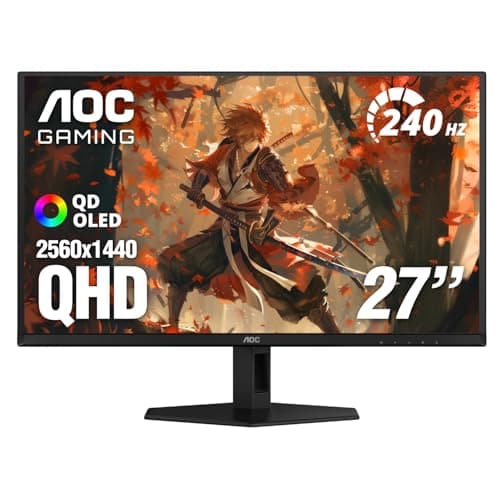
What is OLED vs IPS gaming monitor? A Complete 2026 Guide
An OLED vs IPS gaming monitor comparison comes down to how each panel handles motion, contrast, color, and brightness. If you’re trying to choose a display for fast-paced games, esports, or immersive single-player titles, the “best” option depends on what you value most. This guide breaks down the technology in simple terms so you can pick the right monitor with confidence.
Related Reviews
In short, OLED monitors are known for near-instant pixel response and true blacks, while IPS monitors are popular for strong color accuracy, wide viewing angles, and broader availability. Both can be excellent for gaming, but they excel in different ways. Understanding those differences helps you avoid overspending on features you won’t use—or missing the one feature that matters most for your setup.
How It Works
OLED and IPS use very different display technologies, and that difference is the reason they look and feel so distinct in games.
OLED: self-emissive pixels
OLED stands for organic light-emitting diode. In an OLED panel, each pixel produces its own light, which means the monitor can turn individual pixels completely off when showing black. That creates extremely deep contrast, and it also allows pixels to change very quickly, which is why OLED often looks exceptionally sharp in motion.
For gaming, this can make fast camera pans, flick shots, and dark scenes look more detailed and less smeared. It also gives OLED its signature “infinite contrast” feel, especially in games with shadow-heavy environments or cinematic lighting.
IPS: liquid crystal with backlight control
IPS stands for in-plane switching, a type of LCD panel. IPS monitors use a backlight behind the screen, and the liquid crystals control how much light passes through each pixel. Because the backlight is always on, IPS panels cannot turn pixels fully off the way OLED can, so blacks tend to look more gray in dark rooms.
What IPS does well is maintain consistent color and image quality from different viewing angles. That makes it a reliable choice for gaming setups where you may sit off-center, share the screen, or also use the monitor for content creation and general productivity.
Why the difference matters in games
In practical terms, OLED often looks more dramatic and responsive, while IPS often looks more stable, brighter in some conditions, and easier to live with over long periods. OLED can deliver superior contrast and motion clarity, but IPS usually offers fewer concerns about long-term static-image exposure and often costs less at comparable sizes and resolutions.
Key Benefits & Use Cases
When OLED is the better gaming choice
OLED is usually the better fit if you care most about visual impact and motion performance. It can be especially appealing for:
- Single-player and story-driven games with dark scenes
- Competitive players who want extremely fast pixel response
- Users who value deep blacks and strong HDR presentation
- Gamers who play in controlled lighting or darker rooms
Because OLED pixels switch so fast, moving objects can appear cleaner and more precise. That can make the gameplay feel more immediate, especially in fast genres like racing, fighting, and first-person shooters.
When IPS is the better gaming choice
IPS is often the smarter pick if you want a more balanced monitor for mixed use. It tends to be a strong choice for:
- Gamers who also work, browse, or stream on the same screen
- Bright rooms where consistent brightness matters
- People who want wide viewing angles for shared use
- Buyers looking for more affordable high-refresh-rate options
IPS panels are widely available in many sizes, resolutions, and refresh rates, so they’re often easier to match to your budget. For many players, IPS delivers the best overall value because it balances image quality, speed, and price.
Best use cases by gaming style
If you mostly play competitive multiplayer games, both OLED and IPS can work well, but OLED has the edge in response time and contrast. If you play a mix of gaming, school, work, and media, IPS may be the more practical everyday option. If you want the most cinematic experience possible, OLED usually wins on visual quality.
What to Look For When Buying
1. Refresh rate
Refresh rate is how many times per second the monitor updates the image, measured in hertz (Hz). For gaming, 144Hz is a solid baseline, while 240Hz and above are better for fast competitive play. OLED and IPS both come in high-refresh models, so choose based on the games you play most.
2. Response time and motion clarity
Response time affects how quickly pixels change from one color to another. OLED typically has a major advantage here, which can reduce blur and ghosting. IPS can still be very good, but you should check reviews and specifications carefully if motion clarity is a priority.
3. Contrast and black levels
If you play games with dark environments or want a more cinematic image, contrast matters a lot. OLED usually delivers the best black levels because pixels can turn off completely. IPS will generally look brighter in a well-lit room, but its blacks are not as deep.
4. Brightness and room lighting
Think about where you actually game. In a bright room, an IPS monitor may feel more comfortable because it can maintain a clean, consistent look under ambient light. OLED can still look excellent, but perceived brightness and reflection handling should be considered carefully depending on the model.
5. Burn-in risk and long-term usage
OLED panels can be more sensitive to static elements like HUDs, taskbars, and persistent game interfaces. While modern OLED monitors include protections to reduce this risk, buyers who leave static content on screen for long periods may still prefer IPS for peace of mind. If you game for many hours daily and also use the monitor for desktop work, this is an important factor.
Common Mistakes to Avoid
Assuming OLED is always better
OLED is not automatically the best choice for everyone. It can be fantastic for contrast and motion, but if you mostly play in a bright room or leave static content on screen for long periods, IPS may be the safer and more practical option.
Ignoring the refresh rate
Some buyers focus only on panel type and forget refresh rate. A great OLED panel with a low refresh rate may still feel less responsive than a well-tuned high-refresh IPS monitor for certain games. Match the monitor to your GPU and the frame rates you expect to reach.
Overlooking brightness and reflections
A monitor can have excellent specs on paper but still disappoint if your room is bright or reflective. Before buying, consider how much natural light hits your desk and whether glare will affect your experience.
Not thinking about static UI elements
If you play games with fixed HUDs, use desktop apps heavily, or keep the same interface on screen for hours, OLED ownership habits matter. Screen protection features help, but they do not eliminate the need to be thoughtful about usage patterns.
Choosing based on specs alone
Two monitors with the same resolution and refresh rate can feel very different because of panel tuning, response behavior, and image processing. Reading real-world reviews and comparing owner feedback is important, especially when deciding between OLED and IPS.
Frequently Asked Questions
Is OLED better than IPS for gaming?
OLED is usually better for contrast, black levels, and motion clarity, while IPS is often better for value, brightness consistency, and long-term everyday use. The better choice depends on your room, budget, and gaming habits.
Does IPS have burn-in like OLED?
No, IPS monitors do not have the same burn-in risk as OLED. IPS uses a backlight and liquid crystal layer, so it is generally safer for static images and desktop-heavy use.
Is OLED worth it for competitive gaming?
It can be, especially if you want the cleanest motion and fastest pixel response. However, many competitive players still prefer IPS because it can offer high refresh rates at a lower price and with fewer long-term concerns.
Why do OLED monitors look better in dark scenes?
OLED pixels can turn off completely, which produces true blacks and very high contrast. That makes dark scenes look richer, more detailed, and more cinematic than on most IPS panels.
Should I buy IPS if I game and work on the same monitor?
Yes, IPS is often the more practical choice for mixed gaming and productivity use. It handles static content well, offers wide viewing angles, and usually costs less than comparable OLED models.
Pros
- + 27-inch QHD resolution provides crisp detail for gaming
- + 240Hz refresh rate supports very smooth gameplay
- + 0.03ms GtG response time for sharp motion clarity
- + HDR400 True Black improves contrast and realism
- + QD OLED panel offers rich colors and strong gamut coverage
- + Adaptive-Sync helps reduce tearing and stuttering
Cons
- – OLED panels may require more care with static content
- – Premium OLED performance can cost more than many IPS options
- – Not every buyer needs 240Hz if they mostly play slower games
Frequently asked questions
- Is OLED better than IPS for gaming?
- OLED is usually better for contrast, black levels, and motion clarity, while IPS is often better for value and long-term static desktop use. The best choice depends on how you game and how much you want to spend. Do OLED gaming monitors get burn-in?
- Do OLED gaming monitors get burn-in?
- They can, especially with static elements shown for long periods, but many modern OLED monitors include protections to reduce the risk. If you leave the same HUD or desktop layout on screen all day, IPS may be the safer option. Is IPS still good for competitive gaming?
- Is IPS still good for competitive gaming?
- Yes. A high-refresh IPS monitor can still feel very fast and responsive, and many players prefer IPS because it offers strong performance at a lower price. What is the best size for an OLED vs IPS gaming monitor?
- What is the best size for an OLED vs IPS gaming monitor?
- For many gamers, 27 inches is the sweet spot because it balances sharpness, immersion, and desk comfort. Larger screens can be great too, but they usually need more GPU power. Should I choose OLED if I also use my monitor for work?
- Should I choose OLED if I also use my monitor for work?
- If your work involves lots of static windows, spreadsheets, or taskbars left open for hours, IPS may be the more practical choice. If you mostly game and want the best visual experience, OLED is very appealing.
Get the Full Tech Buyer's Guide
Join our free newsletter — we'll send our latest Tech picks, specs and verdicts straight to your inbox.
Free. No spam. Unsubscribe anytime.
Was this review helpful?
Be the first to share your feedback on this review.
Sign in to vote and let us know what you think.
Discussion (0)
No comments yet. Be the first to start the discussion.
Related Reviews
What is How to Reduce Input Lag? A Complete 2026 Guide
If your games feel “off,” the problem may be input lag: the delay between pressing a button and seeing the action happen on screen. That delay can make aiming harder, combos less reliable, and everyday navigation feel sluggish. This guide explains how to reduce input lag in plain English, plus what
7 Best Fight Sticks in 2026 — Tournament-Ready Picks for Every Budget
If you’re searching for the best fight sticks 2026 , you probably want one thing: a controller that feels accurate, durable, and worth the money for your favorite fighting games. The problem is that “best” depends on your setup, your budget, and whether you want a traditional stick or a more modern
What is How to Extend PS5 Storage? A Complete 2026 Guide
If your PS5 storage fills up fast, you are not alone. Modern games can take up huge amounts of space, and constant deleting and redownloading gets old quickly. This guide explains how to extend PS5 storage in a simple way so you can choose the right expansion method with confidence.