


Who this is for: Best for riders who want dependable bike navigation and mapping features without wasting money on the wrong screen or rerouting setup.
Check PriceIf you’re trying to figure out how to choose a bike computer for navigation and mapping, the hardest part is separating truly useful navigation features from flashy extras you may never use. The wrong pick can leave you squinting at a tiny screen, missing turns, or relying on rerouting that works poorly when you’re off course. This guide breaks down the features that matter most so you can choose a bike computer that fits your riding style, route complexity, and budget.
Related Reviews
Key Features to Look For
1) Clear navigation display size and readability
For map-based riding, screen quality matters more than almost anything else. A larger display can make turn prompts, street names, and route lines easier to read without slowing down, while good sunlight visibility helps you follow directions in bright conditions. If you ride often in changing light or at speed, prioritizing readability can make navigation feel much safer and less stressful.
2) Offline maps and route storage
Offline map support is one of the biggest differentiators in bike computers built for navigation. It lets you follow routes without depending on your phone signal or live data connection. This is especially useful for gravel rides, remote roads, travel, and long rides where you want dependable mapping even when coverage is weak.
3) Turn-by-turn guidance and off-course alerts
Basic breadcrumb lines are helpful, but turn-by-turn directions and off-course warnings are much better for real-world riding. These features reduce the chance of missing a turn and help you recover quickly if you drift off route. If you often ride unfamiliar roads, this is a must-have rather than a nice-to-have.
4) Rerouting capability
Rerouting is important if you want the computer to help you adapt when you miss a turn or choose a different road. Some units recalculate automatically, while others rely more on manual navigation back to the route. The better the rerouting system, the less time you spend stopping to fix your course.
5) GPS accuracy and satellite support
Navigation quality depends on the device’s positioning system. Models with multi-satellite support and dual-band GPS generally offer better tracking consistency, especially in cities, tree cover, and mountainous terrain. Better positioning can also improve route recording accuracy, which matters if you review your rides later.
6) Battery life for long rides
Navigation uses more power than simple ride tracking, so battery life becomes more important than many buyers expect. If you ride all day, tour, or forget to charge often, you want a computer that can stay on through long routes without forcing compromises like dimming the screen too aggressively. Battery endurance is one of the clearest signs of whether a device fits endurance riding.
7) Ease of setup and route syncing
A navigation computer should make route planning and syncing simple. Support for common ride platforms, app-based route import, and quick route transfer can save a lot of frustration before every ride. If the setup process feels clunky, you may stop using the navigation features altogether, which defeats the purpose of buying the device.
What to Avoid
1) Tiny screens with poor map visibility
Very small displays can work for basic ride stats, but they are often frustrating for navigation. If you can’t clearly see route cues at a glance, you’ll spend more time staring down at the computer and less time focusing on the road.
2) Devices that only offer basic breadcrumb navigation
Breadcrumb-only navigation can be enough for familiar routes, but it’s weaker for exploring new areas. If you want real mapping support, look for turn prompts, off-course alerts, and offline maps instead of relying on a simple line to follow.
3) Weak rerouting support
Some computers can guide you along a planned route but struggle when you go off course. That can be a problem if you ride in cities, make spontaneous detours, or simply miss a turn. Weak rerouting turns a helpful navigation device into a more limited tracking screen.
4) Overpaying for features you won’t use
It’s easy to get drawn into premium features like advanced climbing tools, radar integration, or extensive data pages. Those are useful for some riders, but not everyone needs them. If your main goal is reliable navigation, focus on map readability, route handling, and battery life first.
5) Ignoring app compatibility
A bike computer can only be as convenient as its setup process. If route import, syncing, or firmware updates are awkward, you may not use the mapping features consistently. Make sure the device works smoothly with the platforms you already use for planning rides.
Our Top Picks
Best budget-friendly navigation pick: iGPSPORT BSC200S GPS Bike Computer

The BSC200S is a smart choice if you want route navigation without jumping into a more expensive feature set. It supports route creation in the official app, route imports from services like Strava and Komoot, and one-touch navigation for fast starts. For riders who want straightforward mapping and practical navigation reminders, it covers the essentials well.
- ✓ Route navigation with app-based route creation and third-party imports
- ✓ One-touch navigation and “Back to Start” support
- ✓ Smart notifications for turn reminders and ride alerts
- ✓ Continue Last Ride function for interrupted activities
- ✓ Works with compatible front light and radar accessories
- ✗ Less advanced than premium map-focused units
- ✗ Best for riders who want practical navigation, not deep mapping tools
- ✗ Screen and navigation experience are more basic than higher-end models
Best mid-range all-rounder: GEOID CC700 Pro


The CC700 Pro is a strong middle-ground option for riders who want more polished navigation than a basic budget unit, but don’t need the most advanced premium mapping system. Its offline map support, route recalculation, and WiFi sync make it appealing for everyday training and exploratory rides. If you want a balanced mix of usability and navigation capability, this is one of the most practical picks.
- ✓ Color touchscreen with clear navigation layout
- ✓ Global offline map downloads with multiple routes
- ✓ Re-route planning for off-course recovery
- ✓ WiFi and Bluetooth syncing for easier updates and transfers
- ✓ Good fit for riders who want a versatile navigation computer
- ✗ Not as feature-rich as the most advanced map units
- ✗ Re-route planning depends on app connection
- ✗ Screen size is useful, but not the largest in the group
Best premium navigation and mapping pick: iGPSPORT BiNavi GPS Bike Computer


The BiNavi is the standout choice if mapping is the main reason you’re buying a bike computer. It combines a sunlight-readable touchscreen, dual-band GNSS positioning, global offline maps, and automatic off-course rerouting. For riders who regularly explore new roads, ride in challenging terrain, or want the most complete navigation package in this group, it offers the strongest feature set.
- ✓ Large sunlight-readable transflective touchscreen
- ✓ Dual-band GPS with five satellite systems
- ✓ Built-in global offline maps
- ✓ Automatic off-course rerouting and voice prompts
- ✓ Advanced climbing assistant for route planning
- ✗ More advanced than many casual riders need
- ✗ Best value only if you’ll use the mapping depth regularly
- ✗ Premium feature set may be overkill for simple commuting
Best premium compact alternative: iGPSPORT BSC300T GPS Bike Computer
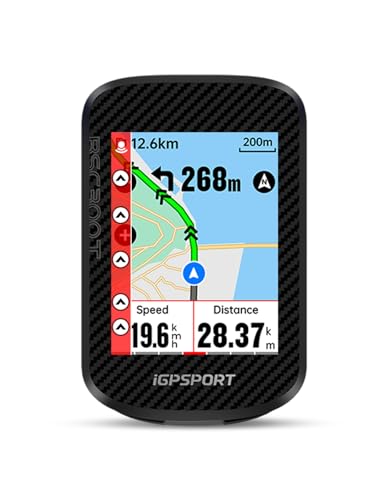

The BSC300T is a strong option for riders who want map navigation in a more compact body while still getting practical tools like offline maps, route preview, and off-course warnings. It also supports e-bike use, which broadens its appeal beyond standard road and mountain riding. If you want premium navigation features without moving to the largest screen in the lineup, this is a compelling alternative.
- ✓ Global offline map support with route preview
- ✓ Off-course warning for route correction
- ✓ Five-satellite positioning for better accuracy
- ✓ Supports e-bike mode and power display
- ✓ Compact touch screen with button controls
- ✗ Smaller screen than the BiNavi
- ✗ Less map-focused than the most advanced premium option
- ✗ Best suited to riders who prefer a compact form factor
Budget Guide: What You Get at Each Tier
Budget tier
Budget bike computers for navigation usually focus on the essentials: route import, turn prompts, basic off-course guidance, and dependable ride recording. You may get a smaller screen and fewer advanced mapping tools, but these models can still be very useful for commuting, casual training, and familiar routes. This tier is best if you want navigation help without paying for features you may not use.
Mid-range tier
Mid-range models typically improve the navigation experience with clearer screens, better route management, offline maps, and more convenient syncing. This is where many riders find the sweet spot between usability and cost, especially if they ride new routes often or want a more polished interface. You can expect a more confident navigation experience without stepping into the most advanced premium devices.
Premium tier
Premium bike computers usually add the strongest mapping tools: larger or more readable displays, better positioning systems, global offline maps, smarter rerouting, and more advanced ride data. They are ideal for riders who explore frequently, ride in challenging conditions, or want the most reliable navigation support possible. If mapping is central to your riding, premium units offer the most complete experience.
Frequently Asked Questions
What is the most important feature in a bike computer for navigation?
The most important feature is clear, reliable navigation that you can read quickly while riding. That usually means a readable screen, offline maps, and turn-by-turn guidance with off-course alerts.
Do I need offline maps on a bike computer?
If you ride unfamiliar routes, travel, or spend time in areas with weak signal, offline maps are highly useful. They let you navigate without depending on a phone connection or live data.
Is rerouting necessary on a bike computer?
Rerouting is very helpful if you often miss turns or like to improvise during a ride. It makes navigation more forgiving and reduces the need to stop and manually recover the route.
How big should the screen be for map navigation?
There is no single perfect size, but larger screens are generally easier to use for maps and turn prompts. If you want fast glances and better readability, prioritize screen clarity as much as size.
Should I choose a bike computer or just use my phone for navigation?
A bike computer is usually better for dedicated riding because it is mounted for quick viewing, built for outdoor readability, and often offers longer battery life. A phone can work, but it is less specialized for cycling navigation.
Pros
- + Offline maps and route import matter most for navigation
- + Turn-by-turn guidance and off-course alerts improve confidence
- + Rerouting helps recover after missed turns
- + Better screens make maps easier to read while riding
- + Battery life is important for long navigation rides
Cons
- – Tiny screens can be hard to use for maps
- – Breadcrumb-only navigation is limited
- – Weak rerouting can frustrate off-course recovery
- – Overpaying for unused features is common
- – Poor app compatibility can make route syncing annoying
Frequently asked questions
- What is the most important feature in a bike computer for navigation?
- The most important feature is clear, reliable navigation that you can read quickly while riding. That usually means a readable screen, offline maps, and turn-by-turn guidance with off-course alerts.
- Do I need offline maps on a bike computer?
- If you ride unfamiliar routes, travel, or spend time in areas with weak signal, offline maps are highly useful. They let you navigate without depending on a phone connection or live data.
- Is rerouting necessary on a bike computer?
- Rerouting is very helpful if you often miss turns or like to improvise during a ride. It makes navigation more forgiving and reduces the need to stop and manually recover the route.
- How big should the screen be for map navigation?
- There is no single perfect size, but larger screens are generally easier to use for maps and turn prompts. If you want fast glances and better readability, prioritize screen clarity as much as size.
- Should I choose a bike computer or just use my phone for navigation?
- A bike computer is usually better for dedicated riding because it is mounted for quick viewing, built for outdoor readability, and often offers longer battery life. A phone can work, but it is less specialized for cycling navigation.
Get the Full Outdoor Buyer's Guide
Join our free newsletter — we'll send our latest Outdoor picks, specs and verdicts straight to your inbox.
Free. No spam. Unsubscribe anytime.
Was this review helpful?
Be the first to share your feedback on this review.
Sign in to vote and let us know what you think.
Discussion (0)
No comments yet. Be the first to start the discussion.
Related Reviews

8 Best E-Bike Cargo Racks and Platforms in 2026 — Safer Hauling, Easier Loading, and More Carrying Space
If your e-bike needs to haul groceries, delivery bags, camping gear, or even another bike, the wrong rack can make every trip awkward and unstable. The best e-bike cargo racks and platforms 2026 buyers should look for are the ones that match your load type, receiver or frame setup, and daily use. In
1 Best Portable Smart Trainers for Travel in 2026 — Foldable Indoor Training That Packs Easily
If you want to keep training while traveling, the biggest challenge is finding a bike trainer that is easy to pack, stable enough to trust, and simple to set up in a temporary space. The best portable smart trainers for travel 2026 are the ones that balance compact storage, quick assembly, and a rea
Garmin Edge 1040 Solar Review (2026): Specs, Pros & Cons, and Who It's For
Check Price on Amazon →