


Who this is for: Best for cyclists who want advanced navigation and training tools in a compact, button-controlled cycling computer.
Check PriceIf you’re trying to decide whether the Garmin Edge 540 is worth buying, the main challenge is separating real-world usefulness from spec-sheet hype. This Garmin Edge 540 review focuses on published specifications, documented owner feedback, and comparisons to help you understand what it does well and where it falls short. If you want a compact cycling computer with serious training and navigation features, this model is one of the most compelling options in Garmin’s lineup.
Related Reviews
Key Specifications
| Spec | Details |
|---|---|
| Product | Garmin Edge 540, Compact GPS Cycling Computer |
| Controls | Button controls |
| Navigation | Advanced navigation with multi-band GNSS |
| Training Features | Targeted adaptive coaching, daily suggested workouts, ClimbPro ascent planner |
| Battery Life | Up to 26 hours in demanding use cases; up to 42 hours in battery saver mode |
| Connectivity | Smart connectivity, cycling awareness, Garmin Connect app integration |
| Best For | Riders who want a compact, button-controlled cycling computer with advanced training tools |
Design & Build Quality


The Garmin Edge 540 is designed for riders who prefer a compact cycling computer that stays unobtrusive on the bars. Its button-only interface is a major part of its identity, and that matters more than it may seem: for many cyclists, physical controls are easier to operate with gloves, in wet weather, or when riding over rough pavement and gravel.
Based on owner feedback and product positioning, the Edge 540’s build is aimed at practicality rather than flash. It feels like a tool first and a gadget second, which is exactly what many endurance riders want. The compact form factor also makes it a good fit for smaller cockpits where space is limited.
That said, the button layout is not for everyone. Riders who are used to touchscreens may find the learning curve a little slower at first, especially when navigating menus or changing pages on the fly. But once set up, the physical controls are often praised for being dependable and consistent.
Pros
- Compact design that fits cleanly on most handlebars
- Button controls are reliable in rain, gloves, and rough conditions
- Practical build geared toward endurance and training use
Cons
- No touchscreen, which some riders prefer for faster interaction
- Menu navigation can feel less intuitive at first than touch-based units
Performance & Features

This is where the Edge 540 earns its reputation. Garmin built it around advanced navigation, training support, and cycling-specific awareness features that appeal to serious riders. The headline feature set includes multi-band GNSS for improved positioning accuracy, which is especially valuable in dense urban areas, wooded trails, and other environments where GPS signals can be less reliable.
Another standout is the training ecosystem. The Edge 540 can show daily suggested workouts and training prompts on screen, and it offers personalized coaching that adapts to your current training load and recovery when paired with a compatible power meter and heart rate monitor. For riders following a structured plan, that kind of guidance can be more useful than a basic ride computer that only records data.
ClimbPro is also a meaningful feature for hilly routes. It shows remaining ascent and grade during climbs, helping you pace effort more intelligently. Garmin’s decision to make it available on every ride, without requiring a course file first, adds real convenience for spontaneous rides and unfamiliar routes.
Battery life is another strong point. Garmin rates it at up to 26 hours in demanding use cases and up to 42 hours in battery saver mode. In practical terms, that makes the Edge 540 suitable for long training days, weekend events, and riders who don’t want to charge constantly.
Owner feedback generally supports the idea that this is a capable, dependable unit once configured. The main criticisms tend to center on the button-only interface and the fact that some riders would rather have the touchscreen convenience found on the Edge 840. But if your priority is performance, navigation, and battery life, the Edge 540 holds up very well.
Pros
- Multi-band GNSS for improved positioning accuracy
- Daily suggested workouts and adaptive coaching support
- ClimbPro helps manage pacing on climbs
- Strong battery life for long rides and events
- Smart connectivity and ride planning integration with Garmin Connect
Cons
- Button-only operation may feel slower than touchscreen models
- Best training features require compatible sensors for full benefit
- Less immediately intuitive than simpler entry-level bike computers
Value for Money
From a value standpoint, the Garmin Edge 540 is best understood as a feature-rich cycling computer that sits in the “serious enthusiast” category rather than the budget-basics category. It offers much of the navigation and training intelligence that makes Garmin’s higher-end devices appealing, but it does so without adding a touchscreen, which helps keep the package focused and, relative to the lineup, more accessible.
What makes it valuable is not just the hardware, but the combination of features: accurate navigation, climb guidance, adaptive coaching, and long battery life. For riders who actually use structured training plans or spend a lot of time on unfamiliar routes, those features can justify the purchase more easily than a basic GPS head unit with limited coaching tools.
Where the value equation weakens is for casual riders. If you mostly want simple speed, distance, and route tracking, the Edge 540 may be more computer than you need. In that case, you could end up paying for advanced capabilities that sit unused. But for committed cyclists, the feature set is broad enough to feel like a long-term investment.
Pros
- Strong feature set for the category
- Good balance of advanced training tools and navigation
- Long battery life adds practical value for endurance riders
Cons
- Can be overkill for recreational riders
- Touchscreen convenience is missing compared with pricier alternatives
Who Should Buy This
The Garmin Edge 540 is a strong fit for cyclists who want a compact, button-controlled GPS computer with serious training and navigation features. It’s especially well suited to road cyclists, gravel riders, and endurance athletes who value reliable controls, accurate positioning, and guided workouts.
It also makes sense if you already use a power meter and heart rate monitor, because that’s where Garmin’s adaptive coaching features become more meaningful. Riders who frequently tackle hilly terrain will appreciate ClimbPro, and anyone doing long rides will benefit from the battery life.
If you want a device that feels purpose-built for performance riding rather than casual tracking, this is one of the better options to consider.
Who Should Look Elsewhere
You should probably look elsewhere if you strongly prefer a touchscreen interface. The Edge 540’s physical buttons are dependable, but they won’t feel as fast or modern to every rider.
It’s also not the best match for casual cyclists who simply want a basic ride computer. If your needs are limited to speed, distance, and simple route tracking, the Edge 540 may be more advanced than necessary.
And if you want the most premium Garmin experience in this size class, a touchscreen model may be the better fit, especially if you often interact with maps on the device itself.
Best Alternatives
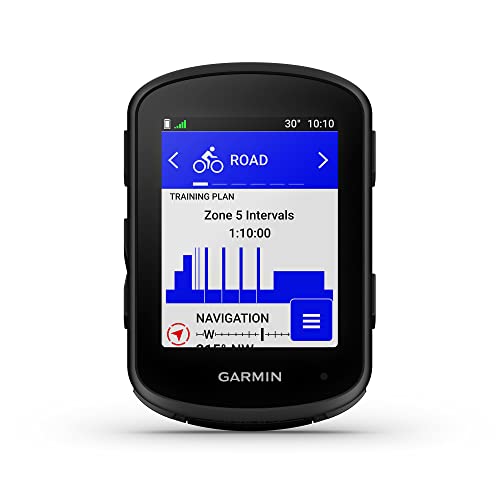

If you want a similar Garmin experience with a touchscreen, the main alternative is the Garmin Edge 840. It keeps the same general performance-first approach but adds touchscreen control for riders who prefer faster map interaction and easier on-device navigation.
Garmin Edge 840
This is the best alternative for riders who like the Edge 540’s feature set but want more convenience from a touchscreen. It’s the more premium option in this comparison and makes sense if you interact with your head unit frequently during rides.
Final Verdict
The Garmin Edge 540 is easy to recommend for cyclists who want advanced navigation, strong battery life, and useful training features in a compact, button-controlled package. It is not the most beginner-friendly option, and it won’t satisfy riders who insist on a touchscreen, but it delivers where it matters most for serious training and route planning.
Buy it if you want a dependable cycling computer that can support structured workouts, climbing, and long rides. Skip it if you mainly need a simple ride tracker or you know you’ll be frustrated by button-only controls.
Frequently Asked Questions
Is the Garmin Edge 540 worth it?
Yes, if you want a compact cycling computer with advanced navigation, adaptive training features, and long battery life. It’s best for riders who will actually use those capabilities.
Does the Garmin Edge 540 have a touchscreen?
No. The Edge 540 uses button controls only, which many riders like for wet-weather reliability and glove-friendly operation.
How long does the Garmin Edge 540 battery last?
Garmin rates it for up to 26 hours in demanding use cases and up to 42 hours in battery saver mode.
Is the Garmin Edge 540 good for climbing?
Yes. It includes ClimbPro, which shows remaining ascent and grade to help you pace climbs more effectively.
Who should buy the Garmin Edge 540 instead of the Edge 840?
Choose the Edge 540 if you prefer button controls and want a more focused, practical cycling computer. Choose the Edge 840 if you want touchscreen convenience.
Pros
- + Compact design
- + Button controls work well with gloves
- + Multi-band GNSS accuracy
- + Long battery life
- + Adaptive coaching and ClimbPro
Cons
- – No touchscreen
- – Can be complex for casual riders
- – Best features need compatible sensors
Frequently asked questions
- Is the Garmin Edge 540 worth it?
- Yes, if you want a compact cycling computer with advanced navigation, adaptive training features, and long battery life. It’s best for riders who will actually use those capabilities.
- Does the Garmin Edge 540 have a touchscreen?
- No. The Edge 540 uses button controls only, which many riders like for wet-weather reliability and glove-friendly operation.
- How long does the Garmin Edge 540 battery last?
- Garmin rates it for up to 26 hours in demanding use cases and up to 42 hours in battery saver mode.
- Is the Garmin Edge 540 good for climbing?
- Yes. It includes ClimbPro, which shows remaining ascent and grade to help you pace climbs more effectively.
- Who should buy the Garmin Edge 540 instead of the Edge 840?
- Choose the Edge 540 if you prefer button controls and want a more focused, practical cycling computer. Choose the Edge 840 if you want touchscreen convenience.
Score breakdown
- value
- 8.0
- usability
- 8.0
- durability
- 8.5
- performance
- 9.0
- buyerFeedback
- 8.5
Get the Full Outdoor Buyer's Guide
Join our free newsletter — we'll send our latest Outdoor picks, specs and verdicts straight to your inbox.
Free. No spam. Unsubscribe anytime.
Was this review helpful?
Be the first to share your feedback on this review.
Sign in to vote and let us know what you think.
Discussion (0)
No comments yet. Be the first to start the discussion.
Related Reviews

8 Best Mountain Bike Shoes in 2026 — Better Grip, Walkability, and Pedal Control
If your current riding shoes slip on the pedals, feel clunky on hike-a-bike sections, or leave your feet aching after long rides, you’re in the right place. This roundup of the best mountain bike shoes 2026 focuses on models that balance traction, fit security, durability, and off-bike comfort. We c
Garmin Edge 540 vs Garmin Edge 840 (2026): Which Should You Actually Buy?
The biggest difference between these two units is control style. The Garmin Edge 540 sticks with button-only operation, which many riders love for wet weather, gloves, and simple no-fuss use. The Garmin Edge 840 adds touchscreen control while keeping buttons, giving it more flexibility in day-to-day
8 Best Road Cycling Shoes in 2026 — Top Picks for Power, Comfort, and Pedal Efficiency
If your current cycling shoes feel too stiff, too hot, or just never quite dial in the fit, you’re in the right place. The best road cycling shoes 2026 buyers want should balance power transfer, comfort, ventilation, and cleat compatibility without making the buying process confusing. This roundup f