

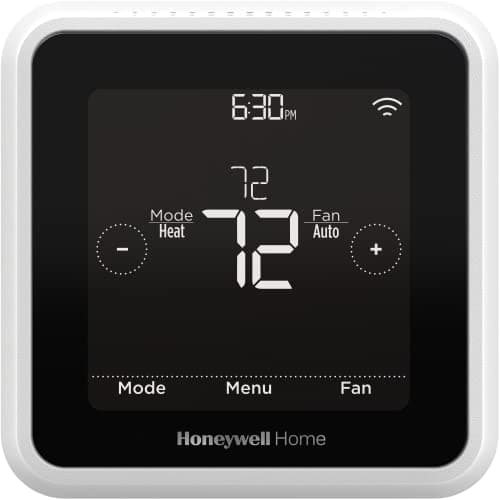
Who this is for: Best for budget-conscious homeowners who want to lower energy costs with an easy first smart home upgrade.
Check PriceWhat is How Much Does a Smart Home Cost? A Complete 2026 Guide
If you’re trying to figure out how much does a smart home cost, the biggest challenge is that prices can range from a few basic devices to a fully automated setup that feels like a luxury upgrade. The good news is that you do not need to buy everything at once, and the total cost depends heavily on which rooms, features, and convenience levels matter most to you. This guide breaks down the real-world costs, how smart home systems work, what to look for before buying, and one practical product recommendation that can help reduce operating costs over time.
Related Reviews
A smart home is a house that uses connected devices, automation, and remote controls to manage things like temperature, lighting, security, and energy use. Instead of adjusting everything manually, you can often control devices through an app, voice assistant, or automated schedule. The result is usually more convenience, better energy efficiency, and a system that can grow with your budget.
How It Works
Smart home systems usually work through a combination of Wi-Fi, Bluetooth, Zigbee, Z-Wave, or a hub that connects multiple devices together. Each device sends and receives data so you can control it from your phone, a smart speaker, or a home automation platform. For example, a thermostat can learn your schedule, detect when you leave, and adjust the temperature automatically to save energy.
The cost of a smart home depends on three main layers: the devices themselves, any installation or setup costs, and the optional ecosystem you build around them. A starter setup might include a smart thermostat, a few lights, and a voice assistant, while a more advanced system could add cameras, locks, sensors, and whole-home automation. The more devices you connect, the higher the upfront price—but the more opportunities you may have to reduce monthly utility costs or improve convenience.
In practical terms, many homeowners start with a single high-impact device and expand later. That approach helps you avoid overspending before you know which features you’ll actually use. It also makes it easier to compare the real return on investment of each upgrade.
Key Benefits & Use Cases
Smart homes are popular because they can make everyday life easier while also helping manage long-term costs. Here are the most common benefits and use cases:
- Lower energy bills: Smart thermostats and automated schedules can reduce wasted heating and cooling.
- Remote control: You can adjust settings from your phone when you are away from home.
- Comfort automation: Devices can respond to your schedule, location, or routines without constant manual input.
- Convenience: Voice commands and app-based controls make it easier to manage daily tasks.
- Scalable upgrades: You can start small and add devices over time as your budget allows.
For cost-conscious buyers, the best use case is usually starting with a device that has a clear payback path. Thermostats are often the most practical first step because they can directly affect monthly utility bills. If you are asking how much does a smart home cost, the answer often starts with one room, one device, or one problem you want to solve.
What to Look For When Buying
1. Upfront price vs. long-term savings
Look beyond the sticker price and consider whether the device can help reduce monthly expenses. A slightly more expensive product may be cheaper over time if it improves efficiency.
2. Compatibility
Check whether the device works with your current wiring, Wi-Fi setup, phone, and voice assistant. Compatibility issues can turn a budget purchase into an expensive return.
3. Ease of setup
Some smart home devices are simple plug-and-play products, while others require installation or professional help. The easier the setup, the lower your total cost.
4. Automation features
Scheduling, geofencing, and app controls can make a device more useful and more likely to deliver savings. Basic remote control is helpful, but automation is what often makes smart home products worthwhile.
5. Reliability and energy efficiency
Choose products that are known for stable performance and energy-saving features. A device that disconnects often or fails to optimize usage may not be worth the cost.
Top Recommended Products
If your goal is to keep smart home costs reasonable while still getting a meaningful upgrade, a smart thermostat is one of the best places to start. It can be a practical first purchase because it targets one of the biggest recurring household expenses: heating and cooling.
Honeywell Home RTH8800WF2022, T5 WiFi Smart Thermostat, 7 Day-Programmable Touchscreen, Alexa Ready, Geofencing Technology, Energy Star, C-Wire Required 4.5★ (based on published product data) ✓ Prime 14% OFF — Was $99.99
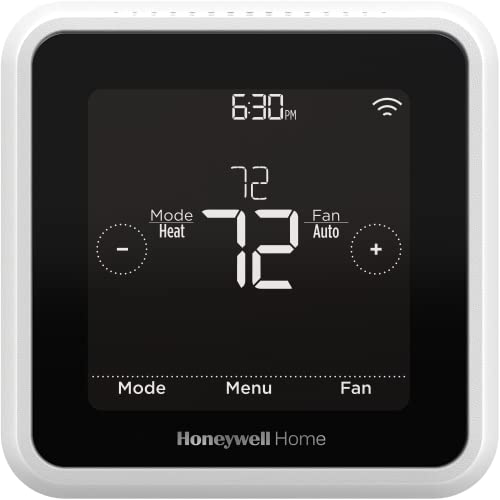


The Honeywell Home T5 is a strong value-focused smart thermostat because it combines scheduling, geofencing, and Energy Star certification in a relatively affordable package. Published product data says frequent use of the scheduling feature can save customers between 8% and 16% on heating and cooling bills, which makes it especially relevant for readers trying to understand how much does a smart home cost in practical terms. It also supports Alexa and includes a demand response program option through eligible utilities, which may add extra savings.
- ✓ 7-day flexible scheduling helps automate temperature changes around your routine.
- ✓ Geofencing can adjust settings based on whether your phone is near home.
- ✓ Energy Star certification supports efficiency-focused buyers.
- ✓ Monthly energy reports and tips can help you track usage over time.
- ✓ Prime shipping and a discounted price improve the value proposition.
- ✗ C-wire required, which may complicate installation in some homes.
- ✗ Best benefits come from active scheduling, not just passive use.
- ✗ Works best for buyers who already want thermostat automation.
For many households, this is the most cost-effective smart home upgrade because it targets a major recurring expense rather than simply adding convenience. If you want to start small and build your system later, a thermostat like this is often the smartest first purchase.
Common Mistakes to Avoid
One common mistake is buying too many devices before solving the biggest pain point. A smart home can get expensive quickly if you start with cameras, locks, speakers, and lights all at once. A better approach is to begin with one high-value device, then expand only after you see real benefits.
Another mistake is ignoring compatibility and installation requirements. Some products need a C-wire, a hub, or specific app support, and missing those details can add unexpected costs. It is also easy to overestimate how much automation you will actually use, so choose features that fit your routine rather than paying for extras you may never touch.
Finally, don’t focus only on purchase price and forget operating costs. A smart device that saves energy, reduces waste, or avoids service calls may be more valuable than a cheaper product with fewer features. That is especially true when you are trying to estimate how much does a smart home cost over the long run.
Frequently Asked Questions
1. How much does a smart home cost to set up?
A basic smart home can start at under a few hundred dollars if you begin with one or two devices, while a more complete setup can cost much more depending on how many rooms and features you automate. The final amount depends on whether you choose DIY installation, advanced security, or whole-home control.
2. What is the cheapest smart home device to start with?
For many buyers, a smart thermostat is one of the best first purchases because it can improve comfort and potentially reduce heating and cooling costs. It offers a more direct savings path than many convenience-only devices.
3. Do smart homes really save money?
They can, especially when you use automation to reduce wasted energy and improve efficiency. Savings vary by device, usage habits, and home size, so the biggest benefit usually comes from consistent use.
4. Is a smart home expensive to maintain?
Maintenance costs are usually modest, but they can include app subscriptions, battery replacements, or occasional device upgrades. Wi-Fi-based systems may also depend on having a reliable internet connection.
5. What should I buy first if I want a budget-friendly smart home?
Start with a device that solves a real problem and has clear long-term value, such as a smart thermostat. That gives you a practical way to test smart home features without committing to a full system right away.
Pros
- + 7-day flexible scheduling
- + Geofencing for automatic home/away control
- + Energy Star certified
- + Potential 8% to 16% heating and cooling savings
- + Prime shipping
Cons
- – C-wire required
- – Best savings depend on active use
- – Primarily useful if you want thermostat automation
Frequently asked questions
- How much does a smart home cost to set up?
- A basic smart home can start at under a few hundred dollars if you begin with one or two devices, while a more complete setup can cost much more depending on how many rooms and features you automate. The final amount depends on whether you choose DIY installation, advanced security, or whole-home control.
- What is the cheapest smart home device to start with?
- For many buyers, a smart thermostat is one of the best first purchases because it can improve comfort and potentially reduce heating and cooling costs. It offers a more direct savings path than many convenience-only devices.
- Do smart homes really save money?
- They can, especially when you use automation to reduce wasted energy and improve efficiency. Savings vary by device, usage habits, and home size, so the biggest benefit usually comes from consistent use.
- Is a smart home expensive to maintain?
- Maintenance costs are usually modest, but they can include app subscriptions, battery replacements, or occasional device upgrades. Wi-Fi-based systems may also depend on having a reliable internet connection.
- What should I buy first if I want a budget-friendly smart home?
- Start with a device that solves a real problem and has clear long-term value, such as a smart thermostat. That gives you a practical way to test smart home features without committing to a full system right away.
Score breakdown
- value
- 9.0
- usability
- 8.0
- durability
- 8.0
- performance
- 8.0
- buyerFeedback
- 8.0
Get the Full Home Buyer's Guide
Join our free newsletter — we'll send our latest Home picks, specs and verdicts straight to your inbox.
Free. No spam. Unsubscribe anytime.
Was this review helpful?
Be the first to share your feedback on this review.
Sign in to vote and let us know what you think.
Discussion (0)
No comments yet. Be the first to start the discussion.
Related Reviews
2 Best Smart Sprinkler Controllers in 2026 — Smarter Watering, Lower Bills
If your lawn is getting overwatered, underwatered, or just plain neglected because your old timer is hard to manage, a smart sprinkler controller can fix that fast. The best smart sprinkler controllers make it easier to schedule watering, adjust for weather, and control zones from your phone. In thi
3 Best Smart Leak Detectors in 2026 — Faster Alerts, Better Whole-Home Protection
If you’re worried about a hidden leak turning into expensive water damage, the right smart leak detector can give you time to act before the mess spreads. The best leak detectors smart shoppers are comparing in 2026 balance fast alerts, easy placement, and reliable app notifications without forcing
What is Are Smart Speakers Always Listening? A Complete 2026 Guide
Wondering whether are smart speakers always listening is a real privacy risk or just a misunderstanding? The short answer is that most smart speakers are designed to listen for a wake word, not record everything you say all day. In this guide, you’ll learn how they work, what “always listening” real