


Who this is for: Best for budget-conscious shoppers who want practical smart-home upgrades without overspending.
If you’re trying to build a smarter home without overspending, the hard part is knowing which devices are genuinely useful and which are just flashy add-ons. The best budget smart home devices should solve a real everyday problem, whether that’s better safety, easier control, or a little more convenience. Below, I’ve ranked the strongest budget, mid-range, and premium-style picks from the available lineup so you can match the right device to the right need.
Related Reviews
Best Budget Pick


SwitchBot Blind Tilt is the most affordable way to add smart-home convenience to an existing part of your house without replacing the whole setup. It’s especially appealing if you want automated light control, simple retrofitting, and a device that can keep running with solar assistance.
Why it stands out
This pick is the best fit for shoppers who want a practical upgrade rather than a full smart-home overhaul. Based on the product specs, it’s designed to make existing horizontal blinds smarter, with precise motorized adjustment and light-sensing automation.
- ✓ Retrofits existing horizontal blinds instead of requiring a full replacement
- ✓ Built-in solar panel and 2000mAh battery support long-term charging convenience
- ✓ High-precision motor adjusts blinds to the closest 2°
- ✓ Light sensor helps maintain a more consistent indoor light level
- ✓ App control and timer-based scheduling are available in Bluetooth range
Best for: renters, apartment dwellers, or homeowners who want a low-friction smart upgrade for daylight control.
Best Mid-Range Pick


Amazon Echo Show 5 is the sweet spot for most people because it combines voice control, a screen, and smart-home management in one compact device. If you want a central command center for lights, cameras, timers, and music without going big on size, this is the most balanced option in the group.
Why it stands out
Unlike simpler smart gadgets, this one gives you a visual interface for daily routines. The 5.5-inch display makes it easier to glance at weather, view compatible cameras, or follow along with music and video content, while still staying compact enough for a nightstand, kitchen counter, or desk.
- ✓ 5.5-inch smart display shows news, weather, and camera feeds at a glance
- ✓ Controls compatible smart home devices like lights and thermostats
- ✓ Built-in camera supports drop-in calls and home check-ins
- ✓ Deep bass and clearer sound improve music, podcasts, and video playback
- ✓ Photo slideshow feature adds extra value when the screen is idle
Best for: buyers who want a versatile all-in-one Alexa display for everyday smart-home control.
Best Premium Pick
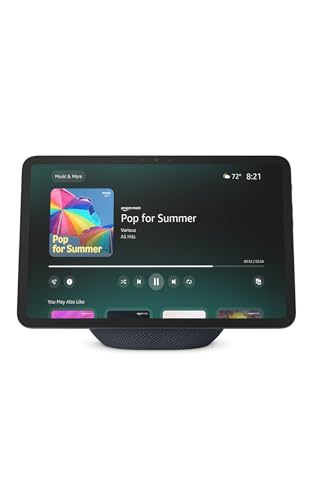

Amazon Echo Show 11 is the flagship pick in this roundup because it offers the biggest screen, the most advanced smart-home control, and the strongest “home hub” feel. If your goal is to get one device that can anchor a kitchen, family room, or shared living space, this is the most capable option here.
Why it stands out
The larger Full-HD display makes everything easier to see, from recipes and calendars to camera feeds and smart-home dashboards. It also adds a built-in smart home hub, spatial audio, and more advanced routines through Omnisense technology, which makes it feel more like a premium home assistant than a simple display.
- ✓ 11-inch Full-HD display gives you more viewing area
- ✓ Built-in smart home hub supports control without a separate hub
- ✓ Spatial audio and crisp vocals improve media playback
- ✓ Camera and display make video calls and live viewing more useful
- ✓ Omnisense technology enables more personalized routine triggers
Best for: households that want the most capable Alexa display for routines, media, and whole-home control.
Is Spending More Actually Worth It?
Usually, yes—but only if the upgrade solves a problem you actually have. In this lineup, the budget pick is best when you want one specific automation feature, the mid-range pick is the best all-around value for most smart-home buyers, and the premium pick is worth it when screen size, hub functionality, and broader home management matter more than keeping things minimal.
For example, SwitchBot Blind Tilt is a smart buy if your main goal is automating light and privacy in one room. But if you want a device that can handle music, cameras, timers, and voice control all at once, Amazon Echo Show 5 gives you more everyday utility. And if you’re building a family hub that everyone uses, Amazon Echo Show 11 is the clearest upgrade in the group.
The key value question is not “Which is cheapest?” It’s “Which device will get used often enough to justify the upgrade?” If the answer is a lot, spending a little more can absolutely be worth it. If the answer is only occasional convenience, the budget option is usually the smarter move.
All Picks Compared
| Product | Tier | Main Strength | Best For |
|---|---|---|---|
| SwitchBot Blind Tilt | Budget | Retrofitting blinds with smart control | Automating light and privacy without replacing existing blinds |
| Amazon Echo Show 5 | Mid-Range | Compact smart display with Alexa control | Everyday home control, calls, camera viewing, and media |
| Amazon Echo Show 11 | Premium | Largest display and most advanced hub features | Family hubs, smart-home dashboards, and premium convenience |
If you want the simplest recommendation: choose the budget pick for one-room automation, the mid-range pick for the best balance of features and usability, and the premium pick if you want the most capable centerpiece for a smart home.
Frequently Asked Questions
What is the best budget smart home device for beginners?
The best beginner-friendly option in this guide is the Amazon Echo Show 5 because it combines voice control, a screen, and smart-home management in one device.
Which smart home device is best for automating blinds?
SwitchBot Blind Tilt is the best fit if you want to automate existing horizontal blinds instead of replacing them.
What smart display is better for a kitchen or family room?
Amazon Echo Show 11 is the stronger choice for shared spaces because its larger screen is easier to use for recipes, calendars, and camera views.
Can these devices control other smart home products?
Yes. The Echo Show models can manage compatible smart home devices like lights and thermostats, while the SwitchBot Blind Tilt works through its app and can extend to voice assistants with a separate hub.
Which option gives the best overall value?
For most buyers, Amazon Echo Show 5 offers the best balance of features, size, and everyday usefulness.
Pros
- + SwitchBot Blind Tilt retrofits existing blinds
- + Echo Show 5 adds a compact smart display
- + Echo Show 11 offers the largest screen and hub features
Cons
- – SwitchBot Blind Tilt only supports horizontal blinds with a tilt rod
- – Echo Show 5 is smaller than full-size smart displays
- – Echo Show 11 is the least budget-friendly option in this guide
Frequently asked questions
- Which smart home device is best for automating blinds?
- SwitchBot Blind Tilt is the best fit if you want to automate existing horizontal blinds instead of replacing them.
- What smart display is better for a kitchen or family room?
- Amazon Echo Show 11 is the stronger choice for shared spaces because its larger screen is easier to use for recipes, calendars, and camera views.
- Can these devices control other smart home products?
- Yes. The Echo Show models can manage compatible smart home devices like lights and thermostats, while the SwitchBot Blind Tilt works through its app and can extend to voice assistants with a separate hub.
- Which option gives the best overall value?
- For most buyers, Amazon Echo Show 5 offers the best balance of features, size, and everyday usefulness.
Score breakdown
- value
- 8.0
- usability
- 9.0
- durability
- 7.0
- performance
- 8.0
- buyerFeedback
- 8.0
Get the Full Home Buyer's Guide
Join our free newsletter — we'll send our latest Home picks, specs and verdicts straight to your inbox.
Free. No spam. Unsubscribe anytime.
Was this review helpful?
Be the first to share your feedback on this review.
Sign in to vote and let us know what you think.
Discussion (0)
No comments yet. Be the first to start the discussion.
Related Reviews
8 Best Smart Displays in 2026 — Alexa-Powered Picks for Every Room
If you want a smart display that actually makes your home easier to run, the choices can feel surprisingly confusing. Some are better for nightstands and kitchens, others are built for video calls, smart home control, or streaming with a bigger screen. This research-based guide to the best smart dis

1 Best Smart Blinds in 2026 — Top Picks for Quiet, App-Controlled Blackout and Easy Home Automation
If you’re searching for the best smart blinds 2026 , you probably want more than a motorized shade—you want something that fits your room, works with your smart home, and actually makes daily life easier. The right pick should balance blackout performance, quiet operation, wireless control, and simp
