


Quick Summary
The Echo Dot (5th Gen) is the practical smart-speaker play: a compact spherical speaker with clearer vocals, a livelier low end for its size, and a small but useful temperature sensor that makes room-based automations easier. It launched as Amazon’s mainstream Dot refresh and continues to be the fastest way to add Alexa and basic smart-home control to a bedroom, kitchen, or rental
Related Reviews
It’s not trying to be a hi‑fi speaker or a touchscreen command center; it’s the “put one in every room” device that actually sounds good enough to justify that strategy. Expect plug-in operation (no battery model built into the unit), reliable voice pickup across a typical small room, and enough smart-home compatibility to automate lights, timers, and routines without drama
Buy on Amazon: Amazon Echo Dot. Click here
Alternative on Amazon: Ring Battery Doorbell Pro. Click here
Alternative on Amazon: Google Nest Hub Max. Click here

Photo 1: Amazon Echo Dot - Vibrant sounding speaker, Designed
Price Range and Deal Timing
• Bundle opportunities: retailers often include discounts when pairing with smart bulbs, plugs, or streaming sticks; cross-sell promotions can knock an effective per-unit cost down further
Technical Snapshot (Practical Numbers)
Core Hardware and Feature Profile
• Release: 5th generation (launched 2022). Practical impact: cleaner design and firmware improvements over prior Dots
• Speaker: roughly a 44 mm / ~1.7-inch front‑firing driver; improved midrange and tighter bass compared with earlier Dots. Expect room‑filling sound for bedrooms and kitchens, not a living‑room stereo
• Microphones: multi‑mic array with far‑field pickup and improved noise suppression — reliable for hands‑free commands across ~10–20 ft in open-plan rooms
• Sensors & extras: built‑in temperature sensor useful for local routines (e.g. “if room temp >72°F then turn on fan”); eero integration on some SKUs to help mesh Wi‑Fi in smaller homes
• Ports & power: plug‑in only (no built‑in battery). No dedicated 3.5 mm audio line‑out — Bluetooth or Wi‑Fi multi‑room are your external audio options
Performance and Daily-Use Metrics
• Loudness: peaks in the low‑80s to mid‑80s dB at 1 m for typical Dot tuning (enough for background music and podcasts). Don’t expect deep sub‑bass
• Latency: Alexa queries are generally sub‑second for common queries (local routines vary by router and Matter/cloud path). Expect longer times (1–3s) for cloud‑dependent, third‑party integrations
• Automation responsiveness: temperature-based local routines fire quickly (sub-second to a couple of seconds) because sensor data is local to the device — useful for HVAC shortcuts and bedside automations
Value and Ownership Math
• Typical ownership window: 3–5 years of feature updates before you feel a meaningful performance lag; firmware and cloud features continue longer but hardware-based audio and microphones age faster
• Maintenance: Plug‑in upkeep only—no battery swaps. Replace if mics degrade or if you need a local Thread/Zigbee border router not offered by this model
• Expected upgrade reasons: need for a screen (Echo Show / Nest Hub), Thread/Zigbee border router capabilities, or substantially better audio
Head-to-Head Overview
If what you want is Alexa and ambient sound in multiple rooms, the Echo Dot wins on price-per-room. It’s small, low-cost to duplicate, and good enough sonically to justify a multi-unit deployment
A smart-display like a large-screen Google or Amazon Show gives you video calling, on‑screen controls, and camera-based automations — things the Dot does not offer. Meanwhile, a doorbell camera (e.g. a battery-powered smart doorbell) targets security, not ambient voice control; it’s a different tool for a different job. The Dot’s sweet spot: voice-first ambient control and cheap audio wherever you need it

Photo 2: Amazon Echo Dot - Vibrant sounding speaker, Designed
Who Should Buy This
• Renters who want Alexa without permanent installs — the Dot is portable and low-commitment
• Buyers on a budget building a multi‑room Alexa presence — cost-per-room math favors buying several Dots over one big speaker
• People who want simple automations (alarms, timers, temperature‑triggered routines) without a big display
• Anyone wanting a reliable bedside smart alarm and sleep routine controller (with the with‑clock model for visual convenience)
Comparison Snapshot
Short comparison notes to help you choose
• Echo Dot (5th Gen)
• Best for: voice-first rooms, low-cost scaling
• Strengths: price, voice pickup, compact size, temperature sensor
• Limitations: no camera, no large display, limited bass
• Ring Battery Doorbell Pro
• Best for: front‑door security and package monitoring
• Strengths: high‑resolution video, radar‑assisted motion, battery convenience
• Drawbacks: subscription model for extended video history and advanced alerts; higher upfront cost than a Dot
• Google Nest Hub Max
• Best for: family rooms or kitchens where video calls, on‑screen recipes, and a larger display matter
• Strengths: 10‑inch display, built‑in camera, stronger speakers than a Dot
• Drawbacks: larger footprint, higher cost, not a drop‑in replacement for a Dot in a cramped nightstand space
Buying Advice and Value Check
If you’re buying one Dot to test an Alexa room, pay full price only if you need it immediately.
• Buy-now triggers
• You need a new bedside alarm or a quick smart‑home gateway for a rental
• Wait-for-a-deal triggers
• You want to outfit multiple rooms — aim for a sale or bundle
• You’re deciding between screen vs. speaker — wait for a demo or a deeper discount on a Show/Hub
Service considerations: features like certain video integrations or advanced automations may require ongoing cloud subscriptions on connected devices (for instance, doorbell cameras). The Dot itself doesn’t require a subscription for core Alexa features, but other ecosystem devices might
Final Verdict
The Echo Dot (5th Gen) is the classic inexpensive foundation for a pragmatic smart home: tiny footprint, competent sound, dependable Alexa, and just enough local sensing to make automations meaningful. It won’t replace a dedicated smart display or a high‑end speaker, but it will do the everyday jobs—alarms, timers, lights, music, and voice fetches—better than a decade of similarly priced devices
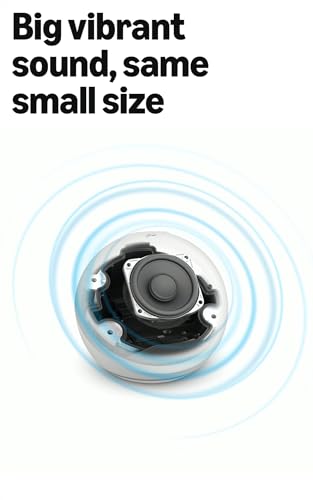
Photo 3: Amazon Echo Dot - Vibrant sounding speaker, Designed
If you want the least-friction way to expand voice control to multiple rooms without breaking the bank, the Dot remains the right call. Buy one for a room you actually use; buy a second on sale for the hallway. Repeat as needed
FAQ
Q: Is the Echo Dot (5th Gen) worth upgrading to from a 3rd or 4th Gen Dot? A: Upgrade if you want better audio, the temperature sensor for local automations, or improved far‑field mics. If your older Dot still handles your needs (alarms, timers, Alexa queries), you can safely keep it and wait for a deeper need to upgrade
Q: Does the Echo Dot act as a smart-home hub for Zigbee/Thread devices? A: The Dot is primarily a voice-first speaker with some local-sensor capability. For full Thread border-router or Zigbee hub duties you’ll want a dedicated hub or a different Echo model designed for hub functions; if you’re building a complex multi‑device mesh, check the exact model’s radio support before buying
Where to Check Pricing
Check latest Amazon listing for Amazon Echo Dot. Click here
Get the Full Home Buyer's Guide
Join our free newsletter — we'll send our latest Home picks, specs and verdicts straight to your inbox.
Free. No spam. Unsubscribe anytime.
Was this review helpful?
Be the first to share your feedback on this review.
Sign in to vote and let us know what you think.
Discussion (0)
No comments yet. Be the first to start the discussion.
Related Reviews

8 Best Smart Home Hubs in 2026 — The Easiest Ways to Control Every Device
If your smart home feels fragmented across too many apps, the right hub can pull everything into one place and make automation actually feel simple. The best smart home hubs 2026 buyers should consider are the ones that balance device compatibility, reliable automations, and easy everyday control. I

5 Best Thread Border Routers in 2026 — Smarter Matter Control for Whole-Home Automation
If you’re building a Matter-based smart home, the wrong Thread border router can leave devices slow, unreliable, or hard to expand. The best thread border routers 2026 picks below are chosen for strong local automation, cross-platform compatibility, and practical setup flexibility. This roundup focu

Apple HomeView vs Echo Hub (2026): Which Should You Actually Buy?
Apple HomeView feels more like a premium home device, with a polished display-first design built to blend into living spaces. The customizable faces, Photos mode, and clean visual presentation make it feel more like a shared household screen than a utility panel.