

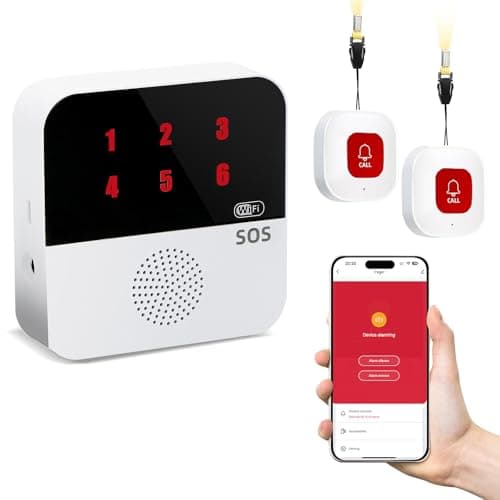
Who this is for: Best for seniors and caregivers who want a simple, no-monthly-fee way to get fast help at home.
Check PriceWhat is Medical Alert Systems Explained? A Complete 2026 Guide
Medical alert systems explained simply: they are devices and services that let someone quickly call for help during a fall, medical emergency, or safety concern. They’re designed for seniors, people with mobility issues, and anyone who wants a faster way to reach caregivers when seconds matter. In this guide, you’ll learn how they work, what features matter most, and which options are worth considering in 2026.
Related Reviews
How It Works
At a basic level, a medical alert system uses a help button, a receiver or base unit, and sometimes a mobile app to send an emergency signal. When the user presses the button, the system can trigger a loud local alarm, send a notification to a caregiver’s phone, or both, depending on the model.
Some systems use Wi‑Fi to connect through the home network, while others also rely on wireless radio signals between the button and the base unit. That’s why many product listings mention range, wall penetration, and backup reliability—those details affect whether the alert still gets through in different rooms or during an internet problem.
Many newer systems also support shared access through apps like Tuya Smart or Smart Life, allowing multiple family members to receive alerts. In practice, this means the system is not just a button—it’s a communication chain designed to shorten response time.
Key Benefits & Use Cases
1. Faster help during falls or sudden illness
For older adults, one of the biggest benefits is being able to call for help without reaching a phone. If a person falls, feels dizzy, or cannot move safely, a single button press can notify caregivers immediately.
2. Peace of mind for families
Family members often want a simple way to know when a loved one needs help. App-based alerts can reduce anxiety by sending instant notifications to multiple people at once.
3. Useful in multiple rooms and care settings
These systems are commonly used in bedrooms, bathrooms, kitchens, hospitals, clinics, and nursing facilities. The best ones are designed to work where help is most likely to be needed, not just next to a phone.
4. Helpful for people who want no monthly fee options
Some buyers prefer a one-time purchase instead of a subscription. Budget-conscious shoppers often look for systems that provide core alerting features without recurring charges, though some advanced phone or SMS functions may still require a plan.
5. Good for shared caregiver coverage
When multiple caregivers are involved, shared app notifications can make coordination easier. That way, the alert is not dependent on a single person seeing the message first.
What to Look For When Buying
1. Alert method
Check whether the system uses a loud base alarm, phone app notifications, SMS, phone calls, or a combination. The more ways it can notify someone, the more flexible it may be.
2. Range and signal reliability
Look for stated range in feet or square footage, and pay attention to whether the signal can pass through walls and doors. This matters for multi-room homes and larger living spaces.
3. Power and connectivity
Wi‑Fi-only systems can be convenient, but they depend on the home network. Some products advertise dual-channel or backup-style operation, which may help if the internet goes down.
4. Wearability and waterproofing
Buttons worn as wristbands or necklaces are easier to keep on throughout the day. Waterproof or splash-resistant designs are especially valuable for bathrooms, showers, and kitchens.
5. Monthly fees and subscription requirements
Always confirm what is included at the base price. Some systems advertise “no monthly fee” but still charge for phone call or SMS alerts, so it’s important to read the fine print.
Top Recommended Products
Life Alert Systems for Seniors No Monthly Fee App-Controlled, Medical Alert Systems for Seniors with 2 Call Button 1 Receiver and1-6 LED Number Display (Only Supports 2.4GHz Wi-Fi) ✓ Prime $37.99
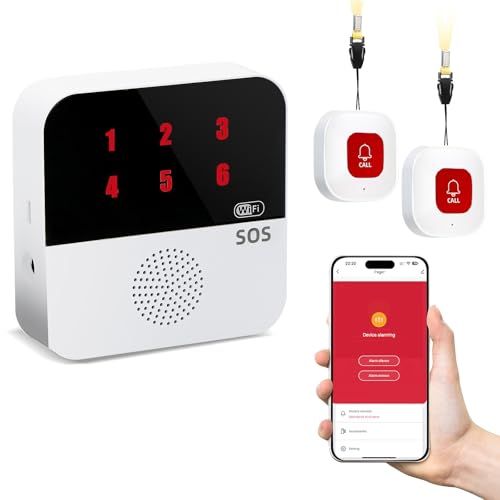


This model stands out for buyers who want app notifications, a low upfront cost, and a simple no-monthly-fee setup. The LED number display and shared-device support make it appealing for households with multiple caregivers.
- ✓ No complicated monthly fee for core use
- ✓ App alerts can notify caregivers immediately
- ✓ Dual-channel style reliability with wireless signal and Wi‑Fi
- ✓ Works in homes and care facilities
- ✓ Shared access for multiple family members
- ✓ Prime eligible
- ✗ Only supports 2.4GHz Wi‑Fi
- ✗ SMS notifications require a subscription
- ✗ Best suited to indoor use rather than true mobile coverage
WiFi Caregiver Pager Life Alert Systems for Seniors No Monthly Fee App Control Medical Alert Systems for Seniors, 1Waterproof Call Button+ 1Watch Button 1Receiver(Only Supports 2.4GHz Wi-Fi) ✓ Prime $37.99
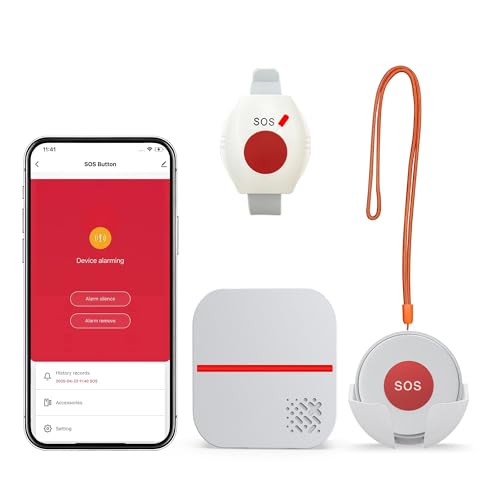


This option is a strong fit if you want both a waterproof call button and a watch-style button. It also emphasizes long range and shared alerts, which can be useful in larger homes or care environments.
- ✓ One-click help request
- ✓ Waterproof call button and watch button included
- ✓ App notifications can be shared with family members
- ✓ Up to 656 feet control range claimed
- ✓ Four volume levels and customizable ringtones
- ✓ Prime eligible
- ✗ Only supports 2.4GHz Wi‑Fi
- ✗ SMS and phone call alerts require a subscription
- ✗ Watch-style wearables may not suit every user
Medical Alert System - NO Monthly FEES - Waterproof Necklace and Wrist ✓ Prime $149.77
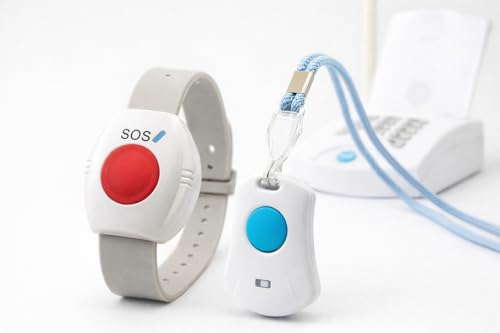


This is the most traditional-feeling system in the group, with necklace and wrist panic buttons and a focus on coverage and simplicity. It may appeal to shoppers who want a broader wearable setup and sequential calling to multiple phone numbers.
- ✓ No monthly fees
- ✓ Waterproof wearable design for all-day use
- ✓ Includes both wrist and necklace panic buttons
- ✓ Can add up to 8 panic buttons total
- ✓ Sequentially calls up to 3 phone numbers
- ✓ Prime eligible
- ✗ Higher price than the other two options
- ✗ Less app-centric than the Wi‑Fi models
- ✗ Best value depends on whether you need the extra button capacity
Common Mistakes to Avoid
Choosing based on price alone
The cheapest system is not always the best fit. A low-cost alert device that lacks reliable range, waterproofing, or easy notifications may not be dependable when it matters most.
Ignoring Wi‑Fi compatibility
Some systems only support 2.4GHz Wi‑Fi. If a home network is configured differently, the device may not connect properly.
Overlooking subscription requirements
“No monthly fee” can still mean some features cost extra. Always check whether SMS alerts, phone calls, or app services require a separate plan.
Forgetting about wearability
If a button is uncomfortable, bulky, or easy to remove, the user may not wear it consistently. The best system is the one someone will actually keep on.
Not matching the system to the living space
Range matters more in larger homes, multi-floor layouts, and care facilities. A system that works well in a small apartment may not be enough for a bigger property.
Frequently Asked Questions
What is a medical alert system?
A medical alert system is a device setup that lets a person quickly request help in an emergency, usually by pressing a button that triggers an alarm or sends a notification.
Do medical alert systems work without a monthly fee?
Yes, some do. However, certain features like SMS or phone call alerts may still require a subscription, so it’s important to check the details before buying.
Are medical alert systems only for seniors?
No. They are most commonly used by seniors, but they can also help people with mobility issues, chronic conditions, or anyone who wants quick caregiver notification.
What is better: a Wi‑Fi medical alert system or a traditional one?
Wi‑Fi systems are often better for app notifications and shared caregiver alerts, while traditional wearable systems may be better for simple, always-on button use. The best choice depends on your home setup and needs.
Can medical alert systems work in the bathroom?
Many can, especially if the button is waterproof or splash-resistant. Bathroom use is one of the most important reasons buyers look for wearable emergency buttons.
Pros
- + App alerts for caregivers
- + No monthly fee options
- + Waterproof wearable buttons
- + Shared family notifications
- + Long-range coverage claims
Cons
- – Some features need subscriptions
- – 2.4GHz Wi-Fi only
- – Best for indoor use
- – Wearable style may not suit everyone
Frequently asked questions
- What is a medical alert system?
- A medical alert system is a device setup that lets a person quickly request help in an emergency, usually by pressing a button that triggers an alarm or sends a notification.
- Do medical alert systems work without a monthly fee?
- Yes, some do. However, certain features like SMS or phone call alerts may still require a subscription, so it’s important to check the details before buying.
- Are medical alert systems only for seniors?
- No. They are most commonly used by seniors, but they can also help people with mobility issues, chronic conditions, or anyone who wants quick caregiver notification.
- What is better: a Wi-Fi medical alert system or a traditional one?
- Wi-Fi systems are often better for app notifications and shared caregiver alerts, while traditional wearable systems may be better for simple, always-on button use. The best choice depends on your home setup and needs.
- Can medical alert systems work in the bathroom?
- Many can, especially if the button is waterproof or splash-resistant. Bathroom use is one of the most important reasons buyers look for wearable emergency buttons.
Get the Full Health & Fitness Buyer's Guide
Join our free newsletter — we'll send our latest Health & Fitness picks, specs and verdicts straight to your inbox.
Free. No spam. Unsubscribe anytime.
Was this review helpful?
Be the first to share your feedback on this review.
Sign in to vote and let us know what you think.
Discussion (0)
No comments yet. Be the first to start the discussion.
Related Reviews
5 Best Medical Alert Watches in 2026 — No-Monthly-Fee Safety for Seniors
If you’re shopping for the best medical alert watches , you probably want one thing: fast emergency help without relying on a phone or paying a monthly monitoring bill. The right watch should be easy to wear, simple to activate, and dependable enough to give families real peace of mind. This roundup
8 Best Medical Alert Systems in 2026 — Safer Senior Protection for Every Budget
If you’re searching for the best medical alert systems 2026 , you probably want one thing: fast help when seconds matter, without paying for features you’ll never use. The tricky part is that “medical alert system” can mean everything from a true GPS pendant with fall detection to a simple caregiver
Neutrogena Ultra Sheer Dry Touch Sunscreen Lotion, SPF 70, 3 fl. oz Review (2026): Specs, Pros & Cons, and Who It’s For
If you’re searching for sunscreen SPF lab verification , you probably want one thing: a product that actually delivers the protection printed on the label. That concern has become even more important after the recent wave of SPF scrutiny, where buyers are looking beyond marketing claims and into for