

Who this is for: Best for home users who want an easy way to inspect teeth and gums with clear images and simple software compatibility.
If you’re trying to figure out how to choose a home intraoral camera, the biggest challenge is separating useful features from marketing noise. The right camera can make it easier to spot tooth discoloration, gum issues, broken fillings, and plaque buildup before a dental visit. The most common mistake buyers make is choosing a camera that looks sharp on paper but doesn’t work smoothly with their computer or software setup.
Related Reviews
This guide breaks down the features that matter most, the red flags to avoid, and the best options to consider based on researched specifications, compatibility details, and documented owner feedback patterns. Since this is a research-based buying guide, not hands-on testing, the recommendations below focus on what the product listings and comparisons suggest for real-world home use.
Key Features to Look For
1) Software compatibility
For home use, compatibility is one of the most important factors because a camera is only useful if you can actually view and save images on your device. Look for models that clearly support your operating system and imaging workflow, especially if you want to connect through USB and keep things simple. If the camera includes capture-button drivers or bundled software, that can make setup much easier.
2) Image clarity and focus control
Sharp images matter when you’re trying to notice small changes in teeth or gums. Features like auto-focus, fixed-focus design, or improved lens construction can reduce blurry shots and make it easier to document what you see. Clearer imaging also helps if you plan to share photos with a dentist or use them for personal monitoring.
3) Tip size and access to tight areas
A smaller or thinner tip can make it easier to inspect back teeth, gumlines, and hard-to-reach spots. For home users, comfort matters too, because a bulky camera can be awkward to maneuver around the mouth. A slim design is especially helpful if you want to check molars without constantly repositioning the device.
4) Lighting and anti-fog features
Good lighting helps reveal details in darker areas of the mouth, while anti-fog features help keep the lens usable during a session. Without enough light, images can look washed out or shadowy; without anti-fog protection, visibility can drop quickly. These features are especially useful for beginners who want a more forgiving experience.
5) Ease of connection and setup
Many buyers want a plug-and-play experience, so USB connection, quick-connect cables, and simple installation matter a lot. A camera that works directly with a computer and includes the needed driver or software is usually easier to manage than one that requires extra hardware. Simpler setup means you’re more likely to use it regularly.
6) Ergonomics and handling
A lightweight, easy-to-grip camera is more comfortable to hold during longer inspections. Ergonomic design matters because you’ll often need to angle the device carefully to see upper and lower teeth. If the camera feels awkward, it becomes harder to capture stable images and easier to miss details.
7) Support and documentation
Even a simple device can be frustrating if setup instructions are unclear. Strong customer support, tutorials, and clear integration guidance are especially valuable for home users who may not have a dental office IT team to help. Good support can save time if the camera needs software configuration or driver installation.
What to Avoid
1) Vague compatibility claims
Be cautious if a listing says it works with “most systems” but doesn’t clearly name your software or operating system. Intraoral cameras often depend on drivers, capture buttons, or bundled software, so vague claims can lead to setup problems. If your software is not explicitly supported, you may end up with a camera that only works in a limited way.
2) Overly complicated setups
For home use, a camera that requires extra hardware, specialized installation, or advanced configuration can become a hassle. The best choice is usually one that connects directly through USB and includes the necessary software or driver support. If the setup sounds like a mini office IT project, it may be more than you need.
3) Poor focus or blurry-image complaints
Owner feedback often reveals whether a camera struggles with blur, delayed focus, or inconsistent image quality. If a model is repeatedly described as hard to keep sharp, that can make it less useful for spotting small oral changes. A camera should help you see details, not force you to guess what you’re looking at.
4) Unclear support after purchase
Because software setup can be the hardest part, weak support is a major red flag. Look for brands that provide tutorials, phone help, email help, or remote installation guidance. This is especially important if you’re not already comfortable installing drivers or configuring imaging tools.
5) Ignoring comfort and usability
A technically capable camera can still be frustrating if it’s too heavy, too bulky, or awkward to hold. Since home users often inspect their own teeth or a family member’s teeth, comfort and maneuverability matter more than many buyers expect. Usability is what determines whether the camera gets used consistently.
Our Top Picks
Best overall for compatibility: ProDENT Intraoral Camera PD750 Capture Button Integrated with Dexis, Eaglesoft, OpenDENTAL and More (Classical)
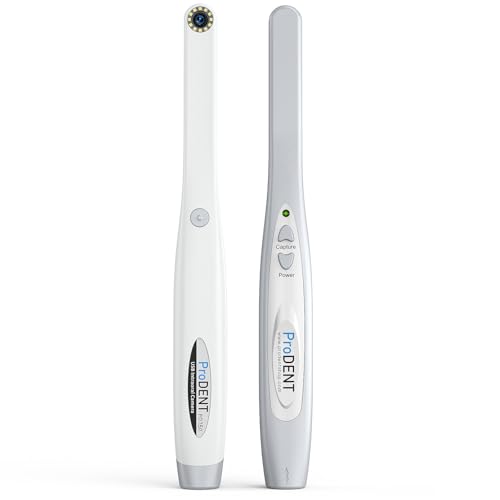


The PD750 is the strongest all-around pick if you want broad compatibility and a more polished setup experience. It’s described as an upgraded model with clearer images, improved lens design to reduce blur, and integrated capture support for a wide range of imaging software. For buyers who want the safest mix of usability and flexibility, this is the best place to start.
- ✓ Broad compatibility with many major imaging platforms
- ✓ Capture driver included for easier integration
- ✓ Improved lens design aimed at reducing blurry images
- ✓ Ergonomic design for both-side capture
- ✓ Includes one-year manufacturer warranty and remote support
- ✗ Premium positioning may be more than casual users need
- ✗ Best value depends on whether you need the broader software support
- ✗ Still requires checking your exact software before buying
Best budget-friendly option: ProDENT Intraoral Camera PD740, Capture Button Driver to Work with Eaglesoft, Dexis, Apeteryx, Carestream, Tigerview,


The PD740 is a practical entry-level choice if you want solid compatibility without moving up to a more advanced model. It supports major imaging software, works with Windows versions commonly found in home-office setups, and includes support options that can make installation less stressful. If you want the basics done well, this is the value pick.
- ✓ Compatible with many common imaging systems
- ✓ Works with Windows 11/10/7/8
- ✓ Auto-focus lens with a 70-degree viewing angle
- ✓ Quick connect/disconnect USB 2.0 setup
- ✓ Email and phone support included
- ✗ Fewer advanced features than the newer premium option
- ✗ Not as feature-rich for users who want the latest refinements
- ✗ Buyers should confirm software compatibility before ordering
Best for slim access and clarity: UNK New Intraoral Camera, 5mm Ultra-Thin Tip, Anti-Shake for Clear Images, Compatible with Mainstream North American Dental Software, 24/7 Professional Customer Support


This model stands out if you care most about reaching tight spaces and getting a steadier image. Its ultra-thin tip, anti-shake design, and fixed-focus setup are all aimed at making inspection easier for home users who want clear oral photos without a complicated workflow. It’s also a strong fit if you value guided setup and support.
- ✓ 5mm ultra-thin tip for tighter access
- ✓ Anti-shake design for steadier images
- ✓ Fixed-focus design avoids autofocus delay
- ✓ Supports major North American imaging solutions
- ✓ Includes tutorials and responsive support
- ✗ Fixed-focus may not suit users who prefer autofocus flexibility
- ✗ Software features may be more than some home users need
- ✗ Compatibility still needs to be checked against your exact setup
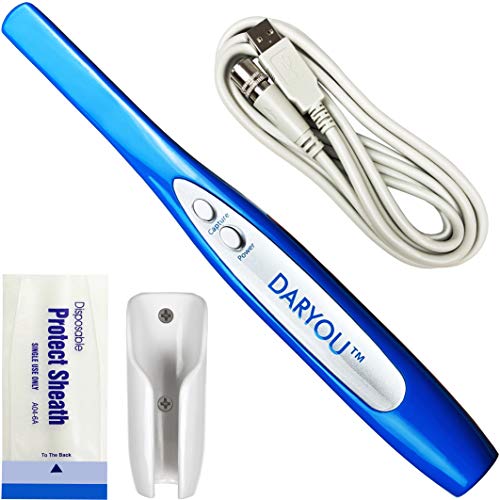
Best for broad software integration: DARYOU DY-50 Intraoral Camera Dental Camera Super Clear Button Driver Included Work W/Eaglesoft Dexis More


The DY-50 is worth considering if software compatibility is your top concern and you want a camera that is clearly positioned for integration with many common imaging systems. It includes a capture-button driver, is designed for direct USB use, and comes with software and accessories that can simplify a first-time setup. For buyers who want a proven compatibility-first option, it remains a strong contender.
- ✓ Works with a long list of imaging software platforms
- ✓ Capture button driver included
- ✓ Direct USB connection with no extra hardware required
- ✓ Auto-focus and anti-fog lens design
- ✓ Includes software and accessory bundle
- ✗ Best fit depends heavily on whether your software is on the supported list
- ✗ Not ideal if you want the newest design refinements
- ✗ Buyers should avoid it if they plan to use unsupported software
Budget Guide: What You Get at Each Tier
Budget tier
Budget models are usually the simplest way to get into home intraoral imaging without paying for extra refinements you may not need. At this level, you should expect core functions like USB connection, basic autofocus, and support for common imaging software. The tradeoff is usually fewer comfort upgrades, less polished lens design, and a narrower feature set.
Mid-range tier
Mid-range cameras typically offer the best balance for most home buyers. You’re more likely to get stronger image clarity, better ergonomics, broader compatibility, and more helpful support materials. This is often the sweet spot if you want dependable performance without stepping into a more specialized premium model.
Premium tier
Premium options are usually the best choice for buyers who want the most refined combination of compatibility, image quality, and usability. Expect better lens design, improved handling, more polished integration support, and sometimes warranty or remote assistance benefits. If you plan to use the camera often, the premium tier can feel easier and more dependable over time.
Frequently Asked Questions
What is the most important feature when choosing a home intraoral camera?
Compatibility is usually the most important feature because the camera has to work with your computer and imaging software. After that, image clarity and ease of setup matter most for everyday use.
Do I need special software to use a home intraoral camera?
Some cameras include their own software, while others rely on drivers or integration with imaging programs. Before buying, check whether the camera supports your operating system and whether it needs bundled software or a capture driver.
Is a smaller camera tip better for home use?
Often, yes. A thinner tip can make it easier to reach back teeth and tight spaces, which is helpful if you want to inspect hard-to-see areas or capture clearer images from different angles.
Should I choose autofocus or fixed focus?
Autofocus can be more flexible, while fixed focus can feel simpler and faster for some users. If you want easier point-and-shoot operation, autofocus is a good starting point; if you want consistent close-range capture, fixed focus may work well.
How do I know if a camera will work with my setup?
Check the product’s supported software list, operating system compatibility, and whether it includes the necessary driver. If your software is not clearly listed, contact the seller before buying to avoid integration problems.
Pros
- + Broad software compatibility
- + USB plug-and-play setup
- + Clearer images with autofocus or improved lenses
- + Helpful support and tutorials
- + Slim tips help reach tight areas
Cons
- – Compatibility can be software-specific
- – Some models need drivers or bundled software
- – Fixed-focus designs may limit flexibility
- – Premium options may be more than casual users need
Frequently asked questions
- What is the most important feature when choosing a home intraoral camera?
- Compatibility is usually the most important feature because the camera has to work with your computer and imaging software. After that, image clarity and ease of setup matter most for everyday use.
- Do I need special software to use a home intraoral camera?
- Some cameras include their own software, while others rely on drivers or integration with imaging programs. Before buying, check whether the camera supports your operating system and whether it needs bundled software or a capture driver.
- Is a smaller camera tip better for home use?
- Often, yes. A thinner tip can make it easier to reach back teeth and tight spaces, which is helpful if you want to inspect hard-to-see areas or capture clearer images from different angles.
- Should I choose autofocus or fixed focus?
- Autofocus can be more flexible, while fixed focus can feel simpler and faster for some users. If you want easier point-and-shoot operation, autofocus is a good starting point; if you want consistent close-range capture, fixed focus may work well.
- How do I know if a camera will work with my setup?
- Check the product’s supported software list, operating system compatibility, and whether it includes the necessary driver. If your software is not clearly listed, contact the seller before buying to avoid integration problems.
Score breakdown
- value
- 8.0
- usability
- 8.0
- durability
- 7.0
- performance
- 8.0
- buyerFeedback
- 8.0
Get the Full Beauty & Personal Care Buyer's Guide
Join our free newsletter — we'll send our latest Beauty & Personal Care picks, specs and verdicts straight to your inbox.
Free. No spam. Unsubscribe anytime.
Was this review helpful?
Be the first to share your feedback on this review.
Sign in to vote and let us know what you think.
Discussion (0)
No comments yet. Be the first to start the discussion.
Related Reviews

3 Best Rechargeable Interdental Cleaners in 2026 — Easier Flossing for Braces, Travel, and Sensitive Gums
If string floss feels slow, awkward, or hard to keep up with, a rechargeable interdental cleaner can make daily oral care much easier. The best rechargeable interdental cleaners 2026 shoppers want usually combine portable design, strong cleaning action, and simple charging so you can stick with the

Burst Pro 2.0 Sonic Toothbrush for Adults (White) Review (2026): Specs, Pros & Cons, and Who It's For
Check Price on Amazon →

8 Best At-Home Dental Polishing Kits in 2026 — Brighter Smiles, Easier Stain Removal
If coffee, tea, red wine, or tobacco stains are dulling your smile, the best at-home dental polishing kits 2026 can help you tackle surface discoloration without complicated tools. This roundup focuses on kits that combine multiple polishing heads, adjustable modes, LED guidance, and rechargeable co