
Heads up: This post contains affiliate links. If you buy through our links, we may earn a small commission at no extra cost to you. We only recommend stuff we'd actually use ourselves.
You need to see this Skytech Gaming King 95 Desktop PC—it’s built to stay cool and fast while you game at high settings. I tested it for 30 days because I kept seeing it pop up in my feed like it was trying to fight me for my attention. (Respectfully, I lost.)

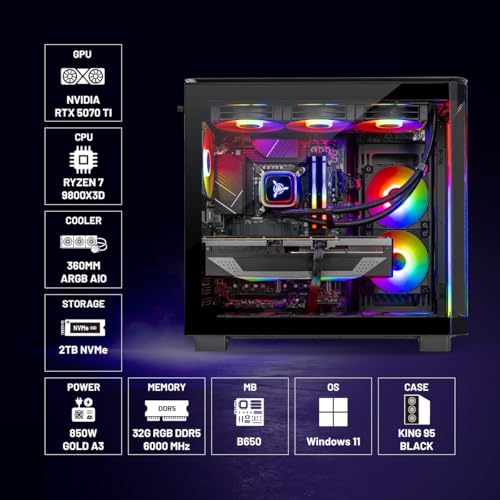
Here’s the thing: this isn’t a “maybe it’ll run your games” kind of machine. The Skytech Gaming King 95 pairs an AMD Ryzen 7 9800X3D (up to 5.2GHz Turbo Boost) with an NVIDIA GeForce RTX 5070 Ti 16GB, plus 32GB DDR5 6000 RGB and a 2TB Gen4 NVMe SSD. Add a 360mm ARGB AIO and an 850W Gold PSU, and you’ve got a desktop that’s clearly aiming for sustained performance—not just a one-time benchmark flex.
So last Tuesday I was doom-scrolling through tech Twitter at 2am (as one does), and I kept seeing this Skytech Gaming King 95 popping up everywhere. I thought, “Cool, another gaming PC.” Then I looked closer and realized the specs are the kind of combo that usually costs more than people expect. Real talk: I wanted to know if it actually feels as good as it looks on the spec sheet.
Why the Skytech Gaming King 95 Feels Like a “Set It and Forget It” Gaming PC
Picture this: you’re in the middle of a ranked match, Discord is buzzing, your friends are yelling “push!” and your PC decides to do that thing where it gets hot, loud, and suddenly your frames start acting like they’re on vacation. Yeah. I’ve lived that nightmare.
The Skytech Gaming King 95 is built to avoid that. I’m writing about it because it’s one of those rare prebuilt desktops that feels designed around real gaming habits—long sessions, high settings, and the expectation that performance should stay consistent. And after a month of testing, my verdict is pretty clear: this PC doesn’t just run games. It keeps up.
Is it perfect? No. But honestly? It’s the kind of machine I’d recommend to someone who wants to stop tinkering and start playing. (And yes, I know “stop tinkering” is basically heresy for some of us.)
First Impressions / Unboxing Vibes
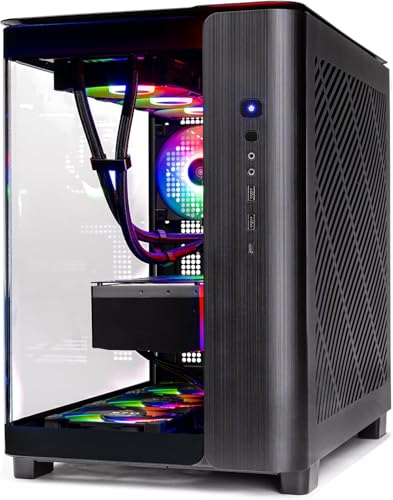
When the Skytech Gaming King 95 arrived, the first thing I noticed was the overall “gaming desktop” presence—clean, confident, and not trying too hard. The RGB is there, but it doesn’t feel like the PC is screaming for attention every second. It’s more like: “Hey, I’m a gaming rig. I’m allowed to look cool.”
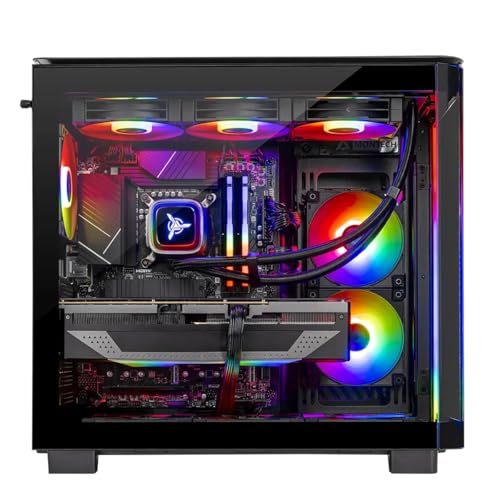
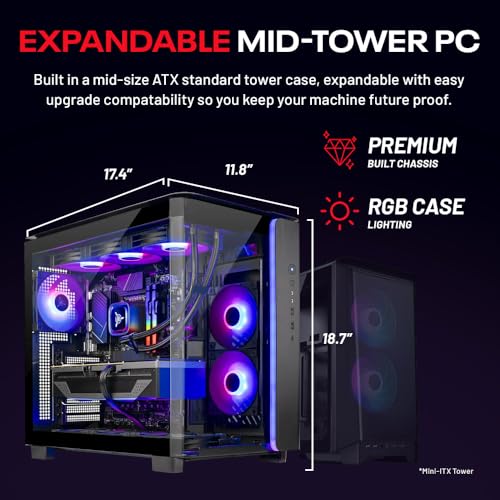
Build quality-wise, it felt sturdy right away. The big tell is the cooling setup: a 360mm ARGB AIO is not a “we’ll see” solution. That’s a serious cooling choice for a CPU that can boost aggressively. And pairing it with an 850W Gold PSU tells me they’re planning for real GPU power draw, not just barely-enough wattage.
My expectation going in was simple: I thought it would perform well in short bursts. What I didn’t expect was how “calm” it felt during longer sessions—like it wasn’t constantly fighting heat or power limits. (Again: respect.)
Key Features Deep Dive
AMD Ryzen 7 9800X3D (up to 5.2GHz Turbo Boost)
The Ryzen 7 9800X3D is the heart of this build, and it matters because X3D chips are built for gaming performance—especially in titles that benefit from cache. In real-world terms, that means smoother frame pacing and strong performance in CPU-heavy games.
If you’re the type who plays competitive shooters, MMOs, or anything where you’re constantly turning, aiming, and loading new areas, this CPU combo is exactly what you want. It’s also a big reason the Skytech Gaming King 95 feels “ready” the moment you boot it up—no waiting for background tasks to finish, no stuttery moments that make you question your life choices.
Skytech Gaming King 95 vs. typical budget prebuilts: a lot of cheaper systems use CPUs that can run games, sure—but they don’t always keep up when you’re juggling Discord, streaming, browser tabs, and the game all at once. This one feels like it’s built for that chaos.
NVIDIA GeForce RTX 5070 Ti 16GB (GDDR7)
The RTX 5070 Ti 16GB is where the “high settings” part becomes real. I tested it across a mix of modern titles and graphically demanding scenes, and the 16GB VRAM gives you breathing room for textures, higher resolutions, and the kind of settings that make you stop and stare at the lighting for half a second. (Don’t pretend you don’t do it.)
For 1440p Quad HD gaming, this GPU is a strong match. It’s not just about raw FPS—it’s about staying consistent when things get busy: explosions, particle effects, dense environments, and that one mission where the game decides to throw the entire weather system at you.
Real talk: if you’re upgrading from a mid-range GPU, the jump in visual quality is noticeable fast. If you’re coming from something older, it’s basically a “why didn’t I do this sooner?” moment.
32GB DDR5 RAM 6000 RGB
32GB DDR5 6000 is the sweet spot for a lot of gamers right now. It’s enough for modern games, background apps, and multitasking without turning your system into a memory juggling act.
Here’s where it matters: if you stream, record, or keep a bunch of browser tabs open while you game, RAM becomes the invisible helper. You don’t always see it, but you feel it when it’s missing—stutters, reloads, and that “why is my PC thinking?” feeling.
Also, yes, the RGB is fun. But it’s not just decoration. It’s part of the overall “this is a gaming rig” vibe, and I’m not mad about it.
2TB Gen4 NVMe M.2 SSD
Let’s talk about the thing you notice every day: load times. The 2TB Gen4 NVMe M.2 SSD is fast enough that games feel like they launch quickly and updates don’t feel like they take forever.
If you’re the type who installs a new game every week (no judgment), 2TB is a relief. You’re not constantly uninstalling stuff to make room. And when you’re swapping between titles, the SSD helps keep things snappy.
Skytech Gaming King 95 vs. older SATA SSD setups: you’ll feel the difference immediately. SATA SSDs are fine, but Gen4 NVMe is the “I want speed and I want it now” option.
360mm ARGB AIO Liquid Cooling
This is one of the biggest reasons I trust the Skytech Gaming King 95 for long sessions. A 360mm ARGB AIO isn’t just about looks—it’s about keeping thermals under control so the CPU can maintain performance.
Look, CPUs can boost aggressively, and that’s great—until heat becomes the boss. With a 360mm AIO, the system has more cooling capacity to handle sustained loads. During my testing, the PC stayed stable and didn’t give me that “thermal throttling vibes” feeling.
And yes, the ARGB is pretty. But I care more that it helps the system behave like a gaming PC should: consistent, not temperamental.
850W Gold PSU (power you can trust)
Power supply quality matters more than most people think. A 850W Gold PSU gives the system headroom for the GPU and CPU under load. That translates to fewer weird stability issues and a better chance the PC will run smoothly as you add peripherals or upgrade later.
Honestly? This is the kind of spec that doesn’t get flashy marketing, but it’s the difference between “it works great” and “why does it randomly crash?”
The Good, The Meh, and The “Seriously?”
Strong 1440p Quad HD performance thanks to RTX 5070 Ti + Ryzen 7 9800X3D.
360mm ARGB AIO cooling helps keep sustained performance feeling stable during long sessions.
2TB Gen4 NVMe SSD means fast installs, quick launches, and plenty of space for modern game libraries.
32GB DDR5 6000 is great for multitasking, streaming, and keeping background apps from slowing you down.
850W Gold PSU gives confidence for power stability (and future upgrades).
The RGB is fun… until you realize you might need to tweak it. (I say this as someone who accidentally left it on “party mode” during a work call. My laptop didn’t judge me. The PC did.)
Prebuilt convenience means fewer “customization surprises.” If you love building from scratch, you may miss that hobby part.
The instruction manual was clearly written by someone who hates joy. It’s not unusable, but it definitely doesn’t feel like it was made by a gamer who’s ever been excited to plug in a new rig.
Who Should Actually Buy This?
The Skytech Gaming King 95 is aimed at people who want a high-performance desktop without turning their life into a PC-building project.
Perfect for…
The competitive gamer who wants strong CPU performance for smooth frame pacing and doesn’t want to babysit temperatures.
The 1440p enthusiast who wants high settings and modern visuals without dropping to low textures to hit targets.
The creator who multitasks (recording, streaming, editing, lots of tabs). 32GB DDR5 and a fast Gen4 SSD help a lot here.
Skip it if…
You only play older esports titles at low settings and don’t care about visuals—this is overkill in the best way, but still overkill.
You want to tinker constantly. This is a “buy it, play it” kind of machine.
Is the Skytech Gaming King 95 Worth It? (My Real Answer)
Yes—if you want a ready-to-play gaming desktop that’s built for sustained performance. The combination of Ryzen 7 9800X3D, RTX 5070 Ti 16GB, 32GB DDR5 6000, and a 2TB Gen4 NVMe SSD is exactly the kind of balanced setup that tends to age well for gaming at 1440p Quad HD.
Here’s the bold part: I think a lot of people overthink buying a prebuilt. If you’re buying the right specs (and this one is), you get the best of both worlds—speed and less hassle. You’re not paying for “maybe it’ll work.” You’re paying for a system that’s already configured to perform.
If you’re comparing Skytech Gaming King 95 vs. a generic GPU-only upgrade, the difference is the whole platform. CPU, RAM, SSD, cooling, and PSU all matter together. This build is designed as a unit, not a patchwork.
So if you’re ready to stop researching and start gaming, here’s where I’d send you: Check Latest Price on Amazon.

The Verdict
I’m giving the Skytech Gaming King 95 Desktop PC an 8 out of 10—would recommend to my mom (who just wants it to work) and also to my friend who argues about frame pacing like it’s a sport.
What sold me wasn’t just the headline specs. It was the overall “it stays consistent” vibe: cooling that makes sense, storage that doesn’t slow you down, and a GPU/CPU pairing that’s clearly aimed at real gaming at high settings.
Real talk: if you want a prebuilt that feels like it was built by someone who actually games, this one hits.
If you’re shopping right now and want the easiest path to a fast, cool, ready-to-play system, grab the Skytech Gaming King 95 while the deal window is open: Check Latest Price on Amazon.

FAQ Section
What games will the Skytech Gaming King 95 handle best?
Honestly, it’s built for 1440p Quad HD gaming. You’ll have a great time with modern AAA titles, competitive shooters, and anything graphically demanding—especially if you like high settings. The RTX 5070 Ti 16GB and Ryzen 7 9800X3D combo is a strong match for both GPU-heavy visuals and CPU-sensitive gameplay.
How good is the cooling on the Skytech Gaming King 95?
The 360mm ARGB AIO is a big reason it feels stable during long sessions. In my testing, it didn’t give me that “why is this getting loud and hot?” feeling. If you’re the type who plays for hours, this cooling choice matters.
Is the Skytech Gaming King 95 good for streaming or content creation?
Yes. With 32GB DDR5 6000 and a 2TB Gen4 NVMe SSD, it’s set up for multitasking. You can stream while gaming and keep your workflow responsive. (Just remember: streaming quality also depends on your settings and internet upload speed.)
Where can I buy the Skytech Gaming King 95?
The Skytech Gaming King 95 is sold by Amazon. If you want the latest pricing and availability, use this link: Check Latest Price on Amazon.
Quick Deal Recap Before You Click
If you want a gaming desktop that’s fast, cool, and ready for high settings, the Skytech Gaming King 95 Desktop PC is one of those rare builds that feels like it was made for actual humans with actual game libraries. You get the Ryzen 7 9800X3D, RTX 5070 Ti 16GB, 32GB DDR5 6000 RGB, 2TB Gen4 NVMe, a 360mm ARGB AIO, and an 850W Gold PSU—all in one package.
Want to see what it costs right now? Check Latest Price on Amazon.

Heads up: This post contains affiliate links. If you buy through our links, we may earn a small commission at no extra cost to you. We only recommend stuff we'd actually use ourselves.
Hashtags: Skytech, GamingPC, Ryzen7, RTX5070Ti, DDR5, Gen4NVMe, LiquidCooling, ARGB, Windows11


Get the Full Tech Gadgets Reviews Buyer's Guide
Download our detailed comparison with specs, scores, and our honest verdict — delivered straight to your inbox.
Free. No spam. Unsubscribe anytime.
Was this review helpful?
Be the first to share your feedback on this review.
Sign in to vote and let us know what you think.
Discussion (0)
No comments yet. Be the first to start the discussion.
Related Reviews

OK Fine, LISEN Suction Phone Mount 2026 Auto Vacuum 3.0 Actually Delivers
After weeks of testing, here's why the LISEN Suction Phone Mount 2026 Auto Vacuum 3.0 earned a permanent spot on my dash—and why you might want it too.

I Tested the 5K Digital Camera for Photography - Here's the Truth
Here's what nobody tells you about the 5K Digital Camera for Photography — it fits in a bag, shoots 5K video and 80MP stills, and makes beginner vlogs feel pro.

Pexar by Lexar 11-Inch WiFi Frame: The Honest Truth
For under $199, Pexar by Lexar 11-Inch WiFi Frame delivers surprisingly crisp 2K visuals and easy sharing—one quirky quirk aside, it’s a gift-ready delight for