

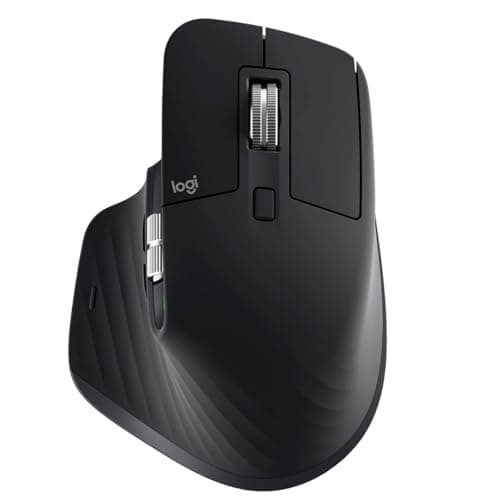
Logitech MX Master 3S long term review (2026): Specs, Pros & Cons, and Who It's For
Key Specifications
| Specification | Details |
|---|---|
| Product | Logitech MX Master 3S |
| Connectivity | Bluetooth, USB-C charging |
| Sensor | 8,000 DPI, track on glass |
| Scrolling | MagSpeed electromagnetic scroll wheel |
| Click Noise | Quiet Clicks with 90% less noise |
| Ergonomics | Right-handed ergonomic shape with thumb controls |
| Customization | Logi Options+ app-specific profiles |
| Prime | ✓ Prime |
Design & Build Quality
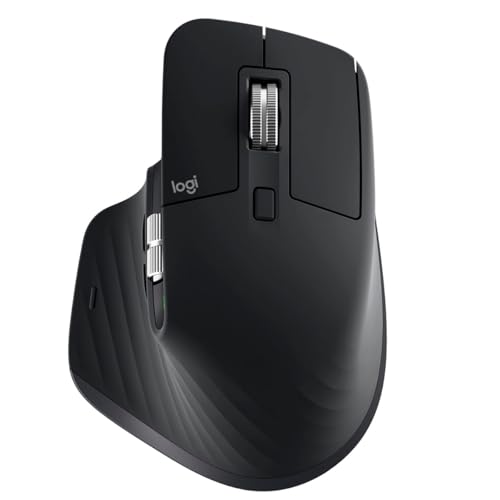
The Logitech MX Master 3S is built around a simple idea: make long work sessions easier on the hand. Research-based reviews consistently praise its sculpted right-handed shape, high thumb rest, and well-placed controls, all of which support a more natural wrist position than a typical flat mouse.
Related Reviews
Owner feedback over time also suggests the build feels premium and durable, with a weight and shape that many productivity users come to prefer quickly. That said, the larger body will not suit everyone, especially if you have smaller hands or prefer a lightweight travel mouse.

Design strengths that matter over time
- Ergonomic silhouette for a more natural wrist posture
- Thumb controls that reduce repetitive movement for productivity tasks
- Premium-feeling construction that suits daily office or home use
Performance & Features

Performance is where the MX Master 3S earns its reputation. The 8,000 DPI sensor and track-on-glass support make it versatile across desks, laptops, and mixed workspaces, while published comparisons frequently point to its excellent pointer control for office and creative workflows.
The MagSpeed wheel is another standout. It is built for fast navigation and fine control, and many long-term owners call it one of the best reasons to buy the mouse in the first place. Logitech also claims the click mechanism is 90% quieter, and that lines up with the broader feedback: it is noticeably quieter than the older MX Master generation without losing the tactile feel.
Logi Options+ is a major part of the experience. App-specific profiles let you customize buttons for different tasks, which is especially valuable if you switch between browsers, spreadsheets, design tools, or editing software. For many buyers, this software layer is what turns a good mouse into a productivity tool.

What stands out most
- 8K DPI sensor with track-on-glass support for flexible use
- MagSpeed scrolling for fast document and timeline navigation
- Quiet clicks that are better for shared spaces
- Logi Options+ customization for app-specific workflows
Value for Money
The MX Master 3S is not a budget mouse, and that is important to say upfront. Its value depends on whether you will actually use the premium features: ergonomic comfort, advanced scrolling, quiet clicks, and deep customization. If you only need a basic wireless mouse, there are cheaper options that will do the job.
But for users who spend hours at a desk, the research strongly suggests the MX Master 3S justifies its price better than most productivity mice. The combination of comfort, software support, and feature depth makes it a long-term buy rather than a short-term accessory.
✓ Prime availability also helps the value case for buyers who want fast shipping and easier returns.
Price varies — check Amazon for current pricing
Pros
- Excellent ergonomic shape for long work sessions
- MagSpeed scrolling is fast, precise, and quiet
- 8,000 DPI sensor works on glass and other surfaces
- Quiet Clicks reduce noise in shared spaces
- Logi Options+ adds strong app-specific customization
Cons
- Premium price compared with basic wireless mice
- Large right-handed design is not ideal for everyone
- Best features depend on using Logitech software
- Not the best pick if you want a lightweight travel mouse
Who Should Buy This
The MX Master 3S is best for people who use a mouse for many hours a day and want a more comfortable, more efficient setup. It is especially strong for office workers, remote workers, spreadsheet users, writers, researchers, and anyone who values fast scrolling and button customization.
It is also a smart choice if you work in a shared environment and want quieter clicks without sacrificing a premium feel. If your workflow involves switching between apps and managing lots of documents, the feature set is genuinely useful rather than just flashy.
Who Should Look Elsewhere
You should probably look elsewhere if you want a compact mouse, a low-cost option, or a model that is equally suitable for left-handed use. The MX Master 3S is purpose-built for productivity, and its size and shape reflect that.
Gamers and frequent travelers may also prefer a different style of mouse. While the MX Master 3S is highly capable, it is not designed as a gaming-first or ultra-portable device.
Final Verdict
The Logitech MX Master 3S remains an easy recommendation for productivity-focused buyers in 2026. Research and owner feedback consistently point to outstanding comfort, excellent scrolling, quiet clicks, and customization that actually improves daily work.
If you spend serious time at a desk, this is a buy. If you want a cheap, small, or gaming-oriented mouse, skip it and choose something more specialized.
Frequently Asked Questions
Is the Logitech MX Master 3S worth it in 2026?
Yes, for productivity users it still looks worth it based on specs, owner feedback, and comparison reviews. Its comfort, scrolling, and customization remain standout strengths.
Is the MX Master 3S good for long-term use?
Yes. Long-term owner feedback generally supports its durability and comfort, especially for daily office or home office work.
Does the MX Master 3S work on glass?
Yes. Logitech lists track-on-glass support with its 8,000 DPI sensor, which is one of the mouse’s most useful practical features.
Is the MX Master 3S quiet?
Yes. Logitech’s Quiet Clicks are designed to reduce click noise by 90%, and reviews commonly describe it as much quieter than older MX Master models.
Who should not buy the MX Master 3S?
People who want a small travel mouse, a left-handed design, or a lower-priced basic mouse should probably look elsewhere.
Pros
- + Excellent ergonomic shape
- + MagSpeed scrolling is fast and quiet
- + 8,000 DPI sensor works on glass
- + Quiet Clicks reduce noise
- + Strong Logi Options+ customization
Cons
- – Premium price
- – Large right-handed design
- – Depends on Logitech software
- – Not ideal for travel
Frequently asked questions
- Is the Logitech MX Master 3S worth it in 2026?
- Yes, for productivity users it still looks worth it based on specs, owner feedback, and comparison reviews. Its comfort, scrolling, and customization remain standout strengths.
- Is the MX Master 3S good for long-term use?
- Yes. Long-term owner feedback generally supports its durability and comfort, especially for daily office or home office work.
- Does the MX Master 3S work on glass?
- Yes. Logitech lists track-on-glass support with its 8,000 DPI sensor, which is one of the mouse’s most useful practical features.
- Is the MX Master 3S quiet?
- Yes. Logitech’s Quiet Clicks are designed to reduce click noise by 90%, and reviews commonly describe it as much quieter than older MX Master models.
- Who should not buy the MX Master 3S?
- People who want a small travel mouse, a left-handed design, or a lower-priced basic mouse should probably look elsewhere.
Score breakdown
- value
- 8.0
- usability
- 9.2
- durability
- 8.5
- performance
- 9.0
- buyerFeedback
- 8.7
Get the Full Home Buyer's Guide
Join our free newsletter — we'll send our latest Home picks, specs and verdicts straight to your inbox.
Free. No spam. Unsubscribe anytime.
Was this review helpful?
Be the first to share your feedback on this review.
Sign in to vote and let us know what you think.
Discussion (0)
No comments yet. Be the first to start the discussion.
Related Reviews
8 Best Office Chairs for Short People in 2026 — Better Fit, Better Posture, Less Foot Dangle
If your feet don’t sit flat, your knees feel cramped, or your desk chair forces you into a slouch, you’re not alone. The best office chairs for short people solve that problem with lower seat heights, supportive cushions, flip-up arms, and adjustability that actually works for petite frames. In this
8 Best Office Chairs for Tall People in 2026 — Extra Height, Bigger Seats, and Better Back Support
If you’re tall, you already know the problem: too-short seat pans, low headrests, weak lumbar support, and armrests that hit in all the wrong places. The right chair should give your legs room, support your upper back, and stay comfortable through long workdays without feeling cramped. This roundup
8 Best Small Standing Desks in 2026 — Space-Saving Picks for Tiny Home Offices
If you’re trying to fit a standing desk into a bedroom, apartment corner, or shared workspace, the wrong size can make your setup feel cramped fast. The best small standing desks solve that problem by balancing compact footprints, stable frames, and easy height adjustment without eating up your room