
Quick Summary
If you want subscription‑free 4K outdoor cameras with built‑in solar, powerful optics, and local NAS storage, the EufyCam S3 Pro is the most compelling package in its class right now. The system pairs high-resolution 4K captures, a hefty battery with integrated panels, and a HomeBase NAS hub so footage stays under your roof rather than behind a cloud paywall. Eufy advertises extreme endurance — up to 365 days per charge under a light daily load — and the HomeBase 3 supports expandable, locally attached storage so you can keep weeks or months of footage if you like
But buyer beware: a growing thread of user reports shows recent firmware updates have caused higher-than-expected battery drain and occasional connectivity hiccups. That’s important because the S3 Pro’s selling point is low-maintenance solar endurance; when software undermines that, it changes the ownership math. I’ll break down the numbers, the likely real-world experience, and exactly when to jump on a deal
Buy on Amazon: EufyCam S3 Pro. Click here
Alternative on Amazon: Ring Battery Doorbell Pro. Click here
Alternative on Amazon: Google Nest Hub Max. Click here

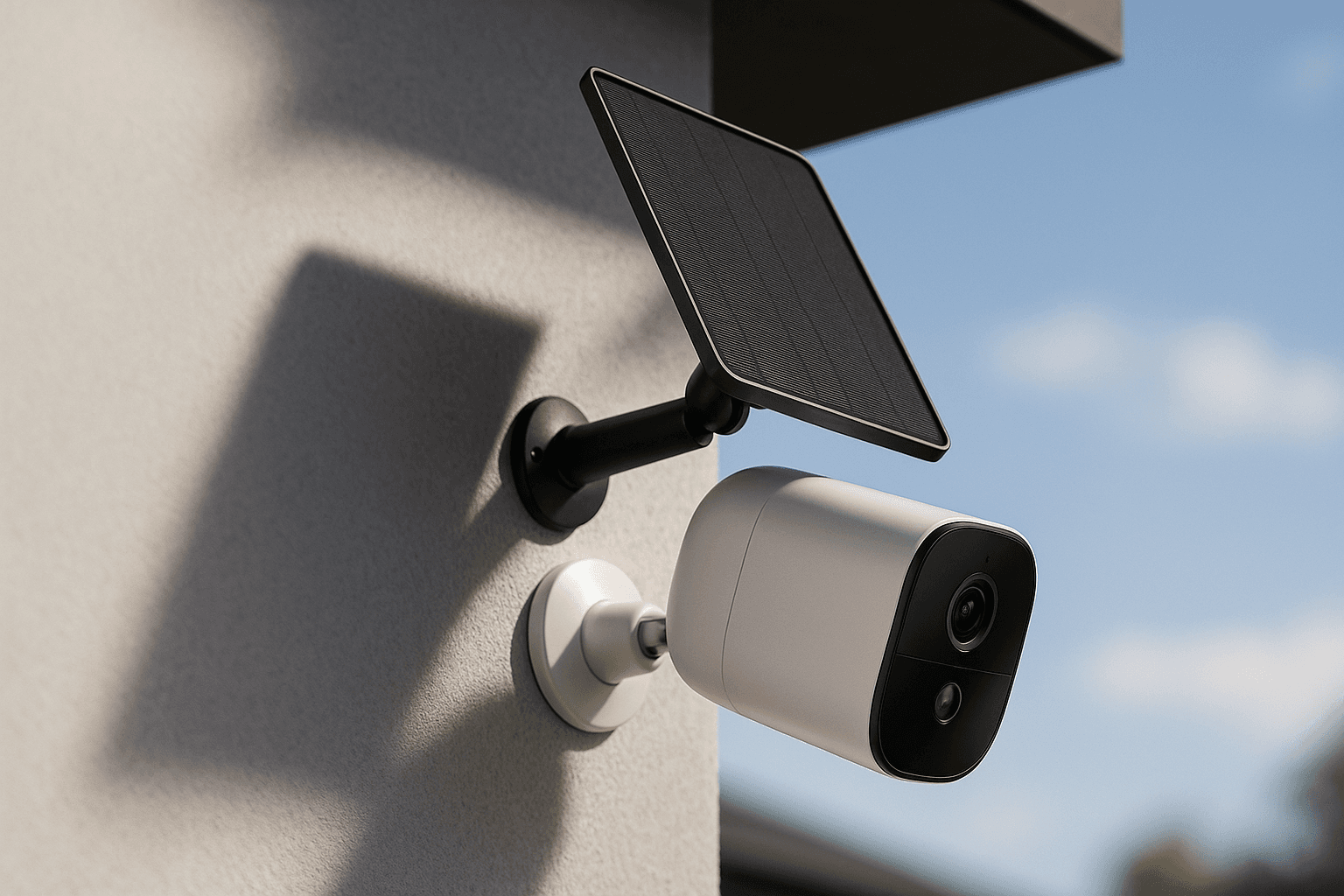
Photo 1: eufy Security eufyCam S3 Pro 2-Cam Kit, Solar Camera Outdoor Wireless, MaxColor Night Vision, 4K Security Camera with Solar Panel, Face Recognition AI, Expandable Local Storage, No Monthly Fee product image
Price Range and Deal Timing
Eufy currently sells the S3 Pro in several kits and add‑on packs, with MSRP tiers you should expect to see around these levels in the U.S
• Add‑on single camera: about $219–$249
• 2‑camera kit (HomeBase 3 included): $549.99 (typical MSRP). Retailers sometimes drop this into the high‑$300s during flash sales
• 3‑ and 4‑camera kits: $699–$879 (bundles with an included 1TB HDD push the price higher
• Large systems (6 cams, HomeBase Pro bundles) scale up to ~$1,200+ depending on drives and alarm integrations
Deal-watch guidance
• Buy now if you find a 2‑camera kit under $450 or a 4‑camera bundle with an included 1TB drive under $650 — those are historically strong prices and represent meaningful savings over MSRP
• Wait or pick an add‑on camera if you’re concerned about battery/firmware reports; single cam add‑ons often go on sale and let you test one camera before committing to a multi‑cam install
Technical Snapshot (Practical Numbers
Core Hardware and Feature Profile
• Video resolution: 4K UHD (3840 × 2160) per camera; excellent detail for faces and plates when not limited by integrations
• Sensor and optics: large sensor with a bright f/1.0 aperture and ~135° field of view to keep detail sharp without extreme fisheye distortion
• Battery: 13,000 mAh internal battery per camera; SolarPlus tech with an integrated top panel claimed to maintain charge on an hour of sun/day. Manufacturer cites up to 365 days per full charge based on a conservative daily recording load (300 seconds/day). Real usage will vary with motion frequency, temperature, and recording length
• Local storage: HomeBase 3 includes 16GB built‑in flash and an internal 2.5" SATA bay for up to 16TB of HDD/SSD — you choose retention length. HomeBase 3 can host up to 16 cameras
• Alerts & AI: Radar + PIR motion sensing plus AI classification (people, vehicles, pets, faces) to reduce false positives and enable classified notifications. Cross‑camera stitching/tracking is available for multi‑cam events
• Integrations: Works with Alexa, Google Assistant, and Apple HomeKit Secure Video (note: enabling HomeKit caps streams at 1080p
Performance and Daily-Use Metrics
• Night performance: Color night vision —night recordings retain color where many rivals fall back to monochrome. Expect better low‑light detail than typical battery cams
• Audio & deterrence: Two‑way audio with AI noise reduction (effective to ~20–25 ft) plus a 100 dB siren and custom voice warnings. Good for confrontation or scaring away intruders
• Expected endurance: Manufacturer claim = up to 365 days per charge under light daily use (300s/day). In real community use, heavy motion areas, poor solar exposure, cold climates, or firmware bugs can cut that dramatically. Plan realistic recharge/backup strategies: wired power to a nearby outlet, or add external solar panels for shaded installs
Value and Ownership Math
• Upfront vs recurring: The major value prop is no mandatory cloud subscription. If you plan to store on local drives, ownership costs are a one‑time hardware buy plus optional cloud backup. Add a 1TB SSD/HDD if you want rolling 30+ days of footage at higher bitrates
• Drive sizing rule of thumb: For 4K at modest bitrates and motion-only recording, 1TB can cover several weeks across 3–4 cameras; 4TB–8TB gets you comfortable multi‑month retention depending on motion density and clip length. (Exact use depends on bitrate settings and recording rules
Head-to-Head Overview
• Versus battery video doorbells: The S3 Pro is a dedicated outdoor camera optimized for range, night color, and storage flexibility. A battery doorbell will catch doorstep interactions but won’t match the S3 Pro’s optics or solar endurance for perimeter coverage
• Versus smart displays (like wall‑mounted hubs): A display provides convenience and local controls, but it’s not a substitute for outdoor‑rated 4K capture or NAS storage. Pairing the S3 Pro with a local smart display gives the best of both worlds: crisp camera footage plus an in‑home control surface
Bottom line: choose the S3 Pro when 4K detail, local control, and solar convenience are priorities; choose a doorbell or hub first when your primary goal is doorstep interaction or a family command center
Who Should Buy This
• Homeowners who want subscription‑free 4K video and retain footage locally
• Installers who prefer a NAS approach (drive-backed HomeBase 3) and want the flexibility to scale to many cameras
• People who prioritize color night vision and plate/face readability in low light
• Buyers willing to spot‑test a single camera if they want to confirm firmware stability before committing to multi‑cam installs
Comparison Snapshot
If you’re deciding between the Eufy S3 Pro and mainstream alternatives, here’s how to think about it

Photo 2: eufy Security eufyCam S3 Pro 2-Cam Kit, Solar Camera Outdoor Wireless, MaxColor Night Vision, 4K Security Camera with Solar Panel, Face Recognition AI, Expandable Local Storage, No Monthly Fee product image
• Cost to operate: S3 Pro — low recurring cost (local storage), higher upfront; many cloud‑centric systems — lower initial cost but monthly fees
• Image quality: S3 Pro clearly wins for 4K detail and color night vision. If you need the clearest license‑plate and facial detail from an outdoor camera, it’s the superior option
• Ecosystem & integrations: S3 Pro supports major assistants and HomeKit Secure Video but sacrifices 4K when HomeKit is enabled. If HomeKit at full resolution is essential, consider alternatives
• Reliability: Hardware looks strong (IP67, solid optics), but software/firmware stability is currently the wildcard — community reports of accelerated battery drain after certain updates mean you should test before large rollouts
Buying Advice and Value Check
• Start with one add‑on camera or the 2‑cam kit to validate solar placement and battery behavior at your property. If you get the expected endurance for weeks, scale up
• Buy a kit that includes HomeBase 3 and, if you want peace of mind, a 1TB or 2TB SSD for immediate local retention. Kits that bundle a drive often deliver a better one‑time cost-per‑camera
• If you live in a northern or heavily shaded location, budget for external solar panels or plan wired power — integrated panels are helpful but mounting location can limit their effectiveness
• Keep firmware updates on your radar: set a maintenance habit of checking battery graphs and forums for any post‑update issues; hold off on immediate updates if you rely on maximum uptime in critical spots until early adopters confirm stability. Community feedback has flagged fast drains after some base‑station updates
Final Verdict
The EufyCam S3 Pro is a rare mainstream camera that pairs true 4K optical horsepower with a local‑first storage model and integrated solar charging. For buyers prioritizing image quality and ownership control—no subscriptions, flexible local archives, and strong low‑light color—the S3 Pro is an excellent choice. Hardware and feature design are top tier
That said, value is contingent on software stability. Community reports of battery drain after certain firmware pushes have introduced risk to the S3 Pro’s core promise of low‑maintenance solar endurance. If you want to be an early adopter, buy a single cam or the 2‑cam kit and watch battery telemetry for a few weeks. If you need turn‑key, guaranteed long‑term low maintenance today, consider staggering purchases or waiting for a confirmed firmware fix
If price hits the sale windows noted earlier (2‑cam under $450, 4‑cam+drive under $650), the equation tilts toward “buy now and test.” If you’re paying full MSRP and depend on flawless out‑of‑the‑box endurance, you can justify pausing for at least one software cycle
FAQ
Q: Does the EufyCam S3 Pro require a subscription to record? A: No — the system is explicitly built around local storage on the HomeBase 3; cloud backup is optional. HomeBase 3 includes 16GB flash and supports internal 2.5" drives up to 16TB

Photo 3: eufy Security eufyCam S3 Pro 2-Cam Kit, Solar Camera Outdoor Wireless, MaxColor Night Vision, 4K Security Camera with Solar Panel, Face Recognition AI, Expandable Local Storage, No Monthly Fee product image
Q: Will HomeKit let me record in full 4K? A: If you enable Apple HomeKit Secure Video, the streams are limited to 1080p, so you’ll lose the S3 Pro’s full 4K resolution while HomeKit is active. If 4K is the priority, run natively through the Eufy app/HomeBase
Q: How long will the battery last in real use? A: The manufacturer cites up to 365 days per charge under light daily recording (300 seconds/day) and with solar replenishment. Real life depends on motion density, temperature, placement, and firmware. There are community reports of cases where battery life has dropped after specific firmware updates, so err on the conservative side and test in your environment
Q: Is the system easy to expand? A: Yes — the HomeBase 3 supports up to 16 cameras; add‑on cameras are sold separately so you can scale camera count and storage independently
Q: Should I buy now or wait for firmware fixes? A: If you can live with testing a single camera and don’t depend on guaranteed month‑long solar uptime immediately, a sale price makes it worth buying and validating. If you need a flawless, low‑touch multi‑camera system for a critical location, consider waiting until community reports show firmware stability across a few update cycles
— End —
Where to Check Pricing
Check latest Amazon listing for EufyCam S3 Pro. Click here
Get the Full Home Appliances Buyer's Guide
Download our detailed comparison with specs, scores, and our honest verdict — delivered straight to your inbox.
Free. No spam. Unsubscribe anytime.
Was this review helpful?
Be the first to share your feedback on this review.
Sign in to vote and let us know what you think.
Discussion (0)
No comments yet. Be the first to start the discussion.
Related Reviews
 Home Appliances
ECOVACS DEEBOT T90 PRO OMNI Robot Vacuum and Mop, 30,000Pa Suction, Instant Self-Cleaning OZMO Roller Mop, TruEdge Deep Edge Cleaning, ZeroTangle, Hot Water Wash & 145°F Air Dry, AI Obstacle Avoidance
For under $1,000, the ECOVACS DEEBOT T90 PRO OMNI delivers more than I expected — and one thing it doesn’t. My real-world verdict after a week of testing.
 Home Appliances
I Tested the Breville Barista Express BES870XL — Here's the Honest Truth
I've tried a lot of home espresso gear, and the Breville Barista Express BES870XL stands out because it combines a burr grinder, precise temp control, and a rea
 Home Appliances
Breville Barista Express Impress Espresso Machine BES876BSS, Brushed Stainless Steel
I've tried a lot of home espresso gear—this Breville BES876BSS nails cafe-quality shots with intelligent dosing, auto-corrected dosing, and assisted tamp in my