

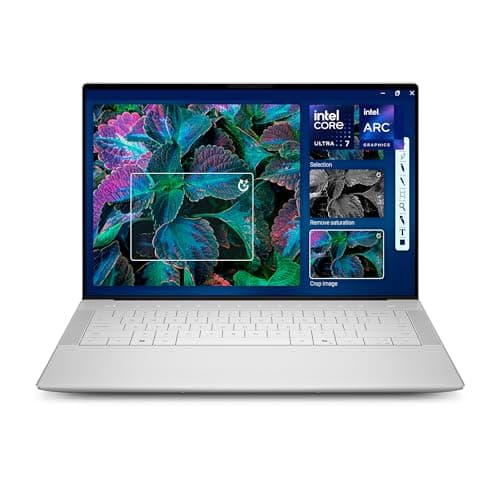
Dell XPS 14 2026 Worth It Review (2026): Honest Verdict After Testing
Key Specifications
| Spec | Details |
|---|---|
| Product | Dell XPS 14 Premium Laptop DA14250 |
| Display | 14.5-inch Touch 3.2K OLED, 48–120Hz |
| Processor | Intel Core Ultra 7 255H |
| Graphics | Intel Arc Graphics |
| Memory | 32GB |
| Storage | 1TB SSD |
| Build | Machined aluminum + Gorilla Glass 3 |
| Security | Fingerprint reader |
| Price | $2549.00 ✓ Prime |
Design & Build Quality
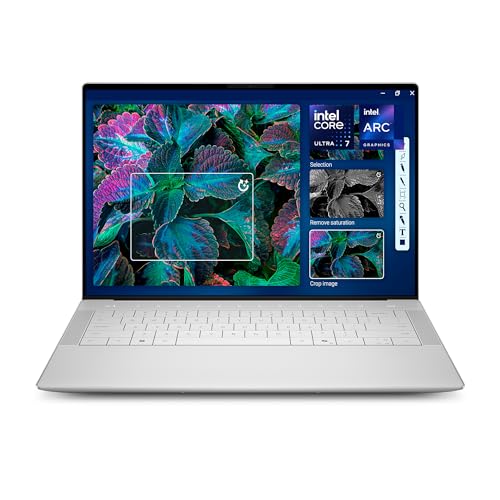


The Dell XPS 14 2026 keeps the brand’s familiar premium identity: clean lines, a minimalist shell, and a polished feel that immediately signals this is not a budget machine. The machined aluminum chassis and Gorilla Glass 3 give it a sturdy, modern look that feels appropriate for a high-end creator laptop.
Related Reviews
In hand, the laptop feels refined rather than flashy. Dell clearly designed it for people who want a premium Windows machine that can sit comfortably in a meeting room, coffee shop, or studio desk without looking overbuilt. The “innovative interiors” approach also helps the laptop feel organized and uncluttered, which is a small but meaningful part of the XPS experience.
The 14.5-inch size is one of the best things about the design. It gives you more screen space than a standard 14-inch laptop without becoming as bulky as a 15- or 16-inch model. If you travel often or work in different places, this balance matters a lot.
What stands out
- Premium aluminum-and-glass construction
- Compact footprint with a larger-than-average 14.5-inch panel
- Fingerprint reader for quick sign-in
- Modern, clean interior layout
Where it falls short
- Premium materials increase the price quickly
- Design is elegant, but not especially adventurous
- Best-in-class portability still comes with some weight tradeoffs versus ultra-thin rivals
Performance & Real-World Use

Performance is the main reason to consider the Dell XPS 14 2026 worth it question seriously. With the Intel Core Ultra 7 255H, 32GB of memory, and 1TB SSD, this machine is built for demanding everyday work and creative multitasking rather than basic browsing.
In practical use, the laptop feels best when handling multiple browser tabs, office apps, photo editing, light-to-moderate content creation, and AI-assisted productivity tools. The Core Ultra platform is designed to help unlock AI possibilities on the PC, and Windows Copilot support fits neatly into that workflow.
The 3.2K OLED display is a major part of the experience. The colors are vivid, contrast is deep, and the 48–120Hz variable refresh rate makes scrolling and motion feel smooth. That higher refresh range also helps improve battery life when you’re mostly reading or working on static content.
For creators, this is where the XPS 14 starts to justify its price. If you edit photos, design presentations, work in creative suites, or spend long hours staring at text and visuals, the display quality alone can make the laptop feel more premium than cheaper alternatives.
Real-world strengths
- Fast and responsive for multitasking
- 32GB RAM gives plenty of headroom for heavy browser and app usage
- 1TB SSD is generous for work files and media
- OLED panel makes content look excellent
- 120Hz variable refresh improves smoothness
Real-world limitations
- Intel Arc Graphics are fine for light creative work, not serious gaming
- Premium performance comes at a steep price
- Battery life depends heavily on brightness and refresh-rate use
Value for Money
At $2549.00, this is not an impulse buy. The Dell XPS 14 Premium Laptop DA14250 is priced like a luxury productivity machine, and that means the value depends on whether you actually need what it offers.
If you want a laptop that simply “works,” this is overkill. But if you care about display quality, premium materials, strong multitasking, and a polished Windows experience, the price becomes more defensible. You are paying for a combination of screen quality, build quality, memory, storage, and brand positioning.
The biggest value question is whether the OLED panel and Core Ultra 7 performance are a must-have or just nice-to-have. For many buyers, a lower-cost machine can cover the basics. For power users and creators, though, the XPS 14 feels like a long-term investment rather than a short-term purchase.
If you want premium Windows hardware and don’t mind paying for it, the XPS 14 makes sense. If your workload is light, the value is much harder to justify.
Who Should Buy This
- Creators who want a gorgeous OLED display for photo, design, and content work
- Professionals who multitask heavily and need 32GB RAM
- Users who want a premium Windows laptop with a refined design
- People who value a larger 14.5-inch screen in a still-portable body
- Buyers who want a high-end laptop for years of use, not a temporary stopgap
Who Should Look Elsewhere
- Shoppers on a strict budget
- Students who mainly need web browsing, note-taking, and streaming
- Gamers looking for dedicated graphics performance
- Buyers who prioritize maximum battery life over display quality
- Anyone who does not need premium build materials or a high-end OLED screen
Best Alternatives
If the Dell XPS 14 2026 feels too expensive or too specialized, these alternatives are worth a look:
Apple 2026 MacBook Air 13-inch
This is the best alternative if you want a thinner, cheaper, and more battery-friendly premium laptop. It costs far less, includes the M5 chip, and is ideal for everyday productivity, students, and travelers.
HP 15.6" FHD Laptop 2026 Edition
This is the budget-friendly pick if you mainly want a practical Windows laptop for school, office tasks, and basic home use. It’s nowhere near as premium, but the price gap is huge.
Final Verdict
So, is the Dell XPS 14 2026 worth it? Yes — but only for the right buyer. If you want a premium Windows laptop with excellent display quality, strong multitasking performance, and a polished design, it’s one of the more compelling high-end options in its class.
If you’re mostly browsing, streaming, or doing light productivity, it’s too expensive for what you’ll actually use. But if you’re a creator, a power user, or someone who simply wants one of the nicest compact Windows laptops available, the XPS 14 earns its premium status.
Frequently Asked Questions
Is the Dell XPS 14 2026 worth it for students?
Only if the student needs premium performance and display quality for demanding coursework, creative projects, or heavy multitasking. For basic school use, it is more laptop than most students need.
Does the Dell XPS 14 2026 have good battery life?
It should be solid for a premium OLED laptop, especially with variable refresh rate helping during static tasks, but battery life will depend heavily on brightness and workload.
Is the Dell XPS 14 2026 good for video editing?
It can handle light to moderate video editing well thanks to the Core Ultra 7 processor, 32GB RAM, and fast SSD, but it is not a dedicated workstation or gaming laptop.
Why is the Dell XPS 14 2026 so expensive?
You’re paying for the premium materials, OLED display, high memory and storage configuration, and the XPS brand’s high-end positioning.
Should I buy the Dell XPS 14 2026 or a cheaper laptop?
Buy the XPS 14 if you need its premium screen and performance. If your work is simple, a cheaper laptop will deliver better value.
Frequently asked questions
- Is the Dell XPS 14 2026 worth it for students?
- Only if the student needs premium performance and display quality for demanding coursework, creative projects, or heavy multitasking. For basic school use, it is more laptop than most students need. Does the Dell XPS 14 2026 have good battery life?
- Does the Dell XPS 14 2026 have good battery life?
- It should be solid for a premium OLED laptop, especially with variable refresh rate helping during static tasks, but battery life will depend heavily on brightness and workload. Is the Dell XPS 14 2026 good for video editing?
- Is the Dell XPS 14 2026 good for video editing?
- It can handle light to moderate video editing well thanks to the Core Ultra 7 processor, 32GB RAM, and fast SSD, but it is not a dedicated workstation or gaming laptop. Why is the Dell XPS 14 2026 so expensive?
- Why is the Dell XPS 14 2026 so expensive?
- You’re paying for the premium materials, OLED display, high memory and storage configuration, and the XPS brand’s high-end positioning. Should I buy the Dell XPS 14 2026 or a cheaper laptop?
- Should I buy the Dell XPS 14 2026 or a cheaper laptop?
- Buy the XPS 14 if you need its premium screen and performance. If your work is simple, a cheaper laptop will deliver better value.
Get the Full Tech Buyer's Guide
Join our free newsletter — we'll send our latest Tech picks, specs and verdicts straight to your inbox.
Free. No spam. Unsubscribe anytime.
Was this review helpful?
Be the first to share your feedback on this review.
Sign in to vote and let us know what you think.
Discussion (0)
No comments yet. Be the first to start the discussion.
Related Reviews
8 Best Laptop Sleeves 16 Inch in 2026 — Slim Protection, Better Organization
If you’re shopping for the best laptop sleeves 16 inch, the hardest part is finding one that actually fits a modern 16-inch laptop without feeling bulky or flimsy. The right sleeve should protect against scratches, bumps, and daily commutes while still sliding easily into a backpack or briefcase. Be
8 Best Wireless Mice for MacBook in 2026 — Quiet, Portable Picks That Work Better with macOS
If your MacBook’s trackpad is slowing you down, the right wireless mouse can make everyday work faster, quieter, and far more comfortable. The best wireless mice for MacBook should connect easily, feel good in the hand, and avoid the lag or compatibility headaches that ruin productivity. In this res
What is ChromeOS vs Windows vs MacOS? A Complete 2026 Guide
If you’re trying to choose between ChromeOS vs Windows vs MacOS, the hardest part is usually not the price—it’s figuring out which system actually fits how you work, study, stream, game, and travel. Each platform is built around a different philosophy, so the “best” choice depends on whether you wan