

Logitech MX Brio vs Insta360 Link (2026): Which Should You Actually Buy?
At a Glance
| Category | Logitech MX Brio | Insta360 Link 2 Pro |
|---|---|---|
| Price | 15% OFF — Was $199.99 Now $169.99 ✓ Prime | $249.99 ✓ Prime |
| Resolution | 4K at 30fps, 1080p at 60fps | 4K with 1/1.3” sensor |
| Low-Light Performance | AI-enhanced image quality, auto-exposure, auto white balance | Excellent low-light performance |
| Tracking | Show Mode, framing controls | AI Tracking with physical pan/tilt |
| Microphones | Dual beamforming noise-reducing mics | Directional pickup dual-mic system |
| Best For | Budget-conscious buyers, meetings, streaming, Switch 2 GameChat | Creators, streamers, presentations, premium tracking |
Design
Winner: Insta360 Link 2 Pro
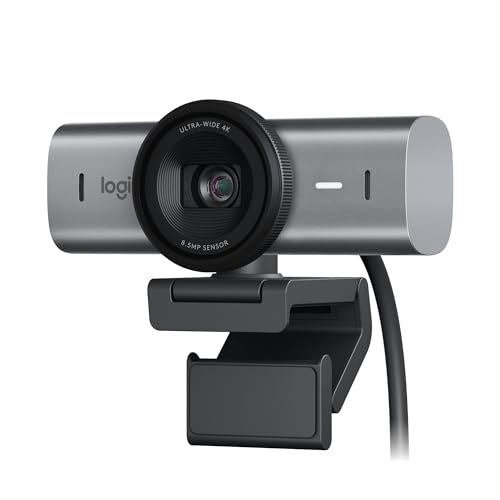

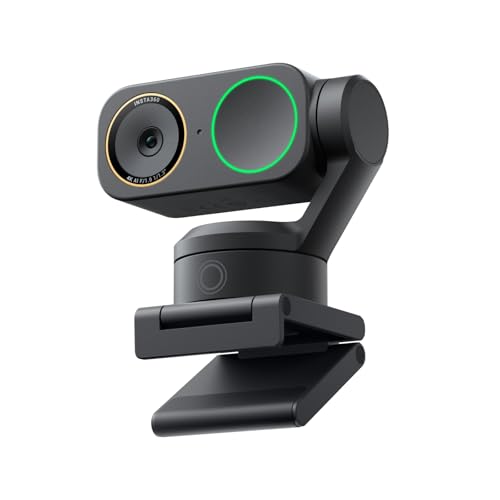
 The Logitech MX Brio keeps things simple: it’s a sleek, premium-looking webcam built for straightforward desk use, meetings, and streaming. The Insta360 Link 2 Pro, though, feels more like a creator tool thanks to its PTZ design and motion-focused hardware.
If you want a webcam that blends into a clean office setup, Logitech is excellent. If you want a webcam that actively moves, tracks, and adapts to your position, Insta360 has the more advanced design.
✓ Pros
- Logitech MX Brio offers a polished, collaboration-friendly design
- Compact and easy to place on a monitor
- Insta360 Link 2 Pro adds physical pan and tilt for smarter framing
- Better suited to dynamic presentations and creator workflows
✗ Cons
- Logitech design is more conventional
- Insta360 design is more complex, which may be overkill for basic calls
The Logitech MX Brio keeps things simple: it’s a sleek, premium-looking webcam built for straightforward desk use, meetings, and streaming. The Insta360 Link 2 Pro, though, feels more like a creator tool thanks to its PTZ design and motion-focused hardware.
If you want a webcam that blends into a clean office setup, Logitech is excellent. If you want a webcam that actively moves, tracks, and adapts to your position, Insta360 has the more advanced design.
✓ Pros
- Logitech MX Brio offers a polished, collaboration-friendly design
- Compact and easy to place on a monitor
- Insta360 Link 2 Pro adds physical pan and tilt for smarter framing
- Better suited to dynamic presentations and creator workflows
✗ Cons
- Logitech design is more conventional
- Insta360 design is more complex, which may be overkill for basic calls
Performance
Winner: Insta360 Link 2 Pro


 In raw image intelligence, the Insta360 Link 2 Pro wins because its large 1/1.3” sensor is built for cleaner video and stronger low-light results. Its AI Tracking also physically pans and tilts, which is a major advantage for movement-heavy use.
The Logitech MX Brio is still very strong: it delivers 4K at 30fps or 1080p at 60fps, plus AI-enhanced image quality, auto-exposure, auto white balance, noise reduction, and autofocus. For most video calls, it will look excellent.
But when you compare feature depth, Insta360 is the more advanced performer.
✓ Pros
- Logitech MX Brio delivers sharp 4K and smooth 1080p 60fps
- AI-enhanced image quality improves face visibility in difficult light
- Insta360 Link 2 Pro uses a large sensor for cleaner 4K
- Physical AI tracking is a standout advantage
✗ Cons
- Logitech is excellent but less advanced in motion tracking
- Insta360 costs more, so you pay for those extra performance gains
In raw image intelligence, the Insta360 Link 2 Pro wins because its large 1/1.3” sensor is built for cleaner video and stronger low-light results. Its AI Tracking also physically pans and tilts, which is a major advantage for movement-heavy use.
The Logitech MX Brio is still very strong: it delivers 4K at 30fps or 1080p at 60fps, plus AI-enhanced image quality, auto-exposure, auto white balance, noise reduction, and autofocus. For most video calls, it will look excellent.
But when you compare feature depth, Insta360 is the more advanced performer.
✓ Pros
- Logitech MX Brio delivers sharp 4K and smooth 1080p 60fps
- AI-enhanced image quality improves face visibility in difficult light
- Insta360 Link 2 Pro uses a large sensor for cleaner 4K
- Physical AI tracking is a standout advantage
✗ Cons
- Logitech is excellent but less advanced in motion tracking
- Insta360 costs more, so you pay for those extra performance gains
Value
Winner: Logitech MX Brio
The value battle is where Logitech MX Brio pulls ahead hard. At $169.99 with a 15% discount, it undercuts the Insta360 Link 2 Pro by a wide margin while still offering 4K, 1080p 60fps, strong AI image processing, and good microphones. If you’re buying a webcam mainly for Zoom, Teams, Google Meet, or occasional streaming, Logitech gives you a lot of the premium experience for much less money. Insta360 is better, but not $80 better for everyone. ✓ Pros - Logitech MX Brio is significantly cheaper - Strong feature set for the price - Includes Prime shipping - Great fit for buyers who want premium basics without overspending ✗ Cons - Insta360 offers more advanced features if you can stretch the budget - Logitech’s value is best for standard use, not pro-level creator needsBattery/Durability
Winner: Logitech MX Brio
Neither webcam uses a battery, so durability and long-term practicality matter more here. The Logitech MX Brio wins because its simpler fixed-camera approach generally means fewer moving parts and a more straightforward day-to-day setup. The Insta360 Link 2 Pro has a more advanced PTZ mechanism, which is fantastic for tracking but adds complexity. That doesn’t mean it’s fragile, but it does make Logitech the safer pick for buyers who want the least fuss over time. ✓ Pros - Logitech’s simpler design is easier to live with long term - No batteries to charge on either model - Reliable for daily desk use - Insta360’s moving parts are useful, but more complex ✗ Cons - Logitech lacks the dynamic movement features of Insta360 - Insta360’s PTZ system is more mechanically involvedAudio and Mic Quality
Winner: Insta360 Link 2 Pro
The Insta360 Link 2 Pro takes this category thanks to its redesigned dual-mic system with beamforming directional pickup. That setup is specifically aimed at clearer voice isolation and reduced background noise in busy environments. The Logitech MX Brio is no slouch, though. Its integrated dual beamforming noise-reducing microphones use AI to help minimize background noise, which is more than enough for most home offices. If audio matters a lot and you’re often in noisier rooms, Insta360 has the edge. ✓ Pros - Insta360 offers clearer directional voice pickup - Better background noise reduction in busy environments - Logitech still provides strong beamforming mics - Both are suitable for meetings without a separate mic ✗ Cons - Logitech’s mics are good, but not class-leading - Insta360 costs more, though audio helps justify itSoftware and Features
Winner: Insta360 Link 2 Pro
This is another win for Insta360 Link 2 Pro. Its feature set is clearly aimed at power users: AI Tracking, gesture control, smartphone remote control, whiteboard mode, and software-driven bokeh all make it more versatile for creators and presenters. The Logitech MX Brio has useful fine controls like ISO, shutter speed, tint, and vibrance, plus an Auto mode for easy setup. It also offers Show Mode, which is handy for presenting objects on your desk. That said, Insta360 simply gives you more tools. ✓ Pros - Insta360 offers AI Tracking and gesture control - Smartphone remote control adds convenience - Logitech includes useful manual image tuning - Show Mode is practical for product demos ✗ Cons - Logitech has fewer advanced automation features - Insta360’s software may be more than casual users needLogitech MX Brio Is the Better Choice If…
- You want the best price-to-performance balance.
- You mostly use Zoom, Teams, or Google Meet for work.
- You want 4K quality without paying a premium.
- You like manual image controls but don’t need PTZ tracking.
- You want a simpler webcam with fewer moving parts.
- You want a webcam that also works with Nintendo Switch 2 GameChat.
Insta360 Link 2 Pro Is the Better Choice If…
- You want the best overall webcam experience in this matchup.
- You stream, present, or move around during calls.
- You care about low-light quality and cleaner 4K video.
- You want AI Tracking, gesture controls, and remote smartphone control.
- You need stronger directional mic performance in noisy spaces.
- You’re willing to pay more for premium features.
Our Final Verdict
Overall winner: Insta360 Link 2 Pro
If you want the most advanced webcam here, the Insta360 Link 2 Pro is the better buy. Its larger sensor, superior low-light performance, AI tracking, and creator-focused features make it the stronger all-around choice for streaming, presentations, and premium video calls.
That said, the Logitech MX Brio is the smarter value pick. It delivers excellent 4K image quality, solid microphones, useful manual controls, and a much lower price. For most buyers, it’s the better deal.
If you want the best webcam overall, choose Insta360. If you want the best webcam for the money, choose Logitech.
Frequently Asked Questions
1. Is Logitech MX Brio better than Insta360 Link 2 Pro?
For value, yes. For overall features and performance, no — the Insta360 Link 2 Pro is the better webcam if budget is not your main concern.
2. Which webcam is better for Zoom and Teams?
Both work well, but the Logitech MX Brio is the better buy for standard Zoom and Teams use because it’s cheaper and still delivers excellent quality.
3. Which webcam is better for streaming?
The Insta360 Link 2 Pro is better for streaming because of its AI tracking, larger sensor, and creator-friendly controls.
4. Does Logitech MX Brio have better microphones?
No. The Insta360 Link 2 Pro has the stronger mic system thanks to its directional beamforming design.
5. Which one should I buy for low-light video?
Choose the Insta360 Link 2 Pro. Its 1/1.3” sensor is built for cleaner video and better low-light performance.
Get the Full Home Office Buyer's Guide
Download our detailed comparison with specs, scores, and our honest verdict — delivered straight to your inbox.
Free. No spam. Unsubscribe anytime.
Was this review helpful?
Be the first to share your feedback on this review.
Sign in to vote and let us know what you think.
Discussion (0)
No comments yet. Be the first to start the discussion.
Related Reviews
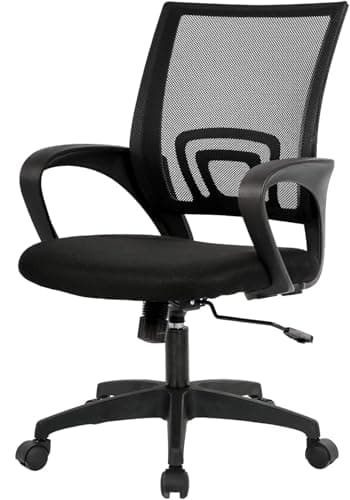
8 Best Office Chairs in 2026 — Comfortable Picks for Better Posture, Lower Back Support, and Easy Setup
If you’re searching for the best office chairs 2026 , you probably want to stop dealing with back pain, weak lumbar support, and chairs that feel cheap after a few weeks. This list focuses on affordable, ergonomic, and easy-to-assemble options that can improve your workday without overcomplicating t
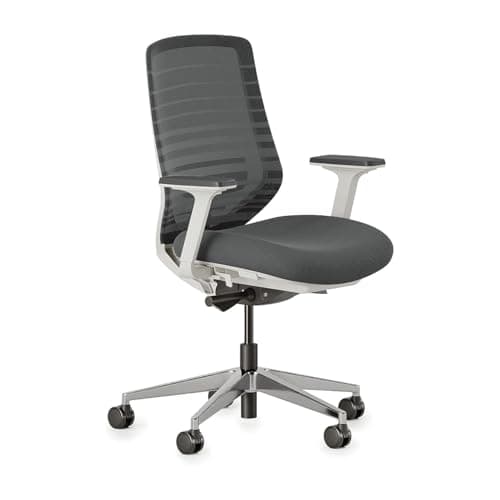
Best Alternatives to Herman Miller in 2026 — Cheaper, Better, or Both?
If you’re searching for Herman Miller alternatives cheaper , you’re probably feeling the same frustration as everyone else: the price is hard to justify, the brand lock-in is real, and the “premium” features don’t always match your actual workday. The good news is that there are strong ergonomic cha
Branch Ergonomic Chair Review (2026): Honest Verdict After Testing
If you’re researching the Branch Ergonomic Chair review , you’re probably trying to answer one question: is this chair actually worth nearly $400, or is it just another attractive office chair with a premium price tag? The short answer is that Branch gets a lot right—comfort, adjustability, and a po