


Who this is for: Best for travelers and phone buyers who want to understand SIM options before choosing a flexible, compatible setup.
Check PriceIf you’re confused by eSIM vs physical SIM explained, you’re not alone: the difference affects how you activate service, travel internationally, and switch phones. The short version is that both connect your phone to a carrier, but they do it in very different ways—one is a removable chip, the other is built into the device or managed digitally. This guide breaks down how each works, where each one makes sense, and what to look for if you’re considering an eSIM solution for travel or device compatibility.
Related Reviews
How It Works
A physical SIM is a small removable card that stores information your carrier uses to identify your phone on its network. You insert it into a SIM tray, and your phone reads the card to connect to cellular service.
An eSIM is a digital version of that same identity module. Instead of swapping a plastic card, you download a carrier profile onto compatible hardware, usually by scanning a QR code, using an app, or managing profiles through a tool or reader.
The key practical difference is flexibility: with a physical SIM, changing carriers or plans often means swapping cards. With eSIM, you can often add, delete, or switch profiles digitally, which is especially useful for travelers, dual-line users, and people who want to keep multiple plans ready to go.
Key Benefits & Use Cases
Why people choose eSIM
- Faster setup when your phone supports digital activation.
- No need to wait for a mailed SIM card when changing carriers or travel plans.
- Convenient for frequent travelers who want local data plans in multiple countries.
- Useful for keeping a primary number active while adding a second line for data.
- Great for devices with limited or no physical SIM flexibility, including newer phones that emphasize eSIM support.
Why physical SIM still matters
- Works with a wider range of older phones and lower-cost devices.
- Easy to move from one device to another by simply removing the card.
- Often simpler for users who prefer a tangible, familiar setup.
- Still common in carrier stores and prepaid plans around the world.
- Can be a backup option when eSIM setup is inconvenient or unsupported.
When this matters most
If you travel often, want to juggle multiple data profiles, or own a phone that supports eSIM, digital options can save time and hassle. If you use an older handset, a carrier-locked device, or you prefer plug-and-play simplicity, physical SIM may still be the easier route.
What to Look For When Buying
If you’re shopping for a SIM solution or eSIM adapter, these five criteria matter most:
1. Device compatibility
Check whether your phone is unlocked and whether it supports direct eSIM activation. Some products are Android-first, while iPhone use may require extra steps or a reader.
2. Carrier and region support
Look for coverage in the countries you actually visit. A good travel-focused option should clearly support the U.S., Europe, and major destinations like Japan or China if those are on your itinerary.
3. Profile storage and switching
If you travel often, the ability to store multiple profiles is a big advantage. More stored profiles means less deleting, re-downloading, or reconfiguring before each trip.
4. Setup method
Some solutions rely on an app, while others use a reader or built-in menu. Choose the method that fits your comfort level and the devices you already own.
5. Support and recovery options
Because eSIM setup can vary by device and carrier, responsive support and clear instructions are valuable. This is especially important if you’re using a physical eSIM adapter or managing profiles across multiple devices.
Top Recommended Products
Below are the most relevant travel-friendly eSIM adapter options from the product list. These are especially useful for people who want to experiment with eSIM-style flexibility on supported devices, or who need a bridge between physical SIM slots and digital profiles.
EIOTCLUB Physical eSIM Card for Android Unlocked Phones more affordable


This option is aimed at unlocked Android users who want a simple way to manage multiple eSIM profiles while traveling. The standout feature is unlimited downloads and deletions, plus support for storing up to 8 profiles at once, which makes it practical for repeat trips.
- ✓ Unlimited eSIM downloads and deletions for flexible travel use
- ✓ Stores up to 8 eSIM profiles simultaneously
- ✓ Pre-cut for Standard, Micro, and Nano SIM sizes
- ✓ Global travel support across major destinations
- ✗ Best suited to unlocked Android phones, not carrier-locked devices
- ✗ iPhone use may require extra steps for managing new profiles
- ✗ Not a universal fix for every device or carrier combination
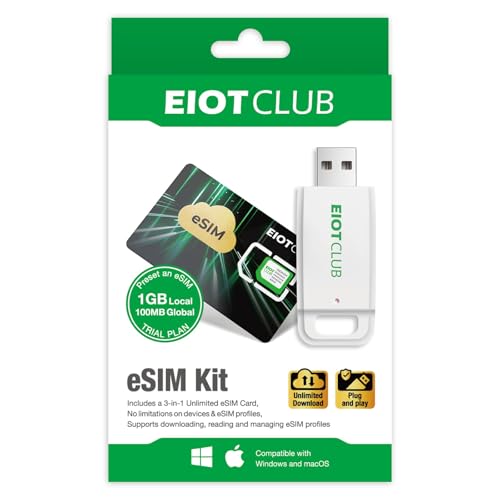
EIOTCLUB eSIM Card & Reader Bundle good value

This bundle adds a reader to make profile management easier across more device types, including Windows and macOS. It’s the most versatile option in the list for users who want a more complete setup for phones, routers, tablets, or portable Wi-Fi devices.
- ✓ Includes both the eSIM card and reader for broader compatibility
- ✓ Supports Windows and macOS profile management
- ✓ Stores up to 8 eSIM profiles with unlimited downloads
- ✓ Good fit for travelers and business users with multiple devices
- ✗ Slightly higher cost than the card-only option
- ✗ More parts can mean a little more setup complexity
- ✗ Still requires compatibility checks before purchase
 9ESIM V0 eSIM Card for Unlocked Android budget-friendly


The 9ESIM V0 is a strong pick for travelers who want a physical card-based eSIM solution with lots of profile capacity and quick switching. Its STK menu is especially notable because it allows one-tap switching without relying on constant app access.
- ✓ Holds up to 15 eSIM profiles
- ✓ Unlimited downloads and rewrites
- ✓ STK menu enables fast profile switching
- ✓ Pre-cut for Standard, Micro, and Nano slots
- ✗ iPhone users need a separate card reader
- ✗ Compatibility must be checked carefully before ordering
- ✗ Best for users comfortable with a more technical setup
Common Mistakes to Avoid
Assuming every phone supports eSIM
One of the biggest mistakes is buying an eSIM solution before checking compatibility. Some phones support eSIM directly, while others need a physical adapter or reader, and some carrier-locked devices may not work as expected.
Ignoring carrier lock status
Even if a phone has eSIM capability, a carrier lock can prevent it from working properly with third-party plans or travel profiles. Always confirm your phone is unlocked before purchasing.
Forgetting iPhone setup differences
Many users assume iPhone setup works the same way as Android, but some physical eSIM adapter products require a reader or an Android device to manage profiles. That detail matters a lot if you plan to switch plans often.
Buying for the wrong use case
If you only need one domestic line, a complex adapter may be overkill. If you travel frequently, however, a product with multiple stored profiles and easy switching can save time and reduce roaming costs.
Not checking the activation workflow
Some solutions use apps, others use readers, and some rely on built-in menus. Make sure you understand the exact activation process before buying so you’re not surprised later.
Frequently Asked Questions
Is eSIM better than a physical SIM?
It depends on your needs. eSIM is often better for travelers and people who want quick digital switching, while physical SIM is still simpler for older phones and easy card swapping.
Can I use eSIM on an iPhone?
Yes, many iPhones support eSIM, but the exact setup depends on the model and carrier. Some physical eSIM adapter products may also require extra steps or a reader for iPhone users.
Do I need an unlocked phone for eSIM?
Usually yes, especially if you want to use third-party travel plans or adapter-based solutions. A locked phone can block activation with other carriers or profile providers.
What is the advantage of a physical eSIM card?
A physical eSIM card can help bridge the gap on devices that don’t support direct eSIM downloads. It’s useful for travelers who want digital flexibility without replacing their phone.
Can I switch between multiple eSIM profiles?
Yes, if your device or adapter supports multiple profiles. That’s one of the biggest advantages of eSIM-style setups, especially for frequent travelers.
Pros
- + Digital profile switching
- + Multiple stored profiles
- + Travel-friendly global use
- + Prime options available
Cons
- – Compatibility varies by device
- – Some iPhone setups need extra steps
- – Carrier-locked phones may not work
Frequently asked questions
- Is eSIM better than a physical SIM?
- It depends on your needs. eSIM is often better for travelers and people who want quick digital switching, while physical SIM is still simpler for older phones and easy card swapping.
- Can I use eSIM on an iPhone?
- Yes, many iPhones support eSIM, but the exact setup depends on the model and carrier. Some physical eSIM adapter products may also require extra steps or a reader for iPhone users.
- Do I need an unlocked phone for eSIM?
- Usually yes, especially if you want to use third-party travel plans or adapter-based solutions. A locked phone can block activation with other carriers or profile providers.
- What is the advantage of a physical eSIM card?
- A physical eSIM card can help bridge the gap on devices that don’t support direct eSIM downloads. It’s useful for travelers who want digital flexibility without replacing their phone.
- Can I switch between multiple eSIM profiles?
- Yes, if your device or adapter supports multiple profiles. That’s one of the biggest advantages of eSIM-style setups, especially for frequent travelers.
Get the Full Tech Buyer's Guide
Join our free newsletter — we'll send our latest Tech picks, specs and verdicts straight to your inbox.
Free. No spam. Unsubscribe anytime.
Was this review helpful?
Be the first to share your feedback on this review.
Sign in to vote and let us know what you think.
Discussion (0)
No comments yet. Be the first to start the discussion.
Related Reviews


7 Best Rugged Phones in 2026 — Built for Job Sites, Camping, and Hard Use
If you need a phone that can survive drops, dust, water, and long days in the field, the usual slim flagship just isn’t built for the job. The best rugged phones 2026 buyers should consider are the ones that combine real protection with practical extras like big batteries, loud speakers, night visio

Pixel 10 Pro vs iPhone 17 Camera (2026): Which Should You Actually Buy?
The Pixel 10 Pro wins design because it is the actual phone in this matchup and comes with a premium build that includes durable aluminum, Gorilla Glass Victus 2, and a bright 6.3-inch Super Actua display. It also feels more like a complete flagship device rather than an accessory focused on protect