

Who this is for: Best for shoppers who want to understand HDR format differences before buying a TV, projector, or Blu-ray player.
Check PriceWhat is Dolby Vision vs HDR10+? A Complete 2026 Guide
Trying to figure out Dolby Vision vs HDR10+ can feel confusing because both promise better brightness, contrast, and color than standard HDR. The real difference is not just “which looks better,” but how each format handles scene-by-scene image optimization and which devices support it. This guide breaks down the technology in plain English so you can choose the right TV, projector, or disc player with confidence.
Related Reviews
How It Works
Dolby Vision and HDR10+ are both dynamic HDR formats, which means they can adjust picture settings as content changes from scene to scene, or even frame to frame. That is different from older HDR10, which uses one static set of instructions for the whole movie or show.
Here’s the simple version: when a movie is mastered in Dolby Vision or HDR10+, the content includes extra metadata that tells your display how to present brightness, contrast, and color more accurately. Your TV or projector then uses that information to preserve detail in dark shadows and bright highlights instead of flattening the image.
The biggest technical difference is that Dolby Vision is a licensed ecosystem with more tightly controlled certification, while HDR10+ is an open standard backed by a wider group of manufacturers. In practice, both can look excellent, but the final result depends on the display, the content, and how well the device processes the signal.
Key Benefits & Use Cases
Why people care about these formats
Both formats are designed to make movies, streaming shows, and games look more lifelike. They can improve perceived contrast, color depth, and highlight detail, especially on high-end TVs and premium projectors.
Best use cases for Dolby Vision vs HDR10+
- Streaming movies and shows: Many premium titles on major platforms use Dolby Vision, while some services and devices also support HDR10+.
- Home theater projectors: High-end projectors can benefit from dynamic HDR processing, especially in darker rooms with controlled lighting.
- 4K Blu-ray playback: Disc collectors often want a player that supports both formats to maximize compatibility.
- Bright-room viewing: Dynamic HDR can help preserve detail when ambient light makes the image harder to see.
- Future-proof shopping: Buying a display that supports at least one of the two formats helps you avoid missing out on premium content.
What to Look For When Buying
If you’re shopping with Dolby Vision vs HDR10+ in mind, focus on these five criteria:
1) Format support
Check whether the TV, projector, or disc player supports Dolby Vision, HDR10+, or both. If you watch content from multiple streaming services and discs, dual support is the safest choice.
2) Peak brightness and contrast
HDR looks best when the display can get bright enough to show highlights while still keeping deep blacks. On OLED, contrast is usually excellent; on projectors, room lighting and screen choice matter more.
3) Source compatibility
Make sure your streaming device, Blu-ray player, or console can actually output the format you want. A display may support Dolby Vision or HDR10+, but the source device has to deliver it correctly.
4) Room environment
For TVs, room brightness matters less than it does for projectors. For projection setups, a dark or controlled room helps dynamic HDR look much more dramatic.
5) Audio and ecosystem features
Many premium displays bundle HDR support with Dolby Atmos, smart-home integration, or advanced upscaling. Those extras can matter as much as the HDR logo if you want a complete home theater setup.
Top Recommended Products
Below are a few products that support Dolby Vision, HDR10+, or both, and they make sense if you’re building a system around premium HDR playback.
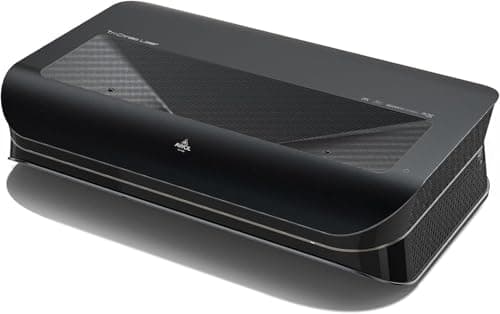
AWOL VISION LTV-3000 Pro 4K 3D Ultra Short Throw Triple Laser Projector, Dolby Vision & Atmos, HDR10+, 150" UST Laser TV Home Theater Projector ✓ Prime 13% OFF — Was $2299.00
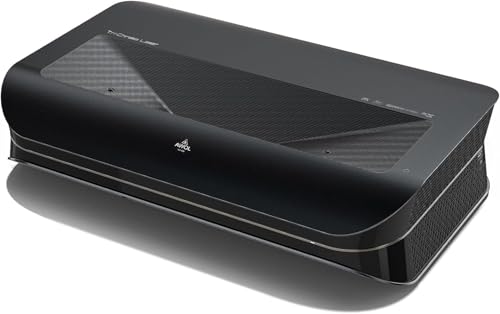


This is the strongest match if you want a big-screen setup that supports both Dolby Vision and HDR10+ in a single premium projector. The triple-laser design, 4K support, and ultra-short-throw placement make it appealing for dedicated home theater rooms.
- ✓ Supports both Dolby Vision and HDR10+
- ✓ Ultra-short-throw design works well for large-screen living room theaters
- ✓ Includes Dolby Atmos support for a more complete cinema setup
- ✓ Built-in center channel speaker mapping is useful for dialogue clarity
- ✓ Prime eligible
- ✓ Strong feature set for immersive movie nights
- ✗ Premium price compared with simpler displays
- ✗ Best results depend on screen choice and room setup
- ✗ UST placement can be finicky if cabinet depth is limited
LG 65-Inch Class OLED evo AI 4K C5 Series Smart TV w/Dolby Atmos, Dolby Vision, HDR10, AI Super Upscaling 4K, Filmmaker Mode, Wow Orchestra, Alexa Built-in (OLED65C5PUA, 2025) ✓ Prime 7% OFF — Was $1396.99
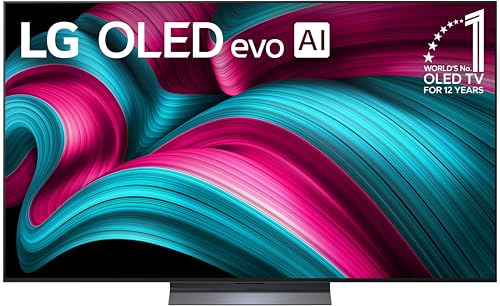


This is a strong pick if you want a premium TV that leans heavily into Dolby Vision and excellent OLED contrast. It is especially attractive for viewers who want deep blacks, bright-room usability, and a polished smart-TV experience.
- ✓ Dolby Vision support for premium streaming and disc playback
- ✓ OLED self-lit pixels deliver excellent contrast
- ✓ Brightness Booster helps in more challenging lighting
- ✓ AI Super Upscaling can improve lower-resolution content
- ✓ Prime eligible
- ✓ Good fit for mixed movie, sports, and TV use
- ✗ Does not list HDR10+ support
- ✗ OLED can be more expensive than midrange LED TVs
- ✗ Screen size may be too small for users seeking a projector-like experience
4K UHD Blu Ray DVD Player with Dolby Vision,HDR10,Twin HDMI Outputs for 3D HD Video and Dolby Audio/DTS Playback,for Region A Blu-ray Discs,DVDs,3D 4K UHD Home Theater Blu ray Player for TV Projector ✓ Prime
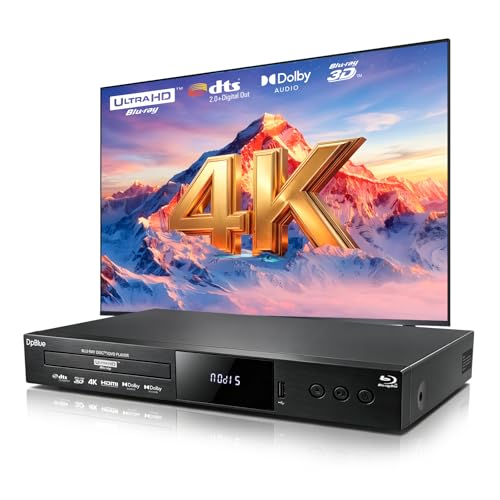


If you want a disc player that supports Dolby Vision and HDR10 for a physical media setup, this is the most practical option in the list. It is especially useful for collectors who want broad disc compatibility and dual HDMI output flexibility.
- ✓ Dolby Vision support for compatible 4K Blu-rays
- ✓ HDR10 support for wide playback compatibility
- ✓ Dual HDMI outputs help separate audio and video
- ✓ Supports 3D Blu-ray, DVD, and CD formats
- ✓ Prime eligible
- ✓ Good fit for projector-based home theaters
- ✗ Does not support HDR10+
- ✗ Best value depends on how much you use physical discs
- ✗ Region A limitation may matter for some buyers
Common Mistakes to Avoid
- Assuming every HDR logo means the same thing: HDR10, Dolby Vision, and HDR10+ are not identical, and the differences affect real-world playback.
- Buying a display without checking source compatibility: Your TV may support Dolby Vision, but your streaming box or disc player may not.
- Ignoring room lighting: HDR projectors need a more controlled environment than most TVs to look their best.
- Chasing the “better” format without checking content: If your favorite services or discs mainly use one format, support for that format matters more than theory.
- Overlooking audio and setup quality: A great HDR picture can still feel underwhelming if the sound system or calibration is weak.
Frequently Asked Questions
1) Is Dolby Vision better than HDR10+?
Not always. Dolby Vision often has broader content support and a more tightly controlled ecosystem, while HDR10+ is also excellent and can look very similar on a well-tuned display.
2) Do I need both Dolby Vision and HDR10+?
If you watch content from multiple services or use both streaming and discs, having both gives you the best compatibility. If most of your content uses only one format, that one matters most.
3) Can a TV support Dolby Vision and HDR10+ at the same time?
Yes, some displays support both formats. That is ideal because it reduces the chance of missing out on premium HDR playback.
4) Does HDR10+ work on all TVs?
No. The TV must specifically support HDR10+ to decode and display it properly. A regular HDR10 TV will not automatically play HDR10+ as intended.
5) What matters more: the HDR format or the TV quality?
The TV or projector quality usually matters more overall. A great display with good brightness, contrast, and processing often looks better than a weak display with a premium HDR logo.
Pros
- + Dynamic HDR improves scene-by-scene picture detail
- + Dolby Vision and HDR10+ can both boost contrast and color
- + Helpful for TVs, projectors, and 4K Blu-ray setups
- + Buying the right format improves compatibility with content
Cons
- – Format support varies by device and service
- – Projectors depend heavily on room lighting and screen choice
- – Some products support only one HDR format
- – A logo alone does not guarantee better picture quality
Frequently asked questions
- Is Dolby Vision better than HDR10+?
- Not always. Dolby Vision often has broader content support and a more tightly controlled ecosystem, while HDR10+ is also excellent and can look very similar on a well-tuned display.
- Do I need both Dolby Vision and HDR10+?
- If you watch content from multiple services or use both streaming and discs, having both gives you the best compatibility. If most of your content uses only one format, that one matters most.
- Can a TV support Dolby Vision and HDR10+ at the same time?
- Yes, some displays support both formats. That is ideal because it reduces the chance of missing out on premium HDR playback.
- Does HDR10+ work on all TVs?
- No. The TV must specifically support HDR10+ to decode and display it properly. A regular HDR10 TV will not automatically play HDR10+ as intended.
- What matters more: the HDR format or the TV quality?
- The TV or projector quality usually matters more overall. A great display with good brightness, contrast, and processing often looks better than a weak display with a premium HDR logo.
Get the Full Tech Buyer's Guide
Join our free newsletter — we'll send our latest Tech picks, specs and verdicts straight to your inbox.
Free. No spam. Unsubscribe anytime.
Was this review helpful?
Be the first to share your feedback on this review.
Sign in to vote and let us know what you think.
Discussion (0)
No comments yet. Be the first to start the discussion.
Related Reviews
What is how to fix TV screen burn in? A Complete 2026 Guide
TV screen burn-in can be frustrating because it leaves faint ghost images, uneven brightness, or permanent-looking marks that distract from movies, sports, and gaming. If you’re searching for how to fix TV screen burn in , the first thing to know is that some cases are temporary image retention whil
7 Best Universal Remotes in 2026 — Easy Setup, Broad TV Compatibility, and Better Value
If your current remote is lost, broken, or full of dead buttons, finding a replacement that actually works can be frustrating fast. The best universal remotes 2026 shoppers want should be easy to set up, compatible with the TV brands they own, and affordable enough to replace without regret. This re
2 Best Transparent TVs in 2026 — Clear Design, Commercial-Grade Reliability
If you’re searching for the best transparent tvs 2026 , you’re probably looking for something that stands out visually without sacrificing everyday usability. The challenge is that this is still an emerging category, so the safest picks are the models with documented specs, practical screen sizes, a