


Who this is for: Best for students and everyday buyers comparing a Windows premium ultrabook against a budget-friendly Mac-style laptop.
Check PriceAt a Glance
| Category | Dell XPS 13 2026 Ultra-Light Laptop | Apple 2026 MacBook Neo 13-inch Laptop |
|---|---|---|
| Display | 13.4-inch 2560 x 1600 touchscreen, up to 120Hz, 500 nits | 13-inch Liquid Retina display, 1 billion colors |
| Processor | Intel Core 5 320, 6 cores | A18 Pro chip |
| Memory / Storage | 8GB LPDDR5x / 512GB SSD | 8GB unified memory / 256GB SSD |
| Battery | Up to 17 hours | Up to 16 hours |
| Weight | About 2.2 lbs | Not specified in the listing |
| Ports / Extras | 2 USB-C ports, 8-in-1 dock included | Built for Apple Intelligence, 1080p FaceTime HD camera |
| Best For | Windows users who want more screen quality and storage | Apple users who want the most affordable Mac-style option here |
Design: Dell XPS 13 Wins


The Dell XPS 13 2026 Ultra-Light Laptop takes this category because it is explicitly built as a thin, portable machine at about 2.2 pounds and only 0.5 inches thick. It also pairs that compact footprint with a premium 13.4-inch InfinityEdge-style touchscreen, which makes it feel more modern and flexible for touch-first use.
Related Reviews
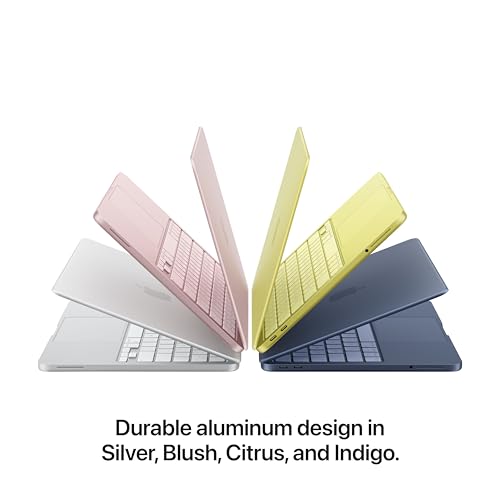
The Apple 2026 MacBook Neo 13-inch Laptop has a durable recycled aluminum enclosure and attractive color options, but the listing focuses more on durability and style than on standout portability details. For buyers who care most about a sleek, travel-friendly Windows machine, Dell has the edge.
Winner: Dell XPS 13
Display: Dell XPS 13 Wins


This one is close, but the Dell XPS 13 2026 Ultra-Light Laptop has the more detailed display spec sheet: 2560 x 1600 resolution, a 120Hz refresh rate, and 500-nit brightness. That combination should appeal to shoppers who want smoother scrolling and sharper visuals for work, study, and streaming.
The Apple 2026 MacBook Neo 13-inch Laptop offers a vibrant Liquid Retina panel with support for 1 billion colors, which is excellent on paper for everyday media and reading. Still, Dell’s higher refresh rate and brighter, more detailed touchscreen make it the more compelling display pick for most people.
Winner: Dell XPS 13
Performance: Dell XPS 13 Wins for General Multitasking
The Dell XPS 13 2026 Ultra-Light Laptop uses an Intel Core 5 320 with 6 cores plus 8GB LPDDR5x memory and a 512GB SSD. Based on the published specs, that gives it the stronger case for everyday productivity, browser-heavy workflows, office apps, and keeping more files locally without immediately running out of space.
The Apple 2026 MacBook Neo 13-inch Laptop relies on the A18 Pro chip and 8GB unified memory, which should be plenty for schoolwork, notes, presentations, and light creative tasks. However, its 256GB SSD is notably smaller, so the Dell is the safer choice if you want a little more headroom for storage and multitasking.
Winner: Dell XPS 13
Battery and Durability: MacBook Neo Wins Slightly
The Apple 2026 MacBook Neo 13-inch Laptop gets the narrow win here because the listing emphasizes up to 16 hours of battery life and a durable aluminum enclosure made with recycled content. For students and commuters who want a simple, sturdy machine that can last through a long day, that’s a strong combination.
The Dell XPS 13 2026 Ultra-Light Laptop actually claims up to 17 hours of battery life, which is excellent, but Apple’s durability-focused design language and aluminum build help it take this category for shoppers who prioritize long-term ruggedness and a straightforward all-day laptop experience.
Winner: MacBook Neo
Connectivity and Extras: Dell XPS 13 Wins
The Dell XPS 13 2026 Ultra-Light Laptop is the clear winner for flexibility because it includes two USB-C ports and an 8-in-1 dock in the box. That makes it much easier to connect external displays, USB accessories, and storage devices without buying extra gear right away.
The Apple 2026 MacBook Neo 13-inch Laptop keeps the focus on simplicity, Apple Intelligence support, and a 1080p FaceTime HD camera. That’s useful, but Dell’s included dock and more expansion-friendly setup are more practical for most commercial-intent buyers comparing these two.
Winner: Dell XPS 13
Value: MacBook Neo Wins for Budget Shoppers
The Apple 2026 MacBook Neo 13-inch Laptop is the better value play in this matchup because it is positioned as the budget option in the pair. If your main goal is to get into a modern Mac experience with solid battery life and Apple Intelligence support while keeping costs lower than the Dell, this is the more appealing buy.
The Dell XPS 13 2026 Ultra-Light Laptop looks like the more feature-rich machine, but it is the premium option here. That means you are paying for a better display, more storage, and a more complete connectivity package.
Winner: MacBook Neo
Dell XPS 13 Is the Better Choice If…
- You want the sharper, faster-feeling display with a 120Hz refresh rate.
- You need more storage headroom with the 512GB SSD.
- You prefer Windows 11 Pro for school, work, or compatibility reasons.
- You want a lighter laptop with stronger out-of-the-box connectivity.
- You like having an included dock for external accessories and displays.
MacBook Neo Is the Better Choice If…
- You want the more budget-friendly option in this comparison.
- You already use Apple devices and want a Mac-first workflow.
- You care more about battery life and a durable aluminum build than extra ports.
- You want Apple Intelligence support in a compact 13-inch laptop.
- You mainly do schoolwork, browsing, notes, and presentations.
Our Final Verdict
For most buyers searching dell xps 13 vs macbook neo, the Dell XPS 13 2026 Ultra-Light Laptop is the better overall pick. It gives you the stronger display, more storage, better connectivity, and a more versatile Windows setup, which makes it the smarter choice for mixed productivity and travel use.
Choose the Apple 2026 MacBook Neo 13-inch Laptop if your priority is getting into the Mac ecosystem at the more budget-friendly end of this matchup, especially if battery life and Apple Intelligence matter more than ports and storage.
Frequently Asked Questions
1. Is the Dell XPS 13 better than the MacBook Neo for students?
Yes, for many students it is. The Dell XPS 13 offers a higher-resolution 120Hz touchscreen, more storage, and included dock support, which can make it more flexible for classes and projects.
2. Which laptop has better battery life?
Based on the listings, the Dell XPS 13 claims up to 17 hours, while the MacBook Neo claims up to 16 hours. In practice, both are designed for all-day use, but Dell has the slight spec advantage.
3. Which is better for Windows users?
The Dell XPS 13 is the obvious choice for Windows users because it runs Windows 11 Pro and is built around a more traditional productivity setup.
4. Which is better for Apple users?
The MacBook Neo is the better fit for Apple users, especially if you want a compact laptop with Apple Intelligence support and a familiar macOS-style workflow.
5. Should I choose the MacBook Neo if I want the best value?
If your priority is lower-cost entry into a modern laptop with good battery life and Apple features, yes. But if you want the best overall feature set, the Dell XPS 13 is the stronger buy.
Pros
- + Sharper 120Hz 2.5K touchscreen on the Dell
- + More storage and better connectivity on the Dell
- + Budget-friendly Mac option with good battery life
- + Durable aluminum design on the MacBook Neo
- + Both are built for all-day productivity
Cons
- – Dell is the premium-priced option in this matchup
- – MacBook Neo has less storage than the Dell
- – MacBook Neo has fewer connectivity extras
- – Neither listing is ideal for heavy creative workloads
- – Specs are enough for comparison but not hands-on testing
Frequently asked questions
- Is the Dell XPS 13 better than the MacBook Neo for students?
- Yes, for many students it is. The Dell XPS 13 offers a higher-resolution 120Hz touchscreen, more storage, and included dock support, which can make it more flexible for classes and projects.
- Which laptop has better battery life?
- Based on the listings, the Dell XPS 13 claims up to 17 hours, while the MacBook Neo claims up to 16 hours. In practice, both are designed for all-day use, but Dell has the slight spec advantage.
- Which is better for Windows users?
- The Dell XPS 13 is the obvious choice for Windows users because it runs Windows 11 Pro and is built around a more traditional productivity setup.
- Which is better for Apple users?
- The MacBook Neo is the better fit for Apple users, especially if you want a compact laptop with Apple Intelligence support and a familiar macOS-style workflow.
- Should I choose the MacBook Neo if I want the best value?
- If your priority is lower-cost entry into a modern laptop with good battery life and Apple features, yes. But if you want the best overall feature set, the Dell XPS 13 is the stronger buy.
Score breakdown
- value
- 7.5
- usability
- 8.5
- durability
- 8.0
- performance
- 8.5
- buyerFeedback
- 7.5
Get the Full Tech Buyer's Guide
Join our free newsletter — we'll send our latest Tech picks, specs and verdicts straight to your inbox.
Free. No spam. Unsubscribe anytime.
Was this review helpful?
Be the first to share your feedback on this review.
Sign in to vote and let us know what you think.
Discussion (0)
No comments yet. Be the first to start the discussion.
Related Reviews

8 Best Laptops for Medical Students in 2026 — Lightweight, Study-Ready Picks for Long Lectures and Clinical Days
If you’re searching for the best laptops for medical students, you probably need a machine that can handle lecture notes, anatomy slides, video calls, and long study sessions without becoming a burden to carry. The right laptop for med school should feel portable, reliable, and easy to use for readi

8 Best Laptops for CAD and Engineering in 2026 — Portable Power for Design, Simulation, and Multitasking
If you need the best laptops for CAD and engineering, the wrong machine can slow down modeling, frustrate rendering, and make multitasking feel painful. This roundup focuses on laptops with strong processors, enough memory for large projects, fast SSDs, and displays that help with detailed technical

Dell XPS 13 2026 Review (2026): Specs, Pros & Cons, and Who It's For
The Dell XPS 13 9345 continues the XPS line’s core appeal: a compact, premium chassis aimed at people who want a laptop that feels refined without being bulky. Based on the product specs and broader owner feedback around the XPS family, this model’s strongest design advantage is portability. It is p